Details
Expansion
Categories
Developers
Having issues?
WRATH MENTOR v3.4.4
In-game raid tactics for every Wrath of the Lich King raid boss (WoW 3.3.5a).
By Saranwrap
Raids: Naxxramas, The Obsidian Sanctum, The Eye of Eternity, Ulduar, Vault of Archavon,
Trial of the Crusader, Onyxia's Lair, Icecrown Citadel, The Ruby Sanctum.
INSTALL
1. Close the game.
2. Copy the "WrathMentor" folder into <WoW folder>\Interface\AddOns\ and keep its name:
the addon loads from it.
3. Start the game.
UPDATING
Close the game and DELETE THE OLD "WrathMentor" FOLDER COMPLETELY, then copy in the new
one. Also delete any "Wrath-Mentor-main" folder from an older download, so only one copy
is installed. Copying over the old folder can keep old files (images in particular),
and the game only loads new files after a full restart, not after /reload.
QUICK START
/wm open the tactics window
/wm lich open a boss directly (part of the name is enough)
Left-click the minimap button to open the window, right-click it for Settings.
Settings (title bar button) opens inside the window; press Back to return.
THE TACTICS WINDOW
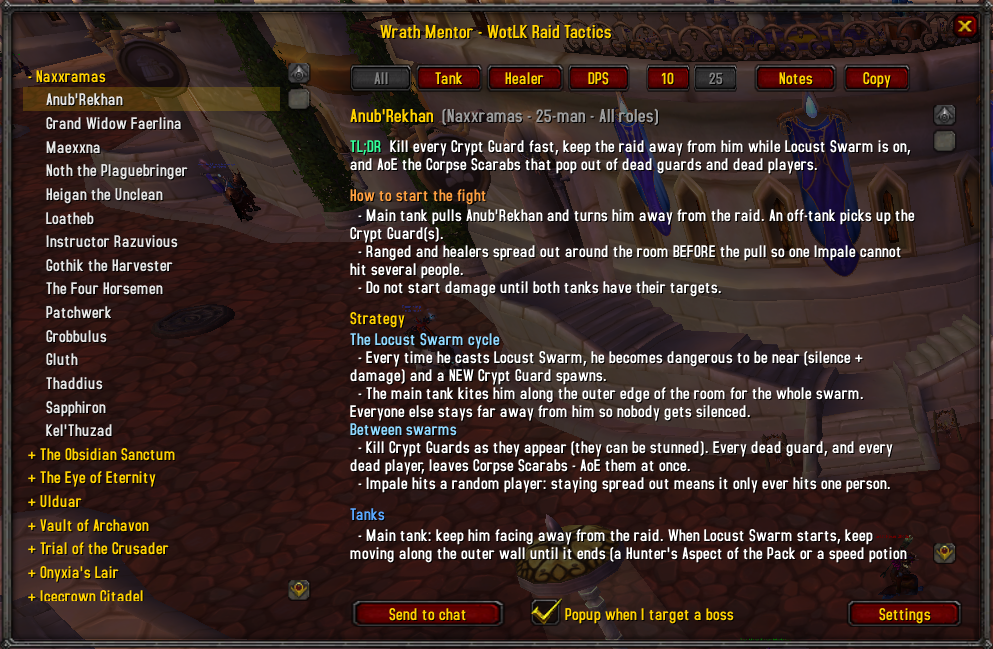
- Pick a raid and a boss in the list on the left.
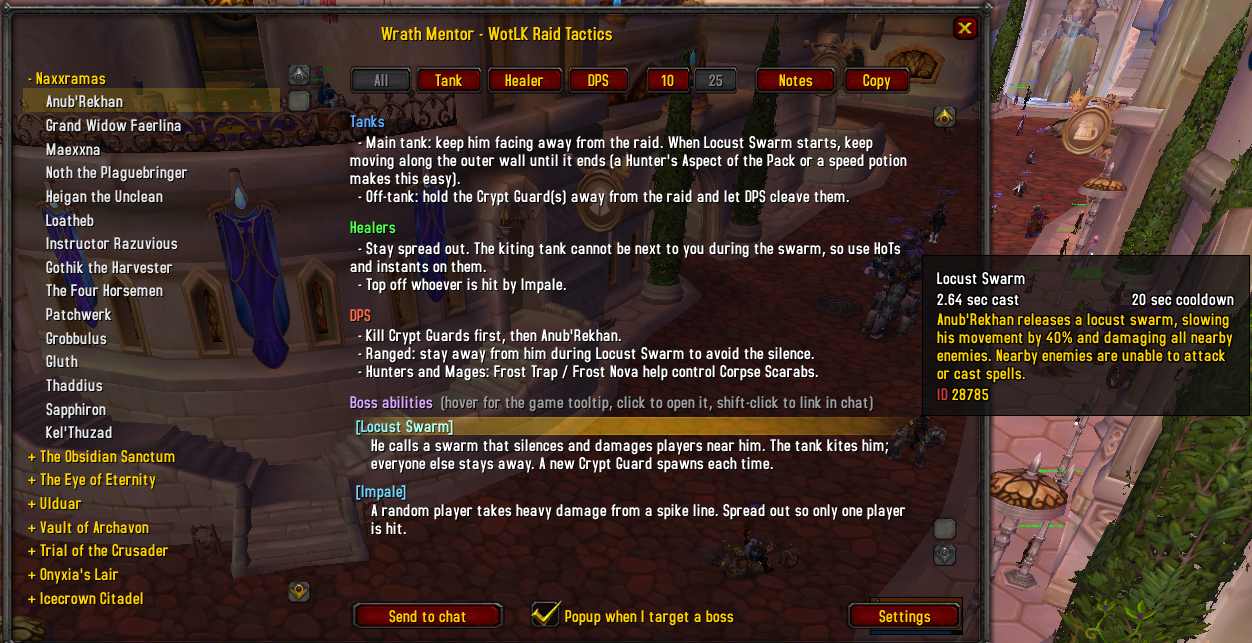
- All / Tank / Healer / DPS: show only the tips for your role.
- 10 / 25: switch the text between the 10-man and 25-man version.
- Each boss page has: TL;DR, how to start the fight, strategy, role tips, hard mode / heroic,
then the full list of boss abilities and buffs & debuffs.
- Ability names are links: hover for the spell tooltip, click to open it, shift-click to link
it in chat. Blue = ability, green = buff, red = debuff.
- Notes: your own notes for the selected boss. Press Save. Bosses with notes are shown in blue
in the list.
- Copy: shows the page as plain text so you can select it and press Ctrl+C.
- Loot: shows the boss's loot table instead of the tactics (press Back or Tactics to return).
- Resize the window by dragging the bottom-right corner.
LOOT TABLES
Press Loot (next to Copy) or type /wm loot.
- The selected boss's loot with item type, item level and drop chance.
- 10 / 25 follows the size buttons. Heroic button for Trial of the Crusader,
Icecrown Citadel and Ruby Sanctum.
- Trash: the raid's trash epics (chance per mob). Patterns: patterns and
recipes with the boss or trash they drop from. Trial of the Crusader also
has Tribute (the heroic tribute chest).
- HM = only in hard mode (Ulduar hard modes, Sartharion with drakes up...).
- A (blue) / H (red) after a name = Alliance / Horde only item.
- Click a column title (Item, Type, iLvl, Chance) to sort, click again to reverse.
- Hover an item for its tooltip, shift-click to link it, ctrl-click to try it on.
Chances are worked out from the AzerothCore world database (the core
ChromieCraft runs on). The server can change its loot, so treat them as a guide.
3D BOSS MODEL
Target the boss to load its 3D model in the top-right corner of its page. The model stays
available for the rest of the session, even after you drop the target. Until then, the spot
shows the Wrath Mentor artwork with a "Target <boss>" reminder.
Turn it off in Settings or with /wm models.
CHAT ANNOUNCEMENT
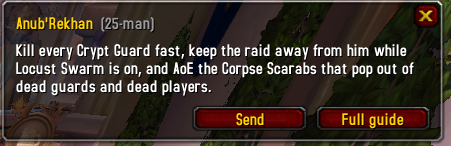
When you target a raid boss, you get a chat line with its TL;DR and a link to its guide
(shift-click the link to open it). Only you see it, and it shows once per fight.
Settings: turn it on/off, choose raid instances only, and press "Test" to see it now.
SEND TO CHAT
"Send to chat" posts the selected boss to your group. Choose what it sends in Settings:
Strategy strategy + ability links (default)
Hard Mode hard mode section + ability links
TL;DR one short summary line
Where it goes: the chat box you have open (raid, party, say, guild...). With no chat box open
it goes to raid, or party, or only your own chat window if you are solo.
"Test send to chat" in Settings shows you exactly what would be posted. Nothing is sent.
SETTINGS (/wm config, or Settings in the title bar)
Opens inside the main window (scroll for the rest); press Back to return.
- Chat announcement on/off, raid instances only, Test button
- 3D model preview on/off
- Minimap button on/off
- Window size and window opacity sliders
- Send to chat content: Strategy / Hard Mode / TL;DR, and Test send to chat
- Default settings: puts every setting back to default
- Reset position/size: puts the window back in the middle at its default size
COMMANDS
/wm open / close the window
/wm <boss name> open a boss (partial names work: /wm sapph, /wm yogg)
/wm role all|tank|heal|dps role filter
/wm size 10|25 10-man or 25-man text
/wm notes open / close the notes box
/wm loot loot table of the selected boss on / off
/wm announce chat announcement on / off
/wm models 3D model preview on / off
/wm minimap minimap button on / off
/wm send [raid|party|say] send the selected boss to chat
/wm config open / close the Settings page
/wm reset reset window position and size
/wm help list the commands in chat
Troubleshooting:
/wm modeltest explains why a 3D model is not showing
/wm checklinks shows how many ability links work on your client
EDITING THE TACTICS
The text lives in the Data_*.lua files (one per raid group). Boss fields:
name, aliases, tldr, start, general, tank, heal, dps, hard, abilities
"[10] text" / "[25] text" line only shown in 10-man / 25-man
"#{a/b}" a in 10-man, b in 25-man
"## Title" sub-heading inside a section
Ability: { ids = { 10-man id, 25-man id }, name = "Exact Spell Name", desc = "..." }
If the name shown in the guide differs from the spell's in-game name, add
spellName = "In-game Name" (e.g. Malygos' Deep Breath is the spell "Surge of Power").
Boss names must match the in-game name (English client) for the chat announcement to work.
The npcId field in some bosses is no longer used and can be ignored.
LINKS
GitHub: https://github.com/saranwrap04/Wrath-Mentor
Warperia: https://warperia.com/addon-wotlk/wrath-mentor/
INSTALL
1. Close the game.
2. Copy the "WrathMentor" folder into InterfaceAddOns and keep its name:
the addon loads from it.
3. Start the game.
UPDATING
Close the game and DELETE THE OLD "WrathMentor" FOLDER COMPLETELY, then copy in the new
one. Also delete any "Wrath-Mentor-main" folder from an older download, so only one copy
is installed. Copying over the old folder can keep old files (images in particular),
and the game only loads new files after a full restart, not after /reload.
No changelog available.
Added loot tables and some QoL
No changelog available.
Comments (1)
so it stays on v1.0.0 and is never up to date or even installed properly

You must be logged in to leave a comment.