
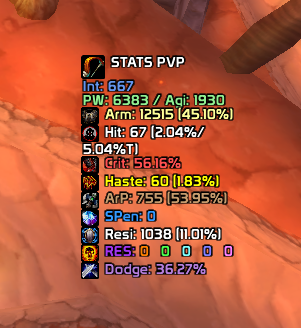
VashStatsPvP
StatsPvP!
Details

Expansion
 Wrath of the Lich King
Categories
Developers

Having issues?
Configuration: Open it with
/vstats, Shift + right-click on the panel, or through Interface Options. Includes:Font size (8–32), scale, and opacity.
Font selection (also lists LibSharedMedia fonts if installed).
Outline (none, normal, or thick) and shadow.
Show or hide icons.
Custom color: when enabled, replaces the original colors with your chosen color; when disabled, displays the colors defined by your aura.
Lock position, show or hide the panel, and center the panel.
Profile Reset: A confirmation button or
/vstats reset.Other Commands:
/vstats show,hide,lock, andunlock.Saved Data: Everything is stored in
VashStatsPvPDB.Updates: Uses the same events as your aura, plus stance and talent changes. It also refreshes every second as a fallback.
No changelog available.
You must be logged in to leave a comment.