
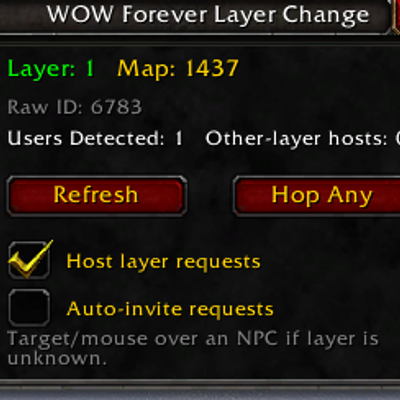
WOW Forever Layer Change
Helps users change layers with other users of the addon. Only works if others have addon. Much like the retail version of this idea of changing layers.
Details
Expansion
 Forever
 Categories
Developers

Having issues?
WOW Forever Layer Change
WOW Forever Layer Change is a lightweight layer-hopping assistant designed specifically for World of Warcraft: Forever.
Tired of repeatedly asking in chat for a layer invite?
This addon is designed to make finding and changing layers quick, simple, and convenient through a small interface—without requiring players to constantly spam chat looking for someone on another layer.
Features
🟢 Easy-to-Read Layer Detection
The addon automatically detects your current layer and displays it in an easy-to-understand format:
Layer: 1
Raw ID: 6783
Instead of forcing players to deal with Forever's large internal layer IDs, discovered layers are presented as simple Layer 1, Layer 2, Layer 3, etc.
Your current layer is displayed prominently in green so it's easy to see at a glance.
👥 See Other Addon Users
WOW Forever Layer Change keeps track of other participating addon users it has recently detected.
The window displays:
Users Detected: Number of recently discovered addon users
Other-Layer Hosts: Available hosts detected on a different layer
Users automatically expire from the detected list after several minutes if they are no longer seen.
This makes it easy to tell whether another player is currently available to help you change layers.
🔄 Hop Any
Don't care which layer you move to?
Simply press:
HOP ANY
The addon searches its known participating users for an available player reporting a different layer and sends a layer-change request.
No need to figure out layer IDs or repeatedly ask random players for an invite.
🏠 Help Other Players Change Layers
Enable:
Host Layer Requests
and your character can help other WOW Forever Layer Change users reach your current layer.
The more people using the addon, the more useful the layer network becomes.
⚡ Optional Auto-Invite
Players who want a more automatic experience can enable:
Auto-Invite Requests
When appropriate, the addon can respond to incoming layer requests by sending the requesting player a normal World of Warcraft party invitation.
Players who prefer manual control can leave this option disabled.
🚫 No Public Chat Spam
One of the main goals of WOW Forever Layer Change is eliminating the need for messages such as:
"Layer invite please!"
"Need new layer!"
"Anyone on another layer?"
Communication between participating copies of the addon happens behind the scenes using World of Warcraft's addon communication system wherever supported.
How Layer Changing Works
World of Warcraft does not provide addons with a command that simply says "move me to Layer 2."
Layer changes still depend on World of Warcraft's normal grouping and layering mechanics.
WOW Forever Layer Change helps automate the process of finding another participating player who is already on a different layer and requesting the appropriate group invite.
The basic process is:
Detect Layer → Find Host → Request Invite → Join Group → Change Layer
The addon does not create layers, modify the game world, or force the server to place a character onto a particular layer.
🌎 The Community Makes It Better
WOW Forever Layer Change is a player-powered system.
If you're the only player using the addon, it can still detect and display your current layer, but another participating player is required for an actual layer change.
As more Forever players install the addon, more potential hosts and layers can become available.
If you use the addon, consider leaving "Host Layer Requests" enabled.
You're not only finding layers for yourself—you're helping other Forever players find them too.
Simple, Small Interface
Everything is controlled through a tiny movable window.
No commands are necessary for normal use.
The window provides:
- Current friendly Layer number
- Raw Layer ID
- Current map
- Recently detected addon users
- Available other-layer hosts
- Refresh button
- Hop Any button
- Host Layer Requests toggle
- Auto-Invite Requests toggle
Move it where you want and leave it out of the way until you need it.
Installation
Install WOW Forever Layer Change through CurseForge, or manually place the addon folder inside your World of Warcraft Forever AddOns directory.
Restart World of Warcraft or use:
/reload
The layer window should automatically appear after logging in.
Optional Commands
The interface does not require slash commands, but the window can also be toggled with:
/wflc
or
/layerchange
Beta Notice
WOW Forever Layer Change is being developed specifically for the evolving World of Warcraft: Forever environment.
Because Forever is actively changing, updates to the game may affect layer detection, grouping behavior, or addon APIs.
If you encounter a Lua error or something doesn't behave correctly, please report what happened and include a screenshot of the complete error whenever possible.
Feedback and testing are greatly appreciated.
Addon: WOW Forever Layer Change
Author: DavidStahrTV
Current Version: 0.1.3 Beta
Stop asking for a new layer. Find one.
You must be logged in to leave a comment.