

Warlock HUD
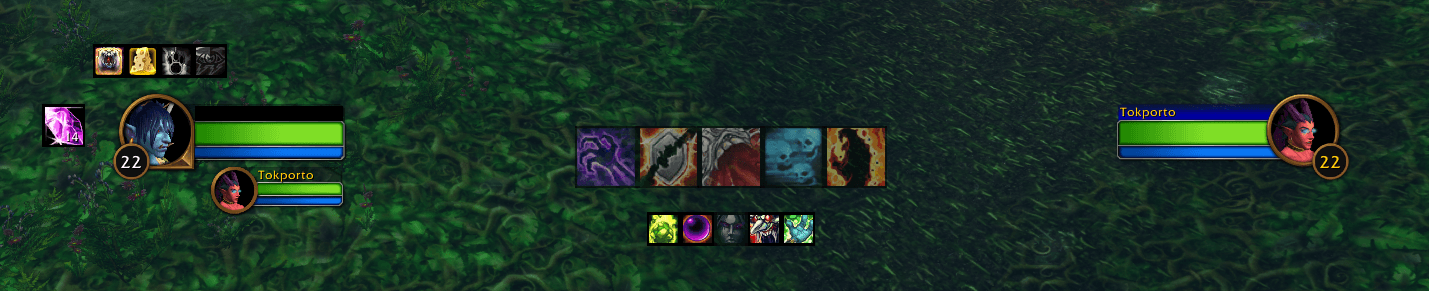
A customizable Warlock HUD for WoW Forever that tracks target DoTs, buffs, procs, cooldowns, and Soul Shards.
Details
Expansion
 Forever
 Categories
Developers

Having issues?
Warlock HUD
Warlock HUD is a lightweight, customizable combat HUD for Warlocks in World of Warcraft: Forever beta.
It keeps the information you actually care about near the center of the screen: target DoTs, utility abilities, buffs, procs, Soul Shards, and execute range indicators. Everything is designed to stay compact, readable, and easy to position without replacing your entire UI.
Features
Target DoTs
Track important Warlock effects on your current target:
- Corruption
- Immolate
- Banes
- Curses
- Drain spells
Banes, Curses, and Drains use shared icon slots to keep the HUD compact.
Active effects display native countdowns, including decimal timing on the main row. Icons fade when you do not have a valid attackable target and indicate when the target is out of range.
Utility
Keep useful abilities visible without filling another action bar:
- Healthstone
- Soulstone
- Fear
- Racial abilities
- Soul Siphon talent indicator
Buffs
Track important personal and group buffs, including:
- Demon Armor / Demon Skin
- Well Fed
- Fortitude
- Mark / Gift of the Wild
- Arcane Intellect
- Divine Spirit
- Blessing of Kings
- Blessing of Salvation
- Thorns
- Unending Breath
Missing-buff reminders appear where relevant. Group-buff warnings are class-aware, and Unending Breath only appears while active.
Procs
Important temporary effects appear only while active:
- Nightfall / Shadow Trance
- Power Infusion
Active procs display a countdown and attention-grabbing glow.
Soul Shards
A separate movable Soul Shard icon displays your current shard count.
You can configure a minimum number of shards to keep. Clicking the icon destroys one Soul Shard from a regular bag until that minimum is reached.
Soul Shard safety: Shards are never destroyed in combat, and the configured minimum is always respected.
Execute Marker
Optionally display a marker at 20% health on attackable enemy nameplates to make Shadowburn execute range easier to see.
Configuration
Open the settings with:
/whud/whub
From the settings panel you can:
- Choose which spells and auras are tracked
- Reorder icons
- Resize HUD rows
- Enable or disable individual elements
- Move rows using WoW Edit Mode
- Configure notifications
- Configure Soul Shard behavior
- Create and manage profiles
- Automatically switch profiles with dual spec
Layouts, icon sizes, visibility, order, and positions are stored per profile.
Notifications
Warlock HUD can announce:
- Ritual of Summoning
- Soulstone casts
- Accepted Healthstone trades
Notifications can remain local or be sent to party, raid, or instance chat while grouped.
Designed for WoW Forever
Warlock HUD is built specifically for the addon restrictions in World of Warcraft: Forever.
Forever limits addon access to combat aura information, so Warlock HUD uses Blizzard-native and Forever-compatible UI mechanisms for in-combat tracking rather than relying on traditional combat-log or aura-scanning approaches.
The goal is simple: provide useful Warlock combat information without trying to become a rotation helper or full UI replacement.
Compatibility
World of Warcraft: Forever beta
- Interface:
1.60.1
You must be logged in to leave a comment.