

VuloForeverUI
Modular UI suite for World of Warcraft: Forever
Details
Expansion
 Forever
 Developers

Having issues?


VuloForeverUI
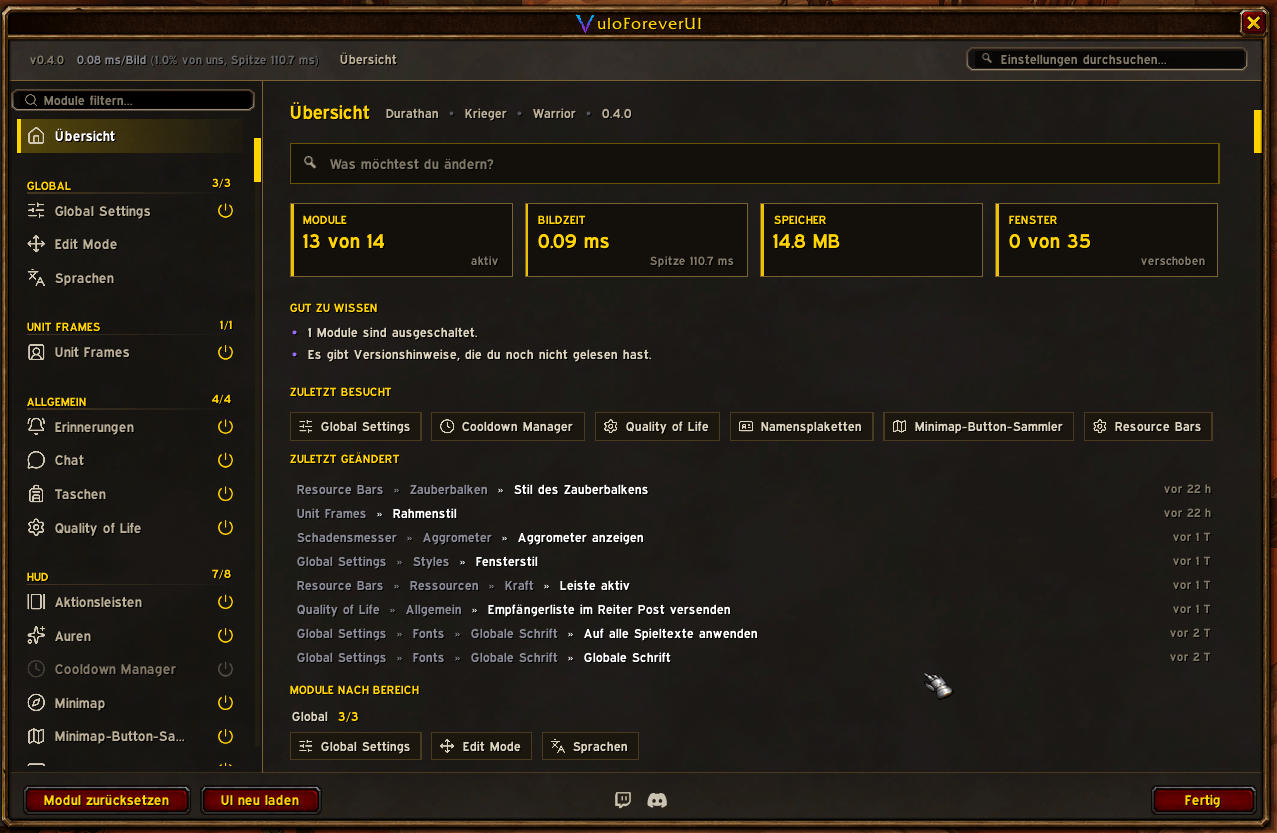
A fully modular UI suite built from scratch for World of Warcraft: Forever. Dark, minimal, one purple accent throughout — and every part of it can be switched off on its own. Forever is not Classic and not retail, so it needed an addon of its own. This is it.
Built for a client that hides its numbers
Forever looks like Classic and behaves like retail. In combat the game stops telling addons what a health bar, a cast bar or an aura actually contains — which is why so much that was written for Classic goes blank or throws errors the moment a fight starts. Every module here is built the other way round: the addon never reads those numbers, it hands them straight to the game and lets the game draw them. Health bars fill, cast bars run, cooldown swipes turn, and none of it stops when you enter combat.
Edit Mode
One editor for everything the suite owns. Drag a frame, nudge it with the arrow keys, snap it to a grid, pin it to a screen edge or to another window so the two travel together. Save complete named layouts, switch between them, export one as a string. Scale-aware and pixel-accurate. — /vedit
Settings you can see while you change them
Live previews sit at the top of the pages they belong to: the cooldown bar, the nameplate, a bag, the bank. Drag an icon in the preview and the bar on your screen reorders. A search box finds any setting by name, and a dot marks every value you have changed away from the default.
Nameplates
Enemy plates that keep working mid-fight: health with absorb shields, a full cast bar with an interrupt shield, spell name, target and timer, plus a tick that marks the exact moment your own interrupt comes off cooldown. Threat colours by role, class colours for enemy players, separate rows for debuffs, buffs and crowd control, quest markers, raid target icons, elite and rare indicators, an execute glow. Six freely assignable slots decide what sits where. Friendly plates come as name-only or as a full bar.
Unit Frames
Three looks for player and target, switchable at any time: Blizzard's own frames with extras added, the original Classic frame art, or a flat modern frame of our own. Class colours, threat display, class icon on the portrait, status text on the bars.
Damage Meter
Damage, healing, interrupts, dispels and deaths in up to five windows, with a breakdown per player and a spell history. Forever gives addons no combat log at all — this reads the game's own combat data instead, which is why it keeps counting where a traditional meter cannot.
Action Bars, Cooldowns and Resources
The 1.x stone band with its gryphons, page arrows, micro menu and bags back in their old places — or just the buttons, restyled. Icon bars for your own cooldowns, with the swipe and countdown drawn by the client so they keep running in a fight. Free-standing bars for power, casting and your swing timer, each placed wherever you want it.
Bags, Chat and Minimap
One bag window with categories, a search, a sort and a stack tool, and the same window for the bank. A chat with a sidebar, real tabs and an input line you can style. A minimap in three looks, plus a collector that gathers every other addon's minimap buttons into one tidy box.
Quality of Life
The small things, each one a switch of its own and all of them off until you turn them on: sell the greys and repair when you open a merchant, one-click looting, accept a quest or hand it in, take a resurrection or a summon (never mid-fight), release in a battleground, block invites and trades from strangers, a flight time bar that learns a route the first time you fly it, your last mail recipients one click from the name field, and a combat line that says when a cast was interrupted, when a hit was dodged or parried, and when your gear is wearing out.
Profiles
Named profiles with completely separate settings, exportable as a string. A profile can be pinned to one character or assigned to a whole class, and it loads itself when you log in. Saved bar setups restore your buttons, macros and keybindings in one click.
Your colour, not ours
The purple is a preset, not a decision. One setting recolours the whole suite — sidebar, borders, highlights, bars — and fonts, outlines and scale are global, with a per-module override where you want one.
English and German
Both complete: every label, message and tooltip. The language follows your game client or you pick one, and the interface terms use the game's own wording.
Included Modules
- Edit Mode — movers, grid, snapping, anchoring, named layouts
- Unit Frames — Blizzard, Classic or Modern look
- Nameplates — enemy and friendly plates, auras, cast bar, interrupt tick
- Action Bars — the 1.x band, or the buttons restyled
- Cooldown Manager — cooldown bars drawn by the client
- Resource Bars — power, cast bar, swing timer
- Auras — your own buff and debuff rows, shortened timers
- Damage Meter — five windows, per-player breakdown, no combat log needed
- Bags — bags and bank in one window, categories, search, sort
- Chat — sidebar, tabs, input line
- Minimap — three looks, plus the button collector
- Quality of Life — merchant, looting, quests, travel, protection
- Profiles — per-class and per-character defaults, import and export
- Bar Setups — save and restore bars, macros, keybindings
- Global Settings — theme colour, fonts, scale, graphics preset
- Locales — the language the suite speaks
Getting started
/vfui opens the suite. /vedit places the windows. /vfsecrets reports what the client lets an addon read right now — useful if something ever looks empty in combat.
Where this stands
Forever is in beta, and so is this. Everything listed above runs in the live beta client. The client changes from build to build, and so does what an addon is allowed to do — so bug reports are genuinely useful right now.
Source, issues and releases: https://github.com/mrvulo/VuloForeverUI
You must be logged in to leave a comment.