

Veilmap
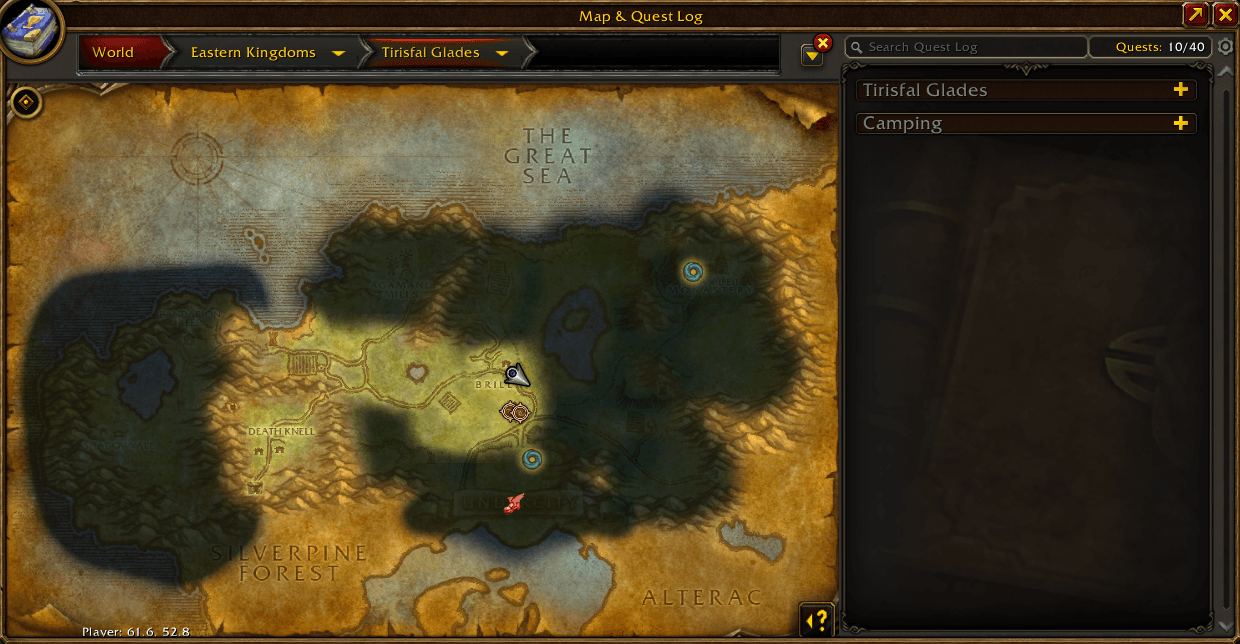
Shows unexplored areas under a tinted fog, plus a movable, scalable, fading World Map with coordinates.
Details
Expansion
 Forever
 Categories
Developers

Having issues?

Veilmap
See the fog of war. Don't lose the map.
The fog of war normally hides every area you haven't explored. Veilmap shows those areas instead, under a tint in a colour you choose, so the whole map stays readable and it's still obvious what you haven't discovered yet.
Built for WoW Forever.
Features
Tinted fog of war
- Unexplored areas are drawn in and tinted, not left blank.
- Choose the fog colour and opacity with the standard colour picker, and the map previews your choice live.
- Works on the World Map, and optionally the Battlefield Map (Shift+M), each with its own toggle.
- Ships with fog data for 84 maps / 1,073 overlays.
Movable, scalable map
- Drag the World Map anywhere on screen. Veilmap remembers where you put it.
- Scale the map from 50% to 200%.
- Plays nicely with the maximise/minimise button and with opening the map in combat.
Map transparency
- Set the map's opacity while you're standing still.
- Optionally fade the map while moving, to a separate opacity you set, so you can run with it open and still see the world.
Coordinates
- Player and cursor coordinates beneath the map.
- Adjustable decimal places (0–2) and font size.
Usage
Open the settings with /veilmap or /vm, or go to Options → AddOns → Veilmap.
| Command | What it does |
|---|---|
/vm | Open the Veilmap settings |
/vm version | Show the installed version |
/vm verify | Check fog coverage for the map you're viewing (useful for bug reports) |
All options live in Blizzard's own settings panel, with no extra libraries.
Known issues
- Settings reset on reload or login. The WoW Forever client currently writes addon saved variables to disk but never loads them back. This affects every addon, not just Veilmap. Until it's fixed on the client side, your fog colour, map scale, map position and other settings go back to their defaults after a
/reloador relog. - The fog doesn't update while you're in combat. Updating the map overlay mid-combat can trigger Blizzard's "action blocked" errors, so Veilmap holds off. If you open the map or change zones during combat, the fog catches up as soon as combat ends.
Reporting issues
If a zone's fog looks wrong, open the map on that zone, run /vm verify and include the output with your report.
AI disclosure
Veilmap was built with the help of AI. The code, tests, fog data tooling, this description and the artwork were written with Anthropic's Claude as a coding assistant, working under my direction. I tested every feature in-game myself before release.
Licence
Veilmap is free software, licensed under GPL-3.0-or-later.
You must be logged in to leave a comment.