

Vault Of Alts – Forever
Hover any item to instantly see which of your WoW Forever characters have it, how many they own, and whether it’s stored in Bags or Bank.
Details
Expansion
 Forever
 Categories
Developers

Having issues?
# Vault of Alts
**Vault of Alts** is a cross-character inventory and bank tracking addon built specifically for **WoW Forever**.
The goal is simple: hover an item and immediately see **which of your characters own it, how many they have, and whether it is stored in Bags or Bank**.
No more logging through every alt just to find an item.
## Features
- Cross-character inventory tracking
- Backpack and equipped bag tracking
- Reagent bag tracking
- Personal bank tracking
- Item ownership information directly in tooltips
- Bags and Bank quantities shown separately
- Total quantity across all tracked characters
- Cross-character item search
- Search by item name
- Search by Item ID
- Persistent shared character database
- Class-colored character names
- Last-known bank data when the bank is closed
- Safe protection against incomplete scans
- Lightweight event-driven design
- No constant OnUpdate polling
## Tooltip Tracking
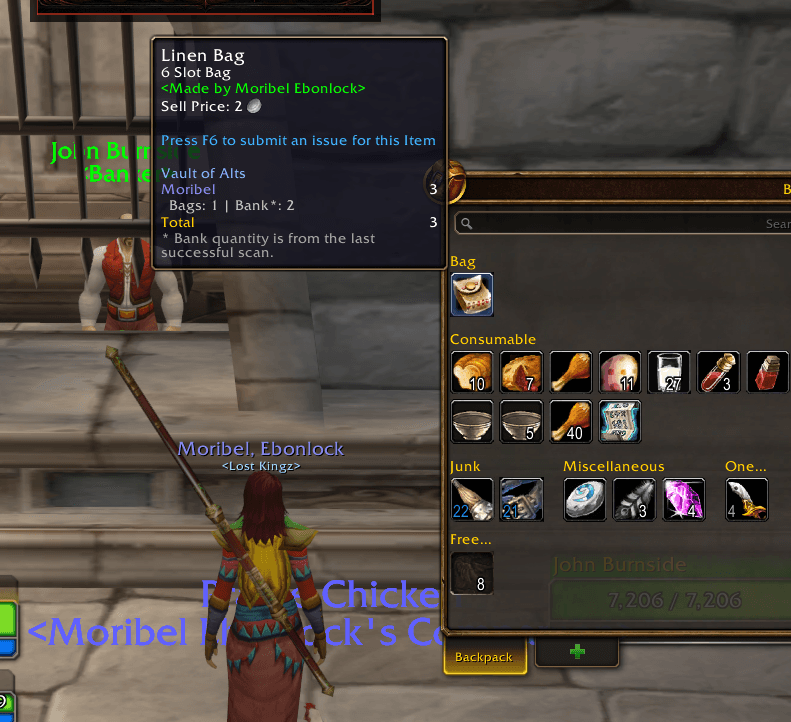
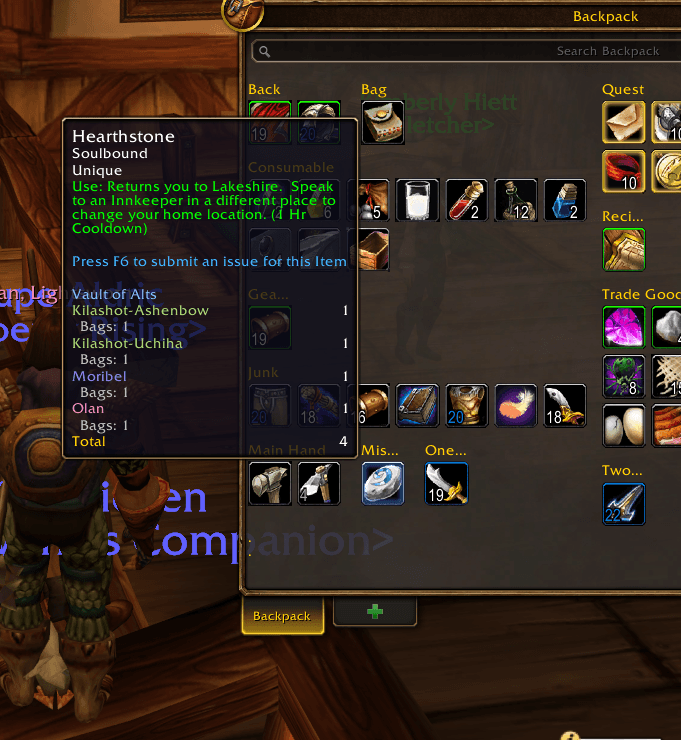
Vault of Alts adds ownership information directly to item tooltips.
Example:
Vault of Alts
Moribel-Ebonlock 3
Bags: 1 | Bank: 2
Kilashot-Ashenbow 1
Bags: 1
Total 4
Vault ownership information is supported on major WoW Forever item surfaces, including:
- Bags
- Bank
- Auction House
- Merchant/vendor windows
- Buyback items
- Profession/crafting results
- Profession reagents
- Item links
If the bank is closed, previously scanned bank quantities are preserved and clearly marked as last-known data.
## Reagent Bag Support
Vault of Alts supports the WoW Forever reagent bag.
Items stored in the reagent bag are included in the normal **Bags** total.
For example:
Normal bags: 5 Peacebloom
Reagent bag: 12 Peacebloom
Vault displays:
Bags: 17
The reagent bag is tracked automatically and does not need to be searched separately.
## Search Window
Use:
`/voa`
to open the Vault of Alts search window.
This is useful when you want to find an item that is not currently visible on screen.
Search results show:
- Item name
- Item icon
- Total quantity
- Character ownership
- Bags quantity
- Bank quantity
## Commands
`/voa`
Open or close Vault of Alts.
`/voa show`
Open the main window.
`/voa hide`
Close the main window.
`/voa scan`
Manually scan currently available inventory data.
`/voa tooltips`
Enable or disable Vault of Alts ownership information in tooltips.
`/voa doctor`
Show addon, database, bag, reagent bag, bank, tooltip, and compatibility diagnostics.
`/voa bankdiag`
Show detailed bank-container diagnostics.
`/voa debug`
Toggle debug output.
## How Tracking Works
Vault of Alts builds its database as you play.
When you log into a character, the addon records that character's:
- Backpack
- Equipped bags
- Reagent bag
When you open that character's personal bank, Vault updates the saved bank snapshot.
Once a character has been scanned, its inventory remains searchable from your other tracked characters.
For best results:
1. Log into each character you want tracked.
2. Allow Vault to scan the character's bags and reagent bag.
3. Open the bank on that character at least once so bank contents can be recorded.
4. Repeat for your other characters.
## Bank Data
WoW only exposes personal bank contents while the bank is available.
Vault of Alts handles this safely.
When the bank is closed:
- Your last successful bank snapshot is preserved.
- Bank items remain searchable.
- Tooltip quantities remain available.
- Saved bank quantities are marked as last-known data.
Vault does not treat an unavailable bank as an empty bank.
## Inventory Accuracy
Vault reads inventory data directly through WoW Forever's container APIs.
A complete inventory scan includes:
- Backpack
- Equipped bags
- Reagent bag
If part of the inventory is temporarily unavailable while the character is loading, Vault protects the previous valid snapshot instead of replacing it with incomplete data.
This helps prevent temporary loading conditions from incorrectly removing items from your tracked totals.
## Compatibility
Vault of Alts reads inventory data directly through WoW Forever's container APIs and does not depend on the default Blizzard bag frames.
Standard GameTooltip-based bag addons should continue to display Vault ownership information normally.
Some third-party inventory addons use entirely custom tooltip frames. In those cases, Vault's stored inventory counts should remain accurate, but the Vault ownership section may not appear on that addon's custom tooltip.
If you find an addon where Vault counts or tooltip information behave incorrectly, please report the addon name and version so compatibility can be investigated.
## Auction House Support
Hovering an Auction House item can show whether you already own that item on one of your tracked characters.
This makes it easier to avoid buying something you already have stored on another alt.
Vault only reads the item information shown by the Auction House. It does not modify Auction House listings, bidding, buying, or selling behavior.
## Merchant Support
Vault ownership information can also appear when hovering items sold by merchants and vendors.
This allows you to quickly check whether an item is already stored on another tracked character before buying another copy.
Buyback item tooltips are also supported where available.
## Profession and Crafting Support
Vault can display ownership information while using WoW Forever profession and crafting windows.
Supported tooltip sources include:
- Crafted result items
- Recipe result items
- Reagents and ingredients
This makes it easier to check how many materials or crafted items you already own across your tracked characters.
## Data Safety
Vault of Alts uses WoW SavedVariables to store its database.
The addon includes safeguards for:
- Cross-character identity
- Duplicate character records
- Item metadata
- Bag scan failures
- Reagent bag scan failures
- Bank scan failures
- Logout-time inventory handling
- Incomplete scans
- Stale bank snapshots
- Duplicate container aliases
- Database migrations
Existing tracked data is preserved across supported addon updates.
## Performance
Vault of Alts is designed to remain lightweight.
It does not use constant frame-by-frame polling.
Inventory updates are event-driven and scan requests are coalesced where appropriate.
Tooltip ownership lookups use the existing Vault database and do not rescan your bags or bank every time you hover an item.
## Current Scope
The current beta focuses on the core Vault of Alts experience:
- Backpack tracking
- Equipped bag tracking
- Reagent bag tracking
- Personal Bank tracking
- Cross-character ownership
- Item tooltips
- Auction House tooltips
- Merchant tooltips
- Profession tooltips
- Search
- Quantities
- Persistent alt data
- Safe last-known bank snapshots
Future versions may expand into additional storage systems and quality-of-life features where WoW Forever supports them.
## Beta Notice
Vault of Alts is currently in **Beta** for WoW Forever.
Core features have been live-tested, including:
- Cross-character persistence
- Bag tracking
- Personal bank tracking
- Reagent bag tracking
- Tooltip ownership
- Bags + Bank totals
- Auction House tooltips
- Merchant/vendor tooltips
- Profession/crafting tooltips
- Search
- Saved bank snapshots
WoW Forever itself is still actively changing, so future game client updates may require addon compatibility updates.
If you encounter a problem, the most useful information to include is:
- What you were doing when the issue occurred
- The name and version of any bag/inventory addon you were using
- Any Lua error shown
- `/voa doctor` output
- `/voa bankdiag` output for bank-related issues
## Privacy
Vault of Alts stores its tracking information locally through World of Warcraft SavedVariables.
It does not require an external account or online service.
---
**Game:** WoW Forever
**Version:** 0.1.11-beta
**Author:** Olan87
You must be logged in to leave a comment.