

Trade Route
The cheapest route to 300 in every crafting profession and Cooking on WoW: Forever, priced from your own auction house scan, with a shopping list that counts what's in your bags.
Details
Expansion
 Forever
 Categories
Developers

Having issues?
Stop paying for someone else's guesswork
Profession guides are written once, with whatever prices the author saw that week. Forever changed the numbers anyway: recipes turn grey earlier, cloth bolts and stone conversions no longer give skill, and hundreds of recipes are new. A Classic guide will send you the wrong way.
Trade Route plans it in-game instead. It knows every recipe's skill colours for this client and prices the materials from your own auction house scan. Then it finds the cheapest way from the skill you have to 300.
What you get
- A route for your realm's prices. Alchemy, Blacksmithing, Enchanting, Engineering, Leatherworking, Tailoring and Cooking.
- It re-plans from wherever you are. Crafted a few things that weren't on the route? The route picks up from your real skill. There's nothing to undo.
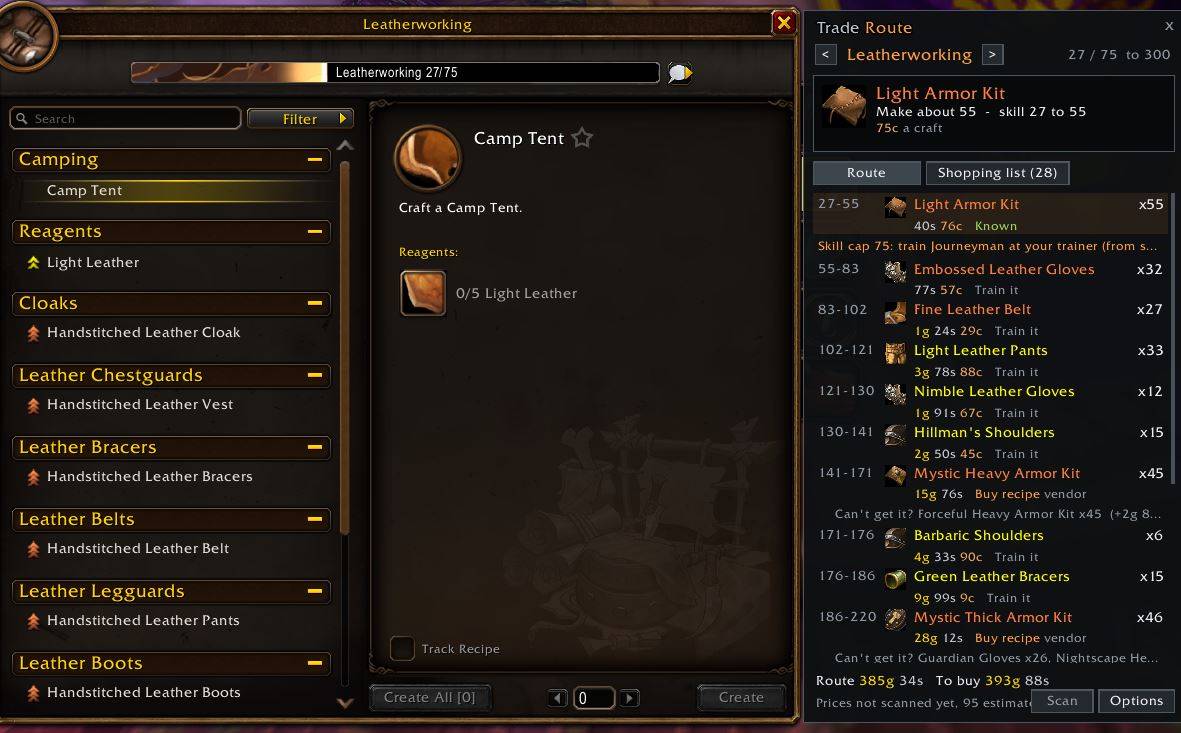
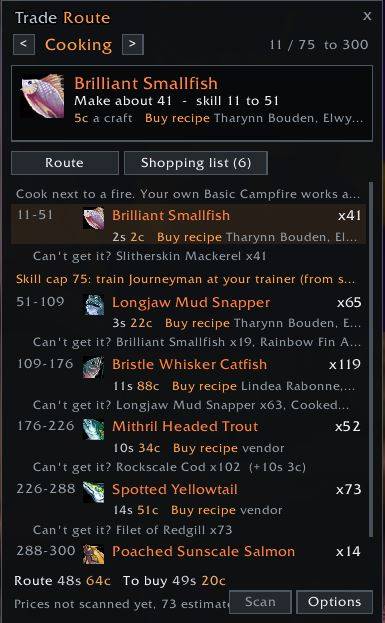
- A panel beside your profession window. It shows the step you're on, how many to make, and the whole route below. Click a step to jump to that recipe. Drag its corner to make it wider.
- A shopping list that counts your bags. If you need 75 and have 3, it says 3/75. Turn on bank counting if you want that too.
- Split by step. Each step of the route gets its own heading with exactly the materials that step needs, and your bags count towards the earliest step first. One click merges it into a single list for the whole route.
- Shift-click to search. The list opens next to the auction house. Shift-click any item to search for it.
- Your own price scan. One button searches every reagent the route could use. The cheapest listings are kept, so a route that needs 200 cloth is priced for 200, not one.
- Vendor recipes, with a way out. If the cheapest route needs a recipe from a vendor, the step names the vendor, zone and price. Underneath is the best route without it, and what that costs extra.
- Counts what you'll vendor. The route picks recipes on materials minus what the item you make sells to a vendor for. A recipe with dearer materials can win if its result vendors for enough to make it cheaper overall. Things the profession uses later, like bolts and leather, aren't counted as sold.
- Make or buy, worked out for you. When making an ingredient beats buying it, like Light Leather from Ruined Leather Scraps, the list says Make Light Leather with the scraps underneath. Hover it to see both prices.
What it won't send you after
- Recipes with a cooldown, like Mooncloth and the transmutes
- Recipes that only drop, unless you already know them
- Vendor recipes that need reputation, unless you turn that option on
- Merchant's Favor recipes, unless you turn that option on
- Any recipe you right-click to leave out
Data that corrects itself
Recipe colours and reagents come from the Forever client's own data (build 1.60.1.70009). The skill a trainer asks for isn't in the client, so open your profession trainer once. Trade Route reads the real requirements and updates the route.
/tr check compares the colours your profession window shows with the data at your skill, and lists any that differ. If you see some, please post them in the comments.
Commands
| Command | What it does |
|---|---|
/tr | Open or close the route panel |
/tr plan <profession> | Plan a profession you haven't opened, e.g. /tr plan tailoring |
/tr shop | Open the shopping list |
/tr scan | Scan prices (at the auction house) |
/tr options | Options |
/tr check | Compare recipe colours with the data |
/tr probe | Report which game functions this client has |
/tr status | Skills, stored prices and last scan |
/tr offset <pixels|auto> | Gap between the profession window and the panel |
Options
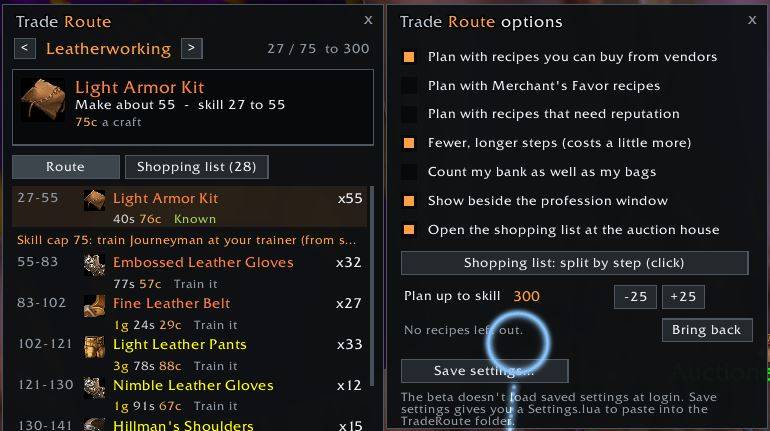
- Plan with vendor recipes (on), Merchant's Favor recipes (off), reputation recipes (off)
- Fewer, longer steps (on). Turn it off for the absolute cheapest route, however many steps that takes
- Count what crafted items sell to vendors for (on)
- Count your bank as well as your bags
- Shopping list split by step (the default), as one list, or just the current step
- Target skill, in steps of 25
- Show beside the profession window, and open with the auction house
Keeping your settings on the beta
The current beta client saves settings when you log out but doesn't load them back when you log in. Scanned prices are lost the same way, so scan again each session.
To keep your settings, set them up in /tr options and click Save settings…. Copy the text, paste it over everything in Settings.lua in the TradeRoute folder, then restart the client.
Good to know
- Until you scan, prices are estimates from vendor sell prices, and the panel says how many.
- Tools aren't on the shopping list: Enchanting's Runed Rods, the Blacksmith Hammer, the Arclight Spanner. The route reminds you which you need.
- Reputation checks on vendor recipes read English tooltips.
Recipe data: the Forever client via wowforevertalents.com, with trainer levels, recipe sources and vendor prices from Wowhead.
Bug reports and ideas are welcome in the comments.
You must be logged in to leave a comment.