

Town Tasks Forever
Never ride away from town again wondering if you actually repaired your gear or checked the AH. Town Tasks Forever is a simple checklist that pops up automatically whenever you walk into a town or city, so your errands are right there in front of you.
Details
Expansion
 Forever
 Developers

Having issues?
Town Tasks Forever
Never ride away from town again wondering if you actually repaired your gear, checked the AH or picked up that flight path. Town Tasks Forever is a simple checklist that pops up automatically when you arrive in a town or city, so your errands are right there in front of you.
Your checklist, your way
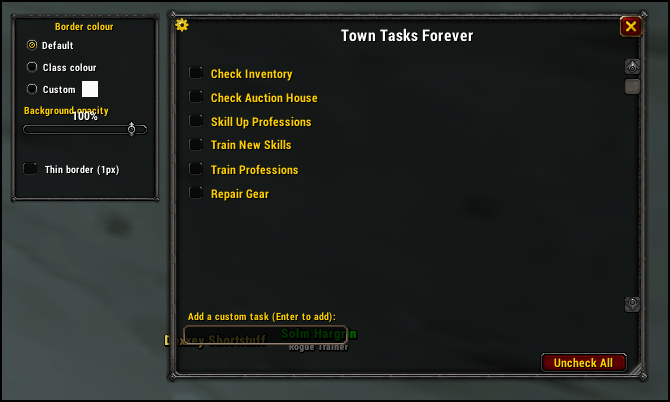
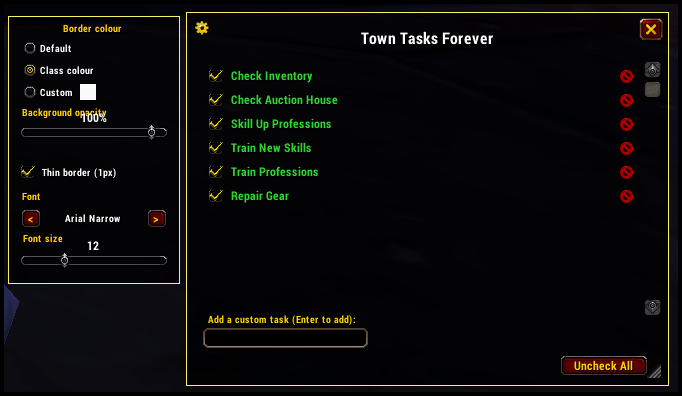
It ships with the essentials: Check Inventory, Check Auction House, Skill Up Professions, Train New Skills, Train Professions and Repair Gear. You're not stuck with those. Type your own task into the box at the bottom of the window and it's added to your list permanently, right alongside the defaults. Don't need one of the defaults? Remove it, and bring it back any time with /tt restore. Tick a task and its text turns green so you can see at a glance what's done.
Never forget a flight path
Walk into a town with a flight master you haven't visited yet and a bright orange "Get flight path" task is pinned to the top of your list, with a reminder in chat. Once you pick up the path (or open the flight master's map), the reminder is ticked off and disappears for good on that character. It's tracked per character, so your alts still get reminded. Is a town missing its flight master? Stand in it and use /tt flightpoint to add it yourself.
Fresh every day
All boxes reset automatically at the daily reset, so you get a clean list every day without touching anything. Prefer to reset early? Use /tt reset.
Every character has their own list
Tasks, ticked boxes, flight paths and window settings are saved separately for each character.
Stays out of your way
- Opens once when you arrive. Close the checklist at the Orgrimmar bank and it stays closed as you wander into the Valley of Spirits. Leave town and come back, and it opens again.
- Major capitals are treated as a single location. Stormwind, Ironforge, Darnassus, Orgrimmar, Thunder Bluff and Undercity never pop the window back up as you move between their districts.
- Works in smaller towns with an innkeeper too, such as Bloodhoof Village, and in neutral hubs like Booty Bay, Gadgetzan, Everlook, Ratchet and Dalaran.
- Faction-aware. A Horde character running through Stormwind or Goldshire won't be bothered (and the same goes for Alliance characters in Horde towns). Neutral towns open for everyone.
- Combat-friendly. The window hides when you enter combat. It comes back afterwards only if it was open when the fight started, or if you arrived in town mid-fight. A window you closed on purpose stays closed.
Make it your own
- Resize the window to whatever size suits you.
- Dial in the background transparency.
- Pick a border colour: default, your class colour, or any custom colour, with an optional thin 1px style if you'd rather keep it subtle.
- Choose your font and font size. Fonts registered with LibSharedMedia by other addons show up in the list too.
- A custom minimap button so you can open the list any time. Left-click opens it and right-click closes it.
Slash commands
Both /tt and /towntasks work.
/tt or /tt toggle - Toggle the checklist open/closed
/tt open (or /tt show) - Open the checklist
/tt close (or /tt hide) - Close the checklist
/tt reset - Uncheck all tasks
/tt restore - Bring back any default tasks you removed
/tt minimap - Show/hide the minimap button
/tt flightpoint - Mark the town you're standing in as having (or not having) a flight master
/tt forgetflight - Mark this town's flight path as not yet acquired, so the reminder returns
If you come across a town or hub that I've missed please use the following command and just report as an issue and I'll ammend it, thanks.
/tt herezone - Print the exact zone and subzone names where you're standing, handy for reporting a missing town or hub
You must be logged in to leave a comment.