

TOG Profession Master
TOG Profession Master should help you and your guild to know faster which player has which profession and who can craft which item or who has learned which enchantment.
Details
Expansion
 Forever
 Categories
Developers

Having issues?
TOG Profession Master — Guild-Wide Profession & Cooldown Tracker for WoW Classic
Stop whispering every alchemist in the guild to ask "is your transmute up?" and stop opening five different alts to remember who knows the recipe you need. TOG Profession Master keeps a live, shared view of every guild member's professions, recipes, and cooldowns — and lets you mail reagents straight to the crafter without typing a single character name.
The Problem
WoW's built-in profession UI shows you exactly one thing: your own professions on the character you're currently logged into. The information you actually need — who in my guild can craft this, whose cooldown is up, what reagents do they need — is scattered across whisper requests and guild-chat noise.
For active guilds with crafting alts, this gets worse fast. Multiple alchemists each on a 24-hour transmute cooldown, four leatherworkers with different specialisations, alts spread across connected realms, and no good way to coordinate without spamming every member.
The Solution
TOG Profession Master uses a hash-then-fetch peer-to-peer sync protocol over the guild addon channel to keep every member's view of guild professions and cooldowns up to date in real time, with near-zero ongoing bandwidth. Recipe details (names, reagents, skill tiers, sources) never travel over the wire at all — they ship in the offline ProfessionDB database, correct for your exact client version — so the only things that sync are who knows what, and what is on cooldown.
Every guildmate's data is relayable — if Alice is offline, Bob's cached copy of Alice's cooldowns can serve them to Carol when she logs in. Cooldown coverage no longer requires the data owner to be online.
Core Features
Cross-Guild Profession Sharing
- Share professions between two allied guilds — for communities split across two socially-linked guilds that can't see each other over the normal guild addon channel. An officer or the guild leader sets the allied guild under Settings → Cross-Guild (members see the list read-only) and their crafters appear right alongside your own.
- Bilateral by design — data only flows when both guilds list each other. A one-sided config does nothing, and a guild you don't list can't pull or inject anything. With no allied guild configured, the addon does nothing cross-guild — purely local.
- Whole-guild, not just you — the allied-guild list propagates across your guild automatically, and allied rosters are shared, so every member sees the allied crafters — not only whoever set it up.
- One list for every TOG addon — the allied-guild list and the allied rosters live in GuildRoster (also editable with
/guildroster sisters), so TOG Profession Master, TOGTools and TOGBankClassic all read the same list and the same rosters instead of each keeping their own. Pull an allied roster once from any online member of that guild and GuildRoster keeps it current from then on. - Live diagnostics — a panel on the Cross-Guild tab (and
/togpm xgdiag) shows known rosters, crafter counts per guild, and dependency status at a glance. - Requires the auto-installed DeltaSync and GuildRoster (0.7.0 or newer) dependencies. Same faction only.
Crafting Tab & Cost-to-Craft
- A full crafting screen in TOGPM's style — a clean Crafting tab that pre-populates a dropdown from your known professions and lists every recipe with a difficulty-coloured name and an orange→yellow→green→grey skill-up tier column. By default TOGPM stays out of the way when you open a profession — Blizzard's window (or TSM / Skillet) keeps the window, with a TOGPM button on it to jump to the tab. Prefer the old behavior? One setting opens straight into the TOGPM tab; another hides the Crafting tab entirely if you craft with another addon.
- Craft queue — queue recipes, drag to reorder, and Craft All works down the queue one recipe's full batch per click (the game needs a click for each recipe), with completion tracking so the queue keeps itself current.
- Enchanting included, and a hunter's pets are left alone — the Enchanting window is supported with recipe tooltips. On Classic and TBC a hunter's Beast Training shares that same window; the takeover recognises it and hands it back to the game, so pets can always be trained.
- Cost-to-craft with profit preview — every recipe shows total material cost and current AH sell price, with profit calculated in real time (green if you'd profit, red if you'd lose gold). Prices come from ItemDB's price sources — Auctionator, TSM, Auctioneer or ItemDB's own Auction House scan, in the order you set with
/itemdb— and, for a reagent a vendor sells, the vendor price: the one you actually paid if you have opened that vendor, ItemDB's base price otherwise. A vendor-sold reagent is always costed at the vendor price, even if someone has listed it on the AH. - No pricing addon required — ItemDB (a required dependency) scans the Auction House itself and builds a price database shared by every TOG addon, or reads Auctionator / TSM / Auctioneer if you already use them. Your price sources are set once, in ItemDB, for all of them.
- Powered by LibProfessionDB — recipe details (names, reagents, difficulty tiers, enchant effect text) come from the standalone offline database, so crafting works for any known profession with no scan wait.
Guild Profession Browser
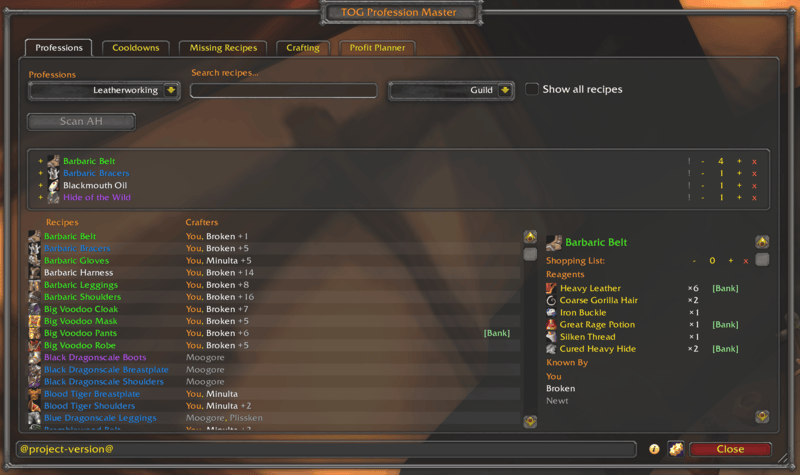
- Master-detail layout: scrollable recipe list on the left, full recipe drilldown on the right
- Filter by profession (Alchemy, Blacksmithing, Cooking, Enchanting, Engineering, First Aid, Leatherworking, Mining, Tailoring, Inscription, Jewelcrafting)
- Search box for fast item-name filtering, with persistent filter preference per character — and it matches more than names: type a guild member's name to list everything that player can craft, or a stat (
5 agi,12 stam,spirit) to find recipes by what the crafted item actually does - Skill-tier filter — a multi-select dropdown narrows the list to the trainer ranks you tick (Apprentice / Journeyman / Expert / Artisan, plus Master and above on later clients), so you can hide the low-level clutter
- Recipe rows show every guild crafter who knows the recipe — online (white), offline (grey), and your own characters (purple, with "You (AltName)" disambiguation when multiple alts know it)
- Drilldown panel shows reagent list with bag counts, bank stock, and shopping-list quantity controls
- Right-click a crafter row to whisper them with one click
- Virtual scrolling for performance on guilds with thousands of recipes
Guild Tab — Your Guild's Crafting Capacity
- Headcount down to the people — tallies how many guild characters have each profession, then drills in: click a profession to expand its specializations, then a specialization to list the characters in it, each with their skill level (
You (300/300)) - Coverage gaps are obvious — every profession and every specialization is listed even at 0, so "nobody's an Axesmith" jumps out instead of silently missing
- Specs are inferred, not just recorded — a crafter's specialization comes from their recorded spec or is deduced from the spec-only recipes they're known to craft, so a Tribal leatherworker who has never run the addon still lands under Tribal
- Gathering professions included — Herbalism, Skinning and Fishing (plus Archaeology on Cata/MoP) have no trade-skill window to open, so they're read straight from your skill lines and synced guild-wide on their own leaf. Now you can find out who actually herbs
- Names colour-coded exactly like the Professions tab: white online, grey offline, brand-colour You — and an online alt surfaces its offline main
Missing Recipes Tab
- Personal and Guild views — My Character shows what one character hasn't learned; Guild shows recipes nobody in the guild knows, so you can spot guild-wide coverage gaps at a glance
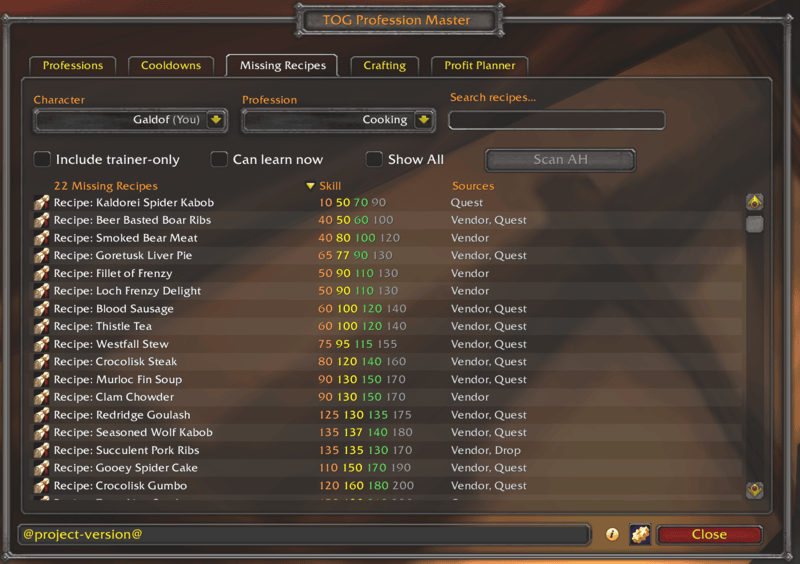
- Pick a character and a profession and see every recipe scroll they haven't learned yet — no more wondering "what am I missing"
- Each row shows the scroll icon, the skill level required, and where to obtain it (vendor, drop, quest, crafted, container, fishing)
- Search by name, filter to a single profession, or toggle whether trainer-only scrolls show
- Where to get it — a [Where] button opens every vendor, drop and zone for the recipe's scroll, with drop chances and map coordinates (from ItemDB)
- Guided there with Questbook — with Questbook installed, a [Guide] button starts the route to the best place for the scroll in one click (one in your current zone first, then a vendor, then the best drop chance), and clicking any place in the [Where] window guides you there instead. The window's bottom row carries Questbook's own stop button, on every tab, to cancel the route
- Shift-click a row to insert the scroll's link into chat; [Bank] button when your guild bank has it in stock
- Defaults to the currently logged-in character; switch to any tracked alt on your account
- Smart filtering: rank-up books (Expert / Artisan / etc. for Cooking / First Aid / Fishing) hide automatically once you've outgrown them
- TBC content-phase filter (optional) — on The Burning Crusade Classic, a setting hides recipes from content phases that are not live yet. It ships off, so by default nothing is hidden from you
Cooldown Tracker
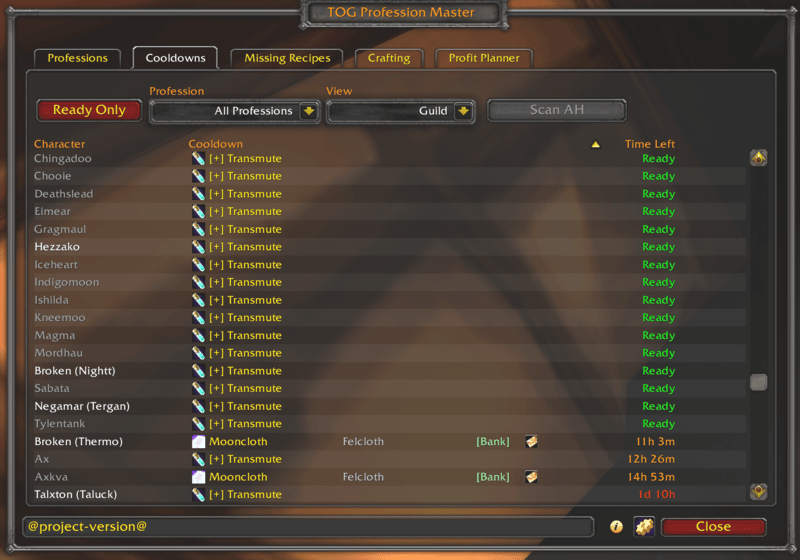
- Cross-character cooldown panel: every guild member's active and ready cooldowns in one view
- Tracks transmutes (per expansion), Mooncloth, Salt Shaker, Spellcloth/Shadowcloth, Northrend / Inscription Research, Icy Prism, Titansteel, Dreamcloth (all 5), Truegold, Living Steel, JC daily cuts, Magnificence — with grouped rows for multi-spell cooldowns (click [+] to expand)
- Two-level filter: pick a profession, then narrow to a specific shared-timer cooldown (Transmute, Mooncloth, Salt Shaker, Dreamcloth group, JC daily cuts, etc.)
- "Ready Only" filter to hide active cooldowns; ready cooldowns sort A-Z by name for stable ordering
- Sortable columns (Character, Cooldown, Time Left)
- Spell tooltip on hover, item tooltip on the reagent
- The reagent column tells you whether you can actually feed the cooldown — white when your bags hold enough of it to fill the mail, grey when they do not, so one glance down the list is enough. It updates live as you loot or send the reagent
- Right-click to whisper the cooldown owner
- One-click [Mail] button per cooldown — splits every reagent the cooldown needs out of your bags and attaches them all to ONE pre-composed supply mail to the cooldown owner. If you are short on any of them it tells you which, and sends nothing
- Multi-reagent transmutes (Arcanite Bar = Thorium + Arcane Crystal) expand to one row per reagent so you can bank-request each independently; the mail button on the first row carries both
Reagent Tracker & Shopping List
- Add any recipe to your personal shopping list with the "+" button on the recipe row
- Floating Reagent Tracker window aggregates every reagent needed across all queued recipes — have from your bags, need from the shopping list, color-coded green / yellow / red
- Shopping-list alerts: a chat notification when your bags hold every reagent for a craft on your list
- Shift-click reagent names to insert item links into chat
Auction House Scanner
- Scan AH button on every tab — walks through whatever's relevant to that tab (your shopping list reagents, the cooldown reagents on screen, the missing recipe scrolls) and queries the AH for live listings through ItemDB's scanner, throttled (one item per 1.5s on Classic Era; set in
/itemdb) so it's rate-limit-safe - After the scan, an [AH] button shows up on every row whose item is actually for sale right now — click to jump the AH browse search to that item with no typing
- Works on the
[+] Transmutepopup too: each transmute reagent gets its own [AH] button when listings exist, so multi-reagent transmutes like Arcanite (Thorium + Arcane Crystal) get one button per reagent - Toolbar button shows
Scanning N/Mprogress while running; click during scan to cancel - Auto-clears scan results when the AH closes (listings go stale fast)
- Supports Vanilla through Mists of Pandaria via the legacy AuctionFrame UI
TOGBankClassic Integration
When the optional TOGBankClassic addon is loaded, TOG Profession Master surfaces guild bank stock everywhere it matters:
- [Bank] button next to every reagent in the recipe drilldown, cooldown panel, shopping-list expansion, and Reagent Tracker — visible only when the bank actually has stock of that reagent, with TOG Bank's own status dot in front of it (green current, red or yellow when a newer copy of that bank is on its way) so you can see at a glance whether the stock is current; hover for each banker's count and status
- Click [Bank] to open a request dialog, pick the banker, set the quantity and send the request to TOGBankClassic. The maximum is the one TOG Bank enforces: the officer's request percentage of that banker's stock, less what you already have on order from them. View-only bankers aren't offered, and a refused order shows TOG Bank's own reason
- While TOG Bank's shop is open, a [Bank] request goes in as a shop purchase, with TOG Bank's price estimate shown in the dialog; the bank character sets the final price when the order is filled
- Auto-detects when TOGBankClassic data isn't loaded yet and refreshes bank buttons once it is
Crafter Online Alerts
- When a guildmate who can craft something on your shopping list comes online, you get a chat alert with their name
- Pick your own sound and visual — choose the alert sound (Chime, Ready Check, Raid Warning, Auction Bell, Whisper, Map Ping) and the on-screen cue (screen flash in gold / red / blue, a raid-warning banner, top-centre error text, or a taskbar flash for when you're alt-tabbed). Selecting an option previews it
- Toggle alerts on/off; configure exclusions (login-burst suppression, stealth-mode opt-out)
- Drives off real
OnMemberOnlinecallbacks fromLibGuildRoster-1.0— notWHOpolling
Sync Log
- Settings → General → Sync Log — a live, real-time view of every sync message in and out, with columns for time, event, size, peer and detail
- Entries name what actually moved (
crafters:165 (Leatherworking), a per-player transfer names the player) rather than an opaque byte count - Pause button freezes the view so a text selection survives long enough to copy; entries keep accumulating and the view catches up on unpause
- Contents are selectable and copyable, and the window remembers its position and size across
/reload— built for pasting into a bug report
Item Tooltips
- Hover any item in your bags, the AH, a vendor, or a chat link, and TOG Profession Master appends a list of guild crafters who know how to make it
- Includes profession, skill rank, and online status per crafter
- BoP items skipped automatically
- Recipe details on every recipe — and on the items they make. Hover a recipe scroll, or the item it produces, anywhere in the game and you get its skill-up difficulty in the game's own tier colours (orange / yellow / green / grey), where the recipe comes from (trainer, drop, vendor, quest, container), and an Unlearned list of which of your characters could still learn it, with their skill rank and specialisation
- Answers on all twelve professions. The source data is keyed by the recipe itself rather than by a scroll item, so it works for the roughly one recipe in three that is trainer-taught and has no scroll to inspect — that is 74.9% of Vanilla recipes covered, against 44.6% for an item-keyed lookup, and the single largest category is precisely those trainer-taught recipes
- It renders even if you run RecipeMaster, and that is deliberate as of v1.0.7. TOGPM's block is not a duplicate of RM's — only TOGPM tells you which of your own characters could still learn the recipe, and which guildmates can craft it, so standing down to avoid overlapping two rows also withheld the rows nothing else in the game provides. (It also could not tell RM being loaded from RM being switched on, so anyone running RM with its tooltip options off got the block from neither addon.) A setting restores the old defer-to-RM behaviour, or turns the block off entirely
- Vendor buy price and vendor sell price on every item — not just recipes. Nobody else shows both: TradeSkillMaster and Leatrix Plus show sell only, All The Things shows neither, and the game itself shows neither in your bags. The buy figure comes from a three-tier lookup that prefers prices captured from vendors you have actually opened, so it reflects your reputation discount rather than a book value. Either heading is omitted when its number is unknown
- Other addons' lines are welcome, and they cannot stretch the tooltip. TOGPM's own recipe tooltips invite All The Things, TOGBankClassic and anything hooking the game's tooltip to contribute, so a trainer-taught recipe with no scroll item gets the same block a real scroll would. Anything drawn there is held to the game's own wrap width, so one long line from any addon cannot widen the frame the way it can on a stock tooltip
Profit Planner
- See which recipes make gold at a glance — dedicated Profit Planner tab shows all recipes your characters know, with craft cost, current Auction House sell price, and profit (green if profitable, red if losing gold) in one sortable view
- Live AH vs. Historical pricing — switch between real-time auction prices and long-term averages to spot short-term flips or stable moneymakers
- Filter and search — multi-select profession, crafter, and pricing source filters let you narrow to exactly what you want to see; search by recipe name to find specific crafts instantly
- Works with your pricing addons — prices come from ItemDB, which reads Auctionator, TradeSkillMaster (TSM), Auctioneer, or its own Auction House scan — use what you already have or let ItemDB handle it; pick which and in what order with
/itemdb - Smart profit tracking — recipes with missing prices stay visible (so you know what needs scanning), and the "+ Profit only" filter hides anything that's currently unprofitable
How It Works
Sync Protocol (Hash-Then-Fetch)
Most guild profession addons broadcast their full data on a timer. With 50 active guildmates each broadcasting 30+ KB every 30 seconds, that's ~1.5 MB of guild-channel traffic per minute even when nothing has changed. TOG Profession Master does this differently:
- L0 broadcast (every 10 minutes) — each peer sends a tiny ~600 B leaf-hash list on the guild channel. The list is differential: only leaves whose content has actually changed since the last broadcast are included. A settled guild generates near-zero traffic.
- Mismatch detection — peers compare incoming hashes against their local cache. When a hash differs, they whisper a small handshake to the broadcaster.
- Drill-down — for roll-up mismatches (e.g.,
guild:cooldowns), the broadcaster responds with per-character sub-hashes so the receiver can pinpoint exactly which characters have differing data. - Per-leaf data response — the chosen sender broadcasts only the differing leaf's data on the guild channel (BULK priority). Every peer with stale data for the same leaf merges for free; no per-recipient whisper bottleneck.
- Owner-authoritative merge — the character who owns a piece of data is the only one who mints its hash, and every other client adopts that hash verbatim rather than recomputing it from its own accumulated view. That's what makes the guild converge instead of drift: cooldowns and each character's profession set and alt list are replaced wholesale from their owner (so a dropped profession, an expired cooldown, or a removed alt actually propagates, which a grow-only union can never do), while crafter membership still union-adds for relay and recipe metadata keeps the richest non-nil value per field. Receiving from any peer converges to the same state regardless of who sent it.
Whispers carry only handshake control messages (offers, requests). All bulk data flows on the guild channel where AceCommQueue-1.0 handles throttling. The protocol scales smoothly to 300–500 character guilds with 50–100 concurrent users.
Recipe details are shipped, not synced
Recipe names, icons, reagents, skill tiers and sources come from the offline ProfessionDB database that installs alongside the addon, scoped to your exact client version. None of it goes over the wire, and none of it is scanned from your profession window — the scan only records which recipes you know. That leaves all ongoing traffic for the part that actually changes: who knows what (crafters:<profId>), each character's professions and skill (skills:<charKey>), and what's on cooldown (cooldown:<charKey>).
Multi-Version Support
All Classic versions share one codebase. Version detection via GetBuildInfo() at startup; per-expansion static tables for skills and cooldown IDs; compat shims for C_Container, C_AddOns.IsAddOnLoaded and the trade-skill APIs; and one resolver for the item API that prefers the C_Item namespace and falls back to the older bare names, so the addon works whether or not the game's deprecated-API fallbacks are switched on. Supported interface versions:
- Classic Era / Anniversary (1.x)
- The Burning Crusade Classic (2.5.x)
- Wrath of the Lich King Classic (3.4.x)
- Cataclysm Classic (4.4.x)
- Mists of Pandaria Classic (5.5.x)
- WoW Forever (early support)
- Retail / The War Within and Midnight (12.x, early support)
Slash Commands
/togpm— Open the main profession browser/togpm reagents— Open the floating Reagent Tracker/togpm minimap— Show the minimap button/togpm sync— Force a fresh broadcast now, without waiting for the 10-minute cycle or the send debounce/togpm status— Print sync / comm diagnostic info/togpm versioncheck— Broadcast a version check across the guild and print responses/togpm purge— Open the purge-data dialog (purge all or just one character)/togpm craft— Toggle whether TOGPM takes over the profession window/togpm debug— Toggle debug output/togpm help— Show the full command list
Diagnostic commands for advanced users / bug reports:
/togpm whyvisible <name>— Explain, gate by gate, why a character is still shown (or is hidden)/togpm perf— How long each window open, tab draw, background build and incoming sync took this session; the game's own record of every addon's worst frame since login, with a clock time for each stall over half a second; and how large each part of the saved data is. Run it right after a pause and paste the output/togpm dsstatus— DeltaSync multi-host health check (namespace / MINOR / prefixes / P2P)/togpm xgdiag— Cross-guild diagnostics: known rosters, crafter counts, dependency status/togpm pullroster <name>— Pull an allied guild's roster (through GuildRoster) and its crafter data from one of its online members;Name-Realmfor another realm. One pull is enough — GuildRoster keeps the roster current from then on/togpm dumphashes— Print the local L0 hash list for cross-peer comparison/togpm dumpcooldowns [charKey]— Dump stored cooldown bucket for a character/togpm dumprecipe <name>— Dump a recipe's stored fields and full reagent table/togpm dumpprice <itemId|link>— Dump full price diagnostics for an item/togpm myalts— List the alt group this account broadcasts/togpm commtest [name]— Probe which addon-message channels the server actually relays/togpm transmutedebug— Explain how a character's transmute cooldowns were resolved/acq status— The comm queue's own view: sends in flight, idle time, stalls and refusals per queue/acq unstick— Force a stuck send queue to release and re-send, without waiting out the timeout/togpm forcebroadcast— Force a full (non-differential) hash list broadcast immediately/togpm backfill— Run the reagentitemIdbackfill pass/togpm spellcache— Print the spellbook name→ID cache/togpm itemgaps [profId]— List crafted items LibItemDB has no stat data for
Requirements
- Ace3 (AceAddon-3.0, AceComm-3.0, AceDB-3.0, AceGUI-3.0, AceTimer-3.0, AceConsole-3.0, AceConfig-3.0, AceLocale-3.0, AceHook-3.0) — auto-installed by CurseForge
- DeltaSync — v4.0.0 or newer required (LibStub MINOR ≥ 15). v4.0.0 made the library multi-host, and TOGPM creates its own isolated sync host so it can't clobber another DeltaSync-using addon in the same client. On an older DeltaSync, guild sync stays disabled rather than falling back — update it. Auto-installed by CurseForge; transitively pulls in
AceCommQueue-1.0 - GuildRoster — 0.7.0 or newer for cross-guild sharing (LibStub MINOR ≥ 18). Provides
LibGuildRoster-1.0, the guild-roster engine (membership, online state, roster callbacks), and since 0.7.0 the allied-guild list and allied rosters that every TOG addon shares. On an older GuildRoster the addon runs normally with cross-guild sharing off. Auto-installed by CurseForge - ProfessionDB — provides
LibProfessionDB, the offline recipe database (names, reagents, skill tiers, sources, enchant effect text) that lets the Crafting, Professions and Missing Recipes tabs render instantly with no scan wait. Auto-installed by CurseForge - ItemDB — the build carrying LibItemDB MINOR 25 or newer for any auction price — provides
LibItemDB, the offline item database behind crafted-item stats and consumable buff text (and the stat-based recipe search), and since v1.1.0 every auction price too: the Auction House scanner, the Auctionator / TSM / Auctioneer bridges and the price-source settings (/itemdb). On an older ItemDB, cost-to-craft still shows vendor prices, but no auction prices, [AH] buttons or Scan AH — update it. Auto-installed by CurseForge - VersionCheck-1.0 — auto-installed by CurseForge
- LibAceGUIWidgets — the shared window and list widgets every TOG addon draws with. Auto-installed by CurseForge
- LibDBIcon-1.0 — the minimap button. Auto-installed by CurseForge (bundled on WoW Forever, where it is not published yet)
- WoW Classic Era, TBC, Wrath, Cataclysm, MoP, WoW Forever, or Retail — all versions supported via compatibility shims
Optional integrations:
- TOGBankClassic — enables [Bank] buttons everywhere reagents appear
- GreenWall — cooldown announcements relay to the confederate guild channel
- Questbook — guides you to where a missing recipe's scroll is sold or drops, from the Missing Recipes tab, with a stop button on the main window
Recent Updates
v1.3.0 (Latest — 2026-10-04) — Retail support; recipe sources from ItemDB; WoW Forever's borrowed recipe data is marked unconfirmed
New
- Retail support (early). TOG Profession Master now loads on Retail. It reads your professions, lists your recipes, and checks each recipe against your skill in that recipe's own expansion (for example Khaz Algar Blacksmithing), for you, and is designed to do the same for your guildmates' characters once they sync. First Aid is hidden there, since Retail no longer has it. This is new: tell us on Discord if anything looks wrong.
Changed
- Missing Recipes shows where a recipe comes from using ItemDB when the recipe database has no source for it — Vendor, Drop, Quest and so on, the same places the [Where] button lists — instead of "Unknown".
- WoW Forever: values the recipe database borrowed from Classic are marked "unconfirmed" — a required skill, a recipe's sources, and a recipe that may not exist in Forever at all. They are shown rather than hidden, so you can still find them.
- The Professions and Guild tabs build their lists faster on a large guild.
Fixed
- WoW Forever: a skill value borrowed from Classic set the orange skill-up point on some recipes, showing them as orange from skill 1.
- Sorting Missing Recipes by skill put recipes with no real skill data at the top as if they needed skill 1. They now sort with the unknowns.
v1.2.0 (2026-10-01) — The Professions tab, its filters and the [Bank] window move to the shared TOG widgets; WoW Forever: the Crafting tab works, and your recipes sync to the guild
New
- [Where] on the Missing Recipes tab shows where to buy or farm a recipe's pattern: every vendor, drop and zone, with drop chances and map coordinates. With Questbook installed, click a place to be guided there. Needs ItemDB; recipes taught only by a trainer have no button.
- [Guide] on the Missing Recipes tab: with Questbook installed, one click guides you to the best place to get the pattern — one in your current zone first, then a vendor, then the best drop chance.
- A stop button for Questbook's guide on the main window, the same one Questbook has, beside the settings gear on every tab. It is dimmed while nothing is being guided.
Changed
- Every list in the window now uses the shared TOG list, as the other TOG addons do: the Professions tab's recipe list, shopping list and recipe details, the Crafting tab's reagents, and the Cooldowns transmute popup. They scroll, highlight and sort the same way everywhere.
- The filter dropdowns, search boxes and check boxes above each list, and the [Bank] request window, are the shared TOG controls too.
- The recipe details panel keeps its reagents and "Known By" in one scrolling list under the recipe's name.
Fixed
- The Crafting tab's Enchant button stayed greyed out and could not be clicked, even with the materials in your bags, once you had clicked anywhere on the window. The Craft button could be hidden the same way for any profession. It now stays on top of the window.
- The [Bank] button on the Cooldowns tab showed an error instead of opening the bank request window. It opens again, from the cooldown rows and from the transmute popup.
- On WoW Forever, clicking the Crafting tab showed a "blocked action" error, and the tab could not show or craft your recipes. The tab now opens your profession, lists your recipes with their reagents, and crafts, the same way Forever's own profession window does. This is new on Forever: tell us on Discord if anything looks wrong. Other game versions are unchanged.
- On WoW Forever, your own recipes never reached the guild. Opening a profession now records what you know and shares it, as on every other version.
v1.1.2 (2026-09-27) — WoW Forever support, Craft All no longer trips a blocked-action error, closing the window in combat works again, and LibDBIcon is now a required addon
New
- WoW Forever support. TOG Profession Master now loads on WoW Forever, and the errors it raised there at login, on tooltips and when opening the tabs are fixed. This is early support: tell us on Discord if anything looks wrong. Reading your recipes from the profession window is not available on Forever yet: opening a profession there shows the Crafting tab's "open a profession" prompt instead.
Changed
- Craft All now crafts one recipe's full batch per click. The game only lets an addon start a new recipe from a real click, so when a batch finishes and more is craftable you are told in chat to click Craft All again.
- LibDBIcon-1.0 is now a required addon instead of being bundled inside this one. The CurseForge app installs it for you. If you install by hand, add LibDBIcon-1.0, or the minimap button will not appear. (On WoW Forever, where LibDBIcon is not published yet, it is still bundled.)
- LibAceGUIWidgets is now a required addon. The window, the Cooldowns, Crafting, Guild, Missing Recipes and Profit Planner lists, and the Reagent Tracker are now built from it, shared with the other TOG addons. The CurseForge app installs it for you.
- The Cooldowns tab opens much faster on a large guild.
- Closing the main window now also closes the [Bank] request window and the Cooldowns group popup, instead of leaving them open on their own.
- The Missing Recipes count ("12 Missing Recipes") now shows in the window's status bar, as the Profit Planner's row count does.
- The Guild tab remembers which professions you expanded when guild data refreshes. It no longer remembers its scroll position across a
/reload. - The addon's name in the game's AddOns list is now shown in orange, with the game version in grey.
Fixed
- A recipe learned from a pattern, plan or formula stayed on the Missing Recipes tab until you opened that profession's window. It now leaves the list as soon as you learn it. (Enchanting formulas may still need the Enchanting window opened once.)
- The "Ready to craft" chat alert only worked for cooldown crafts like transmutes. It now works for every recipe on your shopping list, once your bags hold all of its reagents. It also no longer switches a recipe's "crafter came online" alert (the ! on a shopping-list row) on or off by itself.
- Craft All showed a "blocked action" error as soon as the first recipe finished. It tried to start the next recipe on its own, which the game does not allow.
- Closing the window during combat showed a "blocked action" error. The Craft button made the whole window protected in combat. The button now sits outside the window: it hides during combat and comes back when combat ends, and the window closes normally.
- Allied-guild members could not pull your guild's profession data once their guild's roster was known. A membership check was done the wrong way round and refused everyone.
- Some recipes showed a learn skill of 1 when the real skill is unknown. Those recipes now show "-", and the skill filters no longer hide them.
- The Scan AH button showed no tooltip while greyed out (whenever the Auction House is closed). It now shows its tooltip either way.
- The Missing Recipes help described a "+" button that doesn't exist. It now describes the row's [Bank] and [AH] buttons.
- The Professions and Cooldowns tabs used a little more memory every time they refreshed, and the transmute list did every time it opened. Over a long session in a busy guild that added up. They now reuse what they already built.
v1.1.1 (2026-09-16) — The [Bank] request window follows TOG Bank's request limit and works while the shop is open
Fixed
- The "Request from Guild Bank" window offered more than TOG Bank would accept, then blamed syncing. TOG Bank now holds every order to the officer's maximum request percentage, counted per banker and including what you already have on order. This window worked the limit out from the whole guild's stock instead, so it could offer 20 where TOG Bank allows 5, and a refused order said only "Check that TOGBankClassic is synced." The maximum shown is now the one TOG Bank enforces for the banker you picked, and it updates when you pick another. When an order is refused, you see TOG Bank's own reason, e.g. how many you already have on order, or that ordering is closed.
- Every [Bank] request was refused while TOG Bank's shop was open. With the shop on, TOG Bank only accepts shop orders, and requests from this addon were never marked as one. They are now, with the same price estimate TOG Bank's own window shows, and that estimate line appears in the request window.
- The request window could offer a banker who doesn't take requests. View-only bankers are no longer listed, and if only they hold the item you are told so.
- The limit in the request window could go stale if one of your orders was filled while the window was open; it is checked again when you press Send. The stock figure beside it is now the chosen banker's, so the numbers add up.
v1.1.0 (2026-09-14) — Prices and the Auction House scan move to ItemDB; one mail per cooldown, every reagent split and attached from one click; TOG Bank's status dot on every [Bank] button
New
- Every [Bank] button now shows TOG Bank's status dot — the same green / red / yellow / grey dot TOG Bank draws beside each banker, so you can tell at a glance whether the stock behind a [Bank] button is current. Green: the copy of that bank you hold is up to date. Red: a newer copy exists and is on its way. Yellow: a newer copy has been offered. Grey: the only newer copy is on a client that cannot send it to yours. When several bankers hold the item the dot shows the worst of them; hover the button to see each banker, how many they hold and their status. Needs a TOG Bank that reports banker status; on an older one the button looks as it always did.
Changed
- Prices, the Auction House scan and the Auctionator / TSM / Auctioneer connections now come from ItemDB, shared by every TOG addon. Which price sources are used, in what order, and how fast the scan runs are set once in ItemDB's own window (
/itemdb, or the "Price sources (ItemDB)..." button in this addon's settings) and apply to TOG Profession Master, TOG Bank and the rest alike. Your existing choices carry over on your first login after updating — the nine price toggles that used to live in this addon's settings are gone, and what you had set is written into ItemDB once (from the first character you log in with). Cost-to-craft, the Profit Planner, the [AH] buttons and the Scan AH button all read ItemDB now; a vendor-sold reagent is still costed at the vendor price. Requires an up-to-date ItemDB (LibItemDB 25 or newer) for any auction price — on an older one you get vendor prices only, and no [AH] buttons. - The "TOGPM Scan" button is gone from the Auction House frame. ItemDB draws its own "ItemDB Scan" button there, and the two had been drawn on top of each other. The per-tab Scan AH buttons inside the addon are unchanged and now run ItemDB's scan.
- The Cooldowns tab's mail button now sends ONE mail per cooldown, with every reagent of that cooldown on it. An Arcanite transmute (Thorium Bar + Arcane Crystal) used to take two mails, because the expanded transmute list drew a mail button on each reagent row and each one mailed only its own reagent. The reagent rows stay — each still has its own [AH] and [Bank] request — but there is one mail button per cooldown now, on its first row, and it carries all of them.
- One click does the whole job. It works out every reagent against your bags first and touches nothing unless it can cover all of them; if you are short, it tells you which ones and sends nothing. Then it splits every stack that needs splitting, attaches the pieces and the whole stacks to one mail, and fills in the recipient, subject and body. The "Split N from stack of M?" confirmation and the "click Mail again" second click are gone. If a stack moves between the click and the attach, everything already on the mail is taken back off and you are told to click again — a half-filled supply mail is never sent.
Fixed
- The Crafting tab's "AH price" and profit line under a recipe ignored Auctioneer and TSM. It only accepted a price from Auctionator or the addon's own scan, so a player whose prices came from Auctioneer or TSM saw no sale price or profit there while the Profit Planner showed both. It reads the same sources as the planner now.
- The [Bank] button could light up for stock held by someone no longer on bank duty. TOG Bank keeps a retired banker's last inventory on record, and the stock count included it, so a request could be raised against items nobody could send. Only current bankers count now.
- The supply mail's body asked the crafter to "make Transmute: Arcanite" and "send me the Transmute: Arcanite". It now names the product: "make Arcanite Bar".
- On the Traditional Chinese, Simplified Chinese and Korean clients, the "Attached ..." chat line was erroring instead of printing. The translation had its placeholders in the wrong order. The line now reads the same on every client ("Attached 1x Thorium Bar, 1x Arcane Crystal for Bob.").
Credits
Recipe data comes from ProfessionDB, built from Blizzard's own client data via wago.tools. Two things the client simply does not know are derived from community projects and shipped as static tables: where a recipe comes from — the trainer, vendor and drop sources shown in the browser and Missing Recipes — is derived from the tested TrinityCore and AzerothCore world databases, which reverse-engineered that information because the client stores none of it; and the TBC content-phase tags behind the optional Missing-Recipes phase filter are derived from AllTheThings (that filter ships off as of v1.0.8 — by default you see every recipe, and you can switch it on if you would rather hide content that is not live yet). None of their files are redistributed — only the underlying facts are re-expressed in this addon's own format, with thanks.
Community
If you have any questions, comments, bug reports, or feature requests, please feel free to reach out on Discord!

You must be logged in to leave a comment.