

ThiccLFG
Looking for Group with role and class filters, for World of Warcraft: Forever.
Details
Expansion
 Forever
 Categories
Developers

Having issues?
ThiccLFG
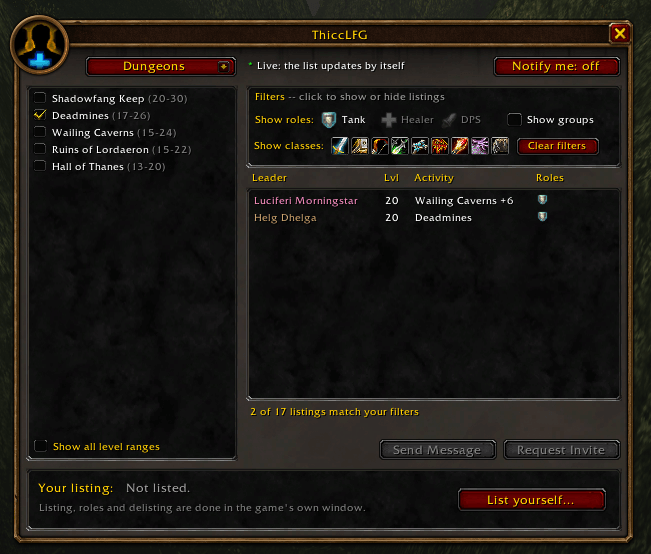
Looking for Group with role and class filters for World of Warcraft: Forever. Find exactly who you need, invite with a double-click, and hear a sound when someone new is listed.
Features
Filters
- Roles: Tank, Healer, DPS
- Classes: pick one or more (Healer + Priest finds priests listed as healers)
- Groups: show or hide them to see only solo players
Listings
- Updates by itself, with no Search button to press
- Dungeon list matches your level, with an option to show all level ranges
- Sort by Leader, Level, Activity or Roles
- Double-click to invite a player, or to ask a group's leader for an invite
Notify me
- Keeps watching while the window is closed
- Plays a sound and opens the window when someone new matches your filters
- Waits until combat ends if you're fighting
Window
- Drag the title bar to move it, right-click and hold to resize
- Can open in place of the game's Group Browser
How to open it
- Minimap button: left-click for ThiccLFG, right-click for settings
- Command:
/tlfg - Key binding: Key Bindings > AddOns > ThiccLFG
Commands
/tlfgopens or closes the window/tlfg optionsopens the settings/tlfg resetresets the window's position and size/tlfg debugprints details for bug reports
Part of the Thicc suite
ThiccLFG is the Group Finder from Thicc UI, a larger quality-of-life suite for WoW: Forever. If you like ThiccLFG, Thicc UI also has: - Keybinds that follow your abilities between bars - A Mobile Trainer tab on the spellbook - A Classic-style quest log and social window - Radial menus for windows, spells, markers and tracking - Nameplates+: combo points, your resource, and who each mob is targeting - A talent planner and gear swapping - Movable, resizable windows - Character snapshots to carry your setup from beta to live
You can run both. Thicc UI then handles the game's Looking for Group key, so only one window opens.
Good to know
- Built for WoW: Forever (interface 16001). Not tested on Retail or Classic.
- Listing yourself uses the game's own window. ThiccLFG opens it for you.
- No network requests. Settings are saved in
ThiccLFGDB.
Reporting a problem
Include your game build, what you did, any Lua error text, and the output of /tlfg debug.
World of Warcraft and Blizzard Entertainment are trademarks of Blizzard Entertainment, Inc. ThiccLFG is a fan-made addon and is not affiliated with or endorsed by Blizzard.
You must be logged in to leave a comment.