
TauntMaster Forever
One-click tanking for WoW Forever: see every party and raid member's aggro at a glance and click their bar to taunt their target off them.
Details
Expansion
 Forever
 Categories
Developers

Having issues?
TauntMaster Forever
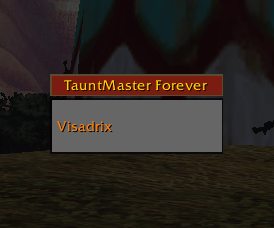
Click a party member's bar to taunt their target off them.
TauntMaster Forever is a tanking addon for World of Warcraft: Forever. It shows a bar for every member of your party or raid, colors each bar by how much threat that player has, and lets you rescue them with one click — no targeting, no macros, no fumbling.
It's a from-scratch rebuild of the classic TauntMaster addon, written for Forever's modern addon rules.
Features
- Click to taunt. Click a party or raid member's bar and your taunt is cast on their target. Your own target doesn't change.
- Aggro at a glance. Bars turn yellow (more threat than the tank), orange (being attacked) and red (has aggro). A faded bar means your taunt can't reach; a red X means that player has no enemy targeted.
- Nameplate marks. The logo appears over any enemy that's attacking someone who isn't a tank. Click its nameplate, then taunt. Needs enemy nameplates (V key).
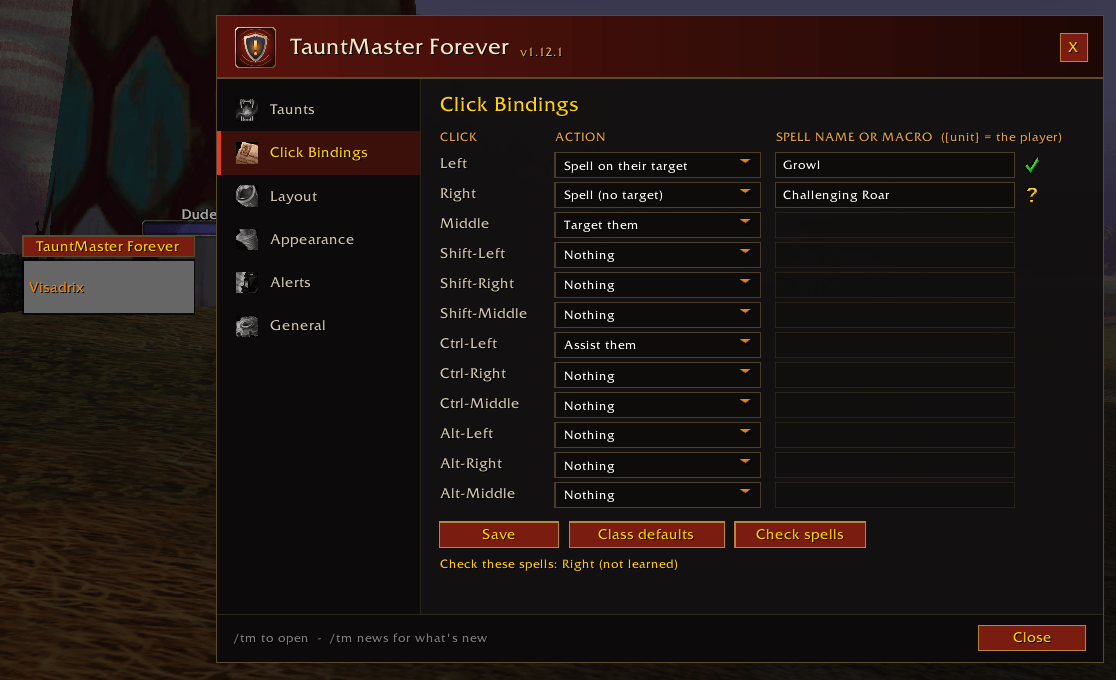
- Bind anything. Left, Right and Middle click, each with Shift, Ctrl and Alt, to a spell, macro, assist or target, with a picker of your class's taunts. Keys and controller buttons work too.
- Alerts. A flashing bar and an optional sound when someone pulls aggro, taunt cooldown icons, and a low mana warning for you and your healers.
- Target's target bar and backup taunt. Taunt what your target is hitting, or (optional) what a player's friendly target is fighting.
- Taunt announcements (optional) in party, raid, instance, say or yell chat, with your own message.
- Raids and looks. Raid bars grouped by raid group; health %, role icons, sort by role, bar textures, text sizes, class colors, and a tank-stance-only mode.
Installation
- Download the latest release.
- Unzip it into your WoW: Forever
InterfaceAddOnsfolder so you end up with anAddOnsTauntMasterForeverfolder. During the beta, that'sWorld of Warcraft_classic_beta_InterfaceAddOns. - Restart the game, or type
/reloadif it's already running.
When you log in you'll see a message like:
TauntMaster Forever loaded. Growl assigned to Left Click, Challenging Roar assigned to Right Click.
That's it — your class's taunts are set up automatically.
Default click bindings
| Class | Left Click | Right Click | Shift-Left Click | Ctrl-Left Click | Middle Click |
|---|---|---|---|---|---|
| Warrior | Taunt | Mocking Blow | Challenging Shout | Assist | Target |
| Druid | Growl | Challenging Roar | — | Assist | Target |
| Paladin | Judgement* | — | Blessing of Protection | Assist | Target |
*Judgement only taunts while Seal of Fury is active.
Taunts cast on "their target" go to the enemy the clicked player is fighting. Blessing of Protection is cast on the clicked player.
Using it
- Move the bars — drag the red header. Lock them in place from the header's right-click menu or the options.
- Open the options — type
/tm, left-click the minimap button, or right-click the header and choose Settings. - Show or hide the bars — right-click the minimap button, or type
/tm toggle.
Options window
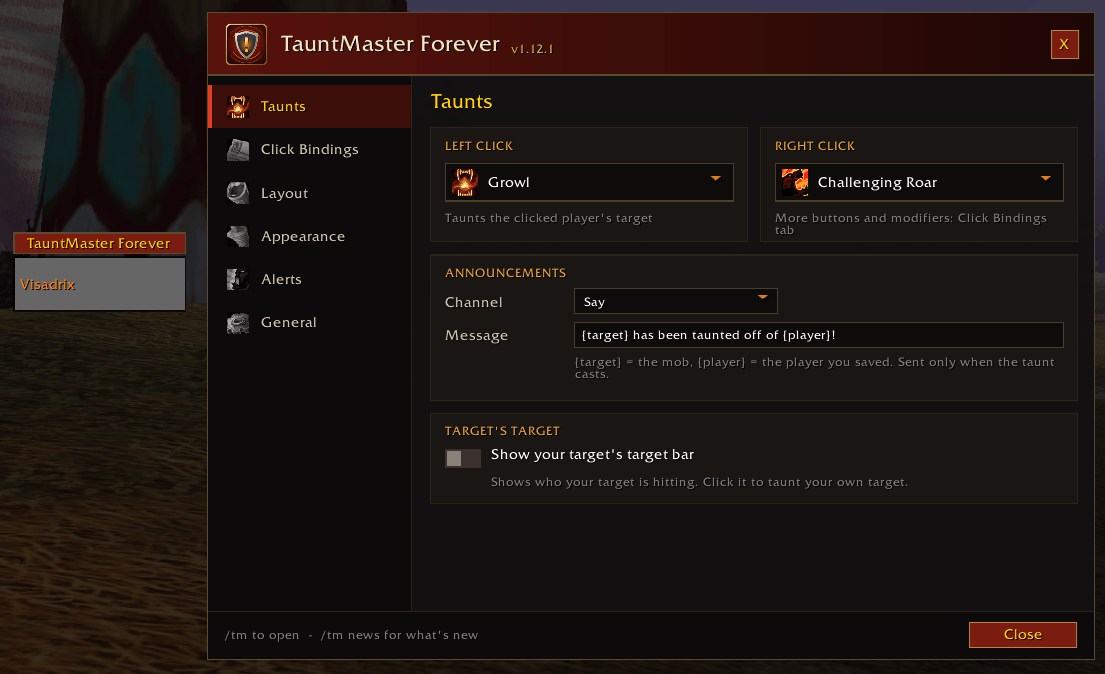
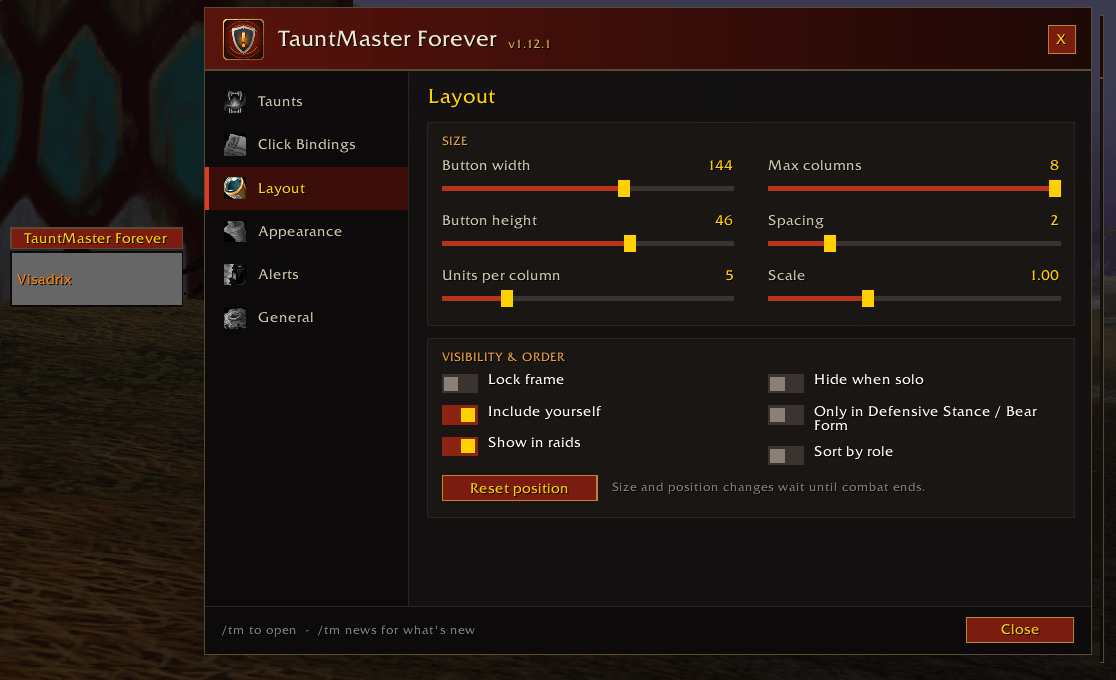
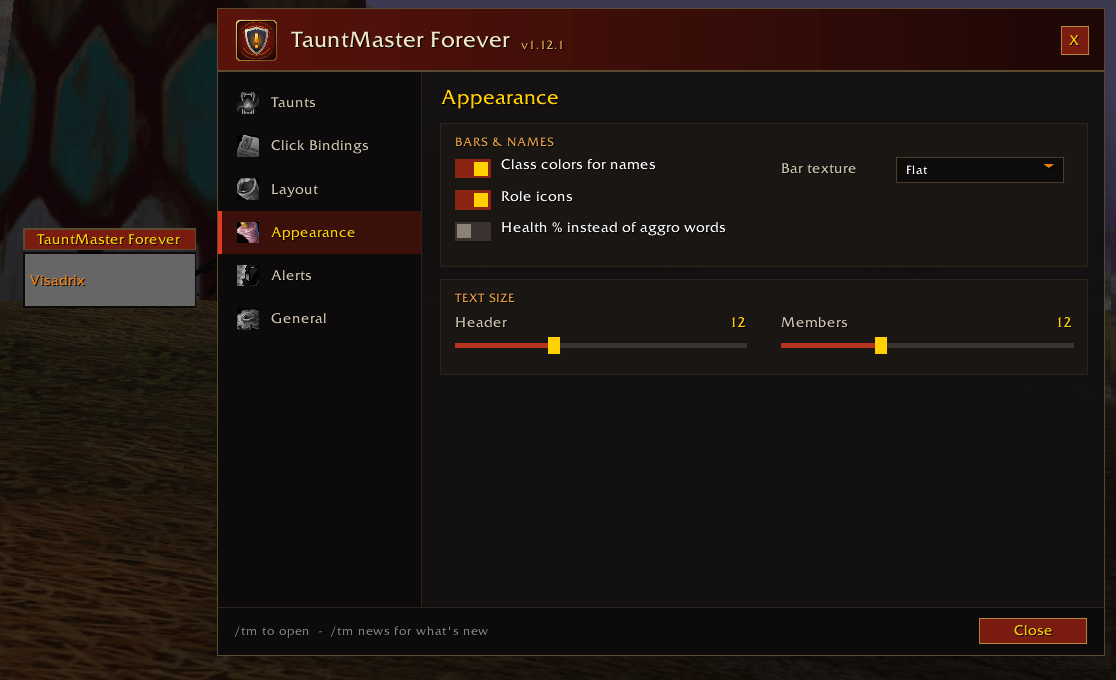
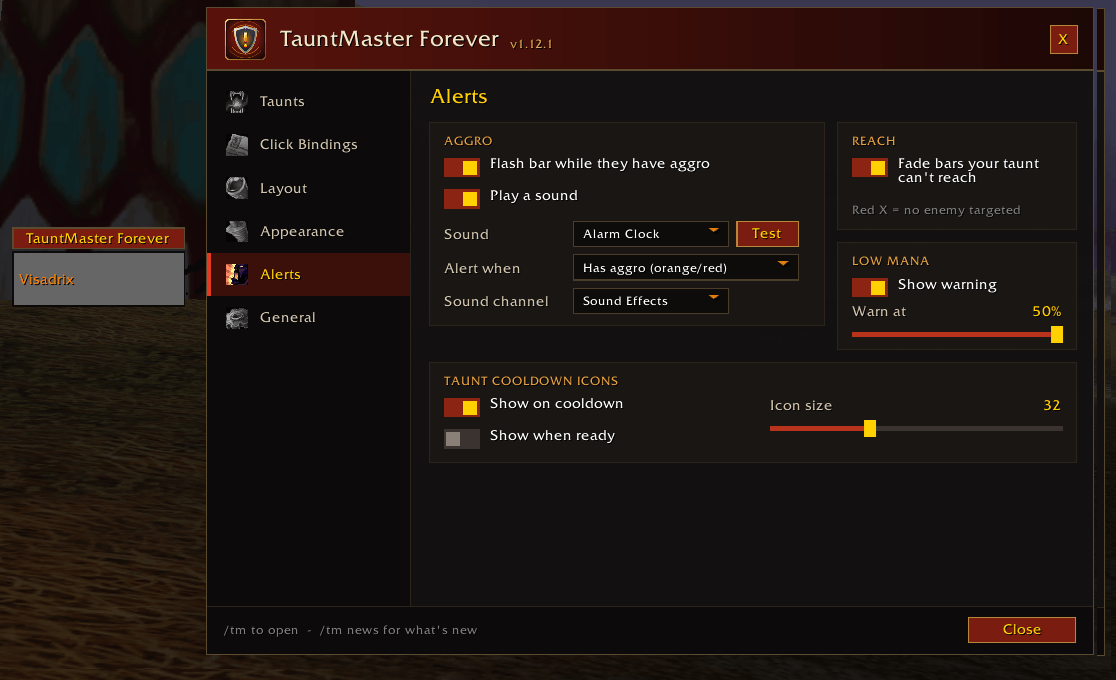
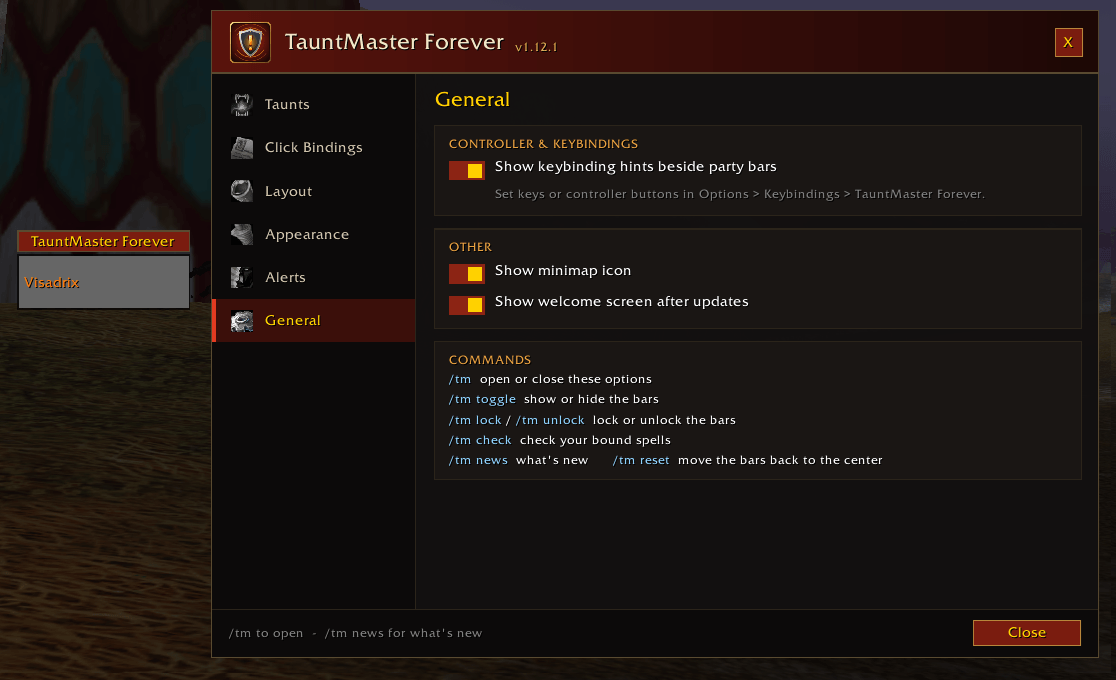
Settings are grouped into tabs down the left side of the options window:
| Tab | What's there |
|---|---|
| Taunts | Left and Right Click spell pickers, taunt announcements, target's target bar, backup taunt |
| Click Bindings | Every mouse button and modifier, with spell names or macros |
| Layout | Bar size, columns, spacing, scale, lock, include yourself, show in raids, hide when solo, tank-stance-only mode, sort by role, reset position |
| Appearance | Class colors, role icons, health %, bar texture, text sizes |
| Alerts | Aggro flash and sound (sound choice with a Test button, when it plays, sound channel), reach fading, low mana warning, taunt cooldown icons, nameplate marks |
| General | Keybinding hints, minimap icon, welcome screen, command list |
In a custom macro, {unit} is replaced with the clicked player (for example /cast [@{unit}target] Growl).
Controller and keybindings
Prefer a controller, or keys instead of clicking? Go to Options → Keybindings → TauntMaster Forever and bind any key or controller button:
| Binding | Does |
|---|---|
| You / Party 1–4: Left Click spell | Casts your Left Click spell on that player's target |
| You / Party 1–4: Right Click spell | Casts your Right Click spell for that player |
| Targeted ally: Left / Right Click spell | Target a friendly player, then press it to cast the spell on their target. Works in raids too. |
Bound keys appear beside each party bar, so you always know which button saves whom. Turn the hints off on the General tab of the options.
Slash commands
| Command | Does |
|---|---|
/tm | Open or close the options |
/tm show · /tm hide · /tm toggle | Show or hide the bars |
/tm lock · /tm unlock | Lock or unlock the bars' position |
/tm spells | Open the options at Click Bindings |
/tm check | Check that your bound spells exist and are learned |
/tm news | Show the welcome / what's new window |
/tm reset | Move the bars back to their default position |
/tauntmaster works too.
Good to know
WoW: Forever limits what addons can do in combat. TauntMaster Forever is built around those rules:
- It never acts on its own. Every taunt is your click.
- A click taunts whatever that player has targeted. Healers usually target a friend, so their bar shows a red X and there's nothing to taunt. Use the nameplate mark on the mob, the backup taunt, or your AoE taunt.
- Layout changes wait until combat ends. Colors, text and alerts always update live.
- Say and Yell announcements only work inside instances.
- Tank-stance-only mode does nothing for Paladins, who have no tank stance.
Troubleshooting
- A click on a healer does nothing — they probably have a friend targeted, not the mob. See Good to know above.
- A click does nothing — type
/tm check. It lists each bound spell and whether it was found and learned. Fix any misspelled spell on the Click Bindings tab. - The bars disappeared — type
/tm show. If they're still hidden, turn off Hide when solo or tank-stance-only mode on the Layout tab. - The bars are off-screen — type
/tm reset. - No nameplate marks — turn on enemy nameplates (V key), and check that Nameplate marks is on in the Alerts tab.
Feedback and bug reports
Found a bug or have an idea? Please submit it on GitHub. A short form asks for your class, group type and any error message, so issues can be fixed quickly. You'll need a free GitHub account. Otherwise, feel free to leave a comment on the CurseForge page.
Support the addon
TauntMaster Forever is free. If it has saved your group a wipe, you can leave a small tip on Ko-fi. Thank you!
Also by me
- ToppedOff Forever: reminds you when buffs, food, reagents, ammo or gear need topping off. Free on CurseForge.
- Outfitter Forever: the classic Outfitter gear manager, ported to WoW Forever. Free on CurseForge.
- BattleText Forever: scrolling combat text for your hits, heals and the damage you take. Free on CurseForge.
Credits
Special thanks to Classic Mistake in WoW Forever for their help with the initial testing.
Inspired by the original TauntMaster addon by prodigy. TauntMaster Forever is a separate, from-scratch rebuild and isn't affiliated with the original.
License
MIT — see LICENSE.
You must be logged in to leave a comment.