

TankForever
This Got Rolled Up Into the Larger "ForeverUI" Project
Details
Expansion
 Forever
 Categories
Developers

Having issues?

TankForever is now part of ForeverUI
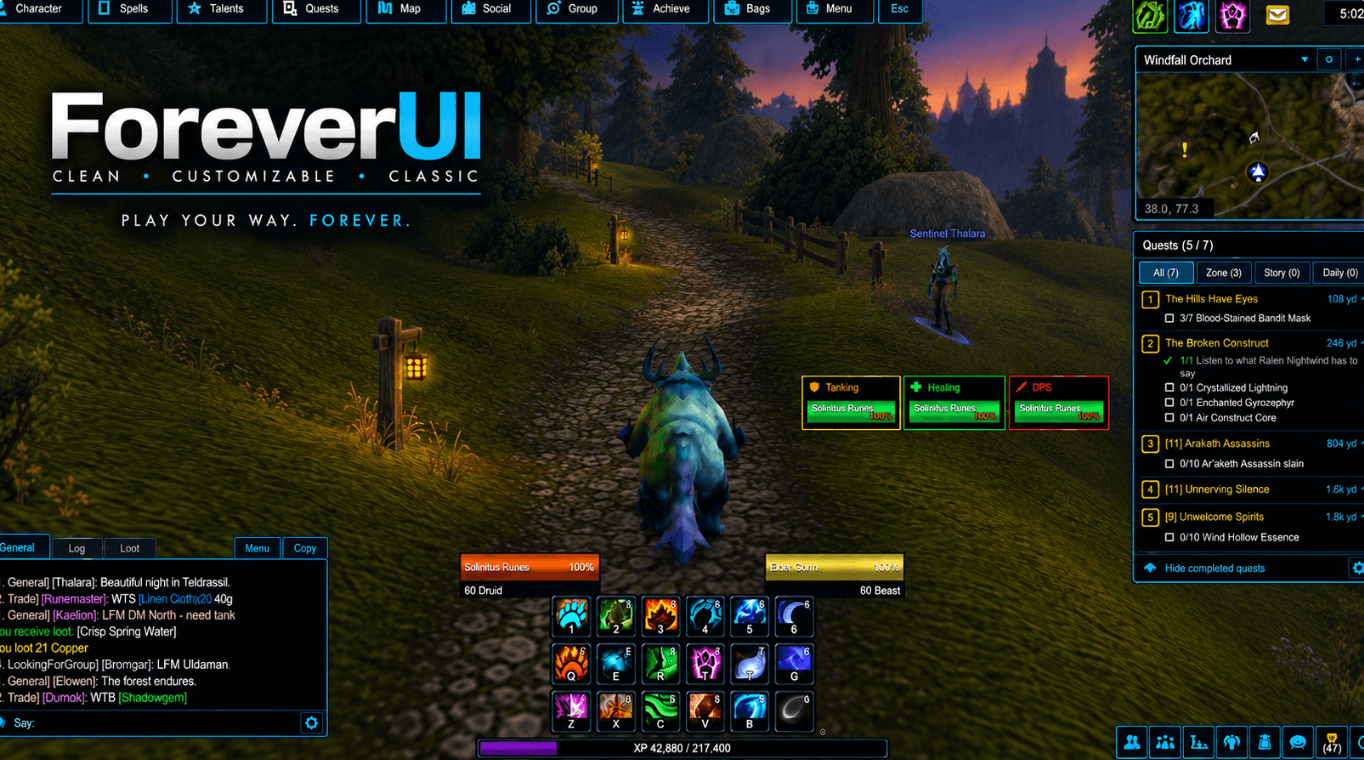
Everything this addon did now ships inside ForeverUI - the same party and raid frames, the same threat display, the same one-click engage, built from the same code. This project stays up and I still build it for every release, so nobody gets stranded. But new work happens there.
A word from me. My name is Solindius. I am mainly a healer - I have always been a healer - but I tank and I DPS too, and most of us are altaholics on top of that. That is the whole reason ForeverUI exists: one setup that follows you between characters and roles instead of a separate addon and a separate configuration for each one. Tank on this character, heal on that one, and the interface changes with you.
You don't have to take a whole interface
ForeverUI asks one question when you install it: how much of it do you want? Answer Frames only and everything else switches itself off - action bars, bags, chat, the map and nameplates all go back to the game - and you are left with exactly what this addon gave you and nothing more. You can change that answer at any time from its first page, or with /fui only frames.
What has changed since this build
- The tank window was rebuilt. An icon sidebar, bindings beside the spell's own icon with an x to clear it, a spell search, and Save in the footer.
- Healer and DPS layouts sit beside it - a druid or paladin who does more than one keeps every set, and each role keeps its own click-casts, keybinds, colours, textures and sizes. Change the tank's bars and the healer's stay exactly as they were.
- One profile per character now covers the whole addon, so there is no second save to keep in step.
- A backup that survives the beta's saving bug. The Forever client currently forgets every addon's saved settings after a restart. ForeverUI keeps your essentials in character macros named "FUI Save", which the game does keep, and puts them back at login. TankForever does not have that.
- Each role's grid is always on, in groups only, or off. Put the tanking grid up while you level, or only when you're in a group - one click in Quick Setup. (Here in TankForever,
/tf grids tankputs the tanking frames away and brings them back.) - Profiles you can copy and share between characters, and export as text.
- Everything the threat frames already did is still here: the thick pulsing AGGRO border for a mob on the wrong player, a threat meter on each frame, the Loose list, the centre-screen alarm, and left-click to engage, right-click to engage and taunt - aimed at the player or at what the player is fighting.
Moving over
- Install ForeverUI.
- When it asks how much of it you want, choose Frames only.
- Choose Tank.
That is the whole migration. Your click-casting and taunts are set up on the first login, the same way they were here.
Where to get it
Here on CurseForge, on Wago, or from ispress.de/foreverui - screenshots and a direct download. That page is piggybacked onto a website I built for music and publishing; it is not a dedicated addon site and may never be. It is just somewhere I can put the files and explain things properly.
Help me test it
Honest problem: Forever's beta did not give us max-level characters, and I wish it had. I have a level 11 druid and a level 8 priest. During this beta I can either build addons that will be good to have when everything goes live, or spend all my time leveling characters to test them on - not both. I chose building.
Tanking is exactly where I need the most help, because I cannot get into a real pull at level 11. If you tank - any class - tell me what you need in the comments and I will implement it. I will eventually cover every class and every spec myself; I just do not have the hours right now. My own plan is to get the druid to 60 so I can tank, heal and boomkin in five-mans and hopefully some raids, and test all three roles the way they are actually played.
Built for WoW: Forever and Classic Era. An independent addon.
You must be logged in to leave a comment.