

SMoRGs QoL
A small collection of opt-in quality-of-life tweaks for World of Warcraft (Retail).
Details
Expansion
 Forever
 Categories
Developers

Having issues?
SMoRG's QoL
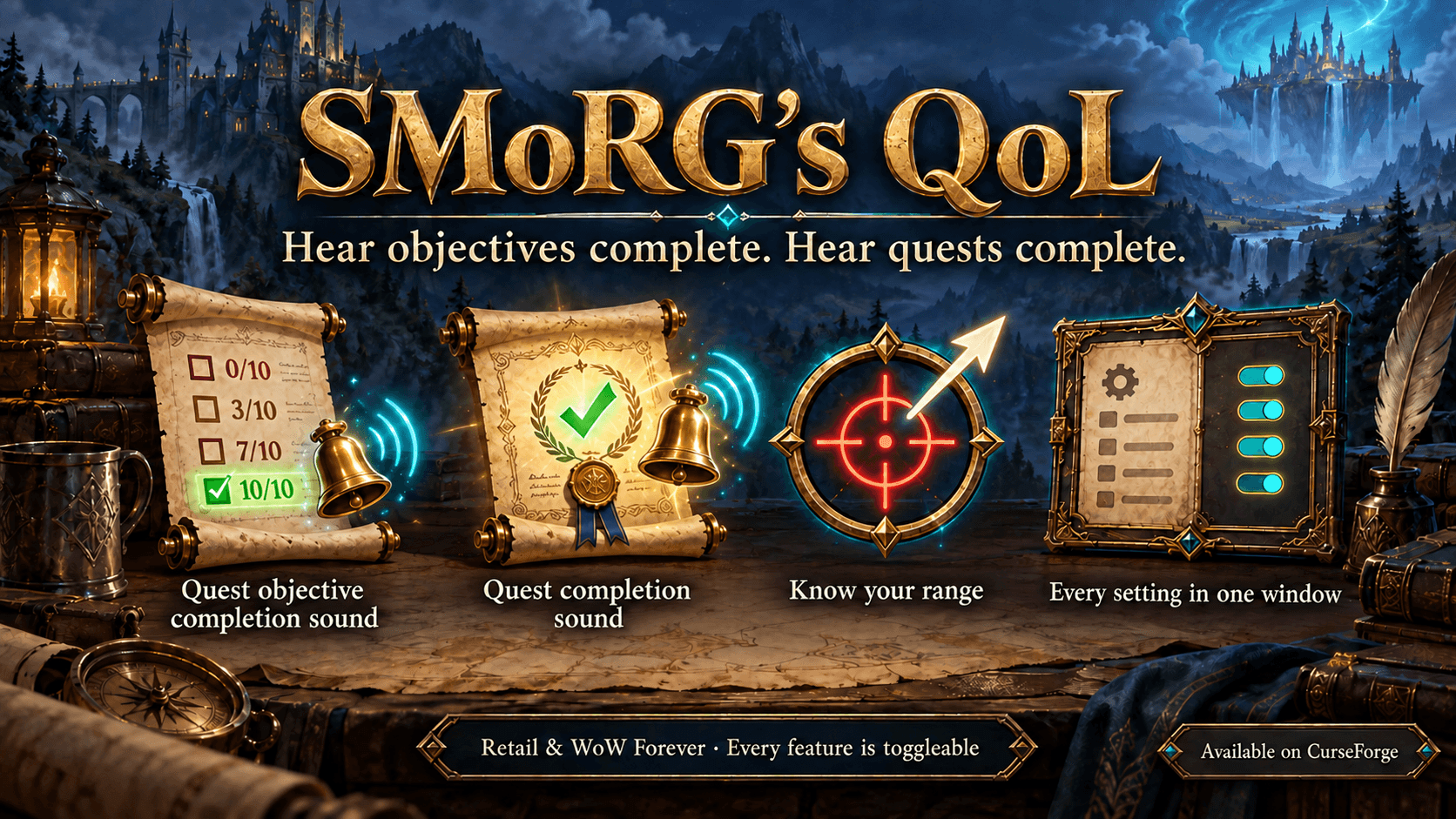
A small collection of individually toggleable quality-of-life tweaks for World of Warcraft (Retail and WoW Forever).
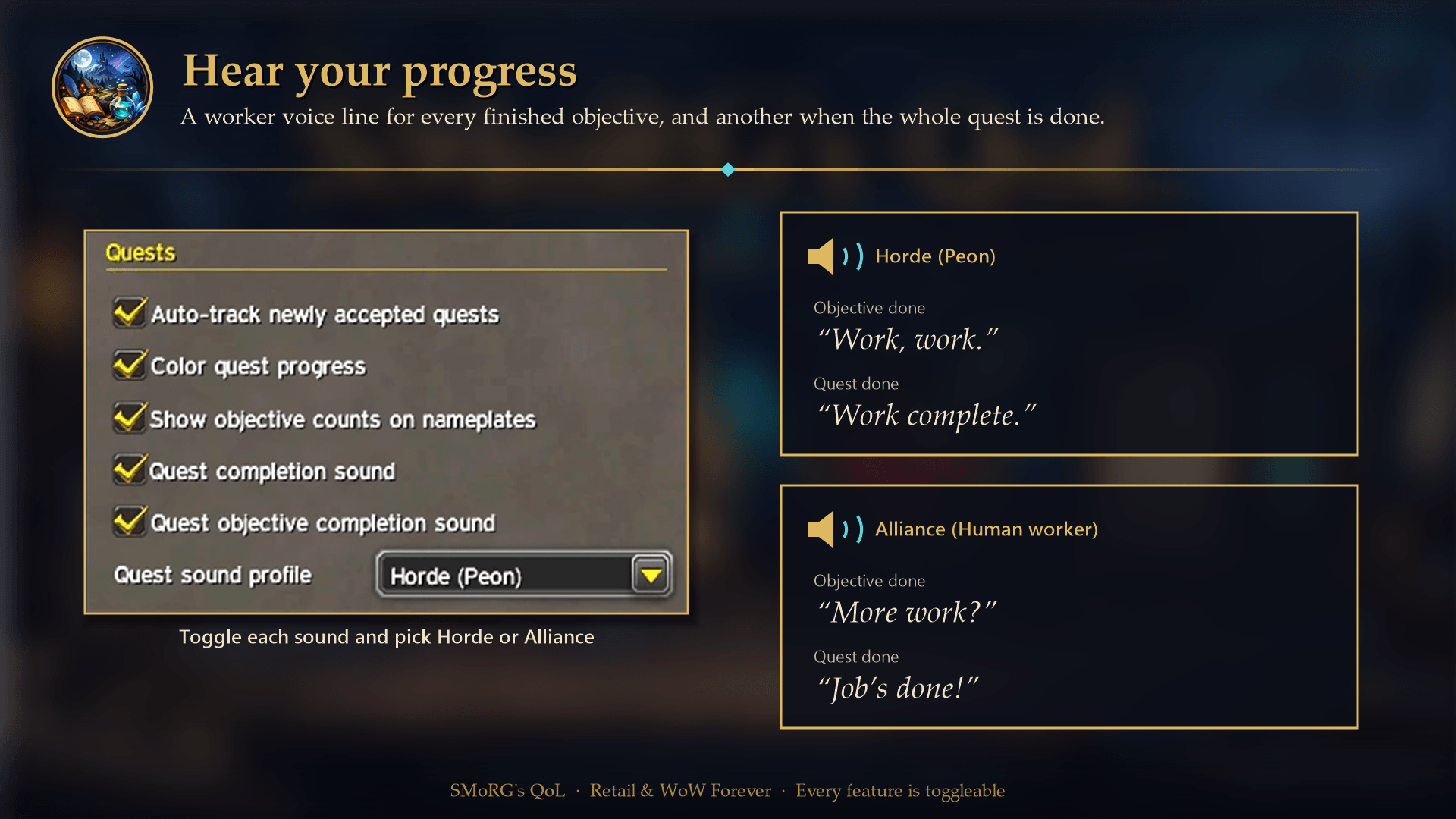
🔊 It started with one idea: hear your quest progress. A worker voice line plays when you finish a quest objective ("Work, work."), and another when the whole quest is ready to turn in ("Work complete."). Prefer the Alliance? Switch to the Human worker ("More work?" / "Job's done!").
Everything is toggleable:
- 🪟 via the options window (LibDataBroker displays such as Bazooka, the addon compartment menu, the optional minimap button or
/sqol config), - ⚙️ via the in-game Settings UI, or
- 💬 via
/sqolchat commands.
What's new in 1.1.0
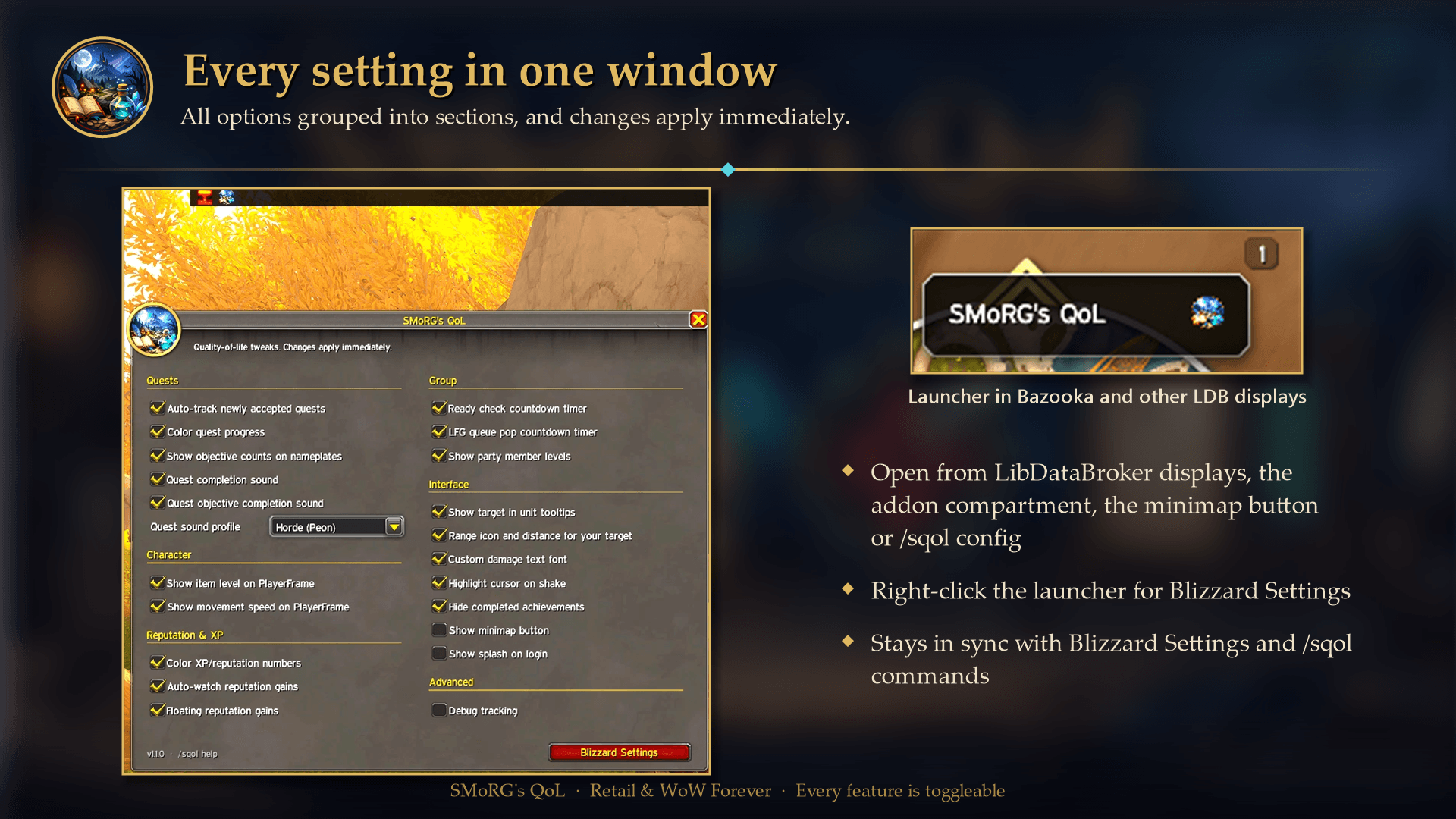
- 🪟 Options window — all settings in one movable window, grouped into Quests, Character, Reputation & XP, Group, Interface and Advanced. Open it from Bazooka/Titan Panel and other LibDataBroker displays, the addon compartment menu, the optional minimap button (
/sqol minimap) or/sqol config. Right-click the launcher for Blizzard's Settings page, which now uses the same sections. - 🎨 Colored objective counts in the quest tracker — with Color quest progress on, the current count (the
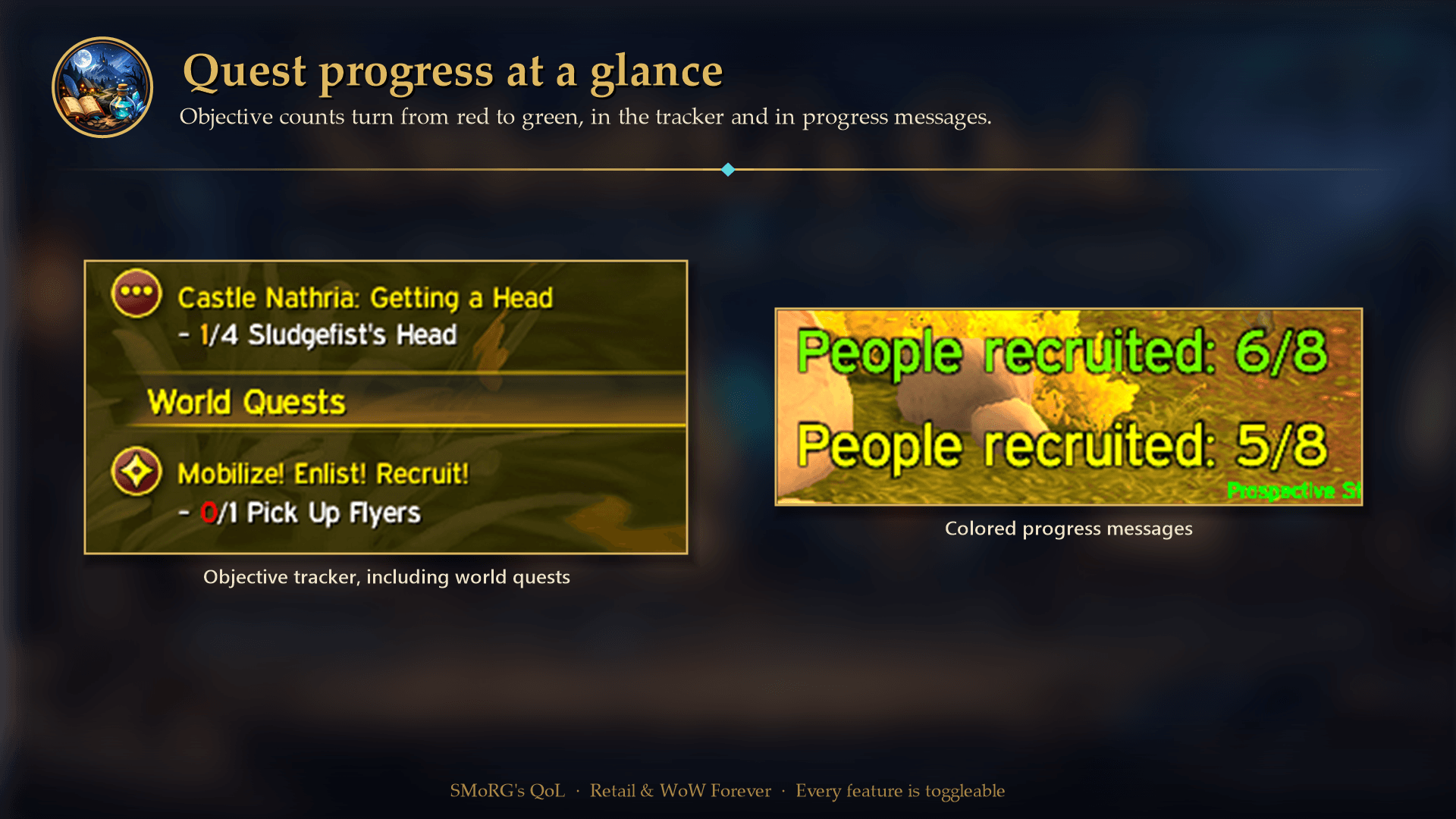
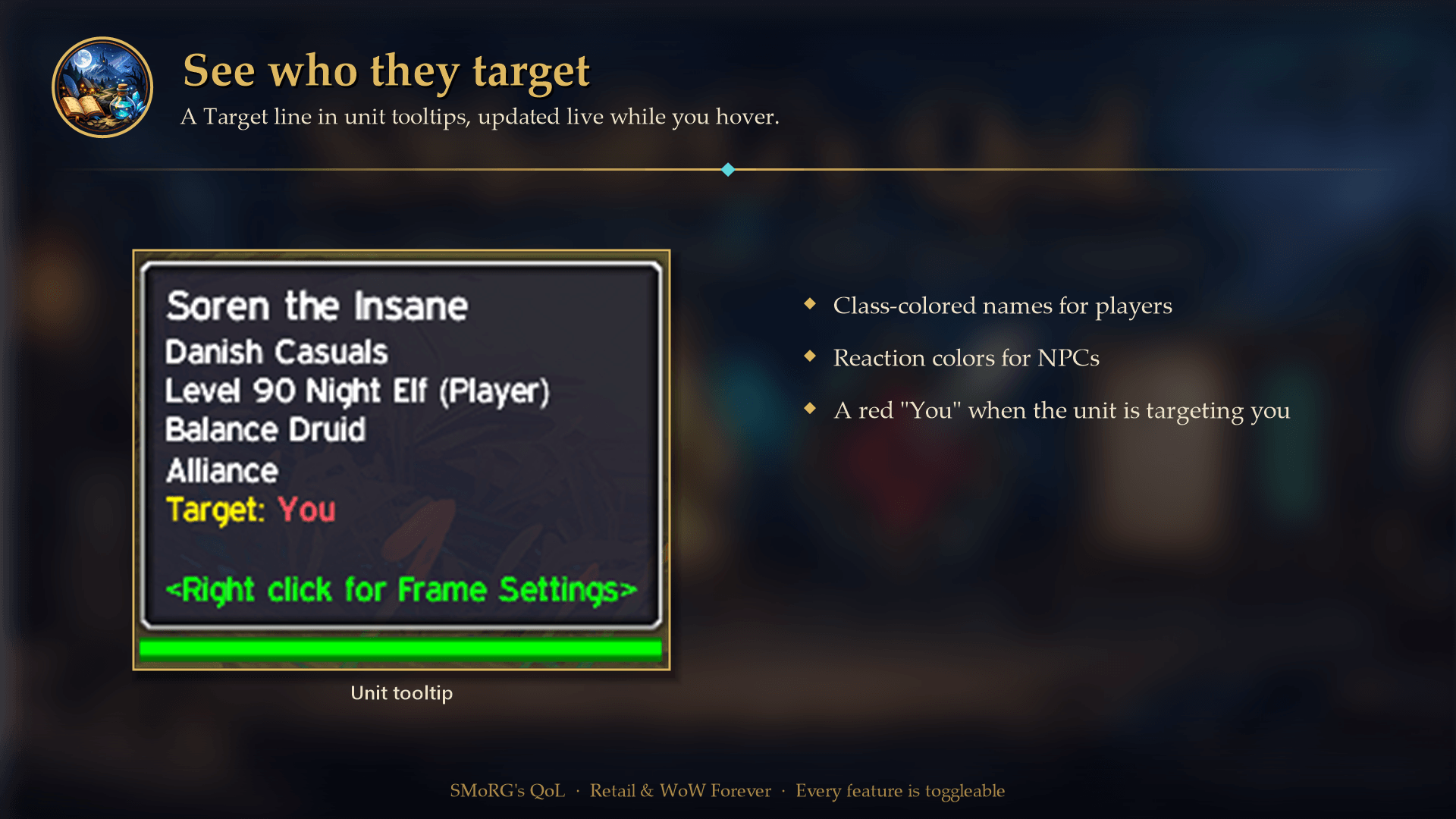
1in1/5 Boar Pelt) is colored red → yellow → green for quests, campaign quests, world quests and bonus objectives, and finished objectives keep a green count. - 🎯 Target in unit tooltips — a
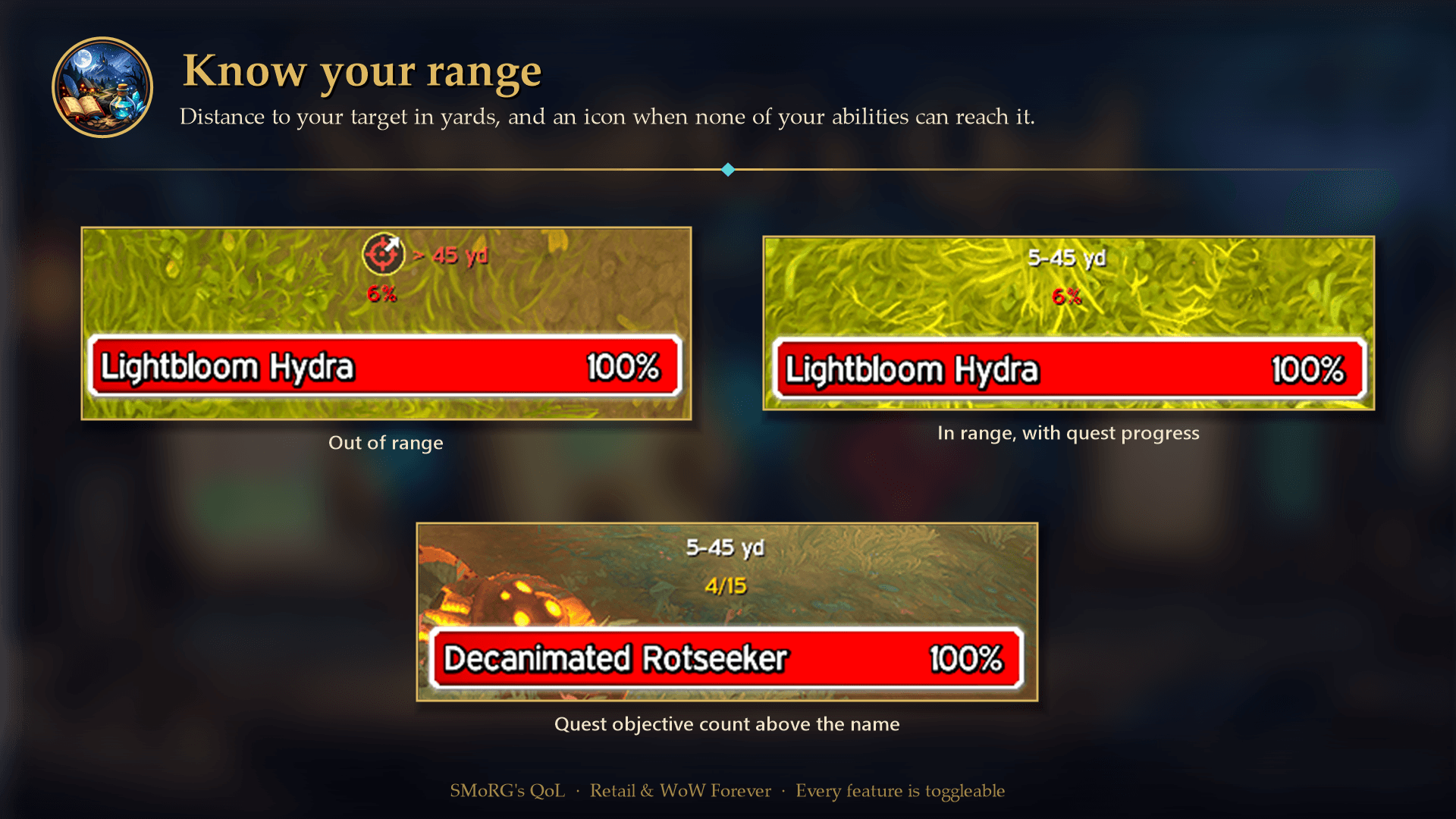
Target:line showing who the unit is targeting, class- or reaction-colored, with a redYouwhen it is you./sqol tooltiptarget(tt). - 🏹 Range icon and distance — on your target's nameplate, where Blizzard's soft target sword icon sits, the distance to your target in yards (e.g.
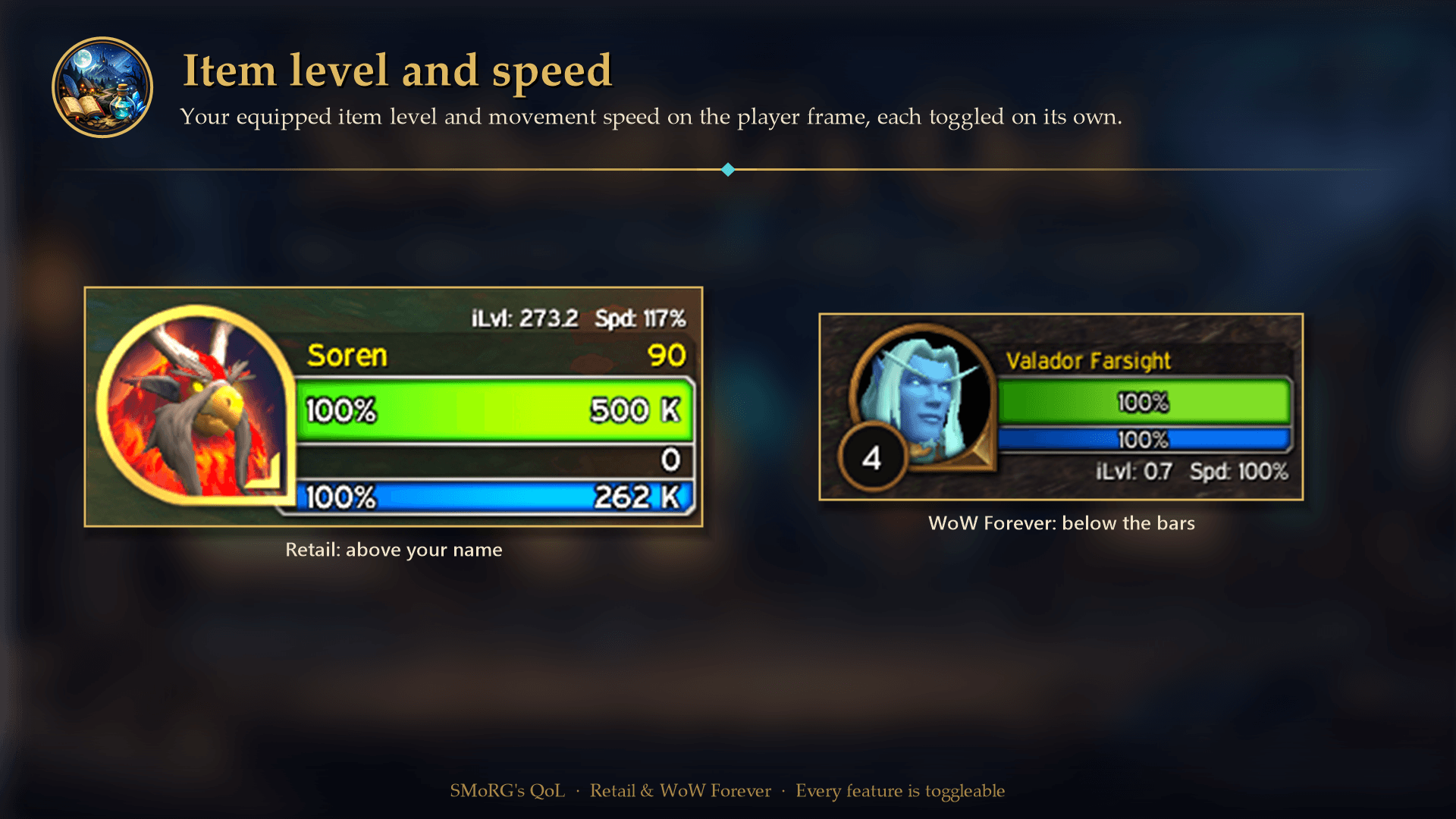
8-30 yd), and a pulsing icon when none of the offensive abilities on your bars can reach it./sqol range(rng). - 🧾 Better placement — the item level/speed line sits above your name on Retail (clear of long names, druid mana and class resources), and nameplate objective counts sit above the unit name instead of overlapping it.
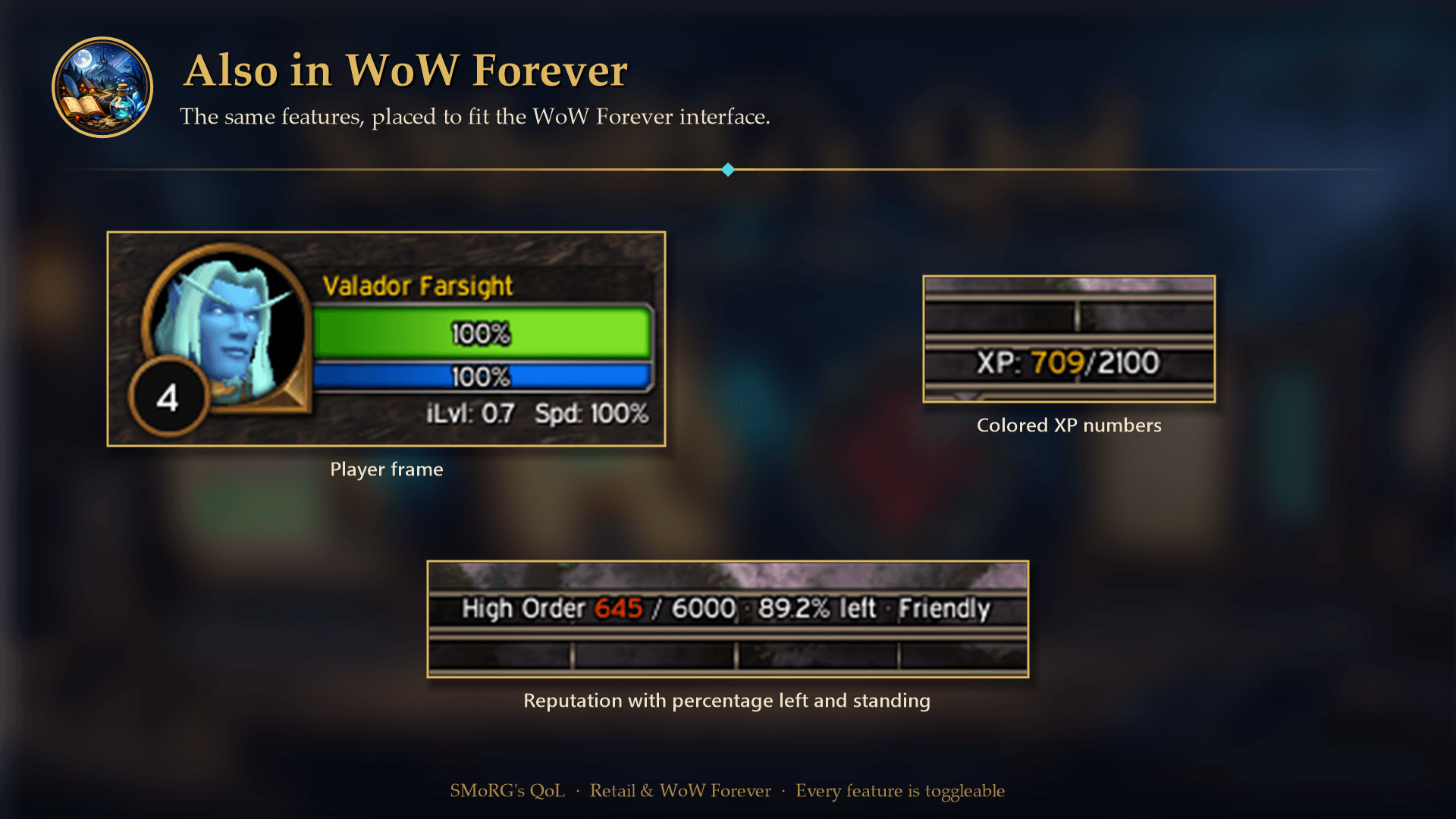
- 🌍 WoW Forever support — the addon loads in WoW Forever, with the item level/speed line placed for its player frame.
After updating, restart the game (a /reload is not enough), because this release adds new files. See the changelog for the full release history.
1.0.24
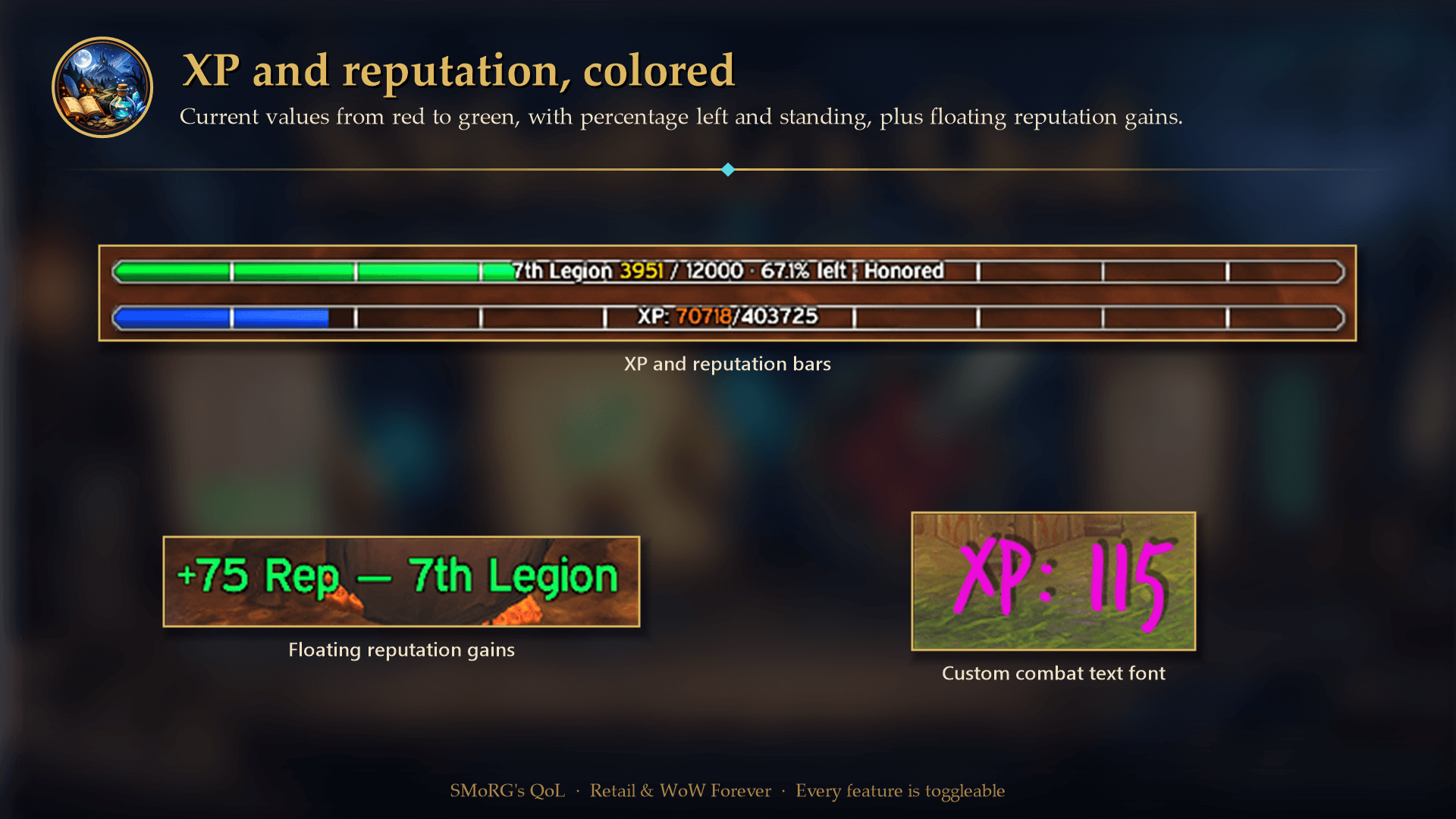
- Floating reputation gains — simple green
+25 Rep — Valarjartext near the screen center, floating upward and fading out. Enable with/sqol reptext(rt). Preview with/sqol reptexttest. - 🎨 XP/reputation number colors — the current number changes from red through yellow to green, with outlined text. Enable it with
/sqol barcolor(bc). - 🧾 Separate item level and speed settings — show either value alone or both on your PlayerFrame (
/sqol ilvl,/sqol speed). The old combined preference carries over. - 🛠️ Modular code structure — feature code is now organized into dedicated files for easier maintenance.
1.0.23
- 🐛 Fixed nameplate taint error — the party-level feature could spam an "Attempt to access forbidden object" error whenever nameplates appeared, because its hook also fired for (forbidden) nameplate frames. It now ignores those frames entirely.
1.0.22
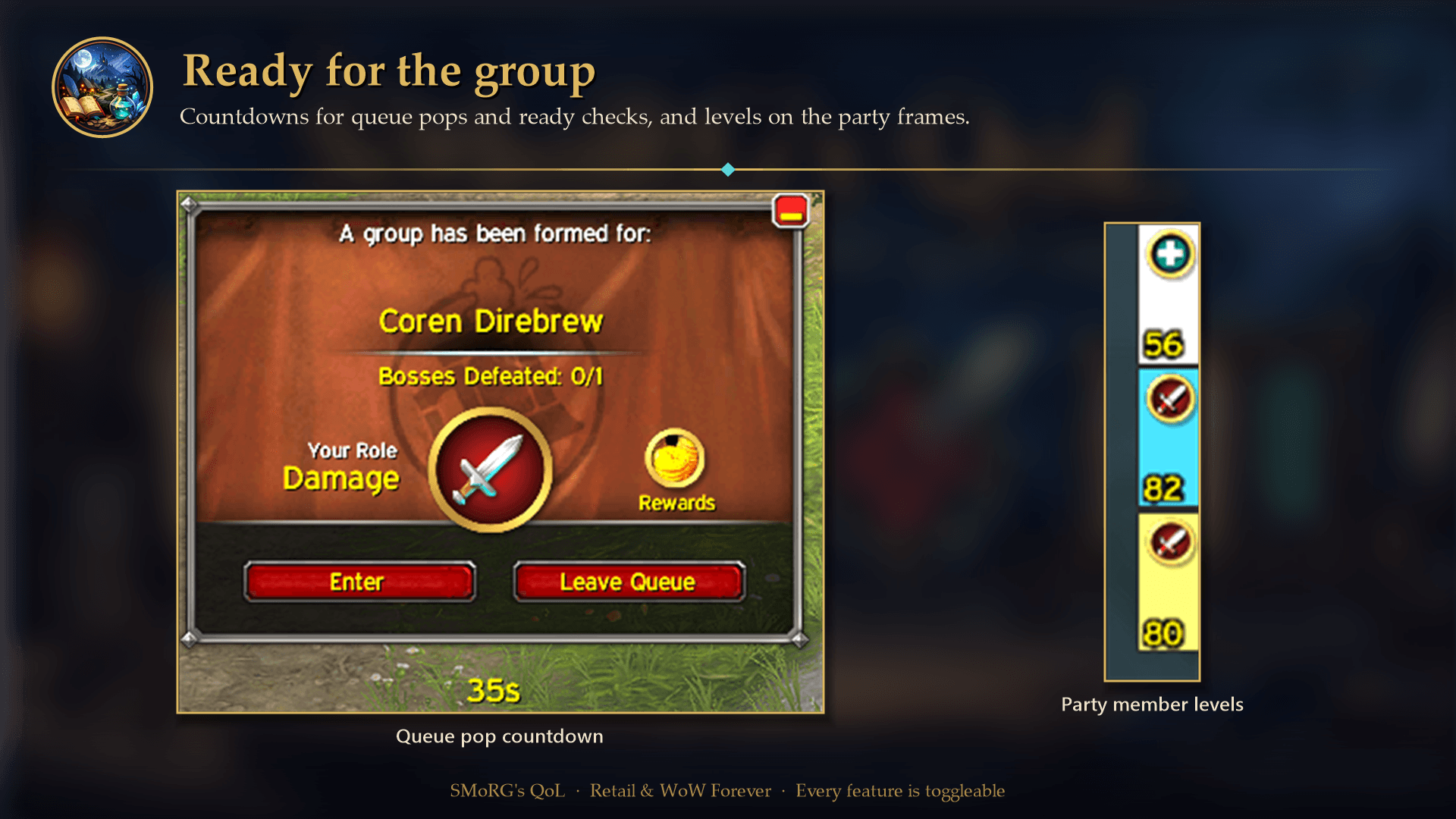
- 👥 Party member levels — shows each party member's level on both the default party frames and raid-style party frames. Enabled by default; toggle with
/sqol partylevel(pl).
1.0.21
- ⏳ LFG queue pop countdown — a live timer showing how long you have left to accept when the group finder pops (40 seconds), turning red for the last 5. Toggle with
/sqol lfgtimer(lfg). - Fixed the ready check countdown being invisible when you started the ready check — Blizzard never shows the popup to the initiator, so the timer now moves to the top of the screen instead.
1.0.20
- ⏱️ Ready check countdown — a live timer showing how many seconds are left before the ready check expires, turning red for the last 5 seconds. Toggle with
/sqol readycheck(rc).
1.0.19
- Colorized progress messages now cover scenario weighted-progress bars (e.g. Void Incursion's "Defending Stillwhisper"), which live outside the quest system and were previously never reported.
1.0.18
- RepWatch no longer rescans while the Reputation panel is open, so collapsing or expanding an expansion header no longer makes the list jump.
1.0.17
- Colorized progress messages now cover progress-bar quest objectives (e.g. "Umbral Attuning Shard charged"), using the objective's own label and without a duplicated percentage.
Features
- 🔊 Quest sounds: objective and quest completion
- Plays a worker voice line when an individual objective is completed before the full quest is done (Peon: "Work, work.").
- Plays another voice line and prints a chat message when the whole quest is ready to turn in, or done for bonus/world quests (Peon: "Work complete.").
- Choose the Horde (Peon) or Alliance (Human worker: "More work?" / "Job's done!") sound profile, and toggle each sound on its own (
/sqol objectivesound,/sqol questsound,/sqol soundprofile).
- 🧭 Auto-track newly accepted quests
- Automatically tracks new quests in the Objective Tracker (with sanity checks to avoid unsupported edge cases).
- 🎨 Colorized progress messages
- Colorizes common progress patterns like
3/10or45%and quest objective progress (red → yellow → green). - Also covers progress-bar quest objectives and scenario weighted-progress bars, which the default UI reports silently.
- Colorizes common progress patterns like
- 🎨 XP/reputation number colors
- Reputation text also shows the percentage remaining in the current bar and your current standing after the total, e.g.
4995 / 6000 · 16.8% left · Friendly. - Independently colors the current XP/reputation number on Blizzard's standard bars (red → yellow → green), with outlined text. Labels and maximum values stay white; bar colors are unchanged.
- Toggle with
/sqol barcolor(bc) or Color XP/reputation numbers in Settings. Disabled by default; independent of quest progress colors.
- Reputation text also shows the percentage remaining in the current bar and your current standing after the total, e.g.
- ⏱️ Ready check countdown
- Shows a live countdown of the seconds left on a ready check, turning red for the last 5 seconds.
- Appears below the ready check popup, or near the top of the screen when you started the ready check yourself (Blizzard never shows the popup to the initiator).
- ⏳ LFG queue pop countdown
- Shows how many of your 40 seconds are left to accept a group finder pop, turning red for the last 5.
- Sits below the queue pop's ready status frame, so it stays useful while you wait for the rest of the group to accept.
- 👥 Party member levels
- Shows each party member's level on both default and raid-style party frames while leaving raid and arena frames unchanged.
- 🚪 Login splash
- Optional status splash on login showing which features are ON/OFF.
- ✅ Hide completed achievements
- Makes the Achievement UI default to showing incomplete achievements only.
- Not available in WoW Forever, which replaces achievements with the Legacy system.
- 🤝 Auto-watch reputation gains
- Switches your watched faction to the one that changed when you gain reputation.
- 🏷️ Nameplate objective counts
- Shows quest objective progress (e.g., 0/10 or 45%) above relevant nameplates, with fallbacks for bonus/world quests.
- 🧾 PlayerFrame iLvl + Speed
- Independently toggle item level and movement speed. Shows either value alone, or both on the same line:
iLvl: xx.x Spd: yy%.
- Independently toggle item level and movement speed. Shows either value alone, or both on the same line:
- 🎯 Target in unit tooltips
- Adds a
Target:line to unit tooltips showing who the unit is targeting: class-colored for players, reaction-colored for NPCs, and a redYouwhen it is you. Updates live while you hover. - Toggle with
/sqol tooltiptarget(tt). Disabled by default. Skipped when the client hides the unit's data (secret values in 12.x).
- Adds a
- 🏹 Range icon and distance
- Shows the distance to an attackable target on its nameplate (where Blizzard's soft target sword icon sits, just above the quest objective count when one is shown), or next to the target frame portrait when the target has no nameplate, as a range in yards (
< 5 yd,8-30 yd,> 40 yd). The client has no exact distance for enemies, so the range comes from the abilities on your action bars that do and don't reach. - Adds a pulsing icon when none of your offensive abilities can reach the target. Uses the same range check that tints action buttons red, so it follows druid forms and bonus bars, and needs no class-specific spell lists.
- While enabled, Blizzard's soft target sword icon over enemy nameplates (
SoftTargetIconEnemy) is turned off so the two aren't confused; it is turned back on when you disable the feature. - Toggle with
/sqol range(rng). Disabled by default.
- Shows the distance to an attackable target on its nameplate (where Blizzard's soft target sword icon sits, just above the quest objective count when one is shown), or next to the target frame portrait when the target has no nameplate, as a range in yards (
- 🖋️ Custom damage text font
- Replaces floating combat text damage numbers with a custom font.
- 🖱️ Cursor shake highlight
- Highlights the cursor when you shake the mouse.
- 🧪 Debug tracking (optional)
- Enables verbose tracking output for troubleshooting.
Configuration
Options window
A standalone, movable window with all settings grouped into sections (Quests, Character, Reputation & XP, Group, Interface, Advanced). Open it from:
- 🧩 LibDataBroker displays such as Bazooka, Titan Panel or ChocolateBar — left-click the SMoRG's QoL icon (right-click opens Blizzard's Settings page).
- 📋 The addon compartment menu by the minimap (Retail and WoW Forever).
- 🗺️ The minimap button — off by default; enable it with
/sqol minimap(mm) or Show minimap button. - 💬
/sqol config(or/sqol options).
Settings UI
Open:
- ⚙️ Esc → Options → AddOns → SMoRG's QoL
Both show the same settings and stay in sync with each other and the slash commands.
Slash commands
Type /sqol to see current status, or use:
/sqol help/sqol config(or/sqol options) — open the options window/sqol minimap(or/sqol mm) — toggle the minimap button/sqol autotrack(or/sqol at)/sqol color(or/sqol col) — toggle quest progress colors/sqol barcolor(or/sqol bc) — independently toggle XP/reputation number colors/sqol questsound(or/sqol qs)/sqol objectivesound(or/sqol os)/sqol soundprofile(or/sqol soundset)/sqol splash/sqol hideach(or/sqol ha)/sqol rep(or/sqol rw)/sqol nameplate(or/sqol np)/sqol ilvl(or/sqol stats) — toggle item level only/sqol speed(or/sqol spd) — independently toggle movement speed/sqol damagefont(or/sqol df)/sqol cursor(or/sqol cs)/sqol cursorflash(or/sqol cf)/sqol readycheck(or/sqol rc)/sqol rctest— preview the countdown solo;/sqol rctest popupalso shows the ready check popup/sqol lfgtimer(or/sqol lfg)/sqol lfgtest— preview the queue pop countdown without a queue/sqol partylevel(or/sqol pl)/sqol tooltiptarget(or/sqol tt)/sqol range(or/sqol rng)/sqol debugtrack(or/sqol dbg)/sqol reset
Saved Variables
Settings are stored per account in:
- 💾
SQOL_DB
Support
SMoRG's QoL is free and always will be. If it makes your questing a little more fun and you'd like to say thanks, you can sponsor its development on GitHub Sponsors. Bug reports and ideas are just as welcome on CurseForge or GitHub.
Updating to 1.1.0
Install the complete addon folder, including the new Libs folder and all Lua
files listed in SMoRGsQoL.toc, then restart the game (a /reload does not load
new files). Keep your saved variables; existing settings are preserved, and the
new features (tooltip target, range icon and distance, minimap button) start disabled.
Code structure
The .toc loads shared utilities and feature modules before the main controller.
Modules share the addon's private SQOL namespace; implementation helpers stay local.
| File | Responsibility |
|---|---|
Core.lua | Defaults, sound profiles, shared utilities and namespace setup |
VisualTweaks.lua | Damage font, cursor highlight, achievement filter and tooltip target line |
QuestProgress.lua | Quest data cache, progress colors/messages, scenario progress and nameplate objectives |
PlayerStats.lua | Independent item level and movement speed displays |
PartyLevels.lua | Levels on default and raid-style party frames |
RangeIndicator.lua | Range icon and distance for the target |
Reputation.lua | Reputation watching, faction lookup and header preservation |
Countdowns.lua | Shared countdown implementation, ready checks and queue pops |
SMoRGsQoL.lua | Saved settings/migration, option side effects, commands, events, auto-tracking and quest completion notifications |
Options.lua | Shared option list (sections, labels, tooltips) and Blizzard's Settings page |
OptionsPopup.lua | Standalone options window built from the shared option list |
Launcher.lua | LibDataBroker launcher, LibDBIcon minimap button and addon compartment entry |
StatusBarProgress.lua | Independent XP/reputation number colors |
Libs/ embeds LibStub (public domain), CallbackHandler-1.0 (Ace3), LibDataBroker-1.1
(public domain) and LibDBIcon-1.0, each under its own license.
Quest progress and nameplate logic remain together because they share quest parsing
and cached data. New feature modules should keep private state/helpers local and
expose only the entry points needed by the controller through SQOL.
Run lua tests/smoke.lua from the repository root for a mocked load/event/command
smoke test. It reads the real TOC order. In-game testing is still needed for frame
layout, protected UI behavior and real quest/reputation data.
You must be logged in to leave a comment.