
Sharpie’s Gear Judge Roadmap
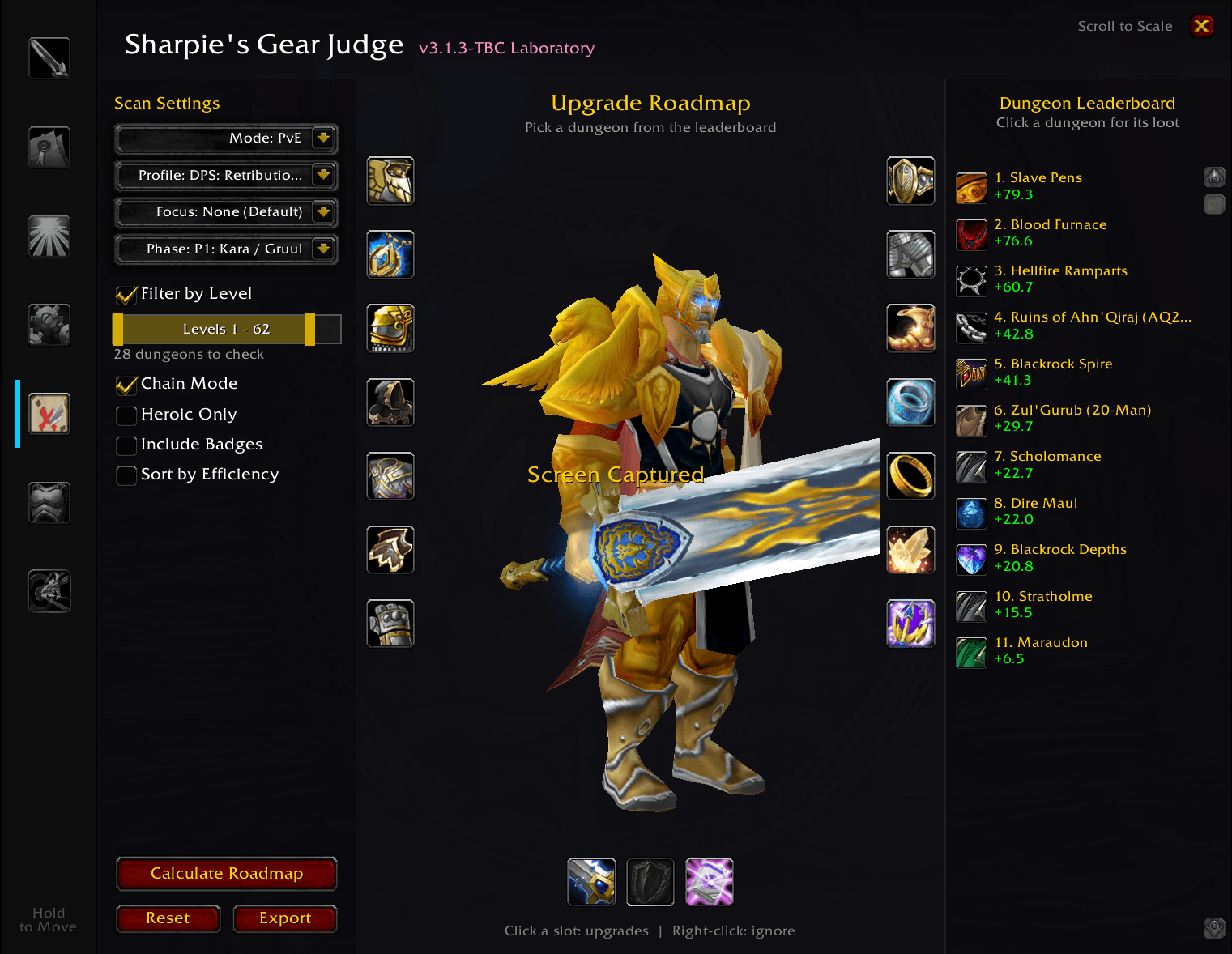
Roadmap is a powerful progression planning tool designed for Sharpie's Gear Judge. It scans every available dungeon to generate a personalized "Upgrade Leaderboard," showing you exactly which instances offer the biggest power gains for your character.
Details
Expansion
 Forever
 Categories
Developers

Having issues?
🗺️ Sharpie's Gear Judge — Roadmap
⚠️ Requires Sharpie's Gear Judge (the core addon). Works on Classic Era, TBC Anniversary and WoW: Forever.
Stop guessing where your next upgrade drops.
AtlasLoot has pages and pages of dungeon loot. Generic BiS lists assume you already have raid gear.
Roadmap answers the real question: "I have two hours tonight. Which dungeon gives my character the biggest upgrades?"
With one click, Roadmap scans every dungeon's boss drops, scores each item against your gear, talents and stat weights, and ranks the dungeons from biggest upgrade to smallest.
🔥 New in 3.0.3
- Dungeon level range. A level bar under the dropdowns sets the lowest and highest dungeon level to check. Drag either handle, or click the bar to move the nearer one; right-click resets it. Set the low end to 60 on a level 70 character to see Outland dungeons only, or raise the high end to plan upgrades ahead of your level. A live count shows how many dungeons the next scan will check.
- Redesigned for Gear Judge 3.2.0's bigger window: scan settings on the left, your character and gear slots in the middle, the dungeon leaderboard on the right. A summary under your character shows the dungeon you're viewing, its number of upgrades and their total gain.
✨ Key Features
🏆 Smart Dungeon Leaderboard
- Scans every dungeon for your game: Classic dungeons on Era, Normal and Heroic dungeons on TBC, and WoW: Forever's dungeons, including its new ones (Hall of Thanes, Ruins of Lordaeron, Excavation Site: Wetlands).
- Ranks dungeons by total upgrade points, so you always know where your time is best spent.
- Hover a dungeon to see its top item upgrades and their score gains; click it to see its drops on your gear slots.
📅 TBC Content Phase Filtering (P1–P5)
Set your phase from the dropdown (Phase 1 by default). Future dungeons, such as Magisters' Terrace, and future Badge of Justice rewards stay hidden until their phase.
⛓️ Chain Mode (Progression Simulator)
Plan your whole pre-raid path step by step:
- Turn on Chain Mode and click a top-ranked dungeon. Roadmap "virtually equips" that run's best upgrades.
- Click the next dungeon. Its drops are now judged against your new virtual gear, not your old gear.
- Watch your 3D character update as you go, and press Reset anytime to return to what you're wearing.
🪙 G'eras Badge of Justice Efficiency (TBC)
The Shattrath badge vendor sits in the leaderboard, with optional sorting by score per badge, so you don't spend 41 badges on a minor upgrade when a big one costs 25.
🧠 Raid-Buff & Hit-Cap Aware
Roadmap uses Gear Judge's Buff Assumptions and Cap Guardian. With Assume Raid Buffed on, it stops pushing hit-heavy loot you won't need in a real raid group.
🎯 Your Weights, Your Way
Pick PvE or PvP weights, any of your class's profiles, and an optional Focus stat to favor.
🔬 Direct Export to The Laboratory
Built a gear set in Chain Mode? Click Export and paste it into The Laboratory for a side-by-side comparison.
🚀 Quick Start
- Open Sharpie's Gear Judge with
/sgjor the minimap button. - Click the Roadmap tab (the map icon).
- Check the Dungeon Levels range (and the Content Phase on TBC).
- Click Calculate Roadmap.
- Click any dungeon on the leaderboard to see its drops and try on the upgrades.
Tip: right-click a gear slot to leave it out of scans, for example a crafted epic or raid weapon you don't want replaced.
🧩 The Sharpie's Gear Judge Suite
- Sharpie's Gear Judge (Core): tooltip verdicts, stat weights, Cap Guardian, bag and quest upgrade arrows.
- Roadmap: dungeon upgrade rankings, badge efficiency and gearing path simulation.
- The Laboratory: build and compare two full gear sets.
- Talents (WoW Forever): talent build guide with weights that follow your build.
- XP Bar: experience bar with quest turn-ins and upgrades waiting for your next level.
Questions or ideas? Join the Discord.
You must be logged in to leave a comment.