
Sharpie’s Gear Judge Laboratory
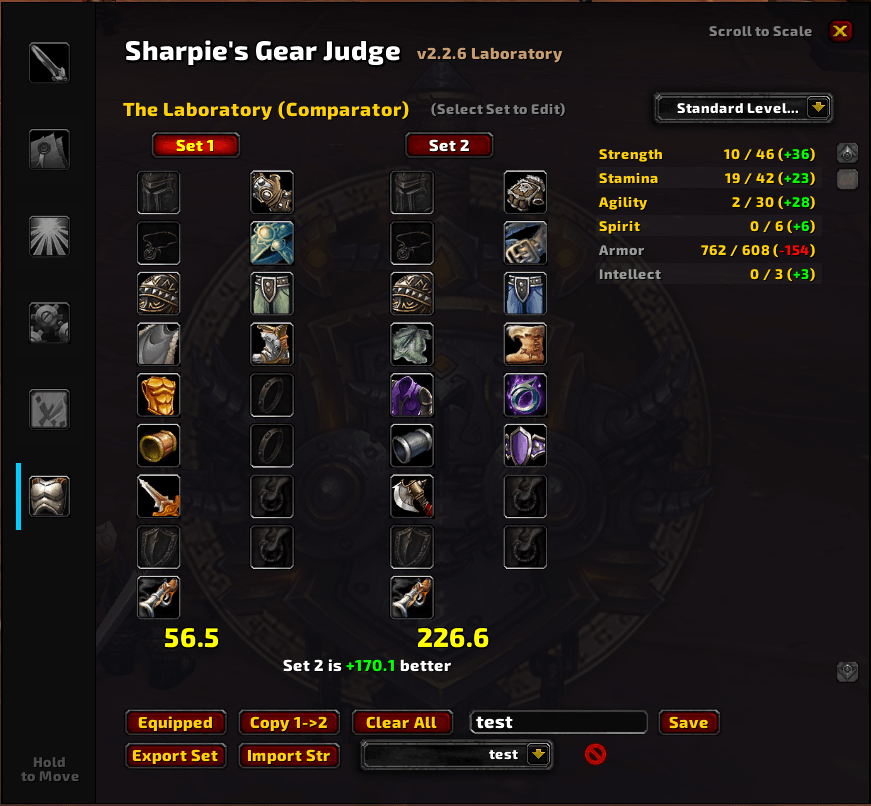
The Laboratory is a specialized module for the Sharpie's Gear Judge (SGJ) addon, it provides a powerful side-by-side gear comparator that allows you to simulate and score potential gear sets against your current stat weights.
Details
Addon ID:
25511
Addon Version:
3.0.8
Expansion:
1.60
Upload date:
Oct 06, 2026
Last Updated:
Oct 06, 2026
Downloads:
Less than 100
Website:
Source Link
Expansion
 Forever
 Categories
Developers

Supersharpie
Creator
Having issues?
🔬 Sharpie's Gear Judge — The Laboratory
⚠️ Requires Sharpie's Gear Judge (the core addon). Works on TBC Anniversary and WoW: Forever.
Build two full gear sets and see which one wins, without owning a single item.
The Laboratory is a side-by-side gear comparator for Sharpie's Gear Judge. It scores whole gear sets against your stat weights, so you can test a BiS list, a crafted upgrade or a single chat link and get instant feedback on which setup is better, and by how much.
🔥 New in 3.0.8
Redesigned for Gear Judge 3.2.0's bigger window:
- Left: your scoring profile and every action, grouped by what it does: Add to Active Set, Manage and Saved Sets.
- Middle: Set 1 and Set 2 side by side. The set that receives new items is outlined in gold, with each set's score underneath and the difference between them.
- Right: a stat comparison with columns for Set 1, Set 2 and the difference.
- Right-click a slot to empty it (shift-click still works too).
✨ Features
- Two full gear sets: build Set 1 and Set 2 and see a direct score comparison.
- Live score difference: which set is better, and by exactly how much.
- Stat comparison: every stat side by side, weighted stats first, with color-coded differences.
- Add items your way: shift-click items in your bags or chat, pull in your Equipped gear, or use Best in Bag to build the highest-scoring set from your bags (shift-click it to also equip those items).
- Import: paste gear from SeventyUpgrades (JSON), SimulationCraft / Raidbots (SimC) or a plain list of item IDs, and export a set to share it.
- Smart slotting: handles two-hander vs. one-hand conflicts and fills empty ring and trinket slots.
- Save and load sets per character.
- Pick any profile: follow Gear Judge's active profile, or score the sets with any of your class's profiles.
🚀 Quick Start
- Open Sharpie's Gear Judge with
/sgjand click The Lab tab. - Pick Set 1 or Set 2 with the buttons above the gear.
- Shift-click items in your bags or chat, or press Equipped to start from what you're wearing.
- Compare the scores and the stat columns. Press ? for the in-game guide.
🧩 The Sharpie's Gear Judge Suite
- Sharpie's Gear Judge (Core): tooltip verdicts, stat weights, Cap Guardian, bag and quest upgrade arrows.
- Roadmap: ranks every dungeon by the upgrades it holds for you, and exports straight to the Lab.
- The Laboratory: build and compare two full gear sets.
- Talents (WoW Forever): talent build guide with weights that follow your build.
- XP Bar: experience bar with quest turn-ins and upgrades waiting for your next level.
Questions or ideas? Join the Discord.
You must be logged in to leave a comment.