
RogueEnergyCombo
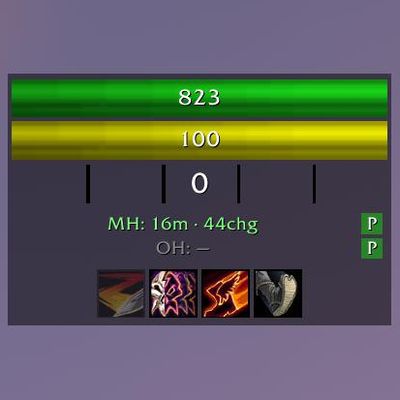
Made by a Rogue for Rogues: A simple and customizable set of frames for HP, Energy, Combo Points, Poisons, and Cooldowns, all rolled into one.
Details
Addon ID:
25141
Addon Version:
1.17
Expansion:
1.60
Upload date:
Oct 06, 2026
Last Updated:
Oct 06, 2026
Downloads:
Less than 100
Website:
Source Link
Expansion
 Forever
 Categories
Developers

Goldfire86
Creator
Having issues?
RogueEnergyCombo — Built specifically for Forever
Health, Energy, Combo Points, Poisons, and Rogue specific cooldown tracking in one compact, customisable, movable frame
Why another resource addon?
I personally don't like Blizzard's implementation of combo points living on the target frame whilst energy sits somewhere else entirely.
I set out on making RogueEnergyCombo, which puts the main things a Rogue actually watches into a single clean display that sits wherever you want it.
RogueEnergyCombo was written from scratch for Forever's client. It's fully compatible with the "secret value" combat-data restrictions because it never tries to read the numbers - it only displays them, exactly the way the new API allows. No dependencies, no libraries, no bloat.
Features
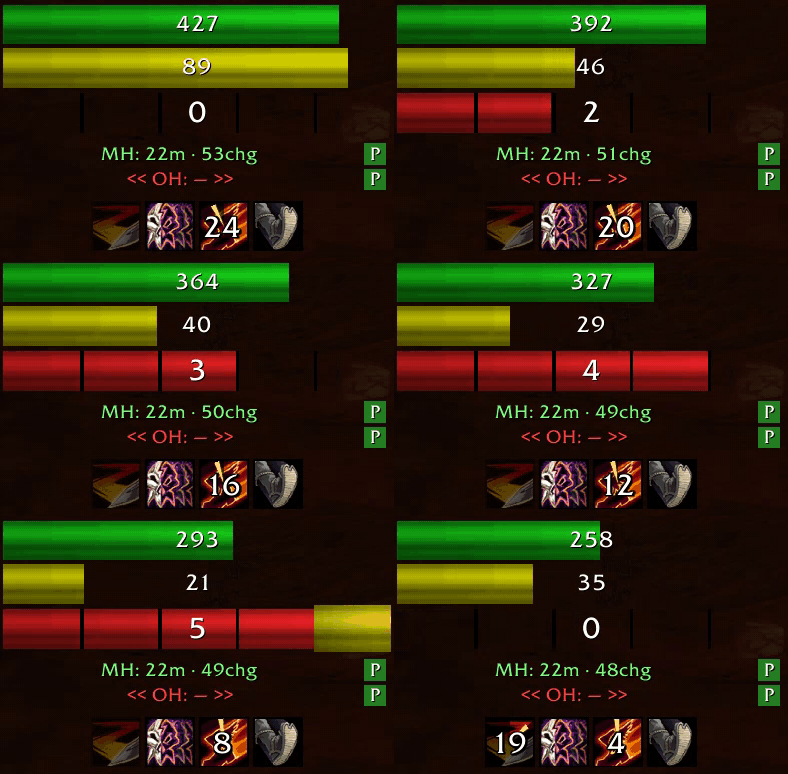
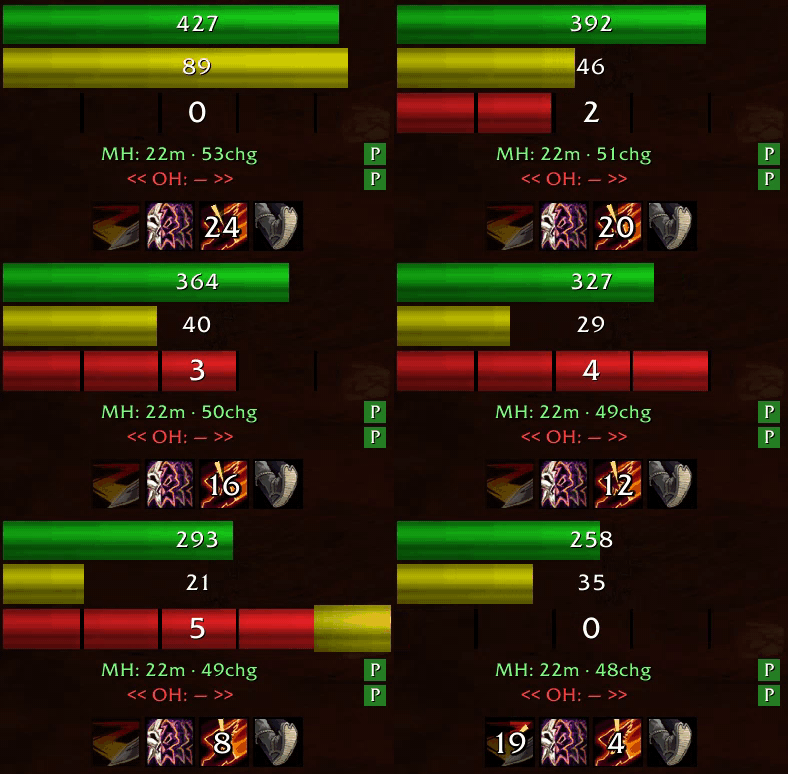
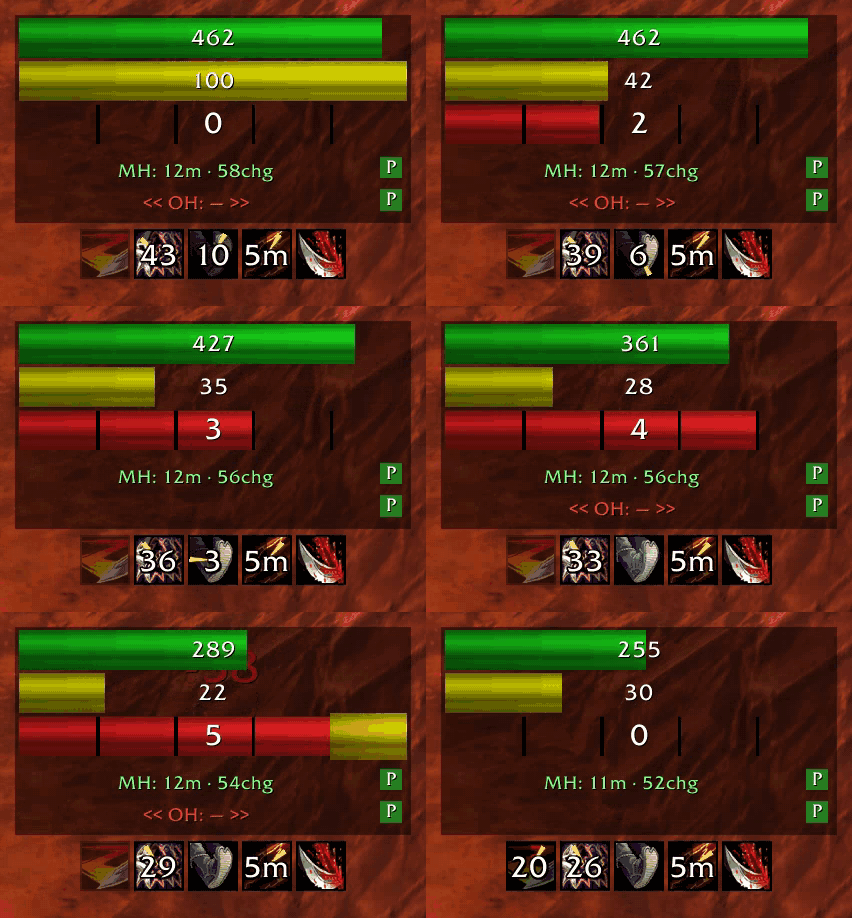
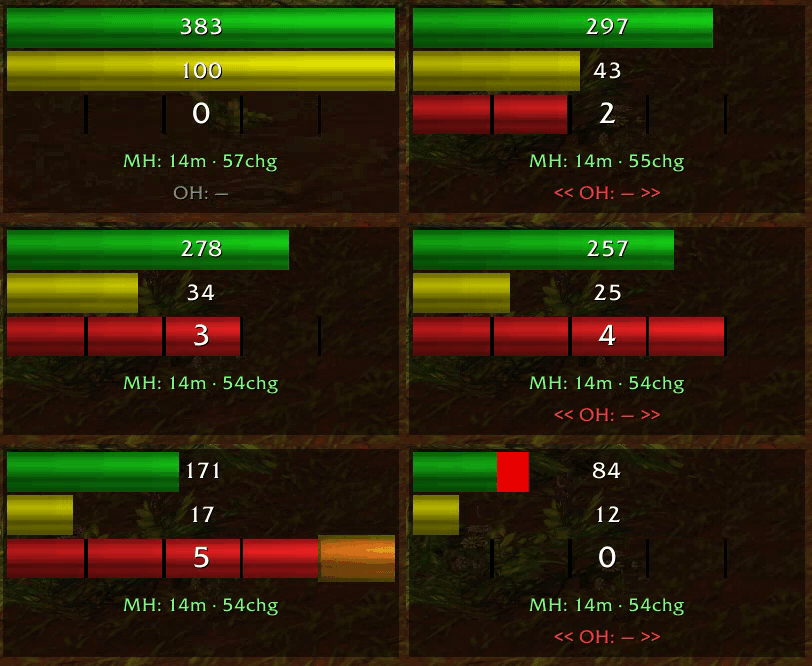
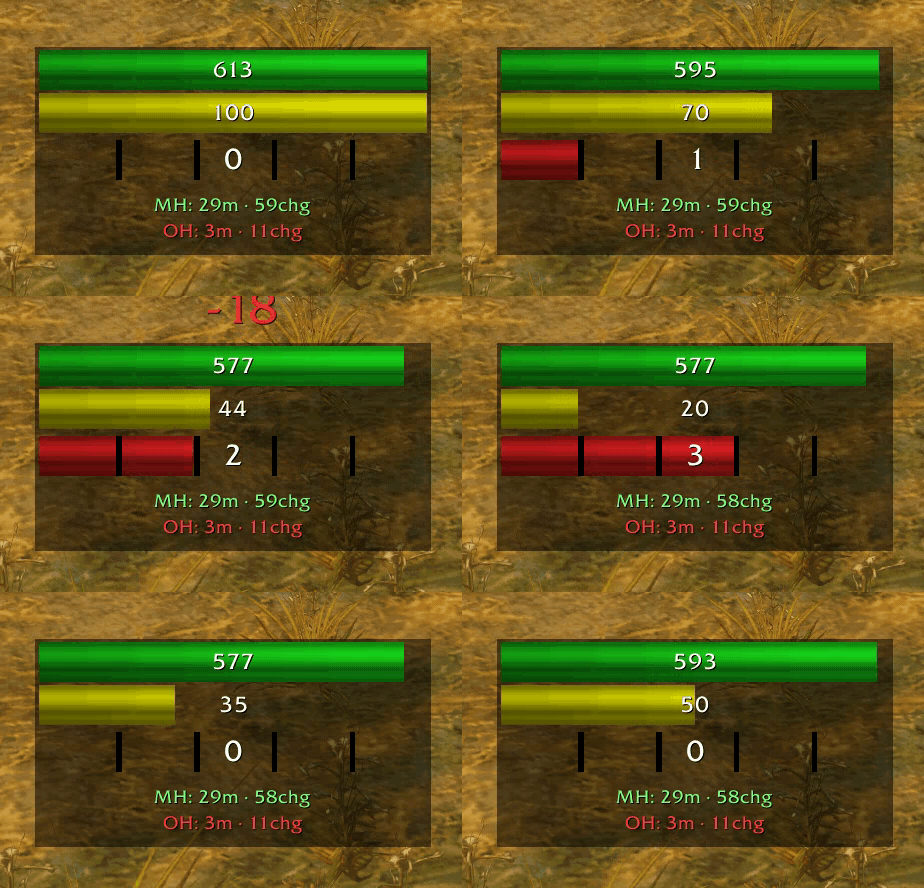
- Health bar — Green, live-updating, and auto-scales to your max health. A pulsing red alert is revealed as your health drops into the bottom 30%, which will be disabled during your corpse run back to your body to avoid that annoying constant pulse.
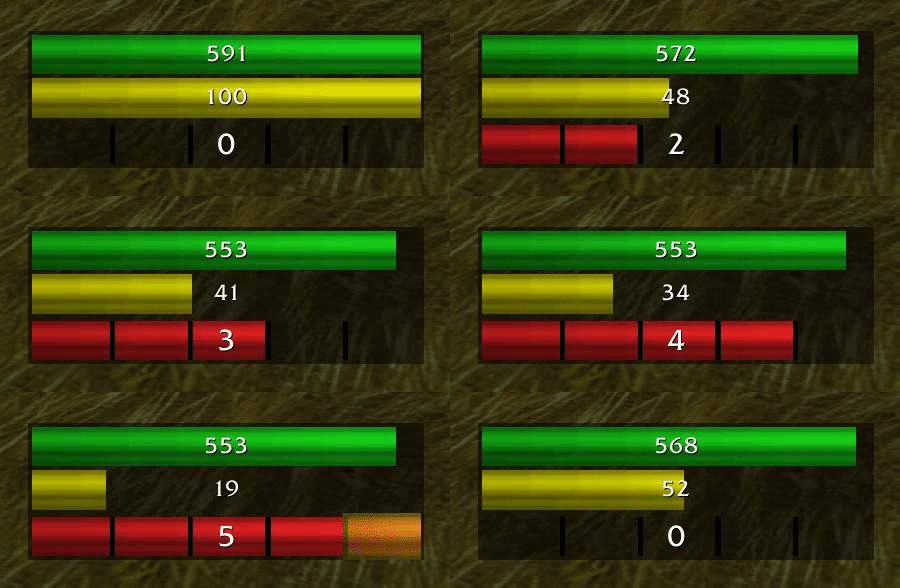
- Energy bar — Yellow bar with a live numeric readout, polled at 20 times per second for fluid energy tracking.
- Combo point squares — Red segmented pips that light up as you build up your combo points.
- Finisher glow — The final combo point pulses bright gold so you never miss a full house.
- Poison information tracking — Live duration and charge counts for both main hand and off-hand weapons. Refreshes every 2 seconds, or instantly on weapon swaps.
- Click-to-apply poisons — Each poison row gets a small
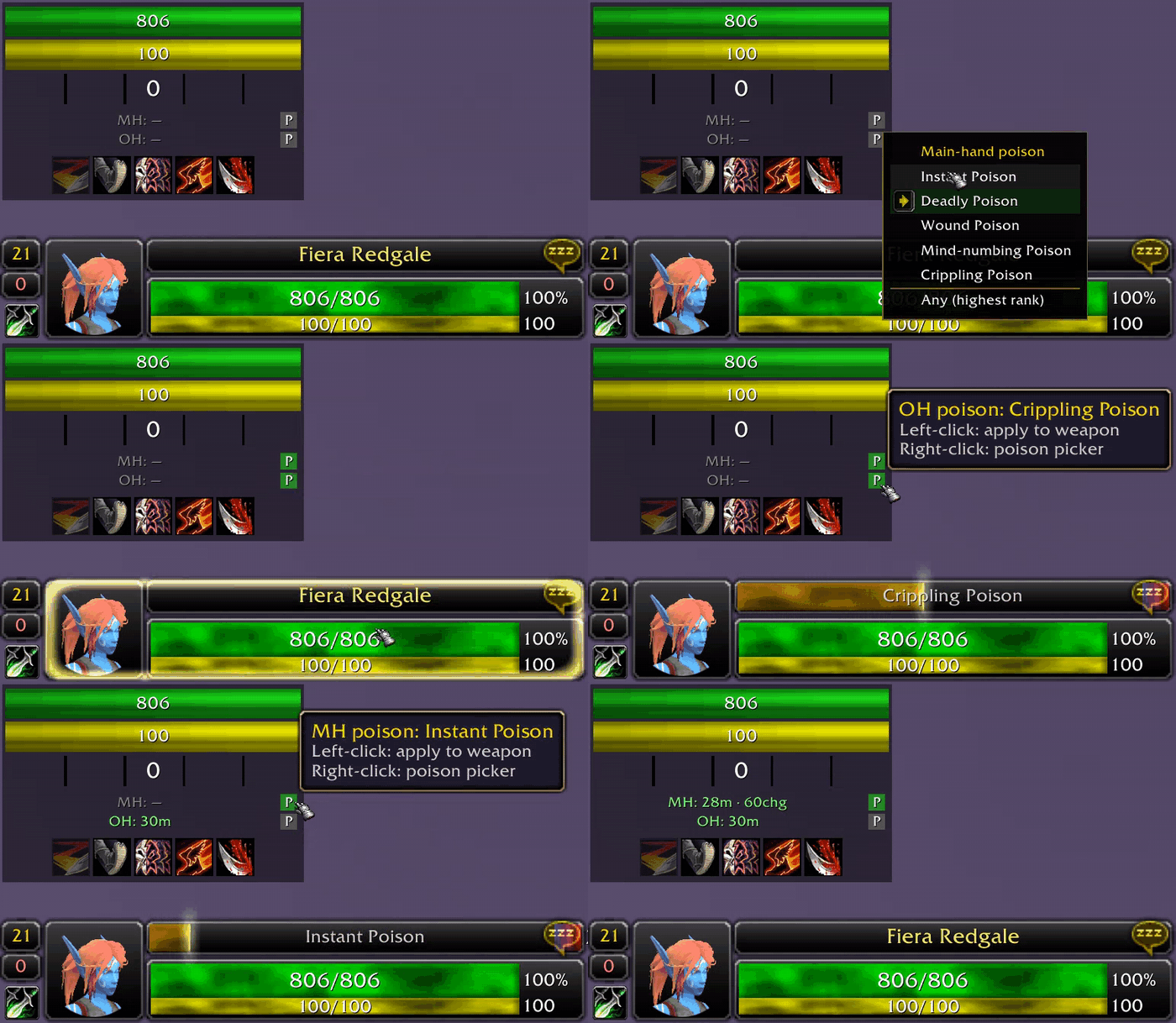
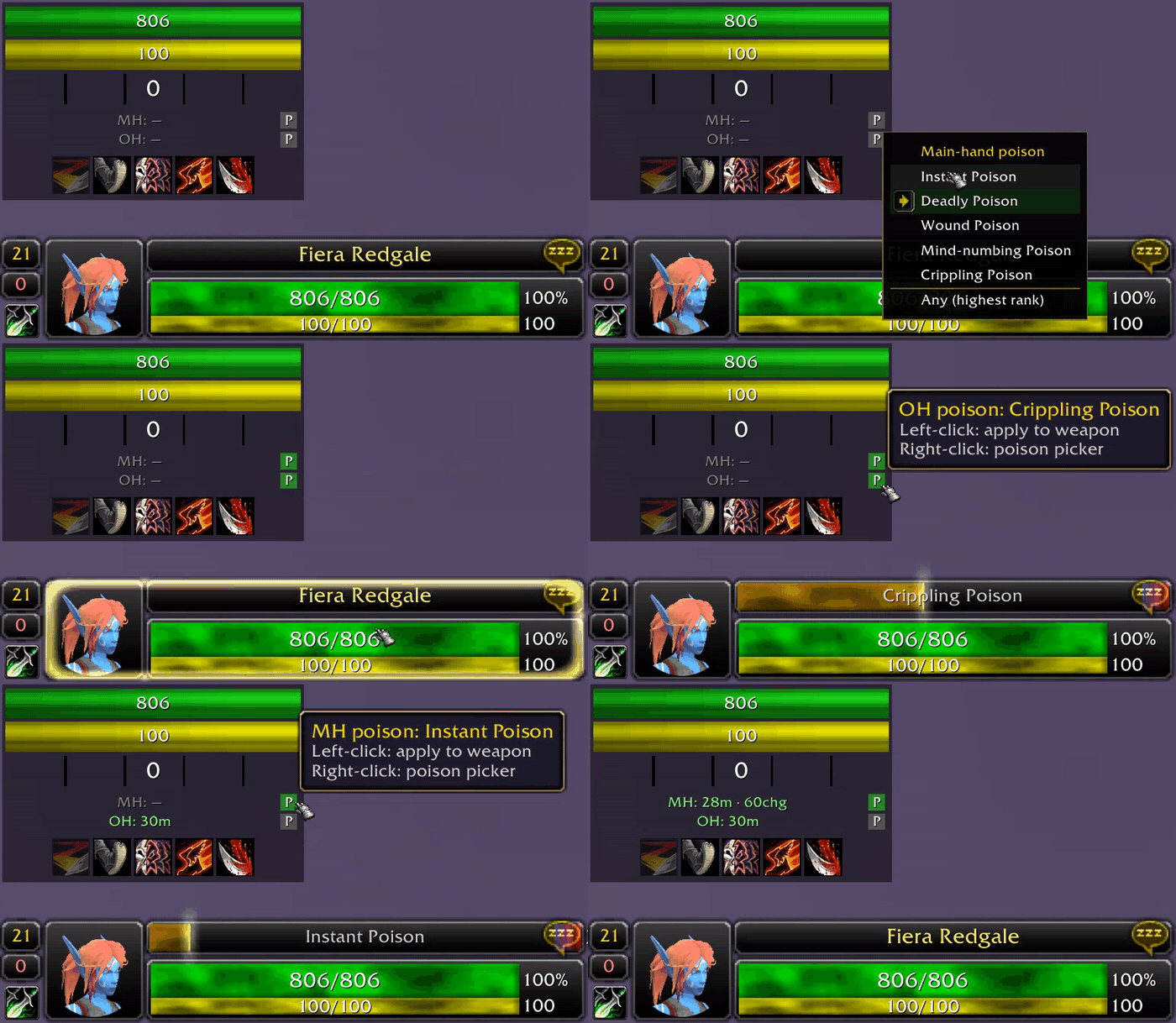
 button. Right-click opens a picker to choose which poison per hand (Instant / Deadly / Wound / Mind-numbing / Crippling), or "Any" for the highest rank you're carrying. Left-click applies the selected poison to that respective weapon. The addon remembers what each weapon had applied, so re-applying after expiry is a quick single left-click instead of stumbling through macro's or tedious menus.
 button. Right-click opens a picker to choose which poison per hand (Instant / Deadly / Wound / Mind-numbing / Crippling), or "Any" for the highest rank you're carrying. Left-click applies the selected poison to that respective weapon. The addon remembers what each weapon had applied, so re-applying after expiry is a quick single left-click instead of stumbling through macro's or tedious menus.
Right-clicking the icon to the right of the respective weapon will assign that poison
Left-clicking the will apply the previously selected poison to that respective weapon
- Smart poison alerts — Alerts trigger when there is less than 5 minutes or 5 charges remaining. "Low poisons" will strobe slowly at 3 seconds on, 1 second off. If you enter combat with no poisons applied, a more urgent strobe will occur at 1 second on, 1 second off. When out of combat, the tracker will quietly show a grey "—" instead of nagging you.
Independent poison tracking shows main hand and off-hand information separately
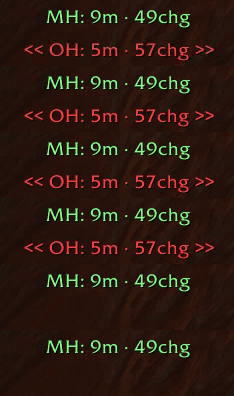
No poisons applied to either weapon shows a more urgent warning when in combat

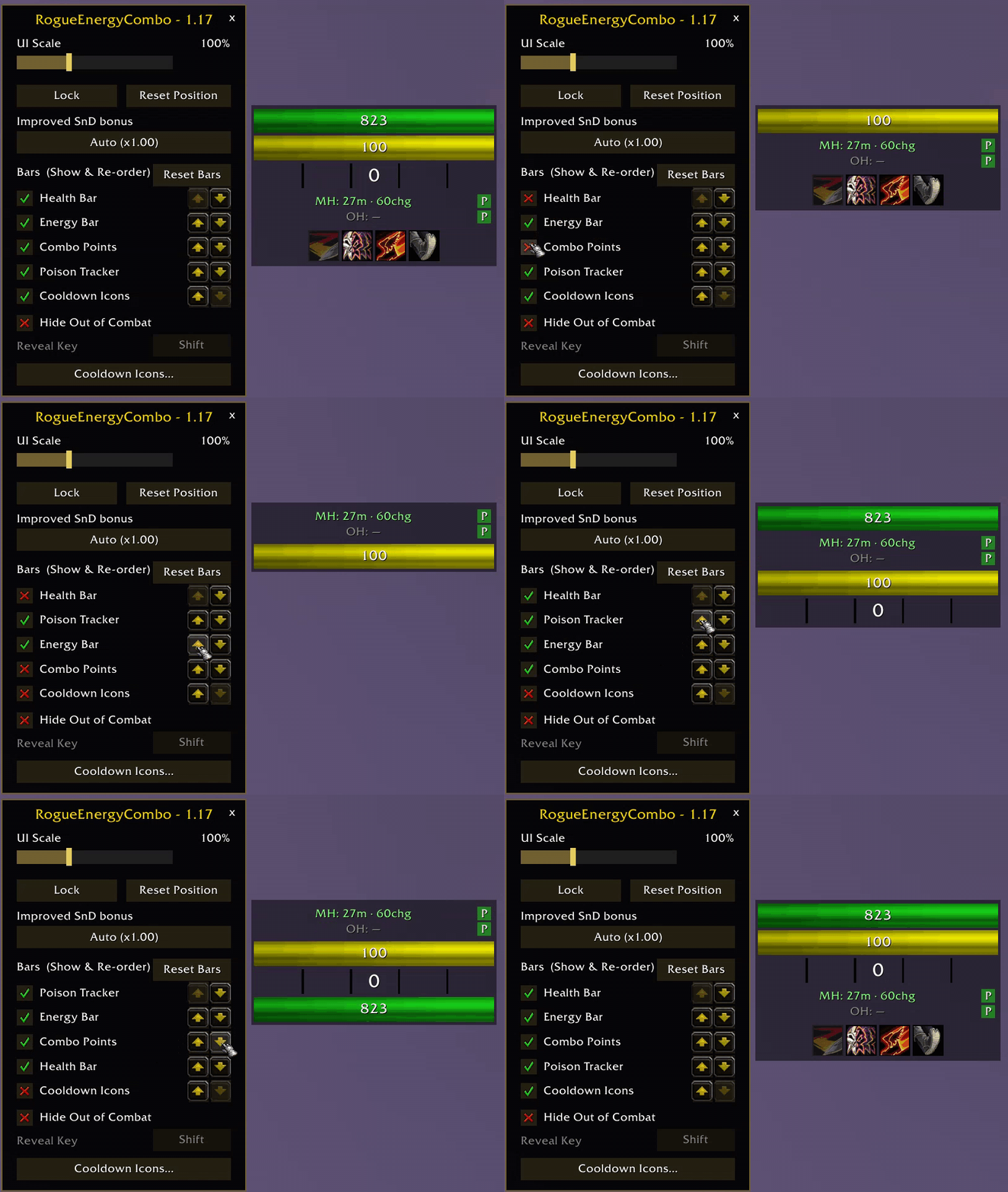
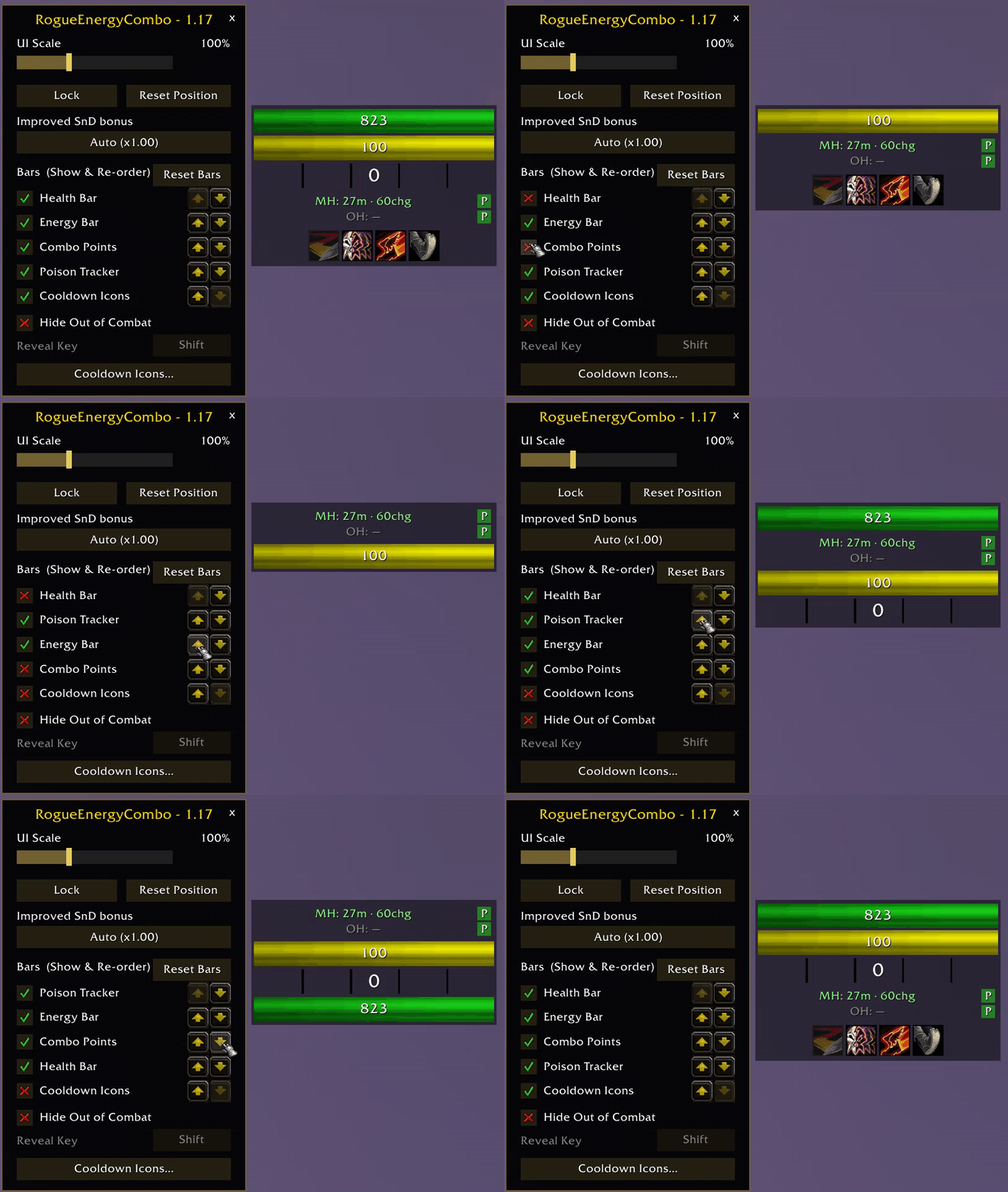
- Customisable bar layout — Don't like the default layout or which rows are displayed? Simply type
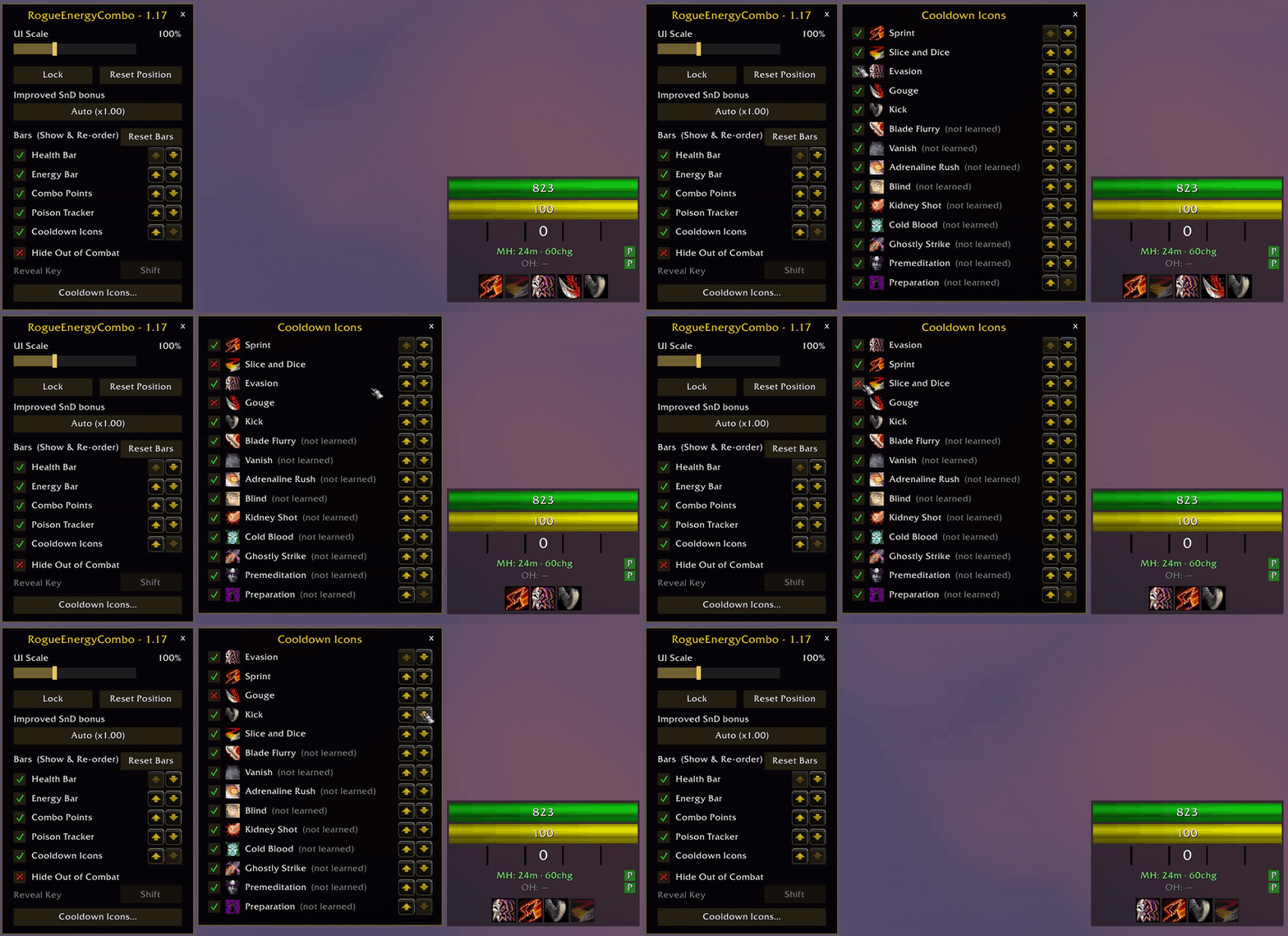
/recinto the chat window to open the options window, allowing you to toggle the five main bars on and off. Move any bar row up or down the stack with the arrow buttons. The frame reflows and resizes itself automatically. Make a mistake? Simply click the Reset Bars button to restore the default layout instantly.
Open the /rec options to re-order and hide the bars to your own personal preference
- Cooldown tracker — An icon row below the frame tracks Vanish, Kick, Sprint, Blade Flurry, Adrenaline Rush, Blind, Kidney Shot, Gouge, Cold Blood, Ghostly Strike, Evasion, Premeditation, and Preparation. Each shows a "swipe" with a live countdown for its runtime, and then a cooldown timer will show, with a flash when it comes off cooldown. Icons only appear once you've actually learned the ability.
- Racial ability tracking — The Cooldown Icons row tracks your race's active racials alongside class cooldowns that I believe will benefit the Rogue class: Will of the Forsaken, Perception, Rapid Regeneration, Stoneform, Escape Artist, Eureka!, Blood Fury, Will to Survive, Shatter Curse, Elune's Light, Berserking, and Shadowmeld. Only your own race's racials appear, marked "(racial)" in the Cooldown Icons list, and they can be toggled on/off and re-ordered just like class abilities. Works in all client languages.
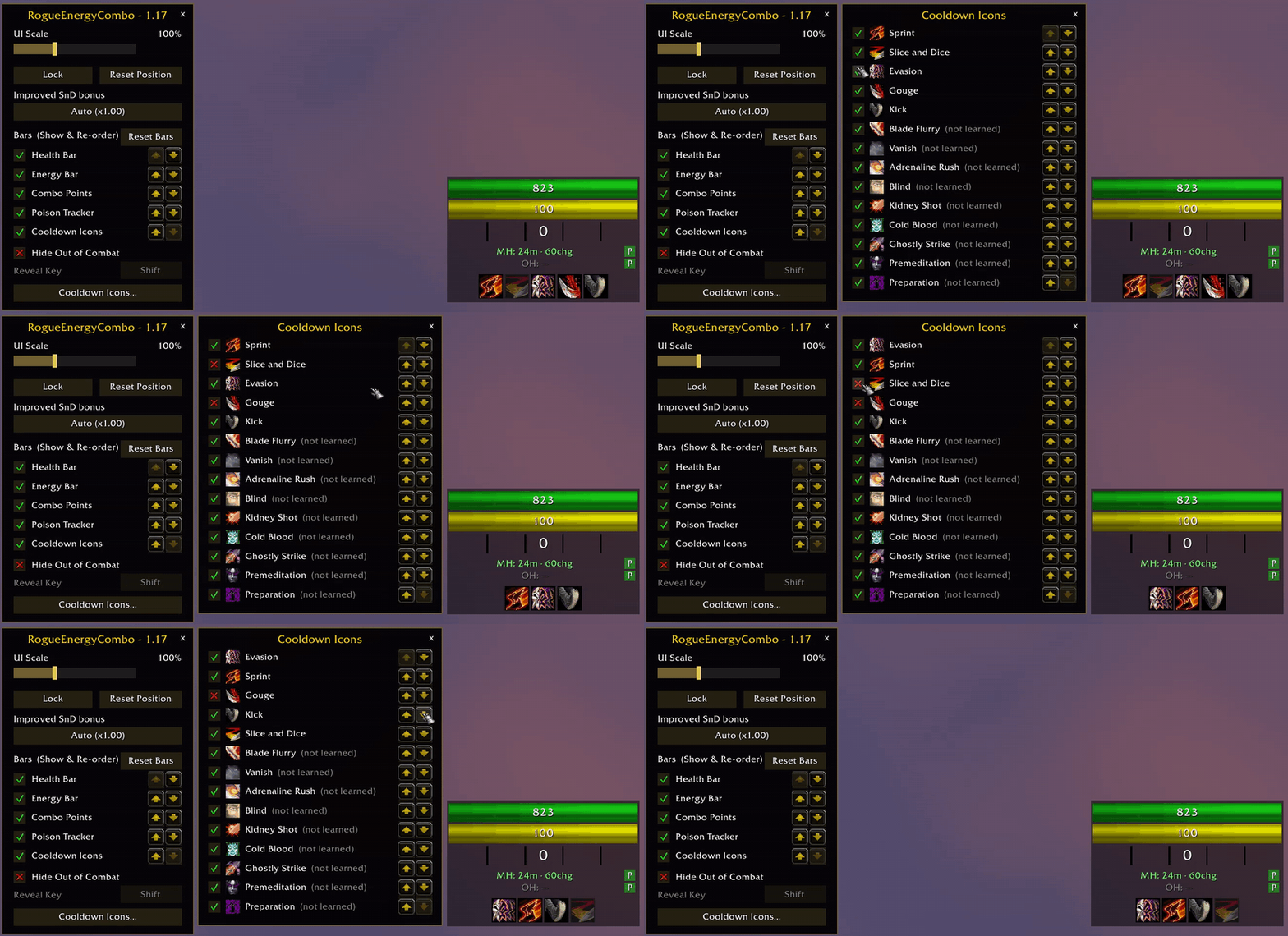
- Cooldown Icons panel — A button at the bottom of the options window opens a dedicated list of every tracked spell and cooldown. Move any spell up or down the list and the tracker row follows instantly. Hidden and unlearned spells keep their saved slot. Tick or untick individual cooldowns (Slice and Dice included) to keep the tracker row free of abilities you don't use. Unlearned spells can be hidden in advance
The "Cooldown Icons..." button at the bottom of the /rec options menu gives you the ability to customise which spells are shown, as well as their order
- Hide Out of Combat — As requested, a toggle in
/recoptions, disabled by default. The frame fades out quickly when you leave combat and back in when combat starts. However, that creates a knockon effect: How do you quickly check your status and to make sure your poisons are applied before that first dungeon pull without having to disable Hide Out of Combat in the options menu? The fix that I have thought of is... - Reveal Key — While Hidden Out of Combat is enabled, hold Alt, Ctrl, or Shift (selectable in options, default Alt) to instantly show the frame without any fade. Poison buttons are fully clickable while the key is held, so applying poisons in a dungeon is a quick and simple hotkey and click instead of fumbling through menus.
- Improved Slice and Dice auto-detect — The addon reads your actual talent rank (1/3, 2/3, 3/3) directly from the talent tree and applies the correct SnD duration multiplier automatically and correctly. This also updates live if you respec in both directions, either resetting or adding points into the talent. There is a manual override available in options in the unlikely event that the detection fails.
- Slice and Dice timer uses your real combo points at the moment of cast — Due to the nature of SnD values being "secret values", we had to esimate how long your SnD will be by basing it on your "builder" moves like Sinister Strike. If those builders were parried, missed, or dodged, the addon would still think that you actually hit your target. This caused inflated numbers on the SnD timer. After 1.17, the addon reads your actual combo point value within the same frametime when you fire SnD, making it very accurate for the number of seconds the addon presents.
- International client support — Poisons and spells are identified by ID rather than name only, so everything works identically on non-English clients.
- Tiny footprint — One frame, two files, no extra libraries required.
- Rogue only — The addon hides itself automatically on any other class.
Commands
| Command | Effect |
|---|---|
/rec | Opens options window to adjust various settings |
Known limitations
- Due to the "secret value" API restrictions, a number of values aren't readable, such as health and energy display as current values only — no "current / maximum" formatting is available, since addons can't perform arithmetic on these values. This also won't allow us to read the SnD timer value from the WoW client, so we need to infer our own data from the combo points directly.
- Poison apply buttons can't be reprogrammed in combat (secure-button restriction), so the picker refuses to open mid-fight — left-click apply still works with whatever was last chosen.
- Bar layout changes, whether it's hiding or re-ordering, will not take effect during combat due to the same "secure frames" that also affect the poison picker during combat. Any changes made during combat will be applied once you ext combat.
I'm new to addon creation, as such, there may be bugs or other issues I may miss during my testing.
Any questions, comments, feature requests, or problems?
Feel free to leave a comment providing constructive feedback and I'll be happy to get back to you.
You must be logged in to leave a comment.