
Retouche
Extends Blizzard's Edit Mode: pixel placement, mouseover bars, square minimap, class colors, loot recap and automation.
Details
Expansion
 Forever
 Categories
Developers

Having issues?
✨ Retouche extends Blizzard's Edit Mode instead of replacing it.
Your bars stay Blizzard's bars and positions are saved in your Blizzard layout. Anything you never tick is left exactly as the game draws it. One light addon covers what usually takes a handful: pixel placement, mouseover bars, a square minimap, class-coloured health bars, a loot recap, auto-repair and quest automation.
Everything is set up in Edit Mode (Esc > Edit Mode). Select an element and the Retouche panel opens next to Blizzard's own settings. Every option has a tooltip that explains what it does.
🛟 Safety net: the first time you launch it, Retouche copies your Edit Mode layout into a shared account layout named Retouche and switches to it. Your original layout stays untouched, one click away (Esc > Edit Mode > Layout).
🎯 Edit Mode
- Pixel-perfect placement: a small box on the selected element's top-right corner follows it while you drag. X / Y count from the centre of the screen (0 / 0 = centred): type them, or use the arrow keys or the mouse wheel (1 pixel, 10 with Shift). Unfold it to center in one click, change the layer or send the element behind another.
- Saved in your Blizzard layout: Blizzard elements keep their position even if you disable the addon.
- Visibility rules for action bars, the bag bar, micro menu, quest tracker, minimap, buffs, experience bars and chat: always shown, hidden, or only on mouseover, in combat or with a target. Fade time and opacity are adjustable.
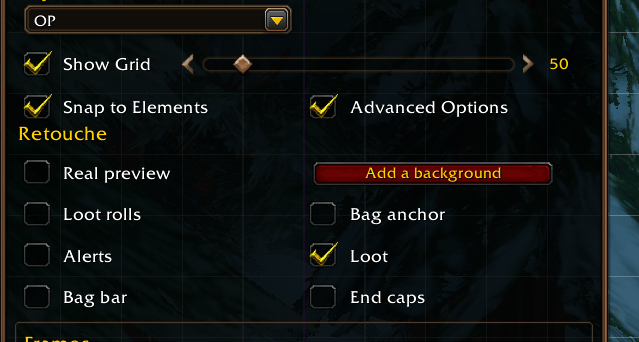
- Real preview: hide Edit Mode's blue boxes to see your interface as in game.
- 📋 Export / Import: your whole interface (Edit Mode layout + Retouche settings) in one text to share with a friend. Importing creates a new layout, yours stays untouched.
- Retouche section in the Edit Mode window: add backgrounds, and hide the handles of the elements Retouche adds.
⚔️ Action bars
- The main bar's frame on any other bar.
- Free backgrounds: place them anywhere, resize them with the mouse like the chat window, then lock them.
- End caps (the gryphons): flip, rotate or resize each one.
- Cast bar: name and timer inside the bar, custom size, hide the icon or the spell name.
- Target cast bar: detach it from the target frame, then move and resize it, with the name and timer inside the bar and the icon on the left, the right or hidden.
- Swing timers dressed like the cast bar.
- Experience bar: smooth (no bubbles), any width and height.
- Optional: no spell animation on action buttons, no keybindings or no macro names on the buttons.
🧝 Unit frames and tooltips
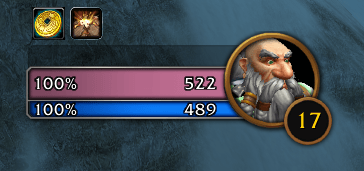
- Health bars in class colours for players and reaction colours (hostile / neutral / friendly) for NPCs, in the game's own colours.
- Softer combat glow around unit frames, adjustable from 0 to 100%.
- Hide the resting glow and "Zzz", or the level circle (your frame, target and focus).
- Target of target detached from the target frame and moved anywhere.
- Class name in class colour in player tooltips.
🗺️ Minimap
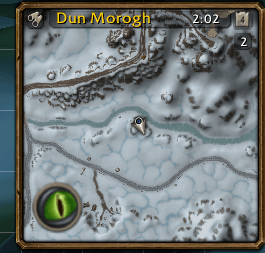
- Square minimap, with an optional gold frame.
- Title bar in its usual place, inside the map or hidden: one choice, and the map never moves when you change it.
- Hide the tracking button, clock, calendar, or the day / night indicator of the round minimap.
- Addon buttons on mouseover, or gathered into a single button (click to show them, right-click to pick the ones that stay on the map).
- Fades out cleanly, without leaving an empty map or a floating arrow.
💬 Chat
- Tabs and buttons with visibility rules; the background follows the tabs.
- Buttons on the left, the right or above the tabs.
- Input box at the top or the bottom, shown only while typing, with or without a border.
- Messages fade one line at a time, oldest first. Message duration and font are adjustable.
- Drag the General tab up to enlarge the window while you read back.
- Up arrow recalls your last messages (Enter, then Up brings back the last one).
🎒 Bags and micro menu
- One-icon bag bar (middle-click to unfold the bags).
- Bags in place of the shop button in the micro menu, and a micro menu without background.
- "Sell grey items" button in the bags.
- Sort bags when opened, with the game's own sort (Options > AddOns > Retouche).
- Middle-click an item to mark it for sale: at a merchant, greys go first, then marked items.
- Tracked currencies on the money line of the combined bag, instead of an extra row.
💰 Loot and automation
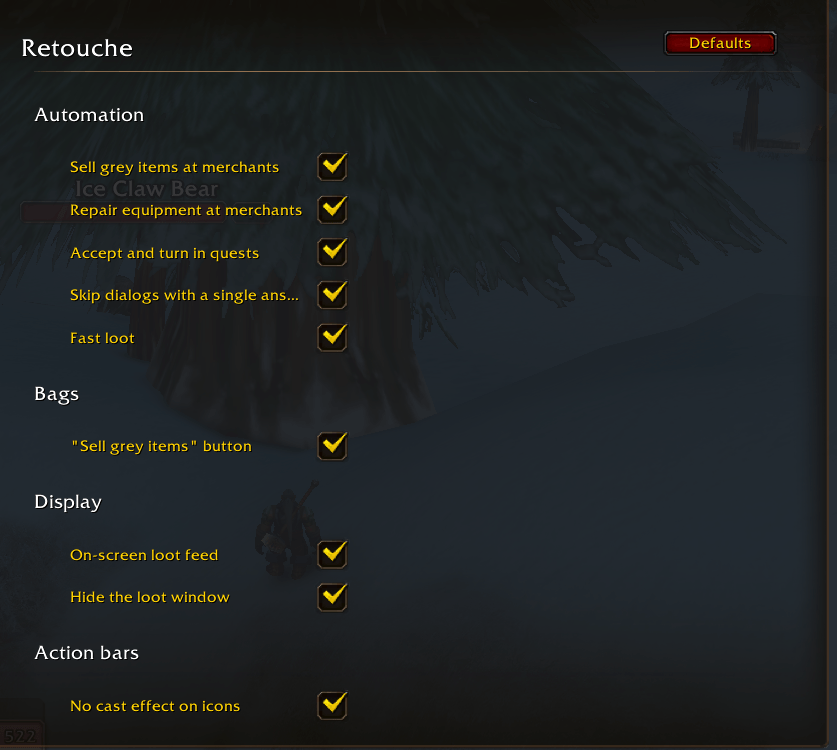
Set in Options > AddOns > Retouche (account-wide).
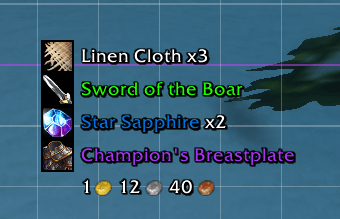
- Loot recap on screen: items and gold you pick up, in small lines that fade out. Placed and sized in Edit Mode.
- Loot window hidden during auto loot; fast looting.
- Auto-sell grey items and auto-repair at merchants.
- Auto-accept and turn in quests, and skip one-answer dialogues, with safeguards: reward choices, repeatable, paid and PvP quests are left to you.
- Hold Shift to skip the merchant, quest or bag-sorting automation once.
🛡️ Safe and light
- Built to stay clean: Retouche does not write into Blizzard's tables. It hooks and uses the engine's own methods, and moves protected frames out of combat only.
- A part that breaks stops on its own: one line in chat, the error is reported once, and the rest of the addon keeps working.
- No libraries, and nothing runs unless a feature you turned on needs it.
- Every game language: English, French, German, Spanish, Italian, Portuguese, Russian, Korean and Chinese (Simplified and Traditional), in the game's own wording.
⌨️ Commands
| Command | What it does |
|---|---|
/rt | Help |
/rt options | Open Options > AddOns > Retouche |
/rt debug | Show the active layout's settings |
/rt reset | Clear the active layout's settings |
/rl | Reload the interface |
🐞 Feedback
Retouche is in beta. Please report bugs in the comments with:
- your game language;
- the element concerned;
- the Lua error message, if there is one.
You must be logged in to leave a comment.