

RestedXP-Navigator
Navigation companion for RestedXP Guides with minimap, world map and configurable direction arrow.
Details
Expansion
 Forever
 Categories
Developers

Having issues?
RestedXP-Navigator
A visual navigation companion for RestedXP Guides / RXPGuides on WoW Forever.
RestedXP-Navigator adds a dedicated navigation layer on top of RestedXP and turns guide targets into clear visual routes on your Minimap, World Map and Navigation HUD.
Follow your current RestedXP objective, preview upcoming steps, visualize farm and patrol routes, navigate corpse runs and receive dedicated guidance for travel steps such as Zeppelins, Ships, Flights, Portals and Hearthstones.
Navigation at a Glance
RestedXP-Navigator is designed to make following a RestedXP guide more visual and intuitive without automating gameplay.
The addon provides:
• Minimap navigation
• World Map navigation
• On-screen navigation HUD
• Distance and ETA
• Current target markers
• Upcoming RestedXP goals
• Farm and patrol routes
• Search-area visualization
• Travel guidance
• Corpse-run navigation
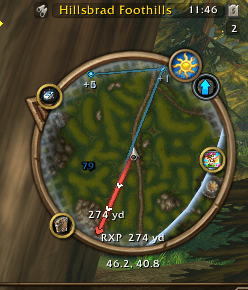
Minimap Navigation
Follow your active RestedXP target directly on the Minimap.
Features include:
• Route line to the current target
• Direction indicators along the route
• Clearly visible destination marker
• Distance information
• Upcoming RestedXP targets
• Support for up to 6 future steps
• Off-screen future goals shown at the Minimap edge
• Automatic handling of nearby and neighbouring map areas
Future targets remain visible even when they are outside the current Minimap range, making it easier to understand where your guide is taking you next.
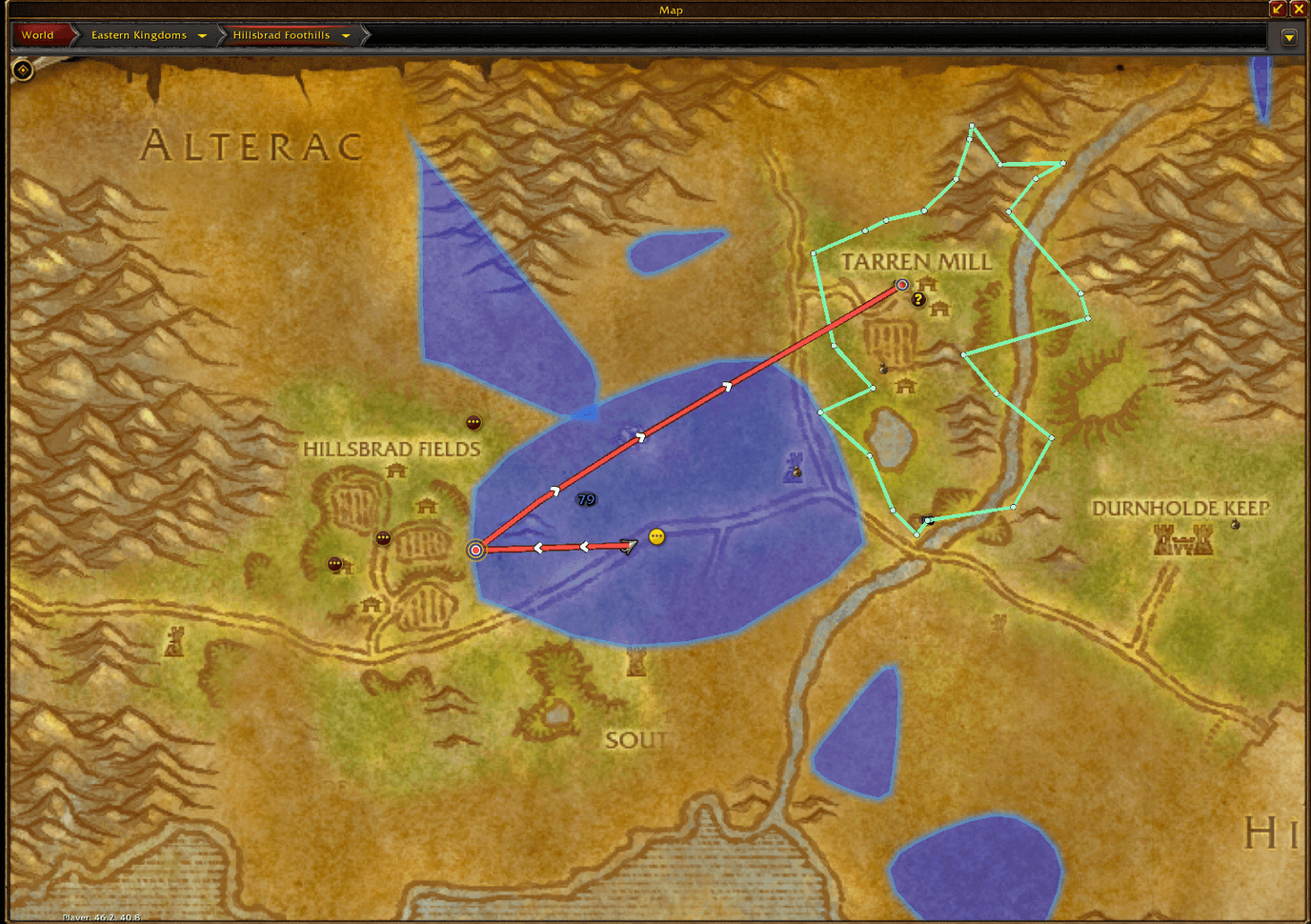
World Map Navigation
RestedXP-Navigator extends the normal World Map with additional RestedXP navigation information.
You can see:
• Current navigation route
• Target markers
• Route direction
• Future RestedXP objectives
• Farm routes
• Patrol routes
• Search areas
• Context-sensitive tooltips
Routes are smoothed and rendered directly over the game map for a clean and readable presentation.
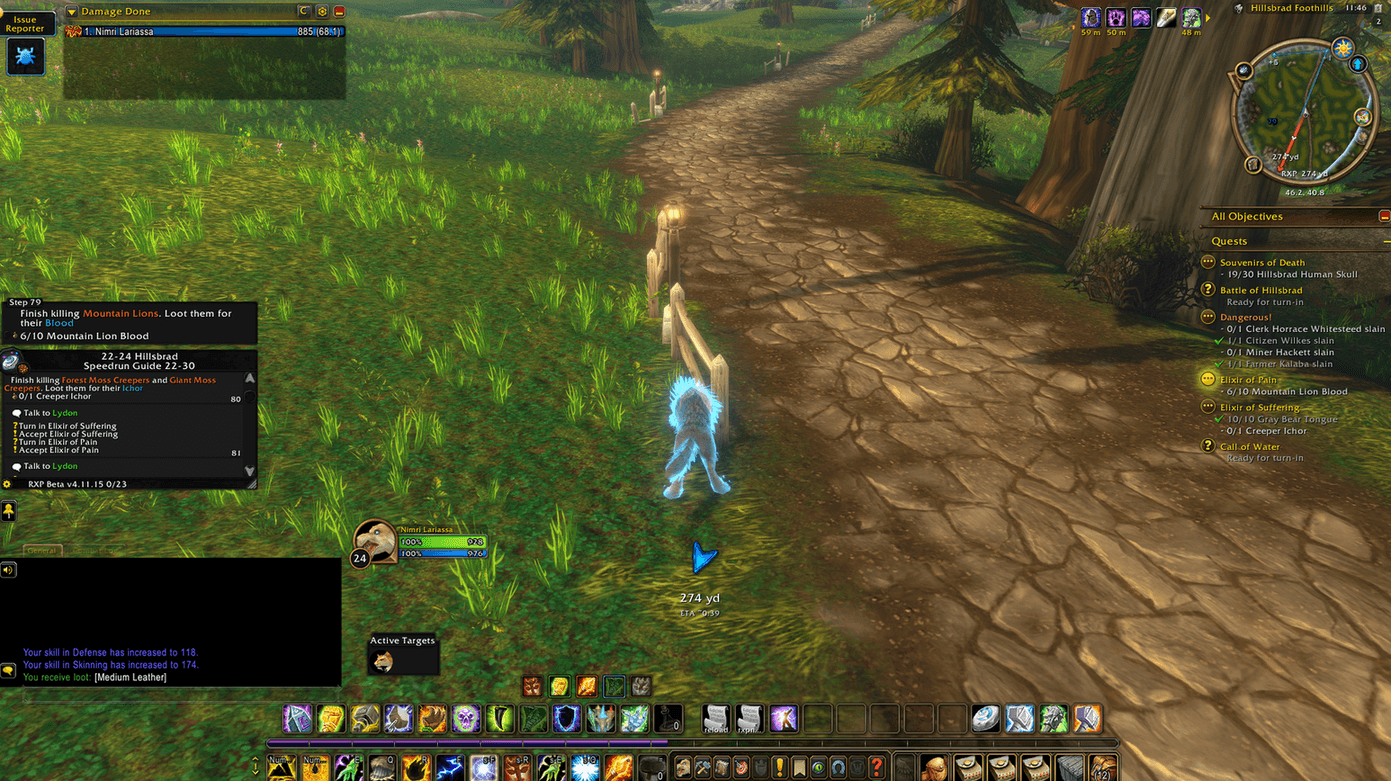
Navigation HUD
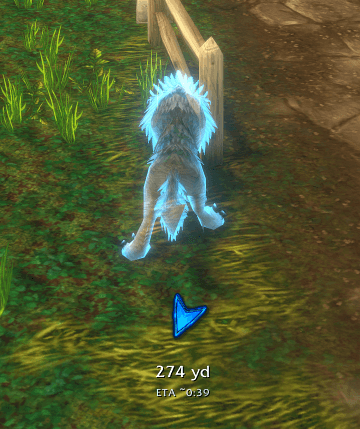
A dedicated navigation arrow can be displayed directly in the game world.
The HUD provides:
• Direction to the active target
• Distance
• ETA
• Adjustable arrow size
• Adjustable text size
• Movable HUD position
• Lockable position
Three different navigation arrow designs are available.
The HUD is designed to stay readable without covering important parts of the game interface.
Upcoming RestedXP Goals
RestedXP-Navigator can preview the next steps of your RestedXP guide.
You can display:
+1 / +2 / +3 / +4 / +5 / +6
future objectives.
This gives you a better idea of where the guide is heading and can make questing, farming and travel preparation easier.
Future goals can be displayed on both the Minimap and World Map.
Travel Navigation
Version 1.3.0 introduces a dedicated Travel Resolver and Smart Travel Planner.
RestedXP-Navigator can recognize travel instructions such as:
• Hearthstone
• Flight
• Zeppelin
• Ship
• Portal
• General travel steps
Instead of simply drawing a route toward a distant target on another continent, the addon can guide you toward the relevant local departure point first.
For supported travel steps the HUD can display information such as:
Zeppelin -> Undercity
Destination: Zeppelin Tower Orgrimmar
Platform: South Platform
Distance: distance to the departure point
This makes cross-zone and cross-continent travel much easier to understand.
RestedXP Route Overlays
RestedXP-Navigator can visualize additional route information from RestedXP.
Supported overlay types include:
Farm / Loop Routes
Shows areas or routes intended for repeated farming.
Patrol Routes
Visualizes patrol paths or movement areas.
Search Areas
Displays areas where an objective may need to be searched for.
Route overlays support mouseover tooltips so you can quickly see what an area or route belongs to.
Corpse Run Navigation
When your character dies, RestedXP-Navigator can automatically switch into corpse-navigation mode.
Features include:
• Route toward your corpse
• Dedicated corpse-run styling
• Distance to corpse
• Red navigation presentation
• Spirit Healer information when available
After resurrection, the addon automatically returns to normal navigation.
Unified Target & Tooltip System
Version 1.3.0 introduces a completely reworked internal target and tooltip system.
Navigation targets, RestedXP objectives, travel instructions and map overlays now use a unified data layer.
This improves consistency across:
• Minimap
• World Map
• Navigation HUD
• Future Goals
• Travel information
• Route overlays
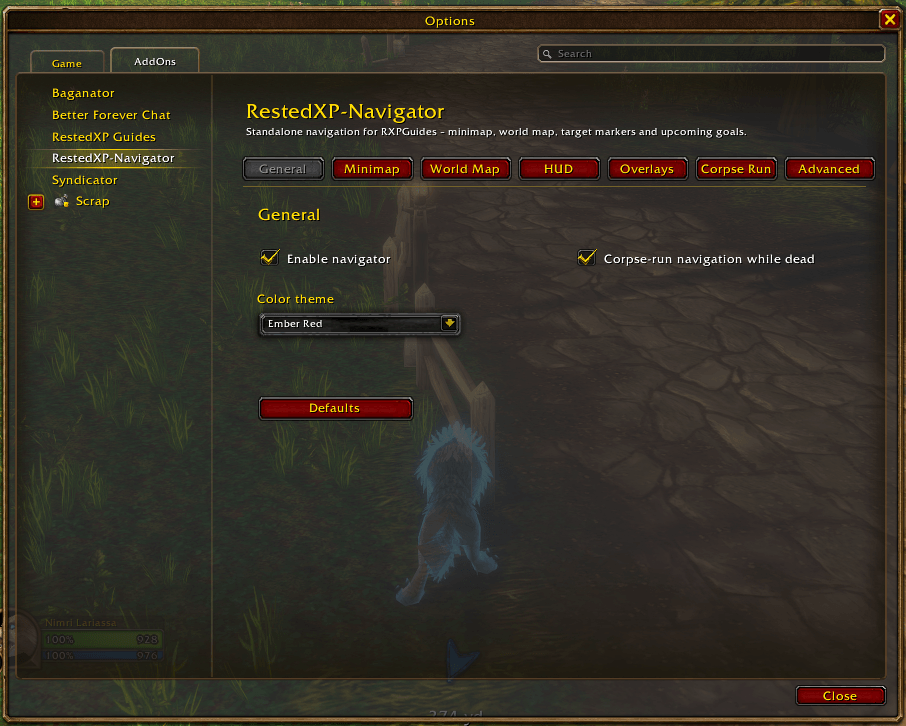
Settings
RestedXP-Navigator includes a dedicated settings interface with separate sections for:
General
Minimap
World Map
HUD
Overlays
Corpse Run
Advanced
You can configure navigation visibility, marker sizes, future goals, HUD appearance, overlay behavior and many other options individually.
Resetting all settings to their defaults requires confirmation to prevent accidental configuration loss.
Diagnostics & Bug Reports
RestedXP-Navigator contains built-in diagnostic tools for testing and troubleshooting.
The diagnostic export can include information about:
• Current RestedXP guide and step
• Player map
• Target map
• Player position
• Target position
• Route state
• Travel mode
• Future-goal configuration
• Minimap status
• World Map status
• HUD status
This information can be copied directly into a bug report.
Requirements
WoW Forever
RestedXP Guides / RXPGuides
RestedXP-Navigator works as a standalone navigation companion.
TomTom is not required.
Slash Commands
/rxpnav options
Open the RestedXP-Navigator settings.
/rxpnav toggle
Enable or disable the navigator.
/rxpnav goals 0-6
Set the number of future RestedXP goals.
/rxpnav status
Display the current navigator status.
/rxpnav maptest
Open map diagnostics.
/rxpnav bugreport
Generate diagnostic information for a bug report.
/rxpnav reset
Reset RestedXP-Navigator settings.
Important
RestedXP-Navigator is an unofficial companion addon for RestedXP Guides / RXPGuides.
It does not include, copy or redistribute RestedXP guide content.
The addon provides visual navigation assistance only.
It does not automate:
• Character movement
• Combat
• Quest interaction
• NPC interaction
• Gameplay input
All gameplay remains fully controlled by the player.
RestedXP-Navigator 1.3.0
Navigate your RestedXP journey — on the Minimap, World Map and directly in your HUD.
You must be logged in to leave a comment.