

RageBar-Forever
A sleek, customizable rage bar for WoW Forever with adjustable size, colors, borders, value displays, and live settings previews.
Details
Addon ID:
27545
Addon Version:
RageBar.zip
Expansion:
1.60
Upload date:
Oct 06, 2026
Last Updated:
Oct 06, 2026
Downloads:
Less than 100
Website:
Source Link
Expansion
 Forever
 Categories
Developers

spacewalk1254
Creator
Having issues?
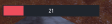
RageBar is a lightweight, standalone rage bar for World of Warcraft: Forever, designed to keep your resource display clean, readable, and easy to customize. Its rectangular design combines a dark background, red fill, subtle borders, and clear text.
Customize your bar through a dedicated settings window with a live preview. Changes apply immediately, making it easy to find the right look and position for your interface.
Features
- Adjustable dimensions: Change the bar’s width, height, border thickness, and inner padding.
- Custom colors: Choose separate colors for the rage fill, background, border, and text, and adjust overall opacity.
- Flexible value displays: Show current rage, current and maximum rage, a percentage, or no value text.
- Text customization: Adjust text size, alignment, and outline, with an optional RAGE label.
- Easy positioning: Unlock and drag the bar anywhere on screen, or enter precise horizontal and vertical offsets. Lock it afterward to let mouse clicks pass through.
- Visibility controls: Keep the bar visible outside combat, show it only during combat, or hide it when rage is empty and readable.
- Optional segment dividers: Add evenly spaced markers to make the bar easier to read.
- Smooth updates: Enable native fill smoothing for readable rage values.
- Live preview and test mode: Preview your appearance settings or display sample rage on screen, even on a class that does not use rage.
- Automatic resource detection: Displays when your active resource is rage, including druid bear forms.
- Saved settings: Your preferences are saved account-wide.
- No dependencies: Works without additional addons or libraries.
Getting started
Type /ragebar or /rb to open the settings window. You can also find RageBar under Settings → AddOns → RageBar.
/rb unlock— Unlock the bar for dragging./rb lock— Lock its position and return to live rage./rb test— Toggle sample rage on screen./rb reset— Restore all default settings./rb help— Display available commands.
You must be logged in to leave a comment.