

QuietHUD
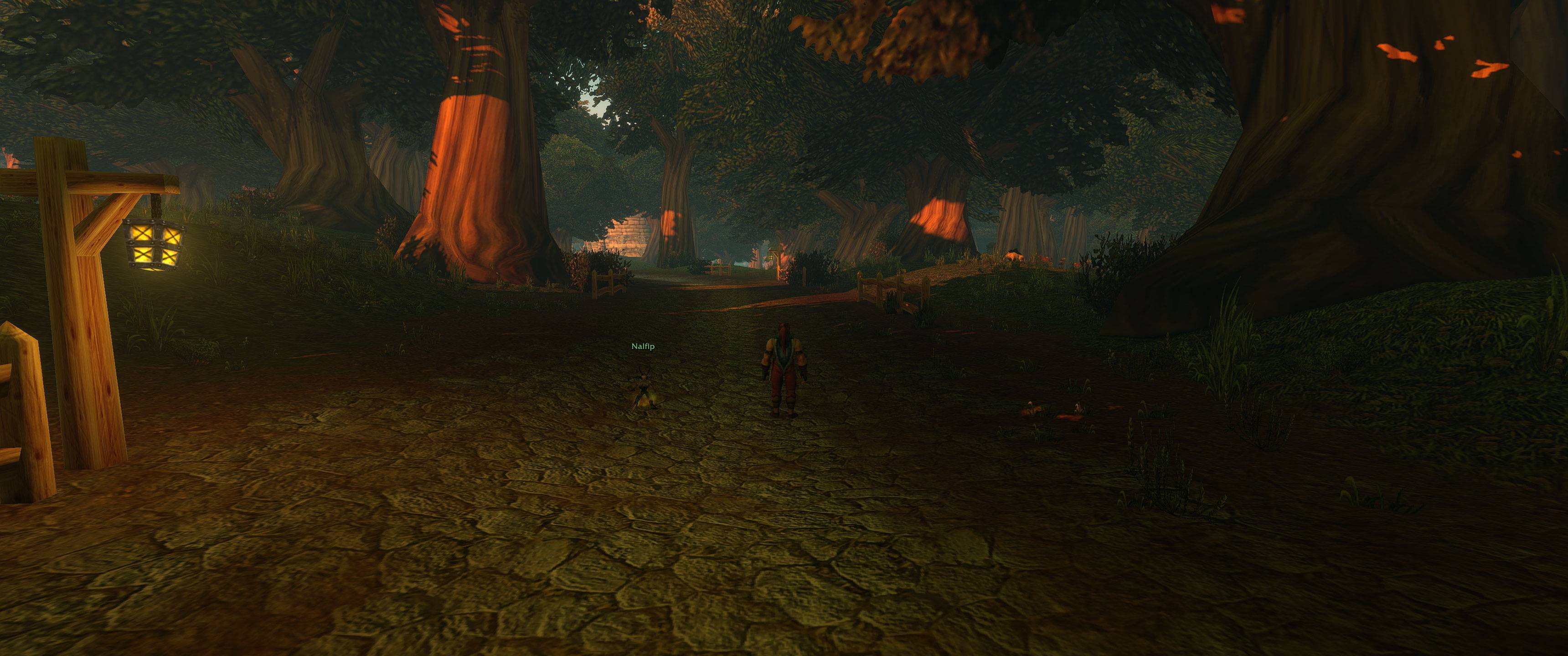
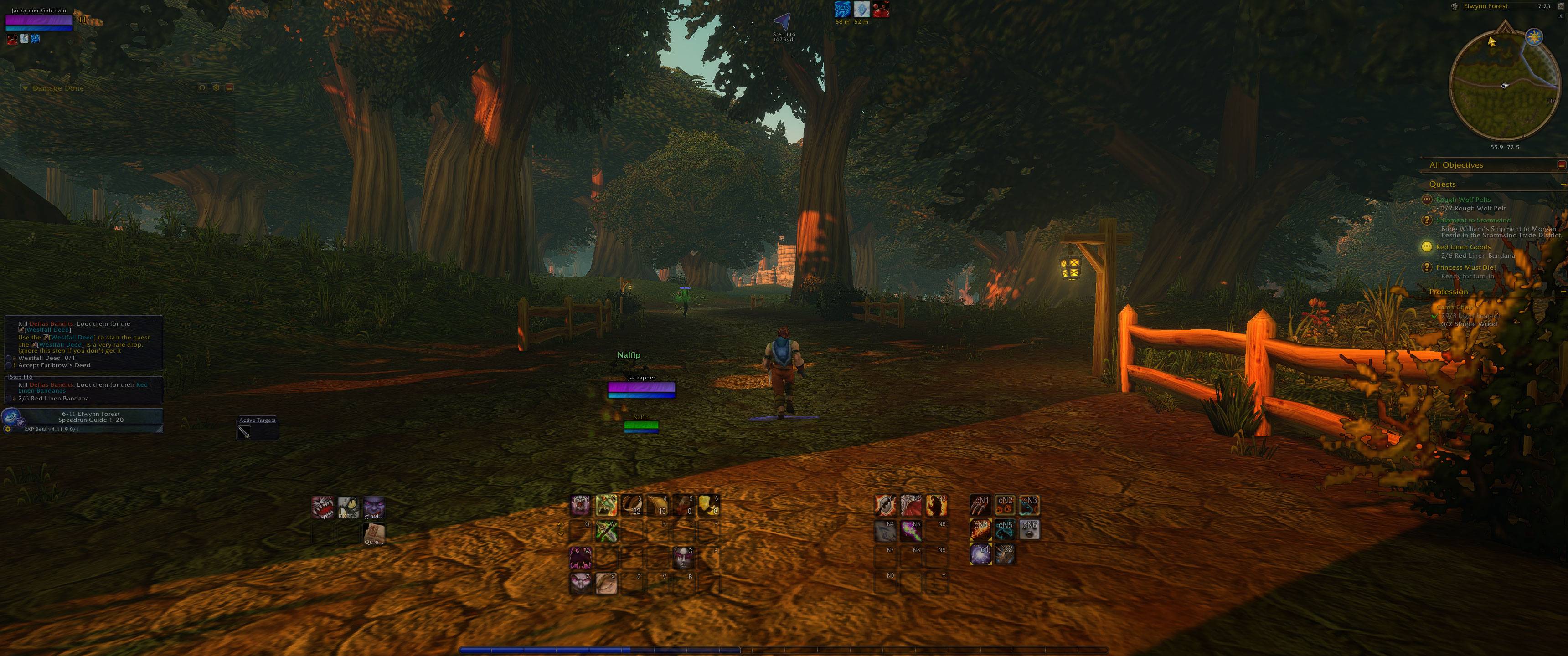
Fades your HUD when idle to protect OLED screens. Every element and trigger is optional.
Details
Expansion
 Forever
 Developers

Having issues?

QuietHUD fades your HUD when you are not doing anything, so static UI does not burn into an OLED panel. Built for the Forever (Classic+ beta) client. No dependencies. Nothing is hidden unless you turn it on.
Quick start
- Install it (the CurseForge app does this for you), then fully restart the game. The client only reads new addons when it starts.
- Type
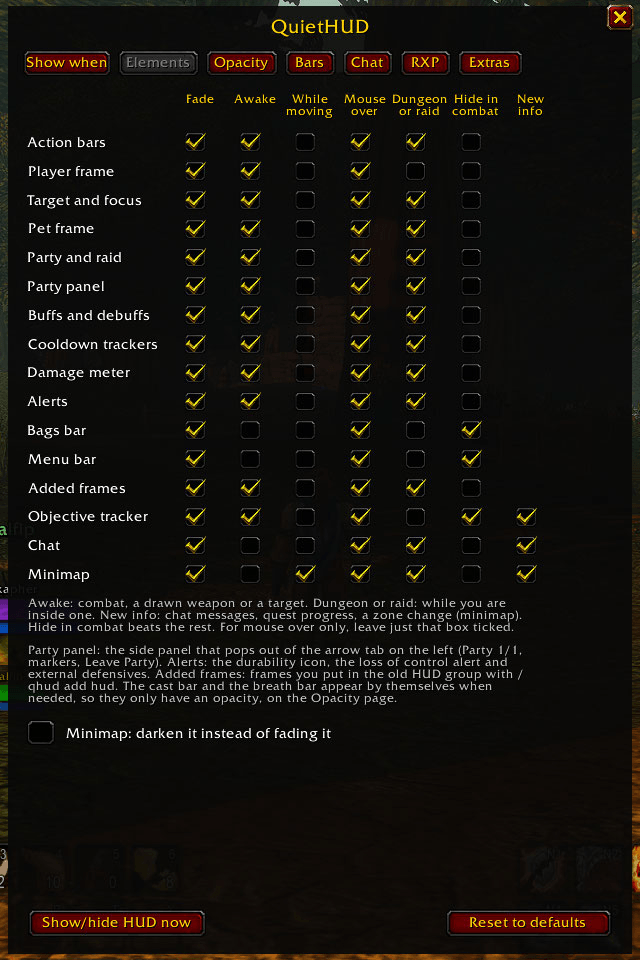
/qhudto open the menu. Nothing is hidden until you turn it on. - On the Elements page, tick Fade for the parts of the HUD you want to fade, and tick what brings each one back: combat, a target, moving, mouse over.
- On the Opacity page, set Idle. 0 hides things completely, and a small value like 0.2 leaves a faint ghost.
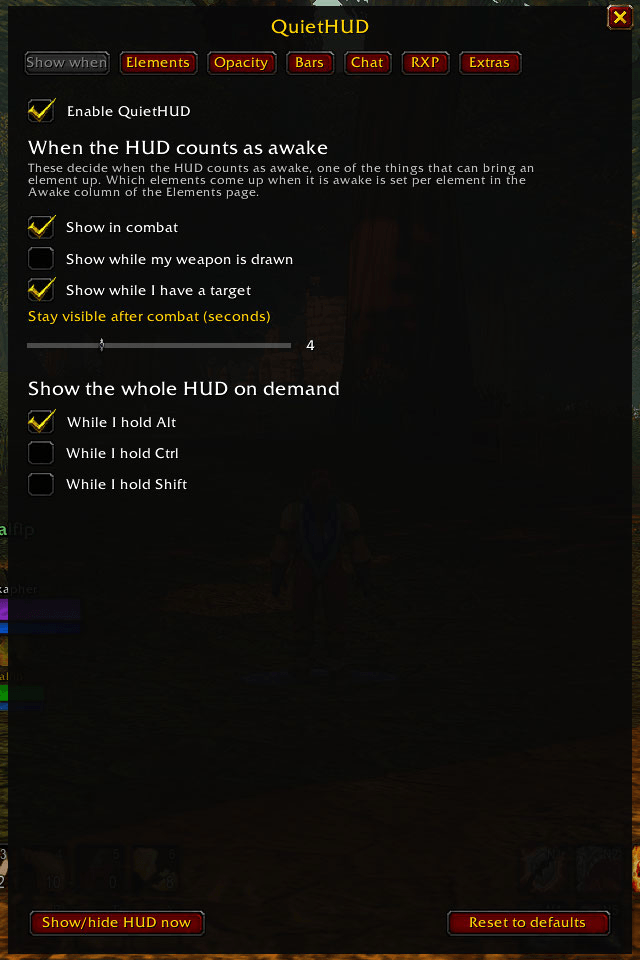
- Optional: to see the whole HUD whenever you want, tick "While I hold Alt" (or Ctrl or Shift) on the Show when page, or bind "Hold to show the whole HUD" under Esc, Options, Keybindings, AddOns, QuietHUD. Pick a modifier you rarely use. I use Alt because I barely use it for anything except auto run and my bags, so holding it down is an easy way to bring the HUD up.
What it does
- A trigger grid decides what fades. Every part of the HUD gets its own row: action bars, player, target and focus, pet, party and raid, the party panel, buffs, debuffs, cooldown trackers, damage meter, alerts, objective tracker, chat, minimap, bags bar and menu bar. Tick Fade to fade it, then tick what brings it back: combat, a drawn weapon or a target, moving, mouse over, a dungeon or raid, or new information (quest progress, new chat, a zone change). "Hide in combat" beats the rest.
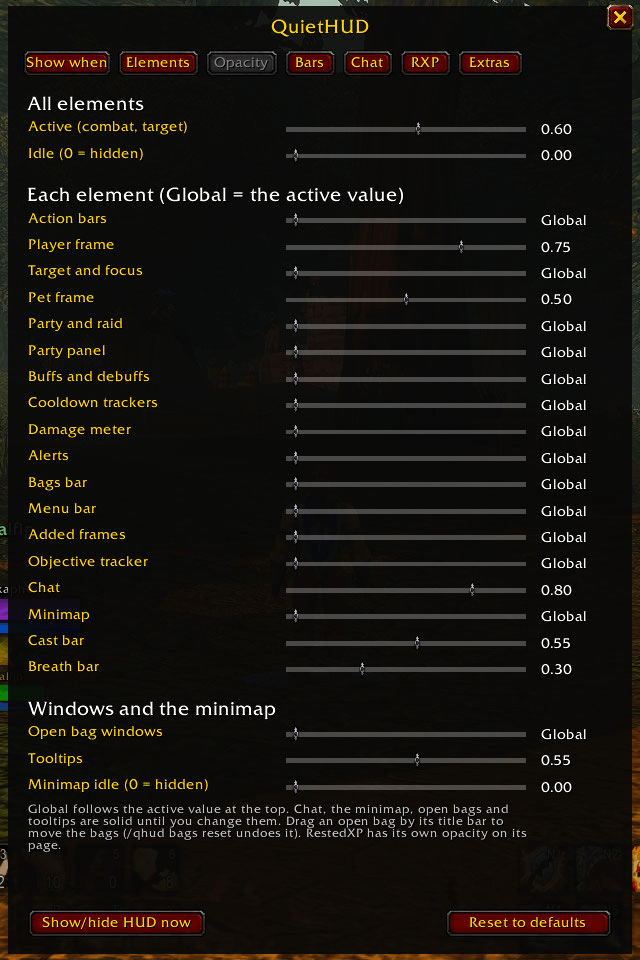
- An Opacity page. One global value for when the HUD is active and one for when it is idle (0 hides it completely). Every element follows the global value unless it has its own, so some things can be easier to see than others. Chat, the minimap, open bags and tooltips are solid until you change them. An element with Fade unticked stays at its own opacity without fading.
- Cast bar and breath bar appear by themselves when you need them, even when the HUD is idle, and have their own opacity.
- Open bags can be moved. Drag any open bag by its title bar and they all move together. The default UI does not let you do that. The position is remembered.
- Show the whole HUD on demand. Bind "Hold to show the whole HUD" (Esc, Options, Keybindings, AddOns, QuietHUD), or tick "While I hold Alt / Ctrl / Shift".
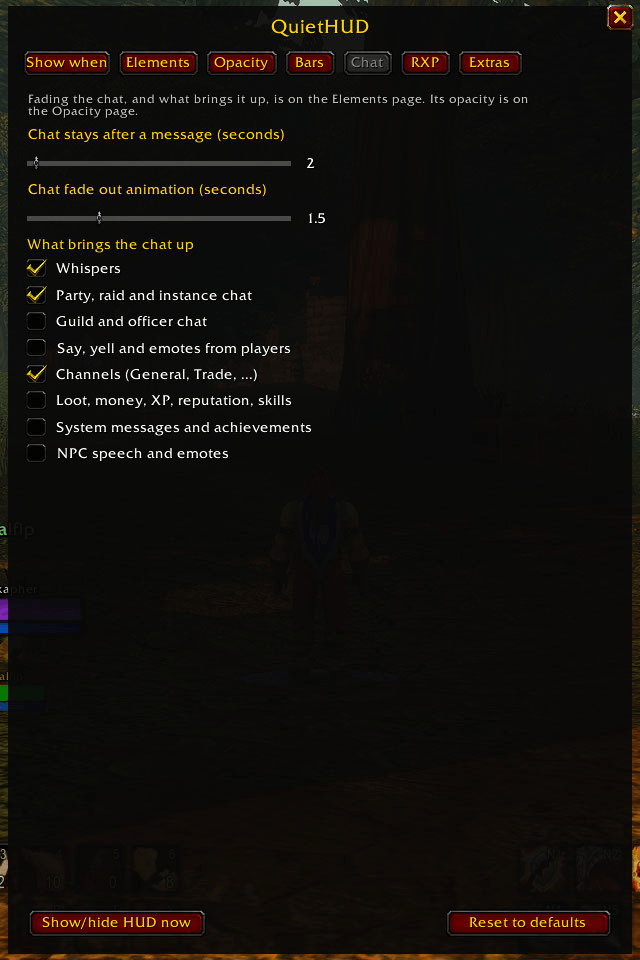
- Chat page: choose which kinds of message bring the chat up (whispers, group, guild, say/yell/emotes, channels, loot and XP, system messages, NPC speech), so channel chatter and loot do not keep waking it.
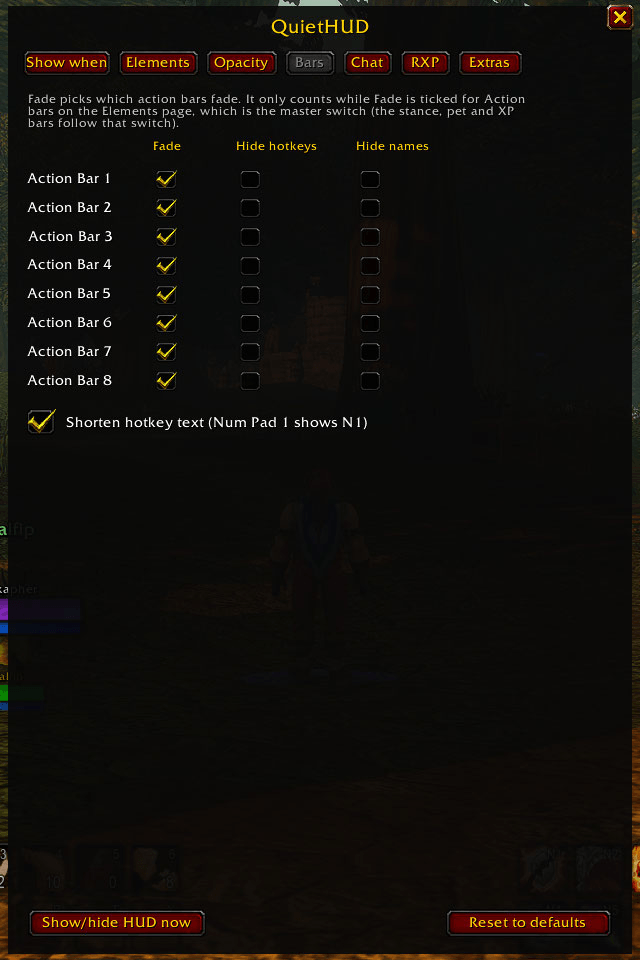
- Action bars (1 to 8): choose whether each fades, and hide its hotkey text or macro names. Shorten hotkey text turns "Num Pad 1" into N1 and "Ctrl+Num Pad 1" into cN1, on the action bars and the pet, stance and possess bars.
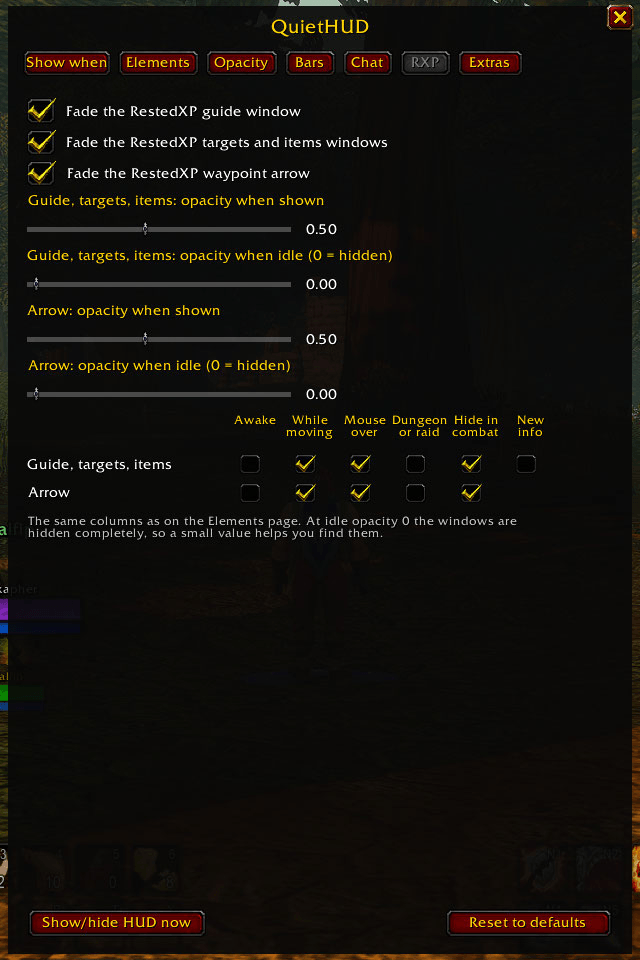
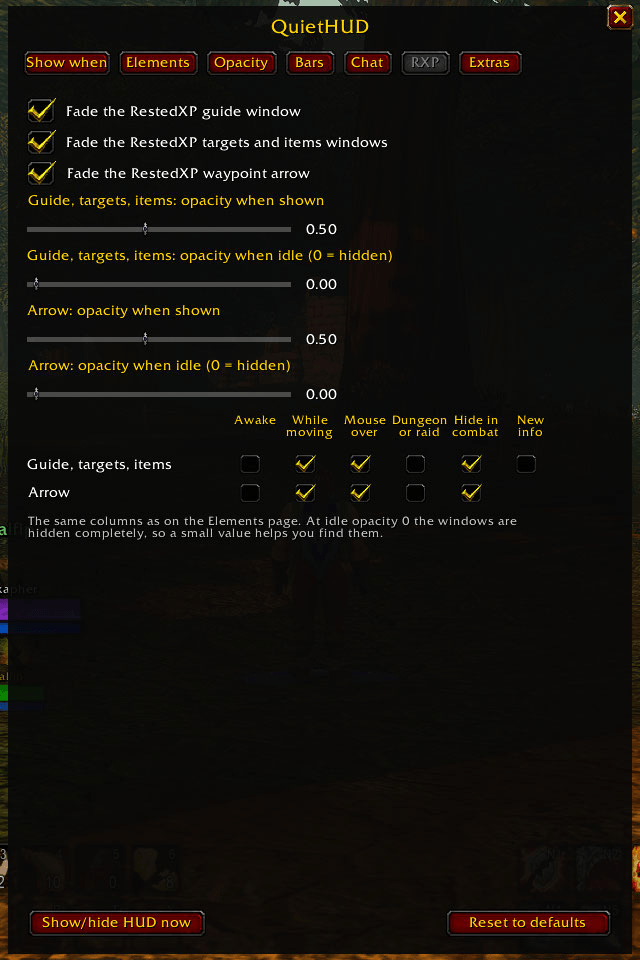
- RestedXP support: fade its guide, targets and items windows and its waypoint arrow, with opacity sliders and the same trigger columns.
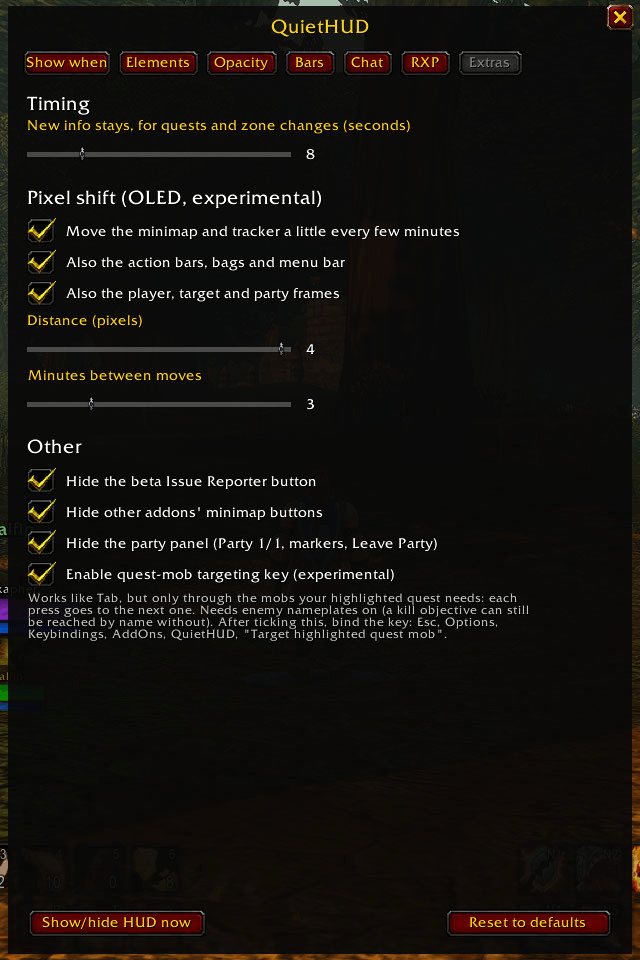
- Pixel shift (experimental, off by default): moves the minimap and objective tracker, and optionally the bars and unit frames, a couple of pixels every few minutes to spread wear on an OLED panel. It never changes a saved position, and everything goes back exactly when you turn it off.
- Optionally hide the beta Issue Reporter, the party panel, and the minimap buttons other addons add. The bags bar and menu bar are rows of the grid, and their keybinds still work when hidden.
The minimap
The game draws a blank map in buildings and cities if the minimap is even partly transparent while it redraws, and hiding the minimap and showing it again does the same. QuietHUD works around it:
- The minimap frame itself always stays solid. The map is made see-through with its mask instead (QuietHUD brings mask images with the opacity built in), so it is truly transparent everywhere, in buildings and cities too, and the ring, buttons and map pins fade with it.
- The game's own icons on the map (the player arrow, quest, tracking and party icons) cannot be made transparent by addons, so they stay solid until the minimap has faded out completely. If you would rather have everything dimmed together, tick "Darken the minimap instead of making it see-through" on the Opacity page: a dark layer dims the map and those icons, but the map is not see-through.
- When the minimap fades out it is shrunk to almost nothing instead of hidden.
- A square minimap (Leatrix Plus has that option) works the same way.
Finding a good way to fade the minimap has been an ongoing source of frustration, and I'll keep looking for better solutions.
Works with other addons
QuietHUD only changes opacity, and hides what you ask it to hide, so it sits next to addons like BetterBlizzFrames, BetterBlizzPlates, HealthBarColor and RestedXP. It fades frames by name, so a frame from another addon that does not fade with the rest can be put into a group with /qhud add. It already knows BetterBlizzFrames' pet cast bar.
Quest-mob targeting (experimental, off by default)
A key that works like Tab, but only through the mobs your quest needs. It is new and has had limited testing.
- Turn it on in
/qhud, Extras, and bind it under Esc, Options, Keybindings, AddOns, QuietHUD. - Turn on enemy nameplates. The key reads them to find quest mobs.
- Click your quest in the objective tracker so it is the tracked one. The key stays on it until you click another.
- Stand near the mobs and press the key. It only ever goes to mobs your quest needs.
How it works: when every enemy with a nameplate around you is a quest mob, the press is the game's own Tab, which steps through identical mobs too. When other enemies are mixed in, it goes to the next kind of quest mob by name and puts the skull on it. Limits: in that mixed case, identical mobs count as one stop, and the key only sees enemies that have a nameplate. In combat it can only use what it prepared before the fight.
Settings
Type /qhud to open the menu. Settings persist even though the Forever beta does not reload saved variables, because they are also stored in account-wide macros named "QuietHUD data", "QuietHUD bags", "QuietHUD opacity", "QuietHUD groups" and "QuietHUD frames". Please leave those macros alone.
A note on updates
Sorry for how often this updates. I play with it running and test as I go, and I usually find something to fix or a new idea while I am in the game, so I push it soon after instead of saving it up. You do not have to install every update. The changelog says what changed, so skip a version if it does not matter to you.
About this addon
QuietHUD was built with AI assistance (Claude Code) and tested in game by the author. It has only been tested on one setup so far, so expect some rough edges. Bug reports are welcome on GitHub: https://github.com/Jackafur/quiethud/issues
Source, full documentation and issues: https://github.com/Jackafur/quiethud
Made by Jackafur: https://jackafur.com
You must be logged in to leave a comment.