
QuickCall – Battleground Forever
Fast, clean callouts for **Arathi Basin** and **Warsong Gulch**. One click (or one key) sends the call to your battleground chat, so your team knows what's coming without you typing a single word.
Details
Expansion
 Forever
 Categories
Developers

Having issues?
# QuickCall - Battleground Forever
Fast, clean callouts for **Arathi Basin** and **Warsong Gulch**. One click (or one key) sends the call to your battleground chat, so your team knows what's coming without you typing a single word, and the map shows what your team is calling.
QuickCall appears automatically when you enter Arathi Basin or Warsong Gulch and hides again when you leave.
## Arathi Basin
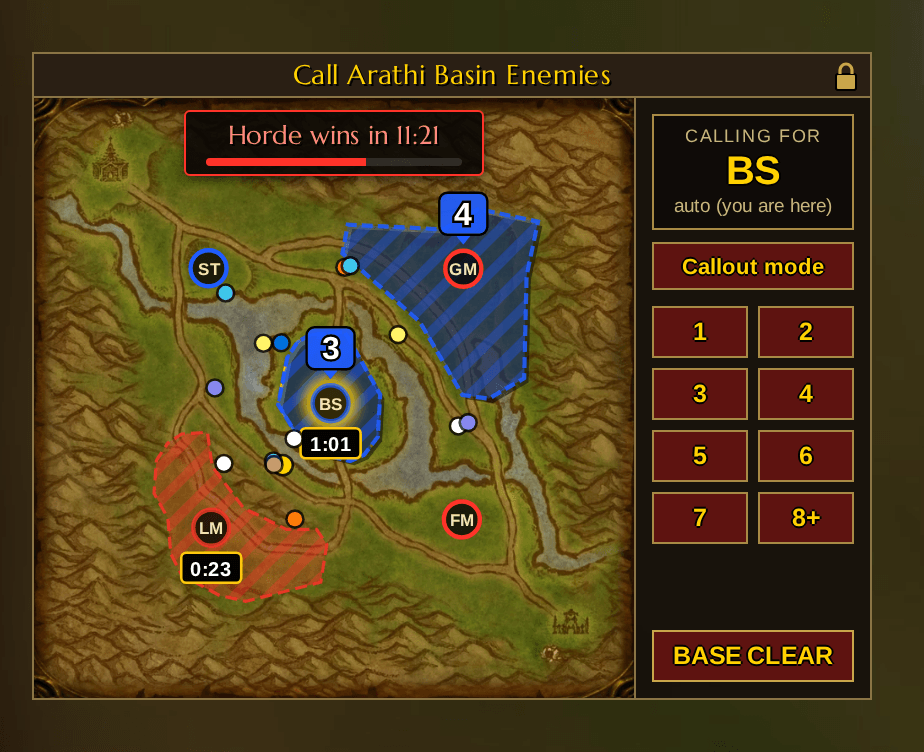
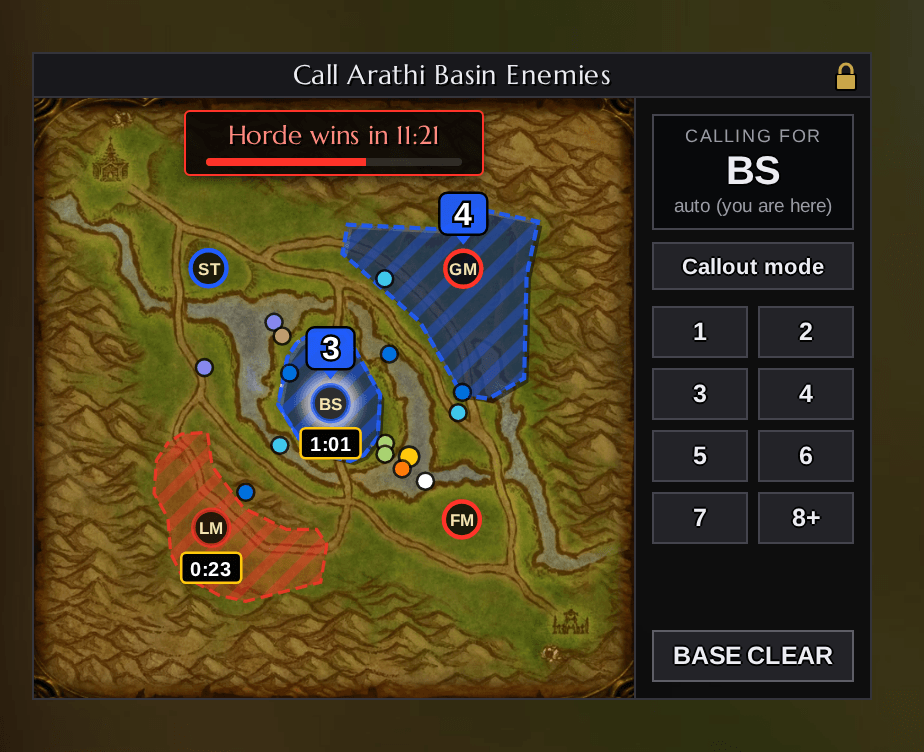
- A map with the five bases and the call buttons **1-7**, **8+** and **BASE CLEAR** beside it. They report incomings at your base, e.g. `3 at BS`, `8 or more at BS` or `BS CLEAR`.
- **"Calling for" box**: always shows which base your calls go to, and whether it is detected automatically ("auto") or picked by you.
- **Automatic base detection**, even when you're standing between two bases (the last base you entered is used). Your base glows on the map with a dashed outline.
- **Callout mode**: click "Callout mode", then any base on the map, and your calls (buttons *and* key bindings) go to that base, wherever you are. Click another base to switch, "Back to auto" returns to the base you stand at. Callout mode ends by itself with the match.
- **Team calls light up the base** on the map for 8 seconds, with the number of incomings (or CLEAR) above it. Hand-typed calls work too: `4gm`, `gm 4`, `inc bs 3`, `5+ lm`, `farm clear`, `st safe`, `3 Horde incoming BS`. (`inc farm` shows an INC marker.) Only short messages naming exactly one base are read, questions and chatter are ignored.
- **Capture timers**: taken from the game's own base data, not from chat. An assaulted base shows who is taking it and a countdown right below it; when it's done the timer flashes in the new owner's color and disappears. Click a timer to report it, e.g. `Horde caps BS in 23s`.
- **Win timer** on top of the map, e.g. `Horde wins in 4:32`. It appears once the first base is taken, is calculated from the bases both teams hold and their current scores, and has a progress bar towards 2000. Hover it to see both scores, click it to report `Horde wins in ~4:32 if bases hold`.
- Short or long base names: `LM, BS, GM, ST, FM` or `Lumber Mill, Blacksmith, Gold Mine, Stables, Farm`.
## Warsong Gulch
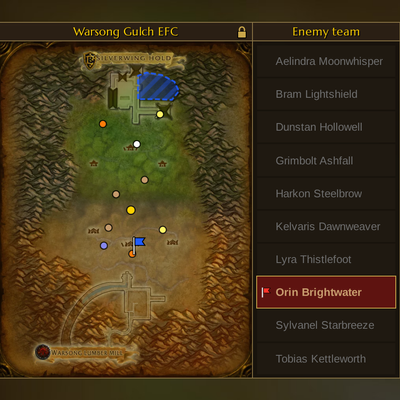
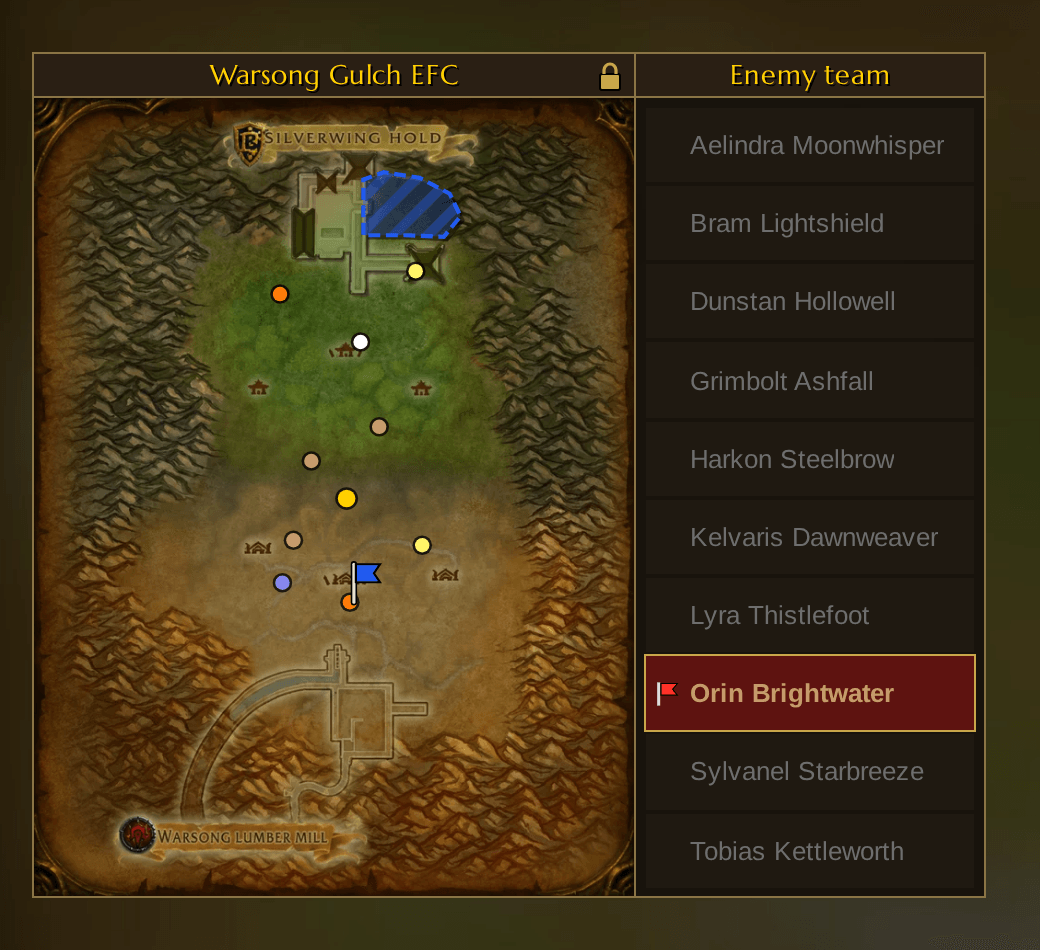
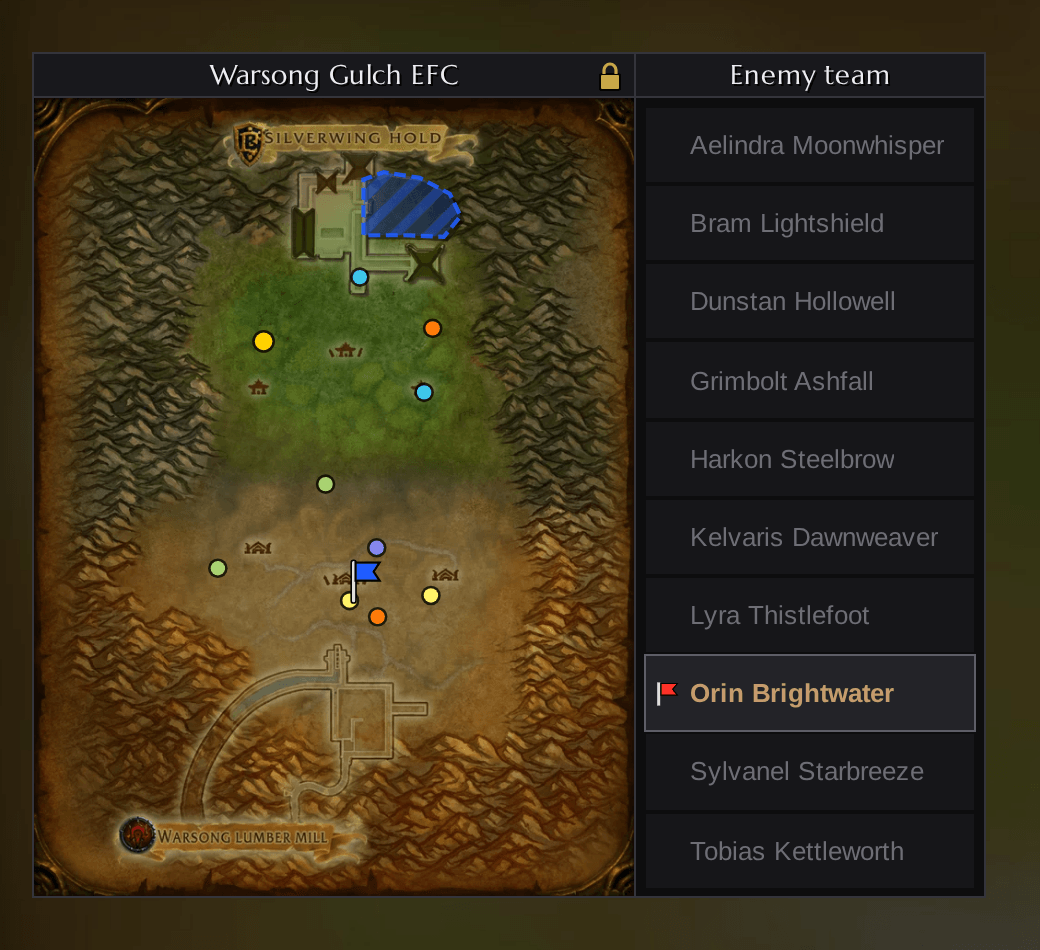
- A map of Warsong Gulch with **26 areas**: flag room, balcony, roof, banana, topside, tunnel, top of tunnel, ramp, graveyard, leaf hut and zerk hut for both bases, plus west, mid, east and tree.
- Hover an area to see exactly what will be sent, click it to call where the enemy flag carrier is, e.g. `EFC = mid` or `EFC = horde tunnel`.
- **Team calls light up on the map** for 8 seconds, from QuickCall users and from hand-typed chat. QuickCall understands how players really type:
- Enemy shorthand: `efc etun`, `eroof`, `efc roof horde`, `efc our ramp`. Without a side, your own base is meant (`efc roof` = our roof, `eroof` = their roof).
- Several places in one call: `efc roof or gy`, `efc tot`.
- Floors and buffs: `2nd floor`, `3rd floor`, `boots`, `speed`, `resto`, `zerk`, `berserk`.
- Map slang: `gy jump`, `gy side`, `catapult`, `construction`, `crane`, `sawmill`, `shrine`, `flower box`, `stump`, `left` / `right`. North means Alliance, south means Horde.
- Ignored on purpose: questions, "efc not at tun", "efc died at roof", "efc has speed". Short answers like `tun` work on their own, longer chatter needs an `efc`.
- **Enemy team list** beside the map, as tall as the map with big rows: when an enemy picks up your flag, his row lights up (class color, flag icon), and **one click targets him**, even in combat. All other rows stay greyed out and can't be clicked by accident. Players who leave are marked "(left)", and a carrier who joined mid-combat is shown in the title until he appears in the list.
## Team mates on the map
- Your group or raid is shown on both maps as dots in class color, you in gold. The positions are drawn by the game itself.
- In Warsong Gulch your own flag carrier keeps his class dot and gets the flag icon beside it, so you always see where he is.
## Team calls between QuickCall users
- Every call goes out as the normal chat line (everyone sees it) plus an invisible addon message with the exact area. Team mates with QuickCall see it on their map right away, even when the chat text can't be read (e.g. in combat), and never twice.
- Your own calls show up on your map immediately.
- Calls have a 1 second cooldown, so nobody spams the chat by accident.
## Options - no chat commands needed
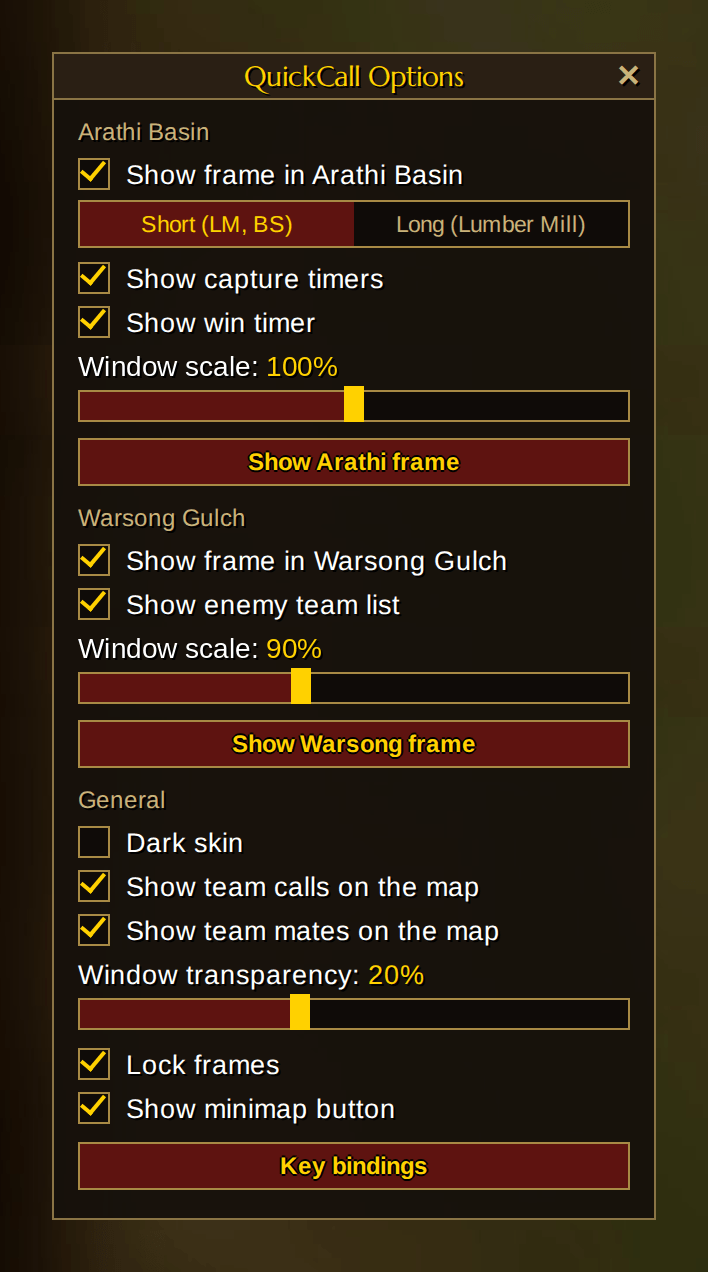
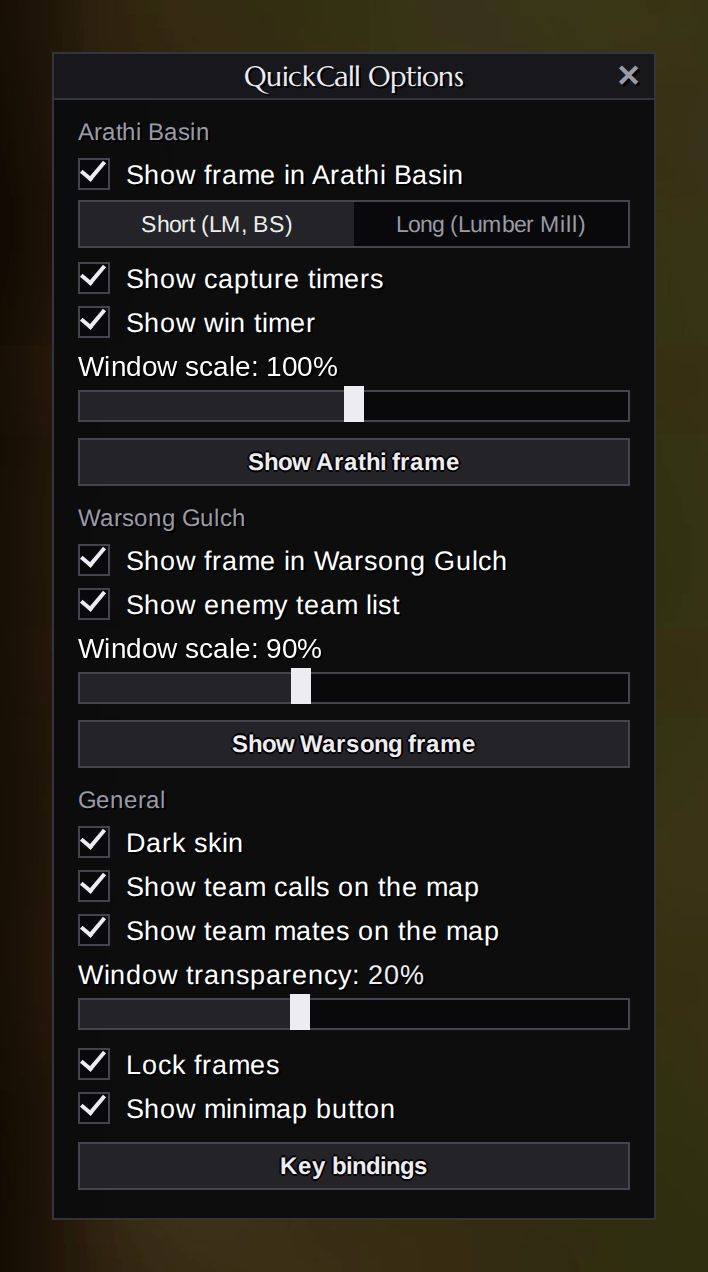
Click the **Q button** on your minimap to open the options:
- Show or hide the Arathi Basin and Warsong Gulch frames in battlegrounds
- Short or long base names
- Show or hide capture timers and the win timer
- Show or hide the enemy team list
- **Dark skin** for all QuickCall windows
- Show or hide team calls and team mates on the map
- Window transparency (0-50 %)
- Lock or unlock both frames
- **Show Arathi frame** / **Show Warsong frame** to place them anywhere, even outside a battleground
- Jump straight to QuickCall's key bindings
- Show or hide the minimap button
Drag the Q button to move it around your minimap. Hidden it by accident? Type `/qc` to open the options again.
## Commands
- `/qc`, `/quickcall` - open the options
- `/qca` / `/qcw` - show or hide the Arathi Basin / Warsong Gulch frame
- `/qcshort` / `/qclong` - short or long base names
- `/qcscale 50-150` - frame size in percent (not in combat)
- `/qcatoggle` / `/qcwtoggle` - keep a frame permanently off (key bindings still work)
- `/qczone` - shows the zone and base your client reports (for troubleshooting)
## Key bindings
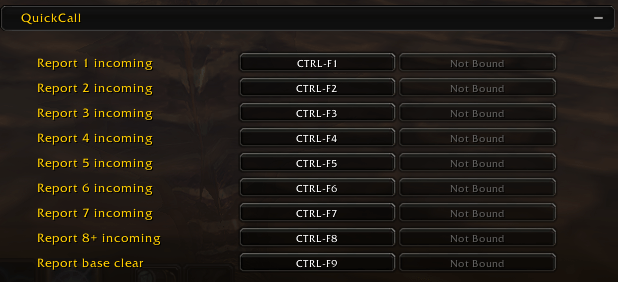
Every Arathi Basin call (1-7, 8+, base clear) can be bound to a key. You'll find them under **Options > Keybindings > QuickCall**, or via the button in QuickCall's options. Key bindings follow Callout mode.
## Moving the frames
Unlock the frames in the options (or with the lock icon in each title bar), drag them by the title bar, then lock them again. Positions and settings are saved per character. The Warsong frame can't be moved in combat.
## Good to know
- Calls are always sent in English, so everyone in the battleground understands them.
- Zone and base detection works on English, German, French, Spanish, Portuguese, Russian, Korean and Chinese clients.
- Flag messages (enemy and own flag carrier) are read on English, German, French, Spanish, Russian, Korean and Chinese clients. Hand-typed Warsong calls are understood in English.
- Joined a match that's already running? QuickCall asks your team who carries your flag, and a team mate with QuickCall answers.
- Click-to-target works in combat because QuickCall prepares one secure target button per enemy player while you're out of combat. Players who join during combat are added at the next moment out of combat.
## What's new in 5.3
- **Callout mode**: call for any base from anywhere, without standing there.
- New Arathi Basin layout: call buttons beside the map and a "Calling for" box.
- **Dark skin** for all windows.
- Hand-typed Arathi calls (`4gm`, `inc bs 3`, `farm clear` ...) show up on the map.
- Much smarter reading of hand-typed Warsong calls.
- Capture timers now sit below each base, incoming counts above.
Found a bug or have an idea? Leave a comment!
Info: I know Battlegrounds are not available yet in the beta, but hopefully they will unlock it with the Level 30 Raise.
You must be logged in to leave a comment.