

QuestMobTarget
Simple addon that creates a macro for quest objective mob you have to kill. Works for some friendly targets as well (but not many)
Details
Expansion
 Forever
 Categories
Developers

Having issues?
QuestMobTarget
Version 0.2.81.
Forever beta 1.60.1 (Interface 16001). Builds /targetexact macros for quest targets.
0.2.81 release summary
- Smaller PNG icon and consistent version metadata in both TOC files.
- Cleaned-up source comments and a runtime-only release ZIP without macOS metadata.
Macro behavior
- No combat automation. Only writes macros out of combat.
- You press the macro to target. Never calls
TargetUnit()or parses combat events. CreateMacro/EditMacroare#nocombat. In combat the addon queues and retries onPLAYER_REGEN_ENABLED.
Install
Add it from CurseForge (recommended).
Manual install:
- Extract the ZIP's
QuestMobTargetfolder intoWorld of Warcraft_classic_beta_InterfaceAddOns. - Folder name must match the
.tocname.
For an update, replace the installed addon files with those from the release ZIP. Saved settings require no migration.
Files:
QuestMobTarget.toc(fallback, Interface 16001)QuestMobTarget_Camelot.toc(Forever-specific, same content)QuestMobTarget.luaQuestMobTarget-logo.png
Use
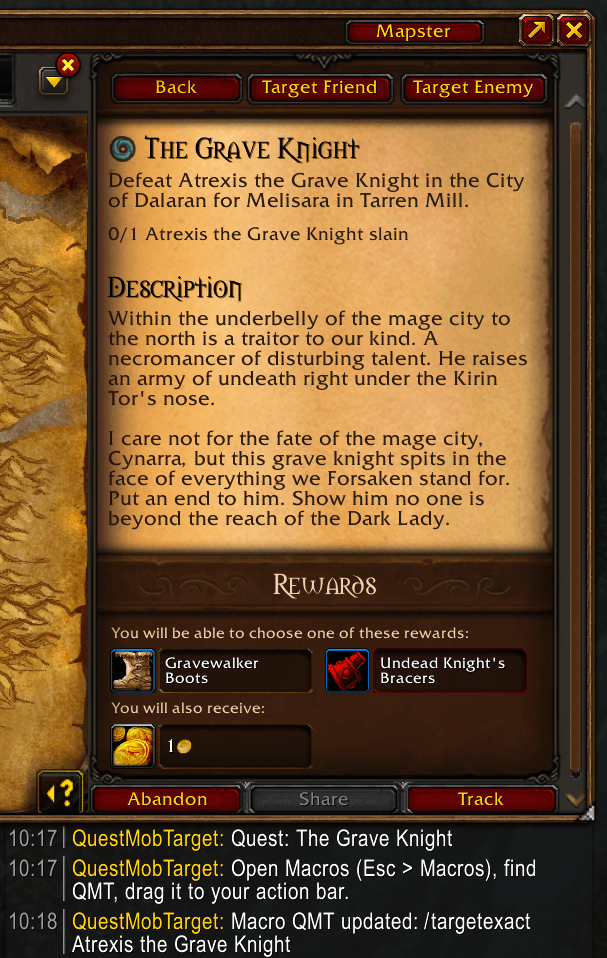
Quest log details pane (top-right, no scroll):
- Target Enemy -> account macro
QMT(crosshair icon) for kill mob - Target Friend -> account macro
QMTF(spyglass icon) for talk NPC
Commands:
/qmt- enemy macro for selected quest, else first kill quest/qmt friendly- friendly macro for selected quest talk objective/qmt list- show kill + friendly objectives/qmt Rok'Alim- manual enemy macro/qmt friendly Rok'Alim- manual friendly/turn-in macro (use when turn-in name is not in the API)/qmt auto on|off- auto-update tracked macro when objectives finish (default on)/qmt untrack- stop auto-updatingQMT/QMTF
Auto-update: a quest-built macro follows that quest. Finish Worg out of
Worg + Gnoll and the macro rewrites to just Gnoll. Manual /qmt <name>
macros never auto-update. In-combat updates queue until combat ends.
Result example:
#showtooltip
/cleartarget
/targetexact Rok'Alim
Multiple mobs (first found wins — WoW macros can't range-check across different names, so Tab is still the true "closest"):
#showtooltip
/cleartarget
/targetexact Worg
/targetexact [noexists] Gnoll
Drag QMT / QMTF from Macros (Esc > Macros) to your action bar.
Notes
- Enemy =
C_QuestLog.GetQuestObjectives(questID)wheretype == "monster".Rok'Alim slain: 0/1->Rok'Alim. - Friendly = talk verbs (
Talk to,Speak with,Meet,Return to, etc.) + event/object objectives. Item objectives are skipped. - Turn-in NPCs are often not in the quest API once complete; manual
/qmt friendly <Exact Name>covers that. - Macro limit is 255 chars / 120 account + 18 character slots. Reuses
QMT/QMTFif they exist.
License
Copyright (c) 2026 Morpster. All rights reserved.
You must be logged in to leave a comment.