

PeaversUI
A World of Warcraft UI pack: small addons that clean up most of the interface, and an installer that sets all of them up in one pass.
Details
Expansion
 Forever
 Categories
Developers

Having issues?
PeaversUI


A World of Warcraft UI pack: ten small addons that clean up most of the interface, and an installer that sets all of them up in one pass.
Part of the Peavers Ultra Performance family: addons that hold themselves to a published budget, measured on every push.
What this is not
This is not ElvUI. It is not trying to be.
A total-conversion pack replaces the entire interface, which means it owns the entire interface: every Blizzard frame reskinned, every patch a scramble to fix what moved, and a load time you can watch happen. That is a real amount of work done well by people who enjoy doing it. It is not what this pack is for.
PeaversUI does a smaller job and stops. It does not do action bars. It does not do party or raid frames. It does not reskin Blizzard's own windows: the bags, the character sheet, the quest log and the rest are left exactly as the game drew them.
That last one is the important one. Skinning Blizzard's frames means reaching into somebody else's XML on every patch day, and it is the single biggest reason UI packs break when the game updates and why they cost seconds of load time before you can move. Leaving them alone means a patch that changes the character sheet changes the character sheet, not this addon.
What to use instead
The gaps are deliberate, and there is excellent work filling them:
- Action bars: Bartender4. It has done this job properly for fifteen years and there is nothing to add.
- Party and raid frames: Danders Frames. Click casting, aura tracking and automatic raid layouts, for every role rather than just healers. Group frames are what you read to know who is about to die, whoever you are playing, and they deserve a specialist.
The installer's More stuff page lists these and others, tells you which you already have, and can hand you a settings string to paste into that addon's own import box. It never writes into another addon's saved variables.
What is in the pack
| Module | What it replaces |
|---|---|
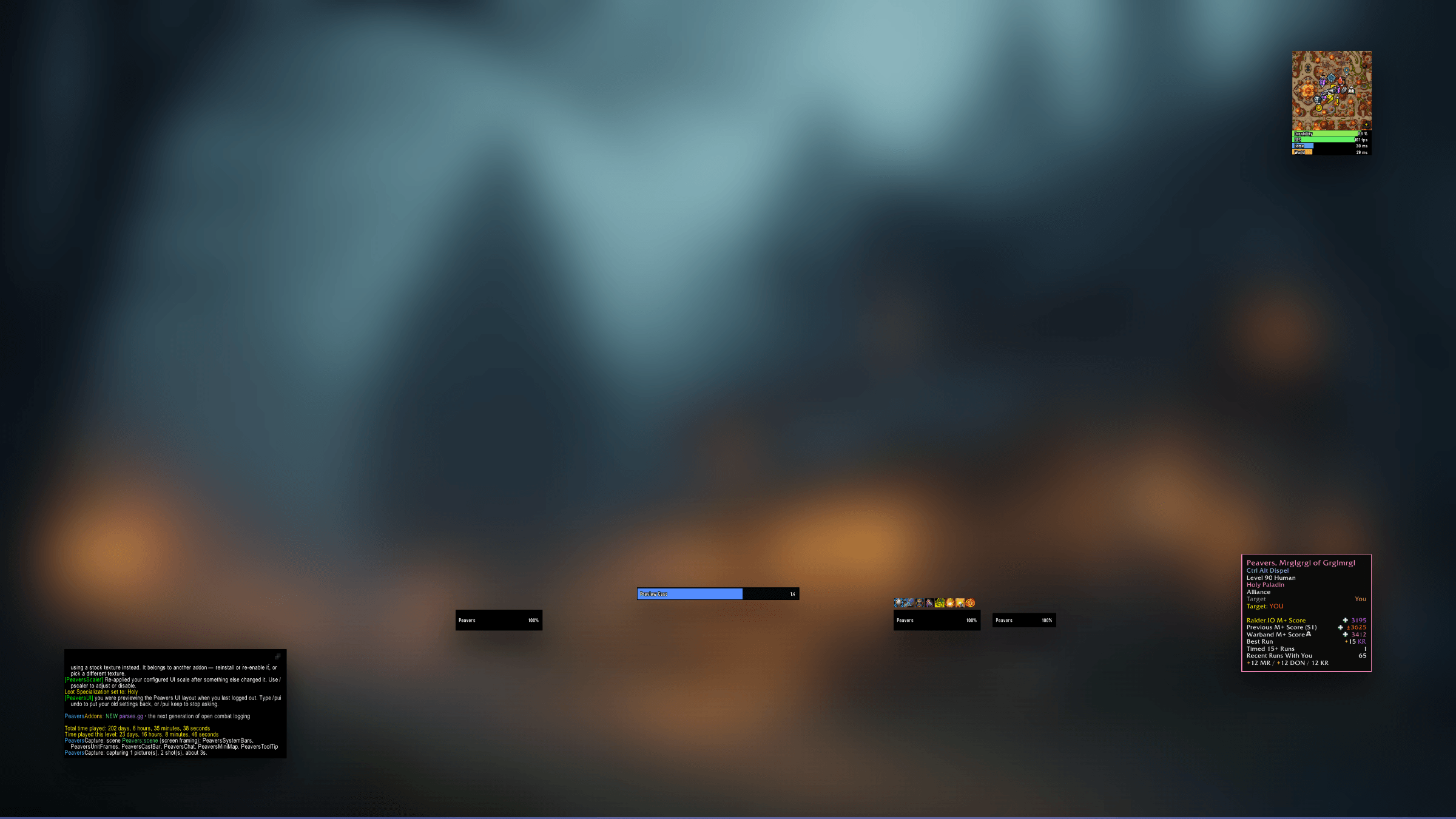
| PeaversUnitFrames | Player, target, target of target and focus, with cast bars and auras |
| PeaversCastBar | Cast bars, matched to the Cooldown Manager |
| PeaversMiniMap | The minimap, squared and cornered, every addon button in one grid |
| PeaversChat | The chat window, flat, with text tabs and a copy button |
| PeaversToolTip | Tooltips, with the border carrying item quality or unit reaction |
| PeaversSystemBars | FPS and latency, as bars rather than a number in a menu |
| PeaversScaler | The UI scale the layouts are drawn at |
| PeaversPerformance | Graphics presets, every CVar snapshotted before it is touched |
| PeaversCommons | The shared library the rest are built on |
| PeaversConfig | One settings window for the whole collection |
Only PeaversCommons and PeaversConfig are required. Everything else is optional, and the installer configures whichever it finds. Switch one off and that part of the interface goes back to Blizzard untouched.
The installer
It opens by itself the first time you log in and never again unless you ask. Seven screens: what you have, which parts you want, how it should look, how big, how the bars are painted, what to do about graphics, and a summary you have to agree to.
Nothing is written until that last screen. The layout and size screens do change your interface as you click, because a picture of a layout answers a question nobody has, but closing the installer without finishing puts every one of those settings back. The undo is written to disk before the first change, so a crash mid-preview is recoverable too.
The four layouts
| Layout | What it is |
|---|---|
| Traditional | Your frame in the top-left corner, target beside it, where WoW has put them since 2004 |
| Modern | A pair low either side of centre, the way retail's Edit Mode arranges it |
| Peavers UI | The author's own, transcribed from a live install. Four frames in a row, flat black bars, almost no auras |
| Inset | Peavers UI with the minimap, chat and tooltips held 50 units off the screen edges |
Traditional is the only one placed from a screen corner rather than from the centre, because half a screen is 960 UI units wide on a 4:3 monitor and 1680 on a 21:9 one. A top-left frame written as a centre offset is in the corner on one monitor and floating near the middle on another, so the installer works the offset out against the screen it is actually running on.
Interface size
Every layout is positioned on a canvas 1440 UI units tall. That is right on the monitor the layouts were built on and too small to read on a laptop, so the canvas is a choice: Smaller (80%), As drawn (100%), Laptop (133%), Large (150%), and a slider for anything between 70% and 200%.
Choosing a size re-derives the layout rather than zooming it. Positions scale with the canvas so the frames stay the same fraction down the screen, while widths, heights and font sizes are left alone so a shorter canvas draws them larger. That is what makes 133% mean bigger rather than the same thing again.
The installer suggests a size from your actual screen. A 1440p or better monitor keeps the canvas as drawn; anything shorter gets the canvas matching its panel exactly, one UI unit to one pixel.
How the bars look
Class colours or flat black, and any bar texture the client has. Each layout states a colour and the installer preselects it, but where the frames sit has nothing to do with what colour they are painted, so it is a separate question with a separate answer.
Updates never rearrange your screen
Every layout has a revision, and installing records the one you got. After that you are pinned: updating the pack changes nothing you can see. Tick Keep this layout up to date, or type /pui follow, and a newer revision is applied at your next login with what changed said in chat. /pui undo reverses it.
Graphics that follow the content
A preset you pick once is a compromise between the raid you want to survive and the open world you want to look at. The installer asks for two things instead: a baseline, applied now, and a plan for what happens when you zone into a raid, a key or a dungeon.
The switching is PeaversPerformance's work, not this pack's. It snapshots every CVar before it writes one, defers to after combat when it has to, and announces every switch in chat. What the pack adds is a plan already filled in, on a screen you were going to look at anyway.
Game versions
One download for retail, Classic Era, Anniversary and Mists of Pandaria Classic. What differs is only what the client has: no key-based graphics context where there are no keys.
What it deliberately does not do
It does not touch your keybinds, action bars or Edit Mode layout. Those are the settings people have spent years arranging, and the ones a UI pack is most tempted to overwrite.
It does not back your settings up. There is nothing to restore from, because nothing is destroyed. Each module keeps its own settings and its own reset. Graphics is the exception, where PeaversPerformance snapshots every CVar and /pperf restore puts it all back.
It does not install anything. It is a WoW addon, so it cannot download the modules it configures. It works with what it finds and names what it does not.
Measured performance
The pack does its work once and then stops existing: no ticker, no per-frame work, no combat events. That is a negative claim, and negative claims rot quietly, so it is measured rather than asserted. The Ultra Performance harness loads the real source into a Lua VM, drives a complete install of every layout, and counts what happened. If any number goes outside perf/budget.json, the build fails.
Measured on every push by the Ultra Performance harness. The build fails if any number here exceeds the budget in
perf/budget.json.
| Check | Measured | Budget | |
|---|---|---|---|
| Packaged size | 297.2 KB | 310 KB | pass |
| Bundled libraries | 0 | 0 | pass |
| Widget calls per frame | 0 | 0 | pass |
| Widget calls per second while idle | 0 | 0 | pass |
Scenarios driven against the real addon source, outside the game:
| Scenario | Calls/frame | Notes |
|---|---|---|
| installing the pack, six modules and a graphics preset | 0.00 | 38 calls into the module addons for the whole install, 0 frames created; happens once |
| idle, after installing | 0.00 | no OnUpdate, no ticker, no combat events: the pack does nothing at all once the installer has closed |
| layout data checked against the module settings | 0.00 | 4 layouts, 414 module blocks verified key by key |
| extras list checked | 0.00 | 10 recommended addons, 0 with a shared profile string |
| layouts redrawn at a different interface size | 0.00 | 16 unit frames re-derived on a 1080-unit canvas: every position scaled, every size left alone, and the shipped layout untouched |
| live preview applied and undone | 0.00 | every setting restored exactly, including keys the layout created that did not exist before |
| settings pages laid out | 0.00 | 3 pages on 3 shared columns: each sizes its own scroll child, nothing overlaps in the left column, and no widget runs off the panel |
<sub>7,200 lines of Lua · 297.2 KB packaged · no bundled libraries</sub>
The same case is the engine's integration test, which is the only kind available for an addon whose real behaviour is writing settings into other addons. It asserts that module toggles run before layout overrides, that a deep merge does not clobber the keys it says nothing about, that an unticked module is reported rather than written to, and that trying a layout round-trips exactly, including a key the layout created that did not exist before.
Layout data is checked too: every key a layout writes has to be a setting the module actually has. That catches a typo like zoneText for zoneTextMode, which is invisible in game.
Features
- A seven-screen installer that sets up the whole Peavers interface in one pass
- Nothing is written until the final screen, so backing out changes nothing
- Click a layout and your interface becomes it on the spot, on your own screen
- Every layout you try is undone exactly if you back out, with the undo written to disk first in case the game crashes
- Four layouts: Traditional, Modern, Peavers UI and Inset
- Class colours or flat bars, and any bar texture the client has
- An interface size per install, with the layout re-derived for it rather than zoomed, and a suggestion made from the screen you are on
- Per-module on/off, with anything you switch off handed straight back to Blizzard
- A graphics preset per context, pre-filled by the layout you picked
- Runs on retail, Classic Era, Anniversary and Mists of Pandaria Classic from one download
- Leaves action bars, party frames, raid frames and Blizzard's own windows alone, and says which addons to use instead
- Everything it writes is an ordinary setting in the module's own page afterwards
- Does nothing at all once the installer has closed
Usage
The installer opens by itself a few seconds after your loading screen, and keeps offering at each login until you finish a run. Escape closes it without changing anything. Once you have installed, it stays shut: /pui reopens it, and /pui reset puts it back to offering. After that the pack lives in the Peavers settings window under UI Pack.
Slash Commands
/pui- Open the installer/pui settings- Open the Peavers UI settings page/pui apply <traditional | modern | peavers | inset>- Switch layouts without the wizard/pui preview <layout>- Try a layout on without the wizard/pui undo- Put your settings back after a preview/pui keep- Stop treating a tried-on layout as temporary/pui extras- Addons this pack works alongside, and shared profiles for them/pui share- Capture your own profiles from those addons/pui status- What is installed, and what is switched on/pui reset- Offer the installer again at your next login
Installation
Recommended: PeaversUpdater
Download PeaversUpdater, the desktop updater for the whole collection. It installs PeaversUI with every module in the pack and delivers updates before they reach CurseForge, which for a pack of this size is the difference between updating once and waiting on ten separate approvals.
Alternative: CurseForge
- Download PeaversUI. Every module comes with it
- Enable them at the character selection screen and log in. The installer opens by itself
Any module you would rather not run can be switched off on the installer's second screen, or disabled at the character screen. The pack copes with a module being absent and says so on its welcome screen.
Part of the Peavers addon collection · Report an issue · Support development on Patreon
You must be logged in to leave a comment.