

PadChat
Controller chat keyboard, suggestions and friend invites, plus optional keyboard/controller voice-to-text via a Windows companion.
Details
Expansion
 Forever
 Categories
Developers

Having issues?
PadChat
Updated: 0.2.1 preview
Repaired PS5 Create/Share voice controls and controller access to Options. Voice users should update both the addon and Windows voice companion.
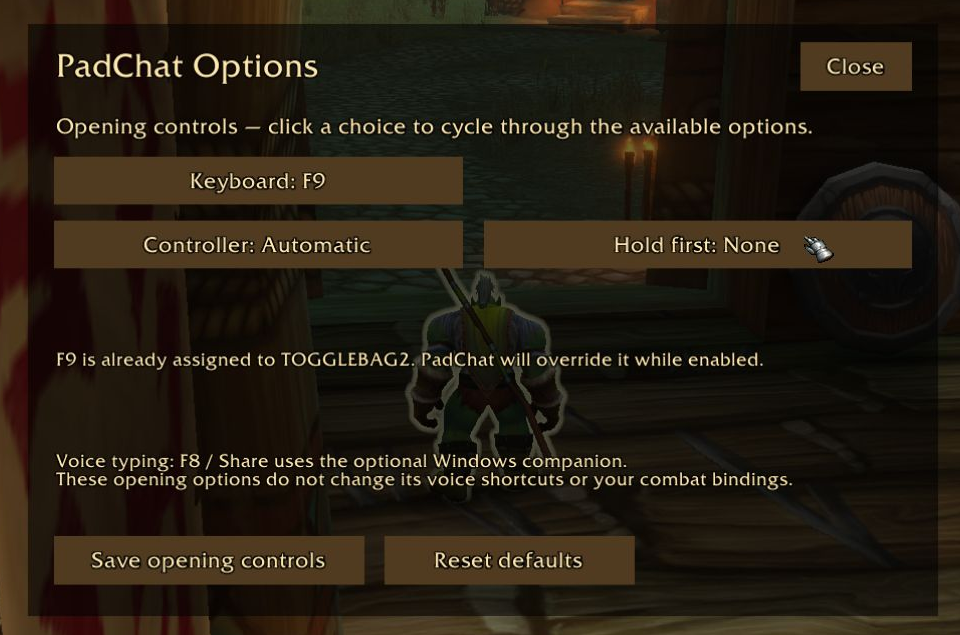
Options with a controller
Select the Options key on the keyboard bottom row using the D-pad or stick, then press X/A. Inside Options: D-pad up/down chooses a setting, left/right changes it, X/A activates, and Circle/B closes without saving. You can also click the header Options button or type /padchat options.
Choose a keyboard opening shortcut, controller opening button and an optional held shoulder/trigger modifier, then save for the current player. Hold the modifier first, then press the opening button. Conflict notices explain existing bindings. Opening settings do not rebind voice shortcuts or combat actions.
A controller-friendly chat keyboard for WoW Forever 1.60.1, with word suggestions, chat-channel selection, whisper replies and friend invitations.
This is an early preview. The CurseForge addon download installs the in-game keyboard. It does not install the optional Windows voice companion or enable microphone capture by itself.
Chat without putting down your controller
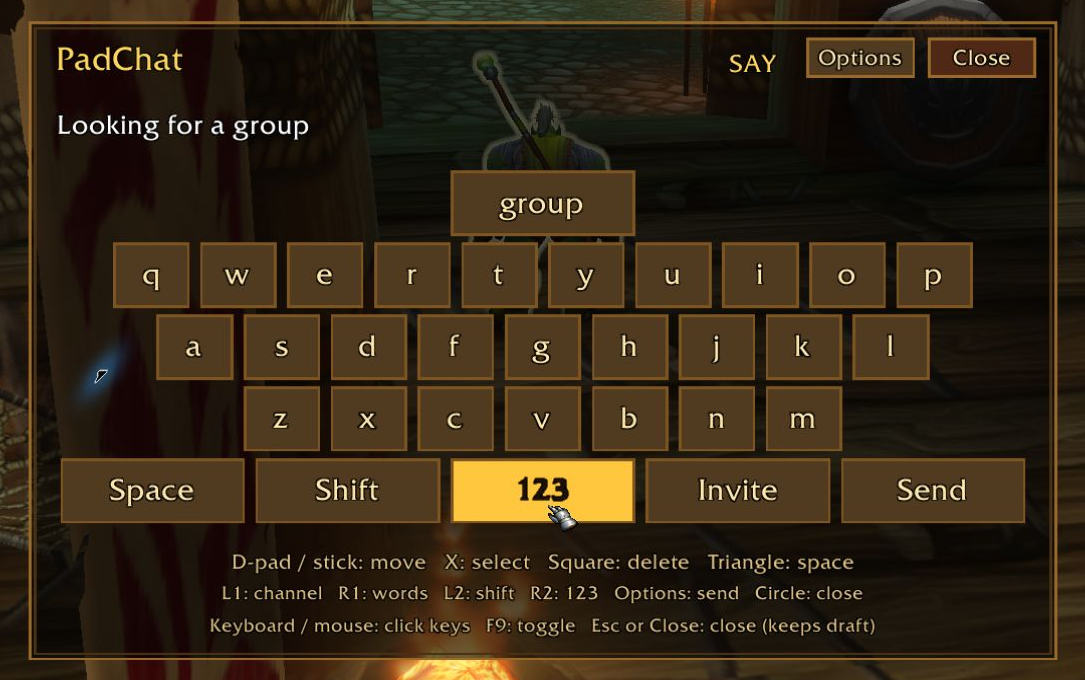
- Open with F9, /padchat, or the PlayStation touchpad click outside combat. Touchpad finger sliding is not supported.
- Select letters with the D-pad or left stick. Selection is held during confirmation until the stick is recentered, helping prevent accidental movement off a letter.
- Choose suggested words and keep a draft when closing the keyboard.
- Switch between Say, Yell, General, Party, Raid, Guild and available whisper-reply targets.
- Prepare invitations from friends, Battle.net friends or recent whisper contacts. Offline and ambiguous recipients are guarded.
- The keyboard closes and releases its temporary bindings in combat.
Keyboard controls
PlayStation / Xbox equivalents:
- D-pad or left stick: navigate.
- X / A: select a key.
- Square / X: backspace.
- Triangle / Y: space.
- Circle / B: close and keep draft.
- L1 / LB: change channel.
- R1 / RB: choose a word suggestion.
- L2 / LT: uppercase the next letter.
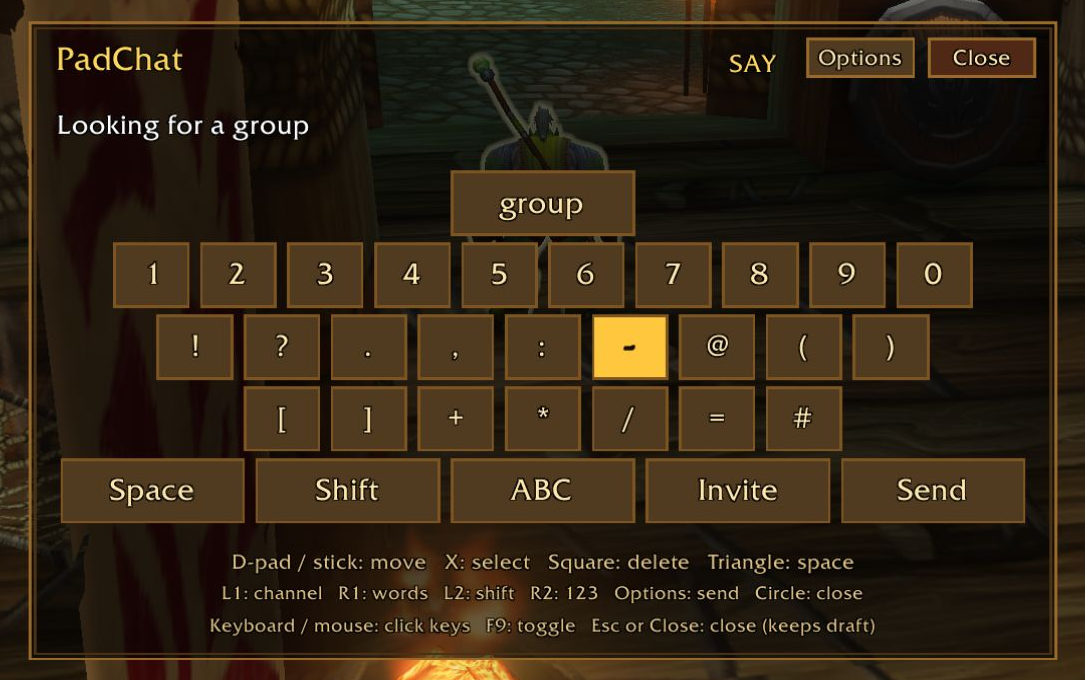
- R2 / RT: switch letters and symbols.
- Options / Start: send and close.
Native controller input must already work in WoW. PadChat does not replace your combat bindings or configure controller hardware or drivers.
Install and compatibility
Install the addon for Forever 1.60.1 (Interface 16001), then restart WoW. For a manual install, place the single PadChat folder in Interface/AddOns. Enable PadChat in the character-selection AddOns list.
Disable ControllerKeyboard and ControllerKeyboardTouchpad if installed; PadChat detects these older keyboard addons and pauses its controller bindings to avoid conflicts. Do not run an older voice helper alongside PadChat Voice.
Retail and older Classic versions are not supported by this preview. The preview has automated addon checks and Windows package tests, but has not been certified across every controller, client patch or a second physical PC.
Keyboard voice-to-text and optional voice companion
Keyboard players can use voice-to-text too; no controller is required. Tap F8 to change channels, hold F8 to speak, and release to send when the companion is installed.
Local English speech recognition is implemented in a separate Windows 10/11 x64 companion. The in-game addon alone cannot access a microphone. Voice is optional; the controller keyboard works without it.
With the companion installed and a host-PC microphone selected, tap F8 or Create/Share (Xbox Back/View) to cycle channels; hold to dictate; release to send. Options + Triangle (Xbox Start + Y) held briefly can open the keyboard. These companion shortcuts are not activated by an addon-only CurseForge install.
Speech uses local models without an API key or paid speech account. Recognition can mishear words and player names; try a short message in Say first and use the invitation list when a spoken name is ambiguous. Release-to-send sends immediately.
Voice typing uses the microphone selected in PadChat Voice on the Windows PC. Choose any connected input Windows recognises, such as a built-in microphone or a USB headset. Game audio playback is independent of PadChat.
The companion is installed separately from the CurseForge addon. Open this project's Source link to the PadChat GitHub project, choose Releases → v0.2.1-preview.1, and download PadChat-Windows-Voice-0.2.1-preview.1.zip. Extract it, close WoW and run PadChat-Setup.exe. Choose your Forever game folder and Windows host microphone. The installer includes both PadChat and the voice companion, with bundled English models; no Python installation or model download is needed.
Source and Windows companion setup
Privacy and feedback
The addon keeps its draft and learned words in WoW's PadChatDB SavedVariables. Optional voice recognition keeps speech buffers and transcripts in memory; it does not upload recordings or use OpenAI tokens. The companion briefly uses and restores the clipboard for verified chat input.
Please report issues in the project comments with your WoW version, controller type, connection method and whether the optional companion is running. Do not post account credentials or private conversations.
Original PadChat code is MIT licensed. Blizzard UI assets are referenced from the installed game and are not bundled. PadChat is not affiliated with Blizzard, Sony or Microsoft.
You must be logged in to leave a comment.