

OlympusAlert
OlympusAlert spots verified Olympus guild members in WoW: Forever. It marks nameplates, whispers, and Group Finder listings, warns on target or mouseover, and keeps a local guild cache and allow list. No automatic player actions.
Details
Expansion
 Forever
 Categories
Developers

Having issues?
OlympusAlert
Local guild awareness for World of Warcraft: Forever.
OlympusAlert helps you recognize players whose guild has been verified as matching a configured pattern. The default pattern is Olympus. Warnings are informational: you decide how to interact with each player.
Features
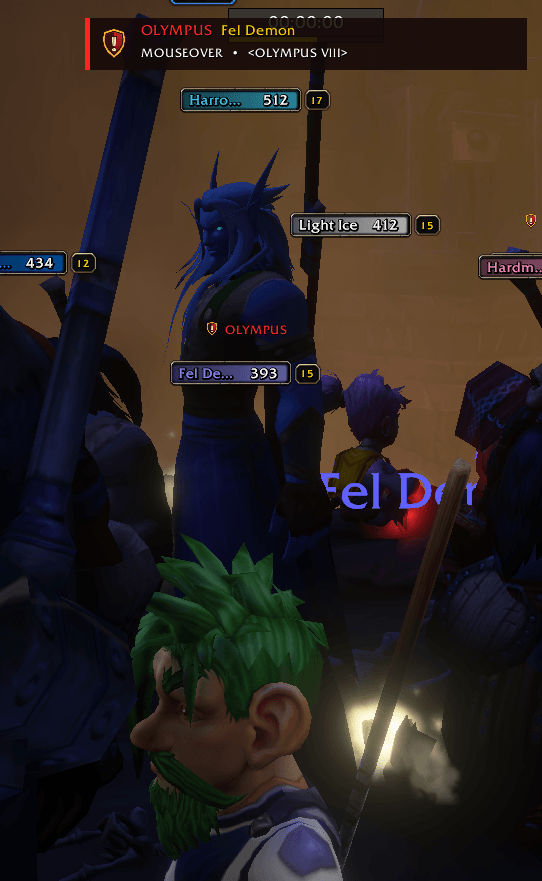
- Nameplates: Shows an alert icon and
OLYMPUSlabel above verified players with visible friendly nameplates. - Nameplates off: Shows a screen warning when you target or mouse over a verified player.
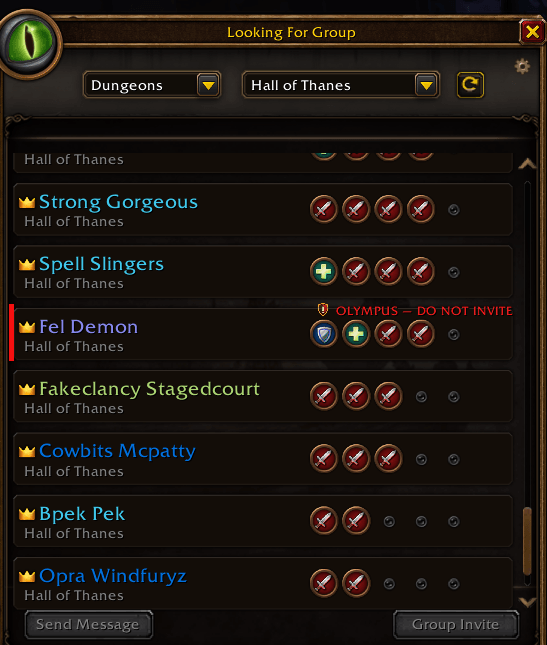
- Group Finder: Marks verified leaders or members in the built-in Forever browser and, when installed, LFG Forever. Markers disappear when the finder closes or a listing changes.
- Whispers and tooltips: Adds a warning for verified characters without hiding the original message or tooltip.
- Local records: Browse nearby and previously verified players, review their guild evidence, and allow-list individual characters.
- Optional notifications: Enable nearby chat or sound alerts in the settings.
How matching works
OlympusAlert learns guild information from characters you can observe, including targets, mouseover units, nameplates, group members, tooltips, and structured /who results. It matches characters by their full First-Surname identity. A first name alone is never enough to identify a player.
Guild patterns are case-insensitive text matches. Olympus, for example, also matches Olympus II and The Olympus Army. You can change the patterns in the addon window.
Options and commands
Open Options → AddOns → OlympusAlert, right-click the minimap icon, or type /oa options. The full addon window contains the player list, guild patterns, and allow list.
| Command | Action |
|---|---|
/oa | Open or close the addon window |
/oa options | Open addon options |
/oa nearby | List currently observable matches |
/oa list | Open known Olympus players |
/oa check First-Surname | Review a character’s cached guild evidence |
/oa allow First-Surname | Suppress warnings for one character |
/oa unallow First-Surname | Remove an allow-list entry |
/oa scan | Send the next user-initiated /who query |
/oa sound on or /oa sound off | Toggle nearby sound alerts |
/olympusalert also works in place of /oa.
Important limitations
- With friendly nameplates off, WoW does not provide an addon anchor for every overhead character name. The target or mouseover warning works without nameplates; individual overhead icons require visible nameplates.
- Group Finder exposes names but not guild membership. A listing is marked only when a full character identity already has matching guild evidence in your local records.
/whoresults are limited by the game and are not a complete guild roster. Scans advance only when you press the command or button.- OlympusAlert does not automatically invite, ignore, message, target, or report anyone.
Installation
Extract the ZIP into your WoW: Forever Interface/AddOns folder so that OlympusAlert/OlympusAlert.toc is present. Restart the client or use /reload, then enable the addon.
Built for the WoW: Forever beta client with Interface 16001. Settings and guild records are saved locally; the addon uses no external service.
You must be logged in to leave a comment.