

Olympus Guild
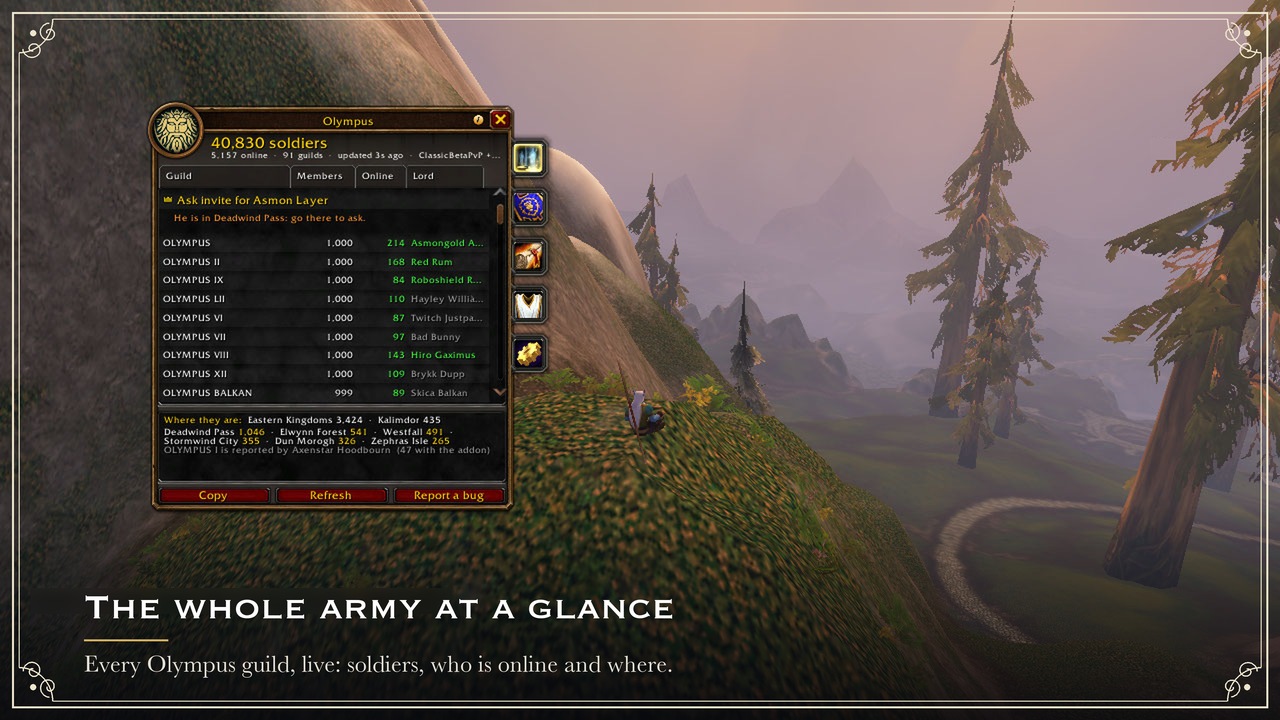
The whole Olympus army in one window: every Olympus guild, their Lords and Captains, the map, decrees and a tabard inspection.
Details
Expansion
 Forever
 Categories
Developers

Having issues?
Olympus
The whole Olympus army in one window, inside World of Warcraft: Forever.
Olympus is Asmongold's guild for World of Warcraft: Forever: Alliance, PvP ruleset, a place to find dungeon groups, organize raids, share class knowledge and build the guild together. It grew past 10,000 members during the beta. A WoW guild caps at 1,000 members, so Olympus is really a realm of many Olympus guilds. In game each player only ever sees the roster of their own guild. Nobody could tell how many Olympus guilds exist, who leads them, or where the army is.
This addon answers exactly that. It adds up every Olympus guild live, in a window that looks like Blizzard's Guild window and docks right next to it.
Status: built for WoW: Forever and running on the Forever beta (1.60.1), where the census already adds up reports from many Olympus guilds. Also tested on Classic Era (1.15) and Anniversary (2.5). Please report anything that looks wrong (
/oly bug).
Horde too. Olympus guilds on the Horde side use the same addon. The factions can't see each other's guilds, so each one gets its own census, channels, decrees and untabarded list: the addon picks yours from your character. On the Horde, the Crown is every Horde Olympus guild master and the officers of the Horde guild named exactly "Olympus", if there is one.
Who can use it
Only members of a guild with "Olympus" in its name, however it was spelled: OLYMPVS the Roman way, Olimpus, Olmps, Olympuz, Olympos, Olimpo and other misspellings count too (Olympia or Olympic do not), and a guild against Olympus ("ANTI OLYMPUS", "Olympus Haters") does not. The check is fixed in the code and cannot be switched off with a command. Outside an Olympus guild the addon joins no channel and hears nothing of the army, but for the author's signed list below, over its own guild. The only thing it offers there is the Join Olympus screen described below, and its own few addon whispers are the only ones it sends or hears there (1.1: which guild to ask, the answer, and your request, each to or from the one member concerned).
Approved guilds (1.1). A guild of Asmon's Olympus whose name the rule leaves out (it leaves
Olympian and Olympia out on purpose) counts as an Olympus guild once the author names it in his
signed list: the same list, signed with the same key on his own computer, that names the High
Council and the King's Steward, for one faction and realm group. No census vote counts, and nobody
else can add one. A few ship with the addon itself, so their members have nothing to paste: since
1.1, the Alliance's <OLYMPIAN> (only a new version takes one of those off). Its members' addons, no Olympus members
until they hold that list, take it over their own guild alone (the list only: nothing else is
read, and they send nothing). The first of them pastes it with /oly approved paste, or a click
on the Join Olympus screen's last line (the author
or a High Councillor hands out the signed text; it is checked like any list, so it can't be forged
or changed), and his addon passes it to his guild every 5 minutes. /oly approved lists the
approved guilds of your faction. A newer signed list without a guild ends it on every client.
Not in Olympus yet?
First it asks the obvious question: "<Your Guild>? Disband immediately. What are you
doing?" Then it helps you get in. The Join Olympus screen uses the game's own /who to
find Olympus members online, groups them by guild, and whispers one of them a ready-made
request that you can edit ("Hi! I'd love to join Olympus. Does <Olympus II> have room for
one more?"). No answer? Try someone else picks a member you have not asked yet. Replies
are highlighted. It is rate limited, so nobody gets spammed.
Where to go (1.1): a search also asks one member's addon (an addon whisper, not a chat line)
where recruits should go, and its census answers: the guild the King opened the gates of
first, then the guilds with the most free slots, and a couple of their Lords and Captains
online (never the King). It names only what the census confirms: guilds two members' reports
agree on, and Lords and Captains two reports name. The screen lists them in that order, each
once /who found one of its members (the gates once a second member's answer agrees: one more
is asked), the guilds found with /who too, and a click asks one of those officers that /who
found in that guild, or another member it found there. Just before, their addon is asked
whether they take recruit whispers (again if it never answered): a member who set do not
contact (/oly nocontact on) is never offered, however many recruits ask him, and the
question closes before anything is sent. It stays one whisper per click, in your
own words (no dues line), 20 seconds apart. With it goes your request to the same member, so an
officer's addon shows it with Invite and Decline instead of a raw whisper. Members on
versions before 1.1 just get the whisper, as before.
What it does
Census: the army at a glance
- Every Olympus guild in one list: Guild · Members · Online · Lord. Columns sort by clicking, like the Guild window.
- Total soldiers and online now across the whole realm.
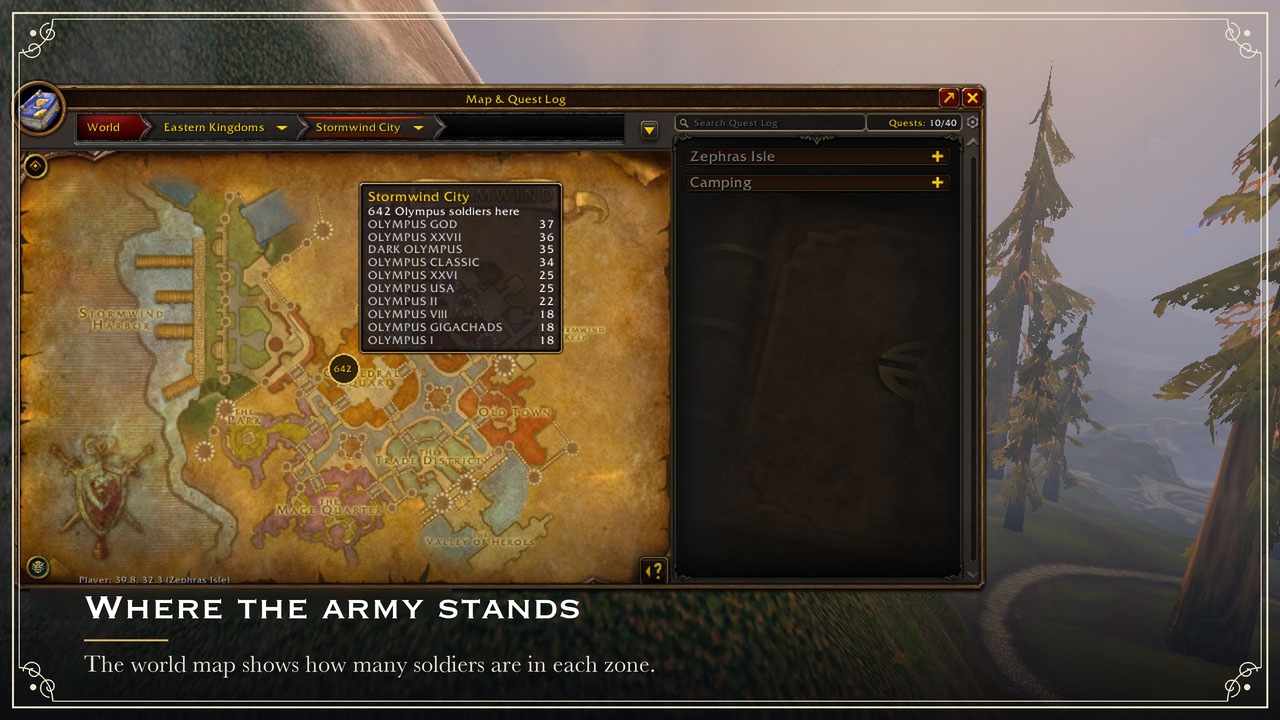
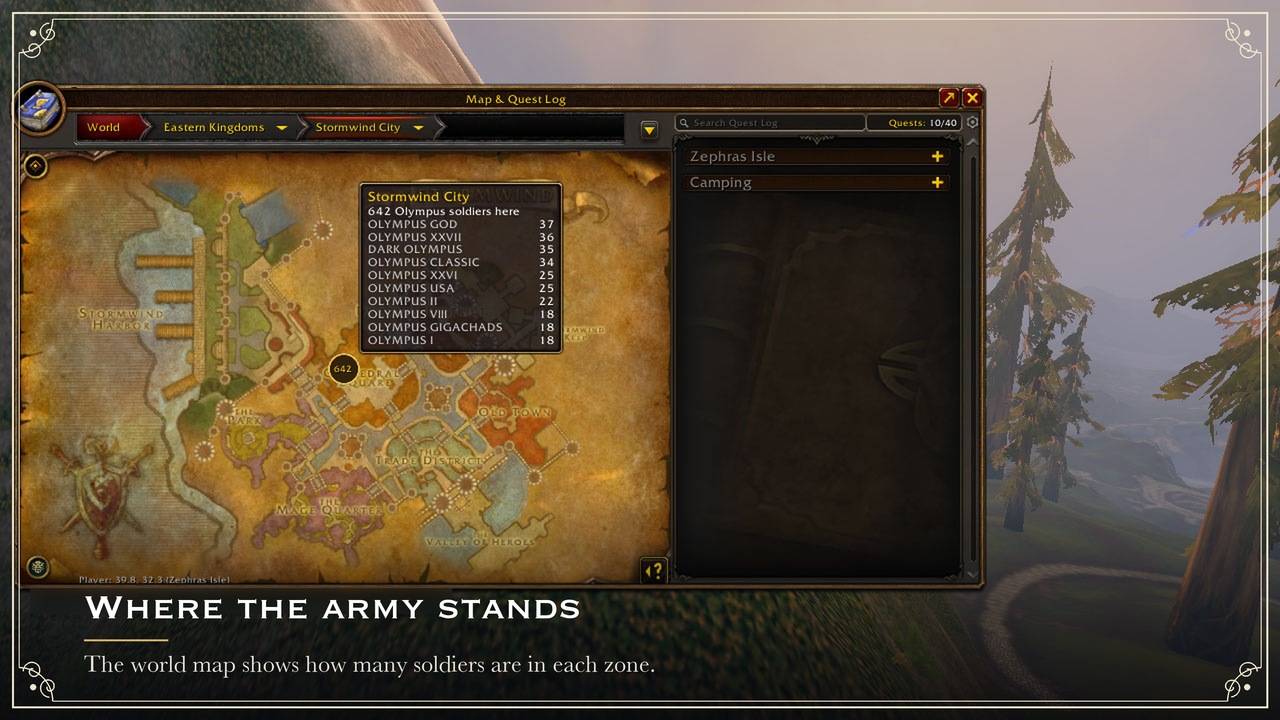
- Where the army stands: top zones ("Stormwind City 742") and totals per continent (Eastern Kingdoms, Kalimdor), counted by the guilds whose census comes from a member who shares their zone (see Privacy, below).
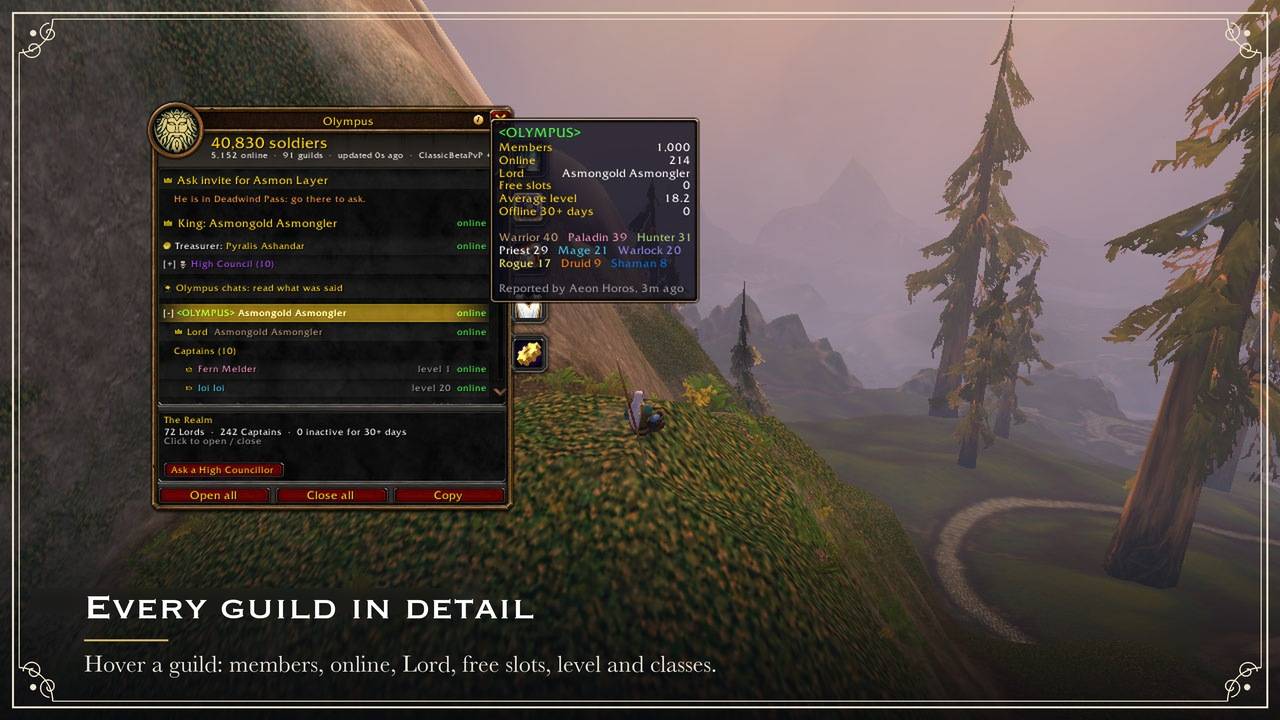
- Hover a guild: members, online, free slots, average level, inactive members, classes online, top zones.
- Right after login (1.1) the header, the Census and the Realm say Rebuilding the census
after login: N guilds heard so far for about 3 minutes, while every guild's reporter answers.
The beta often loads an empty save: the army is not gone, and no
/reloadis needed. The line only waits: it asks nothing (no/who) and opens nothing. - An update line (1.1): when the author's own addon says on the Olympus channel that a newer
version than yours is out (he marks it once CurseForge lists it, never a build he is still
trying), a line at the foot of the Census, one line in chat once a session and
/oly statussay so. It is yours alone: nothing is sent and nobody is whispered. - Marked rows (1.1): a warning mark on a guild whose senders disagree (on its Lord or Captains, or on its size, by more than 5 members or 5% plus the 20 a minute a guild may gain or lose between their two reports), a question mark on one that a single sender stands behind. Its tooltip says which and who: check before calling a muster or opening the gates on it (the gates ask again, with the reason). A marked row can still be right, and the mark changes nothing that counts. Your own guild (your roster) is never marked.
- Asking to join (1.1): a recruit who asked you from the Join Olympus screen shows on top of
the Census, with their whisper. An officer (the game's guild invite permission) answers with
Invite (the game's own guild invite) or Decline (one whisper pointing to the gates'
guild while the King's gates are open, else naming your guild alone: never a guild the census
lists for its room, which two made-up characters could report), one click each; anyone else
can point them to an officer online. Dismiss sends nothing. In the Realm's Recruiting, one
click (or
/oly nocontact) sets your do not contact flag. - Search the census (1.1): a guild, a Lord, a Captain, a player of a guild's top five or one
seen online (the player shows under the guild's row), or a zone ("Stormwind": its soldiers
and its guilds, most first). Type recruiting (or
free 50) for every guild with room, most free slots first and the King's gates on top. - Tonight on this client (1.1): under the list, the most soldiers your addon saw online at once tonight and when, and (in its tooltip, and next to a zone you search) how each zone filled or emptied since. Counted by your own addon once a minute from the reports it already holds, starting about 3 minutes after login once the census is rebuilt: another player's client counts its own evening, and nothing is sent.
The Realm: the hierarchy
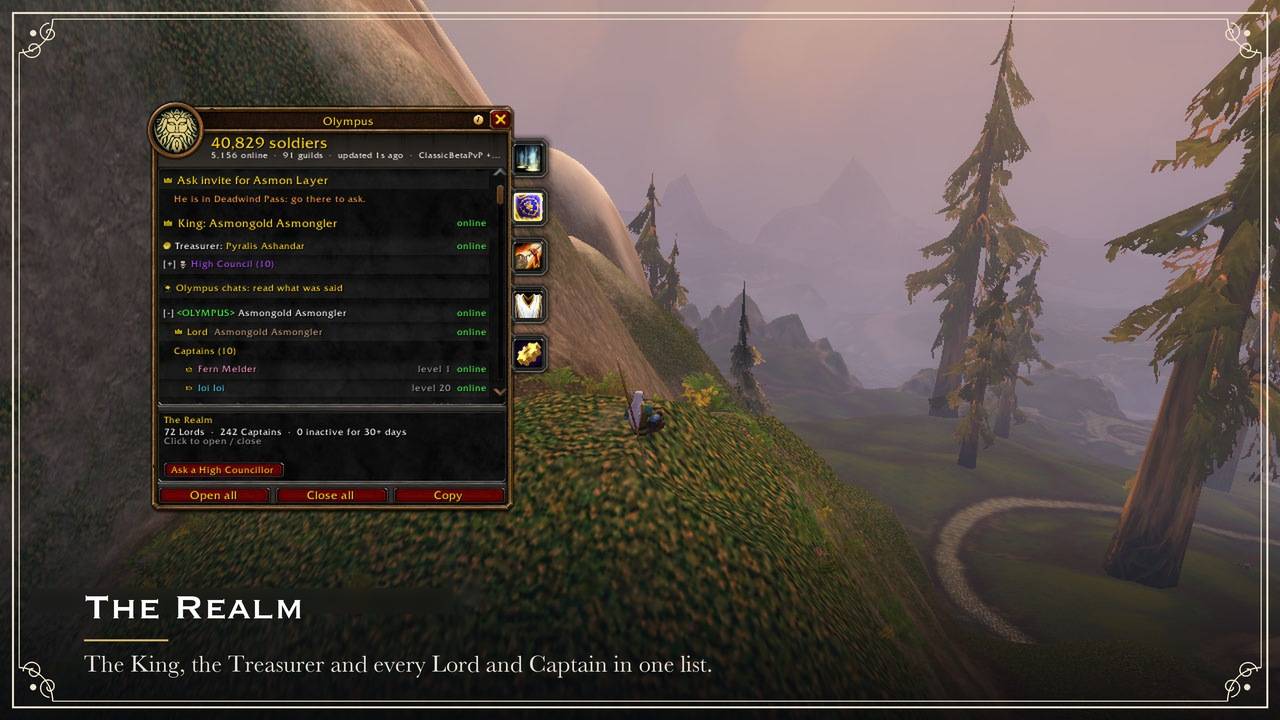
- The King, then every guild's Lord (guild master) and Captains (the officer rank
right below the guild master).
Each shows level, class and online or offline 3d. Long absences show in red
(
/oly warndays <days>, 3 by default). A Lord away (1.1): when a Lord crosses that, one chat line, once per absence: to his own guild's officers from their roster, and to the King, his Steward and his Hands for every guild's Lord, by the census's word (a guild that stopped reporting included, counted from its last report even when that showed him online). Never a popup, and nothing is done to anyone. - The Treasurer of Olympus (Pyralis Ashandar, chosen by Asmongold's chat) right under the King, with a gold coin next to his name wherever he shows, his tooltip and his lines in the Olympus chats included. Only that exact character of the guild OLYMPUS gets it: look-alikes don't.
- Members online under each guild: your own guild's from your roster, any other's from
/who. Opening a guild searches/whofor that guild alone (up to 50 of its players). Click a name to whisper, invite or/whothem. - The ranks of each guild with how many members hold them.
- Inactive members: offline 7+ and 30+ days, per guild. Your own guild's line (or
/oly inactive) opens the list by name (1.1): members offline 7, 14 or 30 days and more, with rank, class, level and last online, from your own roster, longest away first. A rank that may remove members (as in the game's Guild window: ranks below yours) removes one person per click, after a question that shows their rank and days away, a few seconds apart. There is no kick-all, and nothing is sent. - Mentors (1.1): a Lord opens Recruits and their mentors on that page (or
/oly recruits): his guild's lowest rank and whoever joined since he logged in. He clicks a recruit who is online, then one of his Captains, and says yes: one whisper to each from that click, the Captain told who to look after, the recruit told who to ask. The pair shows on his list (his client's alone); nothing goes on the channel. - Level race: the highest level players of the realm.
- Recruiting: the guilds that still have free slots, so new players go where there is room (the five with the most, then every one on a click, 1.1). When the King opens the gates of a guild, it tops the list: send new recruits there.
- Layers of your zone, named after the highest ranked Olympus member on each one ("Asmongold's layer"), with how many members are there.
Layer hop: join the King's layer without begging in chat
While Asmongold is online, the top of the Census and the Realm shows "Ask invite for Asmon
Layer" with his crown. One click (or /oly hop) and the addon does the asking:
- You must already be in his zone (a layer is read per zone): if you are not, the line says where he is and nothing is asked.
- It asks the Olympus players on his layer who can invite (alone, or leading a group with a free seat). Only a handful answer, picked at random on each player's side, so a crowd of askers is spread over many players instead of flooding one.
- It picks one of them, favouring players outside a group and with fewer recent invites. They get "X wants to join your layer" with Invite, Not now and Always invite. No answer or a no, and the next one is asked.
- The invite is accepted for you when that player is one the addon can vouch for (a member of your own guild, or a Lord or Captain the census confirms); anyone else's, and every invite while Blizzard's gamepad UI is on, waits for your click in the game's own invite window. The game moves you to the layer, and the addon takes you out of the group as soon as it sees the move (or offers a Leave group button if it can't tell).
Players alone on the King's layer are asked once per login: "Asmon is online and you are on his layer. May the addon invite the players who want to join, and take them out of the group once they are there?" with For Olympus!, Can't right now and Invite manually, and a Don't ask me again box. With For Olympus! the addon invites on its own (only while you are alone or with its guests, never into a group of your friends) and lets each guest go after 90 seconds: the guest's addon leaves the group, since only a click may remove someone.
Any other layer in the Realm tab's layer list works the same way: click it. Everyone who
shares their zone and layer (/oly location on) and said yes to layer help (1.1: the
first-open page, or /oly layerhelp on) helps: a player who keeps them private is never asked, since an offer would tell the asker where they are. /oly layerhelp
off stops the requests, /oly layerhelp on also forgets the answer to the King's layer
window, /oly layerauto on invites them without the window. Helpers must be in the same zone
as the layer they are on, and the King himself is never asked.
Layers are known from the members who share their zone and layer (see Privacy, below):
the more share, the better hopping works. Asking works either way, and says on the channel
the zone you are in and the layer you want. The King's layer is known only while his crown
shows on the map (Show me on the map on his Throne, off by default): his addon sends it
the moment he shows the crown and repeats it every minute while it shows. With his crown
hidden (or while he is in a dungeon, where it hides) the line says so instead of "try again in
a minute". A layer is a copy of a zone inside one realm: when the census places him on another
realm than yours, the line says that, even if his layer reaches your channel. The king: line
of /oly status (and of /oly bug) says what your addon knows of him: online and how sure,
his realm, his layer and his crown, and how long ago each was heard.
Person details
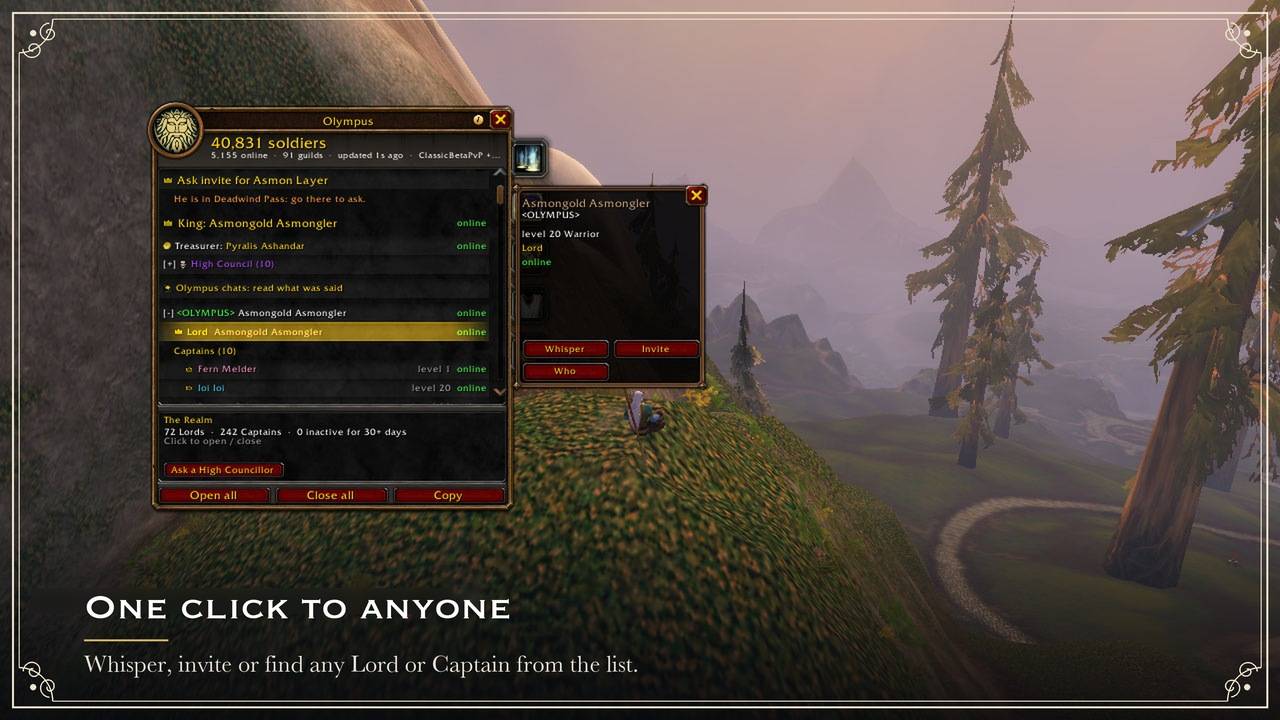
Click any Lord, Captain, racer or inspected player. You get the same card the Guild window shows: level, class, zone, rank and status, with Whisper, Invite and Who buttons. Any soldier can reach the Lord of another Olympus guild in two clicks.
Right-click a player (1.1.2)
Right-click a player (the target frame, party and raid frames, a name in chat, the Who list, the friends list, the guild roster) and the game's menu gets an Olympus part at the bottom:
- Their version: "Olympus 1.1.1 (out of date)", "up to date" or "not seen yet", and under it where it came from and when. Guildmates show up by themselves (their addon says hello to your guild), and so does a known version on the person card. Opening the menu sends nothing.
- Check version: for anyone else, one tiny addon whisper that their addon answers with its version and nothing else (a player once every 2 minutes, 6 a minute). Only 1.1.2 and newer answer, so no answer in 10 seconds can mean no Olympus, an older one, a dungeon or raid, or no Olympus guild (outside one the addon sends nothing). The author's check is his roll call to that player alone, which every version since 0.9.9 answers, and only after their yes to his roll calls.
- Ask to update, when they are behind the newest version your addon knows: on 1.1.2 or newer
their addon shows a small notice with both versions and where to update; an older one can't, so
the click opens a whisper with the ask for you to send. One ask per player a day, 5 an hour;
they see one a day at most, Don't remind me hides them for 7 days (on the beta, which forgets
addon data at login, these last until you log out), and a player they block (
/oly block) or ignore, or one the moderators took off, never gets through. The notice never names a version the author has not released. The author's pick sends his usual update window, naming the version he marked as out (/oly released). - Tell them about Olympus, when their addon did not answer: a whisper with a short invite and the CurseForge link (to get it, or update an old one) opens in Olympus's own window, for you to edit and send yourself. The click sends nothing.
- Ask for a bug report (the author alone, on a player running 1.1.2 or newer): their addon
opens a window of its own, never a game popup, saying the author asks for their Olympus bug
report, with See what is sent (the exact text, the same as
/oly bug), Send and Not now. Send goes to him alone, in game; Not now sends nothing; an ask from anyone else is ignored. On his side the report he asked for opens by itself in a window you can copy from (the sender and time on top, Select all), and stays in the Workshop's list; chat gets one short line. A report nobody asked for gets its line and the list only. His version checks and his/oly statusopen in copy windows too. A window that opens by itself takes no keyboard, waits until a fight is over, and never covers a report he is reading. - In a dungeon, a raid or a match the game holds addon messages: the lines that send show greyed and say why. Not on yourself, enemies, offline names or Battle.net friends, and only while you are in an Olympus guild. It uses the game's own way for addons to add to its menus (a client without it gets no lines); no Blizzard function is replaced, and nothing opens the game's chat box.
Explanations and Answers. Each page has a ? in its bottom box (next to the gear on the
Chat tab): what the page shows and, where it counts, why the numbers can differ between players.
A count's tooltip (the header's totals, a guild's row, the Realm's online, Captains and
Recruiting, a layer's ~N, a zone and a map pin, the Treasury's week and ranking, the dues' guilds,
the Throne's roll call) ends with Why can this differ? and a short answer. The author, the
High Council and the Stewards also get an Answers button at the end of the Chat tab's box and
in Olympus's whisper window: ready answers by topic (the counts, each feature, installing and
updating), with a search. A click puts one in the box to edit (Shift-click: the longer one, to
copy for Discord); nothing is sent until you do. The explanations and answers are in English: in
another game language the tooltips leave them out, and a page's ? says so first. The answers
live in docs/answers.json, and luajit scripts/answers.lua writes Olympus/AnswerBank.lua
from it.
Decrees
| Decree | Who | What happens |
|---|---|---|
| Call to arms! | Captains | Alarm for every Olympus guild: raid warning, sound, red marker at the caller's position for 5 min |
| Muster here | Captains | Rally point: horn marker on the map for 30 min, soft alert |
| Royal decree | The Crown | A proclamation with free text, as a raid warning to the whole army |
| Tabard inspection | The Crown | Announces an inspection at the caller's position: wear your colors |
The Crown means the guild masters of Olympus guilds and the officers of the main
<Olympus> guild. Everyone else gets a local preview when they press the buttons. Since 1.0.0
the officers of <Olympus> are of the Crown for <Olympus>'s own members, whose roster (the
server's word) names them: on every other client, where only the census could, they count as
Captains, and the Crown of <Olympus> there is the King himself (by his character's name) and
the Hands his list or a Steward's own list names, on their word alone: while a list names them,
a Hand who is one of its officers has its Royal decrees, Tabard inspections and [Lords] lines
on every client. The King can't take back a Hand his Steward named: that Steward does, or the
author, by removing him. The
King's Steward (1.0.0, below) sends the Crown's decrees for <Olympus> on every client,
whatever his rank, like the King.
Alert sounds (1.1). Each kind of alert has a sound switch of its own, at the bottom of the
Decrees tab (a click on its line, with the gamepad UI too) or with /oly sound <kind> on|off:
arms (Call to Arms), muster, royal (Royal decrees and Tabard inspections), court, vox,
agenda, throne (the roll call, the Royal Inspection, writs), help (help requests and bug
reports), hop, treasury, patrol and update. Silence the chimes you don't want and keep
the Call to Arms: /oly sound alone is still the switch for every sound, and each kind keeps its
own switch under it. A softer chime never silences the Call to Arms that follows it. Only the
sound changes: the chat line, the raid warning and the Olympus window stay, and nothing is sent.
In an instance or Busy (1.1). In a dungeon, raid, battleground or arena, or while you are
Busy (/dnd), Olympus's alerts wait: no raid warning, no sound and no popup from the addon. Each
one still prints its chat line and waits on top of the Decrees tab, where a click shows it now.
Once you are out and not Busy, one line (and one raid warning and one sound) says what waited and
is still current, and only what is still open pops up: a Vox question still open, the King's call
to his audience within its two minutes, the Agenda still to come, a roll call within its minute,
an unread writ. What is over by then (a Call to Arms lasts 5 minutes) only stays in its list, and
nothing is ever answered for you. /oly alerts always shows them at once as before; /oly alerts
quiet (the default) holds them again; or a click on the line at the bottom of the Decrees tab.
Only on your computer: nothing is sent.
Channels
Chat for the whole federation, carried by the addon over its hidden Olympus channel (no WoW channel number to join). Each channel is exclusive to a rank:
The full section is in the README on GitHub: Channels.
The Chat tab (1.1.1)
The Olympus chats in a tab of the Olympus window, Chat, right after the Realm, like the chat
pane of the Guild & Communities window. Click the tab, or type /oly talk (or /ol, /olc or
/oll with nothing after it), Shift-click the minimap button, or click the Olympus chats on
the Realm tab: each opens the Olympus window on its Chat tab, on that channel. /oly talk lords
opens it on [Lords]; the same command again closes the window.
With the King's tabs the side column of the new look runs out of room: his Treasury moves to the
window's left edge (for the author, his Workshop goes there first).
- On top, where the other tabs show the army's counts, the search box: a name, a guild or words
of a line, and only the lines that hold it show (a line your block terms hide is found by its
writer and guild, not its words), with an x to empty it; like every tab's, it keeps its text
until you log out or
/reload. On the same row, right of it: for a rank that reads more than one channel, a small switch with the channel shown, in its colour, and +N for the lines that came in on the others while the tab was open (a click lists your channels, each with its count, to pick one); then the gear of the settings (below). There is no row of channels: most players read [Olympus] alone, and the lines take that room. A channel muted in chat (/oly mute) still shows here, and a line you write here keeps it muted in chat. The pinned line shows over the lines, as on the Realm tab, and takes no room while nothing is pinned. - Every line whole, in a bubble that wraps: never cut, nothing to hover to read it. Other players' lines on the left, yours on the right in the channel's colour (a line another of your characters wrote shows under that character's name, on the left); the writer's name, guild and time where a writer starts, and the date where the day changes. The lines take the room of the list and of the box under it (this tab has no detail box). The last 100 lines of each channel are kept, from every session, and scroll back. The tab follows the newest line until you scroll up; then the line you are reading stays in its place while new lines come in and the oldest go, and N new at the bottom takes you down to them.
- By each name, Olympus's marks, by the rules of the borders and the nameplate marks (but not switched off with them), and only where the guild a line names is proven: a nameplate reads the guild from the game, a chat line only claims it. The King's crown, the High Council's mark and colour, the game's silver elite mark for Lords and Captains, bronze for Raiders and Veterans of your own guild (the census does not carry other guilds' rank names), a star for any other member of your guild's roster or anyone the census names in theirs (and the King's Stewards and Hands), the Treasurer's coin, and Steward or Hand after the King's. A name whose Olympus guild cannot be checked (a plain member of another guild, or anyone claiming a guild's name) gets no mark. A click on a name whispers that player, in Olympus's whisper window.
- A line your block terms hide shows as a grey bubble, and a click shows it, marked. Over the lines, like the pinned line, how many your filter hides in the channel (no room while it hides none), and a click there shows them all (another hides them again). A link shows its tooltip when you hover it, and a Shift-click puts it in the tab's box.
- The box runs across the bottom, where the other tabs have their buttons, with no Send
button: Enter sends. It is Olympus's own, not the game's chat box: it takes the keyboard only
when you click into it or press your open-chat key (Enter, unless you changed it) while the tab
shows (the tab never takes it when it opens, so your movement keys keep working; in a fight the
key changes over when the fight ends). Enter sends to the channel shown and the cursor stays for
the next line; Enter on an empty box, Escape or a left-click elsewhere gives the keyboard back to
the game; Tab changes channel. With the gamepad UI only a click puts the cursor there, and Enter
lets it go. It runs no command: a line that starts with
/stays in the box and is not sent (commands go in the game's chat box, which Olympus never opens or touches). Your first line in each channel still waits for the privacy warning's Send. A line of yours that did not leave shows a note in its channel, and a click puts it back in the box when the box is empty (what you are writing is never replaced: the note waits). - Add an Olympus tab to the game chat: while your game chat has no Olympus tab (see Channels
above), a line over the lines offers one. Olympus cannot make that tab itself, so a click
shows you where: a small Olympus pointer by your main chat tab says right-click it, Create New
Window, and name it Olympus. The moment a chat window named Olympus exists, Olympus sends the
chats there (as
/oly chatwindow tabdoes) and says so once; the pointer and the line go. It only reads the game's chat windows to see the new one appear. With the gamepad UI there is no pointer (the game's chat tabs work otherwise there): the line gives the same steps as text. The line stays away while you send a channel to a chat window of your own (/oly chatwindow), and its x puts it away for good, on every character: the settings and/oly chatwindow tabstill make the tab. With Chattynator (1.1.2) there is no pointer either (the game's tabs are hidden behind Chattynator's): the click sends the chats to its tab named Olympus at once, and chat says how to make that tab in Chattynator; the Chat tab reads Chattynator's tabs while it shows. The tab is announced once, by the Chat tab when it sees the tab or by the tab's first line if that comes first, and a channel you moved meanwhile stays where you put it. - Settings: the gear at the end of the top row shows them in place of the lines (a click on it
again, or < Back to the lines, goes back). The Olympus chats on or off on this client, what
that means, and a click to choose (the first-open page); for officers while your channel is
public, its quiet grey line. For each channel your rank reads: whether it shows in your game
chat (a click mutes it there or shows it again, as
/oly mute), and the chat window it prints in (a click moves it to the next chat window open in your game, then back to the main one, as/oly chatwindow; with Chattynator, to its next tab, by name, 1.1.2). The Olympus tab of the game chat: add it (as the line over the lines does), the steps while it is awaited, on, or waiting for a chat tab named Olympus. And for whoever may pin, Pin a line for the army… (or for your guild…). Each choice is the one its command makes, kept where it always was, so nothing chosen before 1.1.1 is lost; the game's chat windows are only read, and printed in. - The tab has no place or size of its own: it is the Olympus window's, docked by your guild window or wherever you put it. Escape or the window's X closes it; it never opens by itself. With the chats off on this client it says so, what the choice means, and offers it.
- Blizzard's gamepad mode: the same tab, opened with
/oly talk,/olor the Realm tab's link; click into the box with the gamepad cursor to write. The Olympus window stays off the Escape list there (its X closes it), and the tab opens no game popup: the whisper, a pinned line's takedown and the settings' pin use Olympus's own windows.
The Board: who is looking for a group, and where (1.1)
The Realm tab links the Board (or /oly lfg): who in Olympus wants a group right now, from
what each player chose to share, and the King's week.
- The King's week (
/oly week): the King's Agenda for the next 7 days, by day, with your own guild's events from the game's calendar among them, so nobody books the army twice. Olympus can't write into the game's calendar: an officer's click opens it on the right day's month and says which day to right-click for the guild event. Your client keeps the week across a/reloador a login, so it shows while the King is offline. - The signup sheet: Sign up on an Agenda entry with the role you claim; it goes to whoever set
it, alone, and the army sees the counts (4 tanks, 9 healers…), kept by his client across a
/reload. Nothing checks the role and nothing invites you: whoever runs the event invites by hand. Five minutes before an entry you signed, your client alone prints one line with the usual alert sound (nothing sent), after a/reloadtoo. - Raise a flag with one click: Dungeon, Raid, PvP or Layer, plus a short note if you want one (40 bytes at most). A box says first what goes out: your name, level, class and guild, the flag and the note, to every Olympus player of your realm and faction. The note goes the way chat does (the game's servers keep it, so abuse can be reported); on the King's screen no note shows.
- Your zone shows on your card only while you share it (
/oly location on); otherwise the card says the zone is hidden. Never your position. - A click on someone's card whispers them. Nothing invites anyone, queues or forms a group.
- One flag each, an hour at most; a click on yours, or
/oly lfg off, lowers it at once. - Camps: drop one where you stand (
/oly camp [note]) so the army reuses a fire already up. Its zone only, never your spot; it needs/oly location onand ends by itself after 30 minutes. The Board lists them by zone, and the world map shows one badge per zone with how many (mouse and keyboard only;/oly camps offhides them).
Net-off (1.1): the moderators hide a character or take a guild off the network
The King, his Steward, a Hand (the King's list or a Steward's) or a High Councillor of the
author's signed list can hide one character for the whole army: Hide a character on the
Decrees tab (the name or your target, then the reason), or /oly netoff Name: reason. Every
addon then hides that character on every Olympus surface: their [Olympus], [Captains] and
[Lords] lines (and the lines the Olympus chats kept), their pinned line, their decrees, their layer and hop offers,
their Vox Populi votes and questions, their requests at court, and (1.1, Konig's review) their
signups to the King's week, their flags and camps on the Board (the camps' map badges too),
their listing, answers and recipe lists as a crafter, and their elite border and nameplate mark
(they show as no Olympus player). The names their player already linked as alts are hidden with
them (alt links, below). The rest of their guild, and
the census, are not touched: one name stops the spam.
- The Decrees tab lists who is hidden, with the reason, who hid them and when (the server's
clock), and who passed the word on when it reached you through another issuer's addon (the
server's name for that one: nobody writes a word in someone else's name unseen). The same
people show a name again with a click there, or
/oly neton Name. - Only a word from higher up reaches one who gives words: the King's reaches everyone but himself, a Steward's the Hands and High Councillors, and a Hand's or a councillor's no other issuer (nor the names they linked as alts). So a rogue Hand or councillor can't hide the Steward, another Hand or a councillor; the King (or the Steward, for a Hand or a councillor) hides the rogue, and the rogue's words then fade. And no word replaces one from higher up, whatever its date: a Hand or a councillor never shows again one the King or the Steward hid, nor hides again one they showed again, and the Steward never undoes the King's word (1.1, Konig's review: the King's undo no longer loses an edit war to a newer word). Nor through another name of that player: a word on a name he linked as an alt, or (Forever) on the same name on another realm of the group, doesn't hide him when his own name's word comes from higher up, or from as high and is newer.
- It never aims at the King (his name in any case), nor at the characters he linked as his
alts. It uninvites nobody, demotes nobody and writes nothing to Blizzard's ignore list, and
/oly blockstays one client's and one player's. No treasury code can call it. - The hidden player's addon tells them why, and sends none of it. A Hand or a Steward who is hidden calls the army in vain: their Agenda, roll call, Vox Populi, inspection and gates, and their entries on the King's week (their cancels of anyone else's too) and its signup sheets, show nowhere, and what an addon heard of them before the word leaves its week (whoever named them a Hand still decides whether they stay one). Taking their own entry off the week still reaches every addon, so it doesn't come back once they are shown again.
- A word goes on the Olympus channel with Blizzard's logged addon-message function (the issuer's own words: the server keeps them, so abuse can be reported), one word per name. Each issuer's addon repeats his own words for late logins, every 5 minutes, and never anyone else's (1.1, Konig's review: a word passed on in the King's name went out from the King's addon as his own), and the army repeats at most 20 words a minute however long the list (a long list is repeated less often). Among words of the same rank the newest wins, by the server's clock; on the same second the King's own, else the one hiding the name, so every addon keeps the same word, whatever reached it first. A word hiding someone lapses 30 days after it was given (give it again to keep it); a word showing a name again is kept for 30 days, so an older word never comes back. A word counts only from someone who may give one on that client now (the server stamps every sender's name), never from a name that is hidden itself, and a word passed on only while its giver may still give one on that client: the words of someone taken off the lists or hidden (or of a Hand while nobody who named him keeps his list alive) are no longer repeated, and fade within 3 days, as do, on the other addons, the words of an issuer who has not played for 3 days (his addon repeats them when he is back). When the list is full (500 characters, 200 guilds) a new word waits for room, except the King's own, which always finds it, and no word ever makes room by pushing out one from higher up (1.1, Konig's review: a Hand who filled the list pushed out the King's word showing a name again).
- On the King's screen, while the council's names are hidden (his stream), another issuer's reason (even one written in his name) and a councillor's name stay hidden until he shows the council's names. Nothing about him or his alts is printed on his screen.
- Each honest addon does it: a modified one can ignore it, and versions before 1.1 show everything.
The same people can also take a guild off the Olympus network (Take a guild off the
network on the Decrees tab: the guild's name or your target's guild, then the reason; or
/oly netoff guild Name: reason), and put it back on (/oly neton guild Name). While it is off,
honest addons stop sending and showing that guild's census (its size leaves the army's total),
its zones on the map, its layers and hop, its decrees, its Vox Populi votes, its Olympus chats
and pinned lines, and (1.1, Konig's review) its members' entries and signups on the King's
week, their flags and camps on the Board, and their listings, answers and recipe lists on the
crafters' board: its own members' addons send none of it and say why, and every other addon
drops what still comes. Every addon also drops its members' requests at court, and shows them
with no elite border or nameplate mark (as no Olympus player). Blizzard's guild chat and Guild
window stay up, and so do the guild's own addon messages among its members (its guild master's
pinned line aside: hidden with its chats). A
spam guild, or one that is not really Olympus, is cut out of the
federation without touching anyone's rank. One guild per word and never the King's: there is
no switch for the whole realm. Nothing about it is tied to the treasury or to any payment, and
no treasury code can call it. Its members' hop asks and offers are known by the guild their own
messages name (a census report names its sender's guild), never by the names written inside
someone else's report.
Alt links (1.1): one player, counted once
One player in three guilds used to swell the army by three and look like three donors. Link your alts and the census counts people:
- On your main,
/oly alt add Namenames a character of this account; then log that character and say yes there. The offer waits in this account's saved variables, so only this account's characters can be linked, each confirming on itself: an officer can't attach anyone's alt, and a character added later is linked only once it confirms too. An alt never starts a link (its main does), and it gains nothing of its main's (a Hand's alt is no Hand). - The army's total then counts each player once, whatever guilds their characters are in (each guild's own size stays its roster's; the header's tooltip says how many were counted once). The treasury's ranking and its week's donors put a player's characters on one line, under the main's name. Vox Populi takes one vote per player.
- Each linked character's addon says so on the Olympus channel (its name, its guild and the names it confirmed), and a link counts on a client only when both characters said it: a name someone claims alone links nothing.
/oly altshows your links;/oly alt remove Nametakes one apart, from either character.- While any linked name is hidden by the moderators (net-off), the links freeze: your addon adds and removes none, and every addon keeps the links it knew (it takes new names, drops none), so nobody drops the punished character to walk back in on an alt.
- The same faction and realm group only (one census). Up to 8 alts per player. On the Forever beta, which forgets addon data at every login, the offer can't reach the alt yet.
The Throne (the King and his Hands)
A tab with a crown that only the King sees: the guild master of the guild named exactly "Olympus" (of his faction), and on the Alliance that very character, Asmongold Asmongler: the addon knows him by name, like the Treasurer. It opens on the Throne Room (the queue of his court while it is open, and the Treasury), and holding court takes him there. Each of his tools lives where it belongs:
The full section is in the README on GitHub: The Throne (the King and his Hands).
The King's Steward (1.0.0)
The King's right hand, so that he needn't set everything up himself: a character the author marks as Steward in the High Council's signed titles list. On the Steward's client the Throne opens as the King's, with Acting for the King on top of every page, and in the King's name he:
- names and removes Hands of his own, beside the King's (the Hands button on the Throne): the King's list stays the King's, and his own is his;
- names and removes the treasury's keepers, and sets what the army sees of the treasury (its three switches), on the Treasury tab, and sees the whole treasury as the King does: the balance, the ranking, every keeper's shared book and the guild bank, whatever the switches (every keeper is told so before he shares his book);
- uses every tool of a Hand: the Agenda, Summon the Lords, the Royal Inspection, Vox Populi and the gates;
- sends the Crown's decrees for
<Olympus>(Royal decrees, Tabard inspections, Calls to Arms, Musters), whatever his own rank: every client takes them by his name,<Olympus>'s own members' too, and they never wait behind the flood guard, like the King's. For the other guilds his [Lords] lines are the Crown's, as the Hands' are.
Never the King's own: his crown on the map and his layer, holding court, Royal Writs, Royal Pardons, the untabarded list, and the King's own book of the treasury or his yes to share it (the Steward keeps no book unless named a keeper).
The Hands: each list its owner's. The Hands are the King's list and each Steward's own
list together, and a Hand has the same tools, and the same Crown for <Olympus> on the other
guilds' clients, whoever named him. Nobody changes anyone else's list: the King's Hands page
shows his own list, to change, and each Steward's, to read, under that Steward's name; a
Steward's page shows his own list, to change, and the King's and the other Stewards', to read.
The King can't take back a Hand his Steward named: that Steward does, or the author, by
removing him as Steward (both pages say so). The King's list is the same message as before
1.0.0, from his client alone, and ends 20 minutes after his client stopped repeating it, as
before. A Steward's list goes out from his own client alone, in a message of its own; every
client keeps the last one it heard from him (by his name, which the server stamps), and it ends
20 minutes after his client stopped repeating it, or at once, on every client, when a newer
signed list no longer names him: named again later, he starts from no Hands, as long as his
addon saw the list without him (on any of his characters there). Clients before 1.0.0 follow
the King's list alone, as they
always did, and leave a Steward's out: a Hand only a Steward named has his tools on 1.0.0
clients.
The treasury: the newest word. The treasury's keepers and its switches are one list each, which the King and his Steward both set: each client takes them only from the King's character or from a Steward its signed titles list names, each word dated by the server's clock. The newest wins, and on the same second the King's: the King's newer word always wins (his screen tells him when his Steward changed one of them; the name is cut short there while the council's names are hidden on his stream). The King's client and the Steward's take the newest word as theirs and repeat it, and each answers an older word it hears with the newer one. A word dated more than a minute ahead of the server's clock is not taken.
Who he is. Only the author names a Steward, with the same key that signs the council (the
README on GitHub says how): no name is written in the addon, no census vote counts, and nobody
else can make one. A Steward acts for the Alliance's King (the Horde's only when the list names
one for the Horde), on the list's realm group, where a King is named. A newer signed list
without him ends it on every client at once. /oly status says whom your addon knows as the
Steward and the lists of Hands it holds, whose each is.
The Treasury (its keepers, the King, and the army when the King says so)
A tab with a coin for the treasury's keepers, for the King, and for every member once the King shows the army something of it (1.1: for every member on the Treasurer's realms, with the dues' button alone until then).
The full section is in the README on GitHub: The Treasury (its keepers, the King, and the army when the King says so).
Tabards: tabard inspection and the untabarded list
- Patrol: walk through the crowd and the addon inspects nearby Olympus members level 15 and up, one by one (about 28 yards). Younger players are never flagged. It records who wears a tabard, who wears the wrong one and who wears none. Players it could not see properly are never accused.
- Mark a player (with a note:
/oly mark complained about the rule) or a whole guild. - Gear seen (1.1, officers): target a player in range (about 28 yards) and click Inspect
gear on the Tabards tab (or type
/oly gear). The addon inspects him once, in turn with every other inspection (one at a time, never in combat), and keeps what he wears in your saved variables, under Gear seen: a click shows his items in their slots, each with its own tooltip. A Captain can check a raid signup's last-seen gear days later without pulling him again. Only the guild master and the officer rank right below keep gear; nothing is scored, compared or sent, and nobody is told how to play. - Shared among officers (1.1): what an officer's own inspections find (a player without the
colors or with another tabard, and one caught before who wears ours again) goes to his guild's
officers over guild addon messages, once a minute at most, and an officer's addon asks the others
for the day's findings once a session: after its login, or at his yes if that came later. Each
officer's Tabards page shows them with his own, the officer who found each in its tooltip, for a
day (his own later inspection of that player replaces it). Nothing is inspected more or sooner for
it, nothing goes on the Olympus channel, and only officers (the guild master and the rank right
below, by each addon's own roster) send or keep it. The King's untabarded list stays his: another
officer's finding never joins it, never rides in a Royal Inspection's report and never replaces
what the King saw himself. Off until you say yes (officers get its line on the first-open page, or
/oly patrolshare on);/oly patrolshare offstops it. - Per guild: "5 of 20 with problems".
- Untabarded (the "Wall of Shame" before 0.9.2): the players the Royal Inspection found without the colors are on the King's list, which only he sees. He alone can let the army see it (a switch on the Throne, off by default): then it shows on the Tabards page, quietly (no raid warning, no chat line, no sound), and it leaves every screen when he turns it off or stops repeating it. Nobody else can publish one. Players under level 15 are exempt: never flagged, never listed.
- Hover any player in the world to see their last inspection in the tooltip.
Loot notes (1.1)
Loot arguments restart every raid because nobody kept last week's decision: the Loot notes of
your guild keep it (on the Realm tab, or /oly loot).
- Your guild's officers (the guild master and the officer rank right below) write the decision: which item went to whom, and why ("Ann passed on the gloves, Bob gets the next belt"). The items your group loots show to them there this session, from the game's own loot lines, so a click names one in its note.
- Points, if your guild uses them: a number per member that an officer sets by hand ("Bob 12"; the name alone clears it). A notebook: nothing adds or takes any, and the column only shows once someone has points.
- Every member with the addon reads the book, newest first, with the Realm tab's search and a copy for Discord. An officer's click removes a note for the whole guild.
- It is not a bid window and not a loot tool: no bids, no rolls, no gold (GDKP is not allowed on Forever), and nothing is handed out, traded or looted for anyone.
- Over guild addon messages only, never on the Olympus channel: each change once, when an officer makes it, and what a guildmate's addon lacks of the book when it asks (an officer's at login, anyone else's when the page opens): an answer holds some 5 KB, the newest notes first, and the addon asks again after each until its book is whole, however large. One officer's addon answers each ask, and only an officer's addon that holds that part of the book whole itself (the first officer online takes his own as the guild's). Each addon takes a change only from a sender its own roster ranks an officer, and one dated during your session only from the officer it names (a note's writer, the officer of a points change). Another officer's answer passes on changes from before your session began, and those come on the passing officer's word: nothing proves who made them (one made up and dated back looks the same), so the page names the officer who passed each one on ("Offi via Rival" on a note and in the copy for Discord, and in the tooltips of notes and points). Once your addon holds a note, no other officer changes its words (any officer can remove it), save its writer's own copy replacing one another officer passed on; an officer's addon sends a change in his name only as he made it. Kept per guild in your saved variables (on the Forever beta, which forgets them at every login, the book comes back from the officers online).
Crafters' board (1.1)
"Who can make this?" is a chat scroll: the Crafters page of the Realm tab turns it into one
whisper to a named crafter (/oly craft).
- When you open one of your professions, Olympus reads it (its skill, and the recipes you know:
their recipe and item ids, never a specialization tree) and asks once, in a window of its own,
whether to list it. With your yes the board of every Olympus player of your realm and faction
shows you: your name, guild, that profession and its skill.
/oly crafter offtakes you off at once;/oly crafter onlists every profession read again. - Ask who can make an item: shift-click it after
/oly craft(or type part of its name). The crafters listed who know its recipe answer by whisper, their addons by themselves; the page shows who can, with their skill and the item, and a click whispers one of them. - A crafter's row opens a whisper to him and, on a click, the recipes he listed (hover one for the item). Search the board by crafter, guild or profession.
- It stays light on the Olympus channel and on your own messages: your listing goes once at login, every 45 minutes, and after a change (a profession listed or taken off 2 minutes after the last at the soonest, a skill up 10 minutes), so about 1.3 an hour while you play and 6 at most while you level. Your recipes go a part each 6 seconds (10 messages a minute at most), to two players at a time, and only while your addon's own messages (the census first) are few; the next player is told you are busy and clicks again a minute later.
- Nothing is crafted, ordered, bought or sold for anyone, nothing touches the auction house, and nothing is whispered for you: the whisper is yours to write. Old clients ignore the board.
World map
- Soldiers per zone on zone and continent maps, and per continent on the world map (with Blizzard's gamepad mode, only per continent: see below).
- Decrees are round icons (the horn, the war cry…) where they were called, and the King's crown where he stands; the Board's camps (1.1) one fire badge per zone, with how many. Over a zone's circle they move just outside its edge, top right first, so its number stays readable; several around one circle each take a place of their own.
- The round Olympus button in the bottom left corner of the map switches markers (army per zone, decrees, camps) on and off.
- Every zone of the game counts, not only Azeroth's (1.1): on TBC Anniversary Outland's zones
get their circles, and Outland's total shows on the map above Azeroth and Outland. A zone a
new patch adds is found by itself the first time a guildmate stands in it; one the addon still
can't place shows as plain text in the census, and
/oly status(and/oly bug) lists its name under "zones without a map id".
Olympus Link: your Discord role (1.0.0, optional)
Prove to the Olympus bot on Discord that a character is yours, and the bot gives you your role. It is the one part of Olympus that goes outside the game, and only if you choose to link a character (or to confirm other players' links, below): no password, no Battle.net login, and nothing is sent before you say yes.
Not open yet: the addon carries it, but /oly discord says it is not open until the Olympus bot
is ready and its key is in the addon. Until then no addon makes, keeps, announces or uses a
confirmer key.
- Get a code from the Olympus bot on Discord (its
/verifycommand, in the Olympus server: only you see the reply). It is good for 24 hours. Keep it to yourself, and don't show it (or the Olympus Link window) on a stream. - Type
/oly discord <code>in the game's chat. The addon checks the bot's signature on the code, then asks whether to link this character to the Discord account the code names (the bot's word: nobody can change it). Cancel sends nothing. - Players confirm in game, by addon whisper, that this character asked: a High Councillor
online, or, when none is, verified players drawn for your code (three of them must confirm).
Each signs with a key of its own, for its character, which the bot certified. Every confirmer,
High Councillors included, gets a key from the bot's keeper, made on a computer, and types it
in the game with
/oly discord key <id> <key>, then its certificate with/oly discord cert <certificate>; no addon makes a key of its own (the author's council authority, which could certify keys made in game, is off). Once the bot is ready, a confirmer's addon says so on the Olympus channel every 5 minutes and signs other players' requests by itself (/oly discord key offstops it). - The proof reaches the bot. The Olympus Link window shows a QR code and the same link in a copy box. Open the Olympus Link page, https://dnl-gentile.github.io/olympus-addon/ (a static page on the project's GitHub Pages): point your phone's camera at the code, share the game's window with the page, or paste the link, then sign in with Discord there (Discord's own sign-in page, which tells the bot who you are on Discord) and the page sends the proof to the bot. Or, later, the addon hands it to a High Councillor's watcher the next time you are both online, and the bot's keeper uploads it.
The page reads the code in your browser: the camera and the shared window never leave it, and
the proof rides after the # of the link, which a browser never sends to any server. The page
loads its fonts from Google Fonts. The bot keeps which character (name, realm, guild and
faction) is linked to which Discord account, and a record of each proof it received (for 90
days). A linked character never moves to another Discord account by a new link: the bot refuses
it. Delete my link, at the foot of the Olympus Link page (signed in with Discord), takes the
role away and deletes what the bot keeps about your account, except how many codes and links you
used today, counted for a day at most. The Olympus bot is Fernmelder's; how it checks a proof
is on GitHub (the README and web/FERN.md).
/oly discord show opens the window again, /oly discord status lists every character of your
account, /oly discord forget drops this character's request and proof.
Everywhere
- Copy: every tab produces a ready-to-paste text for Discord.
- What this client saw (1.1, the Decrees tab and
/oly log): a log of the acts your addon took while you were online (decrees, the gates opening and closing, pardons, the King's visibility switches for the treasury and the untabarded list, and the shared block terms' edits), each with the sender's name as the server stamped it, the newest 300. So "who opened the gates" has an answer after the message is gone. Only acts heard from whoever did them: a repeat or a relay of someone else's act (the Treasurer's book carrying the King's switches, another editor's list carrying a block term) and a state caught up on after a later login are not written. On the King's screen, while the council's names are hidden there (his stream), every sender but the King shows cut short, and the shared terms' words too, as everywhere on his screen. Kept on your computer only, never sent, never in/oly bug; a record, not proof (anyone can edit their own saved files). The Decrees tab lists it with a search box and a copy;/oly log [n | word | copy | clear]in chat. - Backup (1.1):
/oly backupputs one text in the copy box (keepers also have Copy a backup of your book and settings on the Treasury tab): this character's book of the treasury (its opening, its 500 lines and its sums of all time, each giver's weeks of the dues and each week's amount with them; on the Treasurer's characters his mail character's book too), the King's switches and keepers on his client or a Steward's, and your settings (sound, map, minimap, borders, nameplates, Vox, your chat windows and mutes, the players you blocked). Keep it in a text file: when the beta wipes the saved variables,/oly restoreopens a box to paste it back, says what it restores and waits for your yes. Clipboard only: nothing is uploaded or sent anywhere (a keeper's book goes out afterwards as it always does). A book goes back only into that character's (merged with what it wrote since, nothing counted twice), a text that was cut or changed is refused, and it never holds your yeses to sharing (the addon asks them again). It never holds or sets the channel key, on anyone's character: a text someone else made would move your guild to another channel (your officers hand the key out in game as ever, or/oly key); the confirm says a key in a text is left out, and warns when it is one your guild replaced. The players it would block are named one by one in the confirm (30 at most) and added only on your yes. - Search: a box on top of the Census (guilds, Lords, Captains, players, zones, recruiting),
the Realm (guilds, Lords, Captains, members seen online), the
Tabards (inspected and untabarded players, by name or guild), the Treasury (donors in the
ranking and the book, and since 1.1 the bank's items), the Decrees (since 1.1: the log of what this client saw) and the Chat tab (since 1.1.1: a name, a guild or words of a line). Any case, accents too; only what matches shows, under the headers it belongs to (a Captain under his guild, opened
for you, a page of guilds at a time), with an x to empty it. Each tab keeps its text until
you log out or
/reload; a guild clicked in the Census opens in the Realm with its box emptied. It only changes what the list shows: Copy still gives everything, and nothing is sent. - The window opens from
/oly, the minimap button, or the round button in your guild window: the old Guild tab or the new Guild & Communities window, whichever one you use. Shift-click the minimap button for the Chat tab (1.1.1, above). - Next to Forever's Guild & Communities window it takes that window's look: icon tabs down the right side, its rows, column headers, buttons and member card. When the tabs do not all fit down that side, the Workshop and then the Treasury move to the window's left edge, low, until the rest fit: the King's view with the Chat tab moves the Treasury alone, the author's preview both (1.1.1).
- Blizzard's gamepad mode (Forever's controller interface): Olympus asks its questions in
windows of its own instead of the game's popups, which Blizzard's gamepad code blocks (and
freezes) when an addon opens one. With mouse and keyboard, the game's popups as always.
Since 0.9.8 it also leaves the game's own frames alone there: no quiet
/whoon its own (Refresh and Find Olympus online still search, and so does the King's click on his Throne's /who line for his key rotation, 1.1: the answer shows in the game's Who list), and the Issue Reporter is the game's to show. Since 0.9.9 it leaves the world map alone there too: no zone counts, decrees, crown or guildmate dots on it (the minimap keeps the crown and the dots, the Azeroth map its continent totals), because each of those went through the map library into the gamepad map's own state. If the game still says it blocked Olympus, a/reloadclears it; to tell us what it was, open the Olympus window, press its help button (left of the X), then Report a bug. Don't type/oly bugwith the gamepad: a command typed in the chat there can set the block off again. - English and Portuguese in full, and since 1.1 Spanish, French and German for the main
screens, the alerts and decrees, the Join screen and its whisper, the chats and the privacy
questions (the rest in English; the pages' ? explanations and the Answers of 1.1.2 are in
English too). It follows the game language, and only the text on your
screen changes: nothing sent between players does.
/oly statusshows the language in use.
Install
Easiest: install Olympus Guild from the CurseForge app or WowUp. It installs in the right place and keeps it updated. For Forever, pick the Forever (beta) installation of the game in the app, not Classic Era.
By hand:
- Download
Olympus-x.y.z.zipfrom the Files tab here (or GitHub Releases). - Open your World of Warcraft folder. On Windows it is usually
C:Program Files (x86)World of Warcraft(on Mac:/Applications/World of Warcraft/). - Open the folder of the game version you play. For the Forever beta it is the one with
beta in its name (for example
_classic_beta_); Classic Era is_classic_era_, TBC Anniversary is_anniversary_. - Go into
InterfaceAddOns(createInterfaceandAddOnsif they don't exist) and extract the zip there, so you end up with...InterfaceAddOnsOlympusOlympus.toc. Careful: Windows' Extract All adds a folder named after the zip (AddOnsOlympus-0.8.1Olympus...). If that happens, move theOlympusfolder up intoAddOns; the game only loads it fromAddOnsOlympus. - Restart the game. If the addon list says out of date, tick Load out of date AddOns.
The addon only shows live data: guilds appear as soon as one of their members with the addon is online (give it a few minutes). There is no demo mode any more.
One member per guild is enough for that guild to appear for everyone. The more guilds have at least one install, the more complete the census gets.
For officers: seal the channel (recommended)
Type once, with a secret the Olympus officers agree on:
/oly key <secret>Your guildmates with the addon receive it automatically through guild chat. From then on the Olympus channel has a name and password derived from the secret, and outsiders can't find or join it. Share the same secret with the officers of the other Olympus guilds (for example in the officers' Discord), so all guilds meet on the same sealed channel. Since 1.1 the King (or his Steward, for him) can also rotate the army's key from the Throne: his new key reaches the Lords and Captains online of the guilds he picks whom his own /who saw in them by whisper, and their guilds over guild chat, never on the Olympus channel.
How it works
- Every guild member can read their own guild's roster: name, level, class, zone, rank, online and last seen.
- Members with the addon find each other through hidden addon messages in guild chat and elect one reporter per guild. The first name alphabetically wins, and every client computes the same answer. Each realm of WoW: Forever has a hidden channel of its own, so a guild with members on several realms elects one reporter on each realm (since 1.0.0).
- The reporter sends a compact summary of its guild about every 3 minutes on the hidden Olympus channel.
- Every client adds up all the summaries: that is the census.
The addon itself talks only in game, through the game's own addon messages: it has no server of its own, and nothing it sends leaves the game. The one exception is Olympus Link (above), and only when you choose to link a character: it uses a website (the Olympus Link page, on the project's GitHub Pages) and the Olympus bot on Discord. A confirmer (a key from the bot's keeper) signs other players' requests by itself once the bot is ready, and those signatures reach the bot in their proofs.
Realms vs layers. A realm (ClassicBetaPvP, ClassicBetaPvP2…) is a separate world with its own guilds; layers are copies of a zone inside one realm. Guilds on the same realm always see each other, whatever layer they are on. The hidden channel stays inside one realm (PvP and PvP 2 each have their own), while guild chat reaches a guild's members on both. So since 1.0.0 each realm elects its own reporter for a guild, and the High Council's lists cross over through guild chat. Realms whose guilds span each other share one census and one realm key: PvP and PvP 2 on the beta from the start, and any realm your guild turns out to be homed on. Alts on any other realm keep their census apart, and the window shows which realms you are counting.
Privacy
The addon itself talks only through the game's own addon messages: it has no server of its own,
and what it sends stays in the game. The one exception is Olympus Link, and only when you choose
to link a character, or to confirm other players' links: a link's proof goes to the Olympus bot
on Discord, through the Olympus Link page on GitHub Pages (where you sign in with Discord) or a
High Councillor's watcher. A confirmer, a High Councillor too, is someone who typed in a key the
bot's keeper made them (no addon makes or announces a key by itself, and the author's council
authority is off): once the bot is ready, their addon says so on the Olympus channel every 5
minutes and signs other players' requests by itself, and their character's name and signature
reach the bot in those players' proofs, until /oly discord key off. Your name is on every
message (the game adds it). What goes where:
The full section is in the README on GitHub: Privacy.
Security and trust
What the author's character can see. The author (Faladoriel Skylance) has a Workshop tab
to keep the addon healthy. It reads the install counts every guild report already carries,
plus the addon versions of each guild's users. On demand he can ask for a roll call: each
addon online (a share of them when the army is large) answers, by addon whisper to him only,
with its version, game client, and whether it joined the channel, is its guild's reporter and
has the channel sealed with a key. Nothing about the character (no guild, level or class), no
position, no chat, nothing else. He may ask one player alone the same way, by addon whisper:
the same answer, and each addon answers him once every 4 minutes at most, however he asks.
He can also ask a player on an old version to update: a fixed window with the two version
numbers and nothing else. Only his character on his realm group
can do either: every addon checks the sender's name, which nobody else can carry. Since 1.1
a roll call is answered only after the player's yes (the first-open page, or /oly rollcall on),
and /oly rollcall off refuses both. Since 1.1 your addon also reads the released version his addon
announces on the channel (his presence): newer than yours, the Census, /oly status and one chat
line a session tell you to update. That is local to your client, sends nothing, and shows
whatever /oly rollcall says. He runs a new build on his own PC before it is published, so his
presence names only the version he marked as out with /oly released [version] (his character
only; the Workshop tab shows it) once CurseForge lists it, never the build he runs, and never one
newer than that build; addons before 1.1 read none of it. The addon's error catcher keeps only Olympus's own errors (for
/oly bug), never another addon's. For the store's screenshots he has a photo mode (/oly
photo, his character only): on his own screen it fades everything but Olympus and the world
map to invisible, and gives every frame its look back on the second /oly photo or a
/reload. Never in combat, not with the gamepad UI, not on a screen of more than 1000 frames
(it says so and leaves them as they are), and nothing is sent to anyone.
To check the elite borders his own rank doesn't carry, /oly borders test <tier> (his
character only) shows one of the six round his own portrait, and on his target frame when he
targets himself, and its nameplate mark after his own name on his player frame and on every
friendly player's nameplate (/oly borders test member: the member's star alone), on his screen
alone until /oly borders test off or a /reload. It follows the borders' and the marks' own
rules (none with the gamepad UI, made out of combat), and nothing is sent.
The full section is in the README on GitHub: Security and trust.
Built for a crowd of thousands
- One summary per guild about every 3 minutes, not one per player.
- In a full guild only the members who could be elected keep saying hello; the rest go quiet.
- Layers are announced by officers plus a stable 1 in 8 sample who share them, every 10 minutes (the King's alone every minute, while his crown shows: one client, one message a minute).
- A layer request goes out once; only about 6 players answer it, each by a whisper to the asker.
- Messages are spaced 1.2 s apart, below Blizzard's addon message limits, and alert sounds play at most once every 15 seconds (1.1: a softer one never silences the Call to Arms or a louder alert after it).
- Chat has its own short lane: a line goes out within about a second, and while reports are waiting it never takes more than every other message slot.
- The Board (1.1): a flag is repeated every 10 to 30 minutes (less often the fuller the Board), and a Board's ask is answered by whisper, by about 40 flag holders at most.
Commands
| Command | |
|---|---|
/oly | open or close the window |
/oly realm · /oly decrees · /oly tabard | open a tab |
/ol <text> · /olc <text> · /oll <text> | write in [Olympus], [Captains] or [Lords]; alone (/ol, /olc, /oll): open the Chat tab on that channel (1.1.1) |
/oly privacy | the first-open page again: what the addon shares, and your Yes or No to each (1.1) |
/oly talk [olympus|captains|lords] | open or close the Olympus window on its Chat tab, on that channel; also /ol, /olc or /oll with nothing after it, or Shift-click the minimap button (1.1.1) |
/oly discord <code> · /oly discord | Olympus Link: link this character to your Discord account with the bot's code (or paste it in a box) |
/oly hop | ask for an invite to the King's layer (while he is online) |
/oly lfg · /oly lfg dungeon|raid|pvp|layer [note] · /oly lfg off | the Board (1.1): who is looking for a group; raise your flag (a box with your note first) or lower it |
/oly map | zone markers on the world map |
/oly sound · /oly sound on|off | every alert sound on or off |
/oly bug | copyable bug report (also: the help button left of the window's X, then Report a bug) |
/oly status | diagnostics in chat (1.0.0: whom your addon knows as the King's Steward, and the lists of Hands it holds, whose each is; 1.1.2: the author's in a copy window) |
/oly help in game lists every command; the full table is in the README on GitHub: Commands.
Reporting a bug
While the addon's author is online, the Report a bug window also has a Send to Faladoriel Skylance button: your report goes to him in game, by addon whisper, and nowhere else (once every 10 minutes at most, unless he asked for it). It first checks he is really there: the rest follows only once he answers, and you are told when he got it.
Since 1.1.2 the author can also ask you for it from the right-click menu: your addon shows you the exact text first, in a window of its own, and sends nothing without your Send.
Type /oly bug (or press Report a bug), copy the text and open an issue on GitHub. Errors are
also saved in WTF/Account/<ACCOUNT>/SavedVariables/Olympus.lua.
Credits
- Asmongold and his team (Daily Dose of Asmongold, Max, Heuto, Fernmelder and the High Council), for making Olympus the army's addon and for the ideas.
- Security reviews: Konig, bjess9 (jess), lordjumper and Fadirstave, who read the code and showed what an attacker could do.
- Code and ideas: RoyLeviGit (Olympus chats in their own chat window), Artz (hiding the Issue Reporter), bjess9 (CI and the shared checks), hypertectonic (Chattynator's tabs).
- Feature requests: Fernmelder, whose 39 posts became 1.1 (the Fernmelder release);
shenanigans_ (the nameplate marks), Valdericht (
<OLYMPIAN>), Pyralis Ashandar (taking donations) and Zeal (what the King hides stays off the channel). - Art: Max (the bronze elite borders of Raiders and Veterans, drawn over the game's own).
- Reports from the field: Riukensei and PartyRockAce (the gamepad UI), Ignitheus (whispers to Forever names), Pyralis Ashandar, the Treasurer (the treasury and the guild bank), and the player who told us WoW had handed him the channel.
- Everyone who reported a bug, tested in game or asked for a feature.
License
MIT. A fan project, not affiliated with Blizzard Entertainment, Asmongold or the Olympus leadership. The Olympus emblem belongs to its owners and is used for the community.
Sources for the Olympus description: the Olympus Discord welcome message, Prism on X (10K+ members in the beta), Dexerto.
Source code: https://github.com/dnl-gentile/olympus-addon
You must be logged in to leave a comment.