

McAwesome Buffs and Debuffs
McAwesome Buffs adds a compact **Impact Lens** for your character.
Details
Expansion
 Forever
 Categories
Developers

Having issues?
McAwesome Buffs
See the debuffs that threaten your job before the harmless noise.
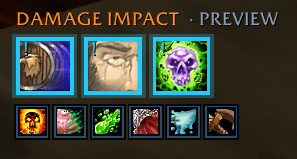
McAwesome Buffs adds a compact Impact Lens for your character. Debuffs that Blizzard classifies as relevant to your current role—or as boss mechanics—are promoted into a clear priority row. Other harmful effects remain visible in a smaller, quieter row underneath, so tanks, healers, and damage dealers can scan the same information with the right visual weight.
Features
- Role-aware priority: promotes Blizzard's role and boss aura classifications without reading restricted combat data.
- Compact two-level layout: large impact icons above a small row of ordinary debuffs.
- Native aura behavior: keeps Blizzard-provided icons, cooldowns, stack counts, and tooltips.
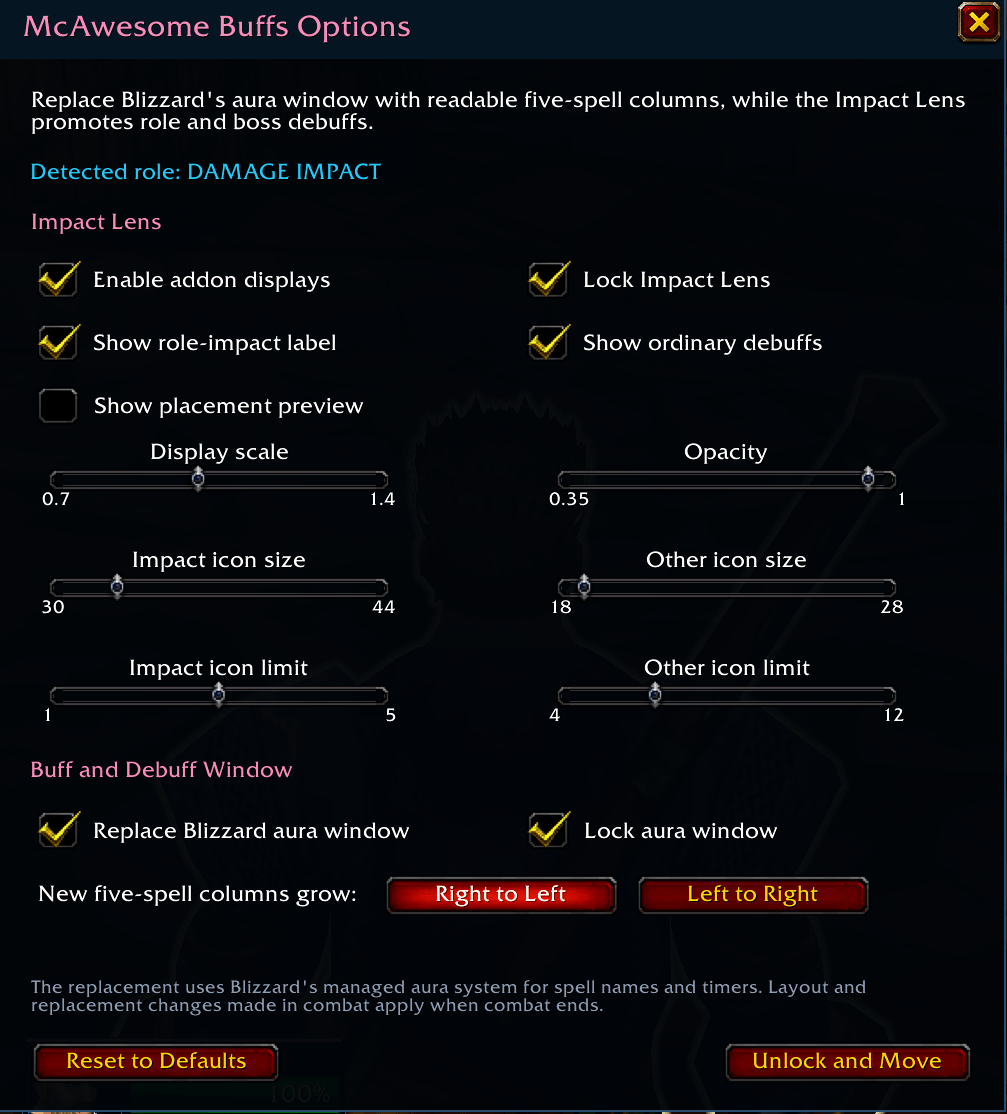
- Movable and configurable: lock the HUD, adjust its scale and opacity, and choose icon sizes and limits.
- Combat-safe changes: saves adjustments made during combat and applies layout work when combat ends.
The Impact Lens
The upper row answers one question: does this effect threaten what I am here to do? A tank sees role-relevant defensive threats promoted; a healer sees healing-impacting effects promoted; a damage dealer sees damage-impacting effects promoted. Boss auras share that high-priority treatment. The client, not a tooltip parser, supplies that classification.
The lower row contains the rest of your harmful effects. It stays deliberately small so ordinary damage-over-time effects remain available without competing for the center of the screen.
Getting started
- Install and enable McAwesome Buffs on a Forever/Camelot character.
- Enter
/mab unlock, then drag the cyan Impact Lens handle to a comfortable location. - Enter
/mabto tune icon size, count, scale, opacity, labels, and locking.
Configuration
Open the full configuration panel with /mab or through Settings → AddOns → McAwesome Buffs. The panel includes display toggles, lock state, HUD scale and opacity, impact and ordinary icon sizes, and row limits. Changes that could disturb protected layout during combat apply after combat ends.
Controls
| Action | Result |
|---|---|
| Drag the Impact Lens while unlocked | Move it on the screen |
| Hover an aura icon | Show Blizzard's aura tooltip |
/mab unlock | Show the drag handle and unlock movement |
/mab lock | Lock the current position |
Slash commands
| Command | Action |
|---|---|
/mab or /mab options | Open the configuration panel |
/mab lock | Lock the Impact Lens |
/mab unlock | Unlock it for dragging |
/mab show | Enable the Impact Lens |
/mab hide | Disable the Impact Lens |
/mab reset | Reset layout and settings |
/mab help | Show command help |
Installation
CurseForge App
Install McAwesome Buffs from the CurseForge app, then restart World of Warcraft or run /reload.
Manual installation
- Download and extract
McAwesomeBuffs-0.1.0.zip. - Copy the inner
McAwesomeBuffsfolder into the Forever client'sInterface/AddOnsfolder. - Confirm the final path ends with
Interface/AddOns/McAwesomeBuffs/McAwesomeBuffs.toc. - Restart the game or run
/reload.
Supported game versions
- World of Warcraft Forever/Camelot, interface
16001.
Known limitations
- Forever's combat privacy model does not safely expose every aura's spell identity or tooltip text to addons. McAwesome Buffs uses Blizzard's managed
isBossOrRoleAuraclassification and does not claim that every promoted aura can be labeled as a specific “block,” “defense,” or “damage” reduction. - The current release focuses on harmful effects on the player. Buff tracking, party/raid panels, encounter-specific databases, and dispel assignment are outside the 0.1.0 scope.
- The managed aura container behavior must still be exercised in the live Forever client because the API is new and client-side access restrictions cannot be fully simulated by automated tests.
You must be logged in to leave a comment.