

MaxRank
One-click spell rank updater for WoW Forever: upgrade your action bars to max rank and keep the low ranks you want.
Details
Expansion
 Forever
 Categories
Developers

Having issues?
MaxRank

Keep every spell on your action bars at its highest rank, in one click.
In Forever, learning a new rank at your trainer doesn't change your action bars: your buttons keep casting the old rank until you drag the new one onto every bar yourself. MaxRank does it for you, lets you keep the low ranks you use on purpose (downranking), and shows at a glance what still needs an upgrade.
Features
- Update: replaces every outdated spell on your action bars with the highest rank you know. Every bar and every page, including stance and form bars you aren't in right now.
- Ignore: keep a specific rank on purpose, like Flash Heal (Rank 1) for cheap heals. Ignored ranks are never touched, on any bar.
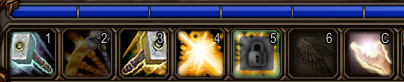
- Highlight: outdated spells glow gold on your bars, ignored ones show a padlock.
- Safe: never downgrades a spell, never touches macros or items, never changes your bars in combat.
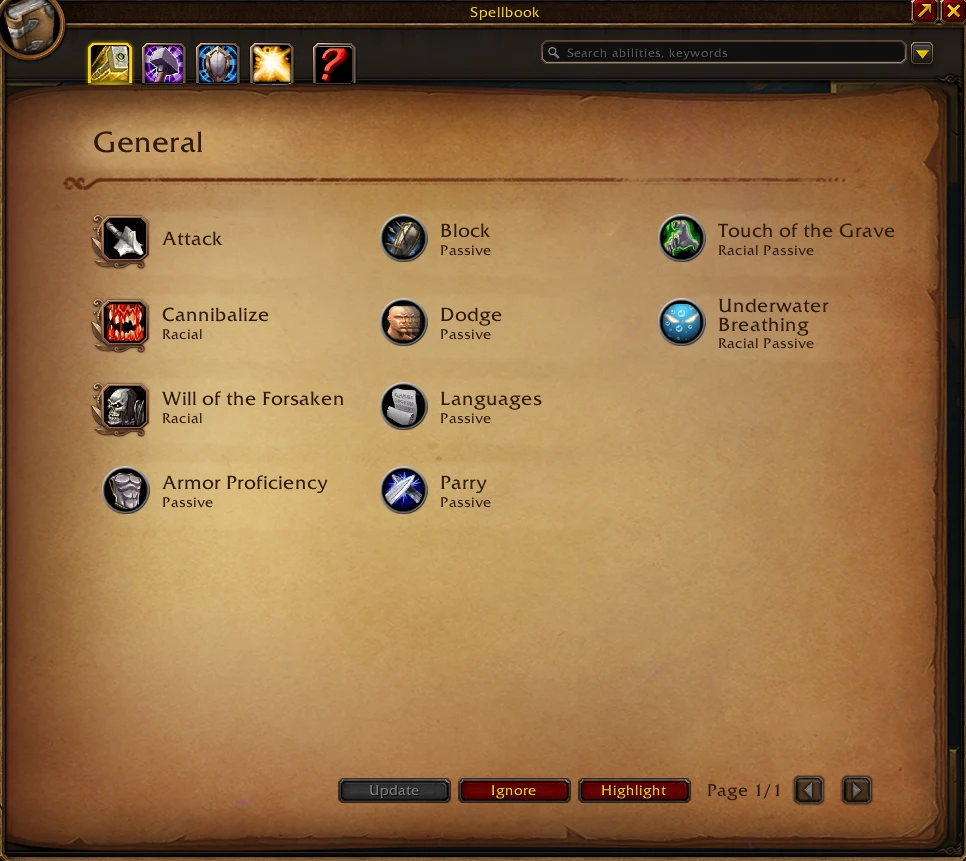
- Simple: three buttons in your spellbook, nothing to set up.
How to use
1. Open your spellbook
Press P. The three MaxRank buttons sit at the bottom of the spellbook, next to the page arrows: Update, Ignore and Highlight.
2. See what's outdated: Highlight
Click Highlight. Every spell on your bars that isn't at its highest rank lights up in gold.

Click it again, or close your spellbook, to turn it off.
3. Keep the ranks you want: Ignore
Using a low rank on purpose? Protect it before you update:
- Click Ignore.
- Click the spell on your action bar. It turns grey with a padlock: that exact rank is now kept on all your bars.
- Changed your mind? Click it again to un-ignore it.
- Right-click, press Esc or close your spellbook when you're done.
No risk of casting by mistake: while Ignore mode is on, clicking a button never casts the spell.
4. Upgrade everything else: Update
The Update button shows how many buttons it will change, for example Update (3). Hover over it to see the list, then click it.
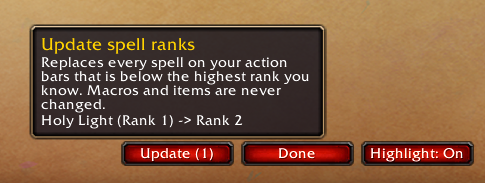
Each change is printed in your chat, like Holy Light (Rank 1) -> Rank 2. When everything is up to date, the button greys out.
Tip: after each visit to your class trainer, open your spellbook and click Update.
Slash commands
Everything also works from the chat:
/maxrank update: upgrade your bars now/maxrank scan: list outdated spells without changing anything/maxrank ignore: turn Ignore mode on or off/maxrank highlight: turn Highlight on or off/maxrank list: list your ignored ranks/maxrank clear: un-ignore every rank/maxrank bar onor/maxrank bar off: show or hide the spellbook buttons/maxrank status: version and diagnostic info
Good to know
- Combat: action bars can't be changed in combat. Click Update during a fight and MaxRank updates your bars as soon as combat ends. Ignore mode turns off when combat starts.
- Key bindings still cast normally in Ignore mode: only mouse clicks are caught.
- Ignored ranks are saved per character.
- Macros are never changed
- Bar addons: Update works with any bar addon.
- Don't use MaxRank together with an addon that upgrades ranks automatically: it would undo your ignored ranks.
Feedback
Found a bug or have an idea? Open an issue on GitHub.
You must be logged in to leave a comment.