

Mastercraft
Your all-in-one profession companion: guides, live recipe picks, real auction house costs, gathering nodes and loot advice.
Details
Addon ID:
24968
Addon Version:
1.5.7.8
Expansion:
1.60
Upload date:
Oct 06, 2026
Last Updated:
Oct 06, 2026
Downloads:
Less than 100
Website:
Source Link
Expansion
 Forever
 Developers

shadowblade5587
Creator
Having issues?
Mastercraft
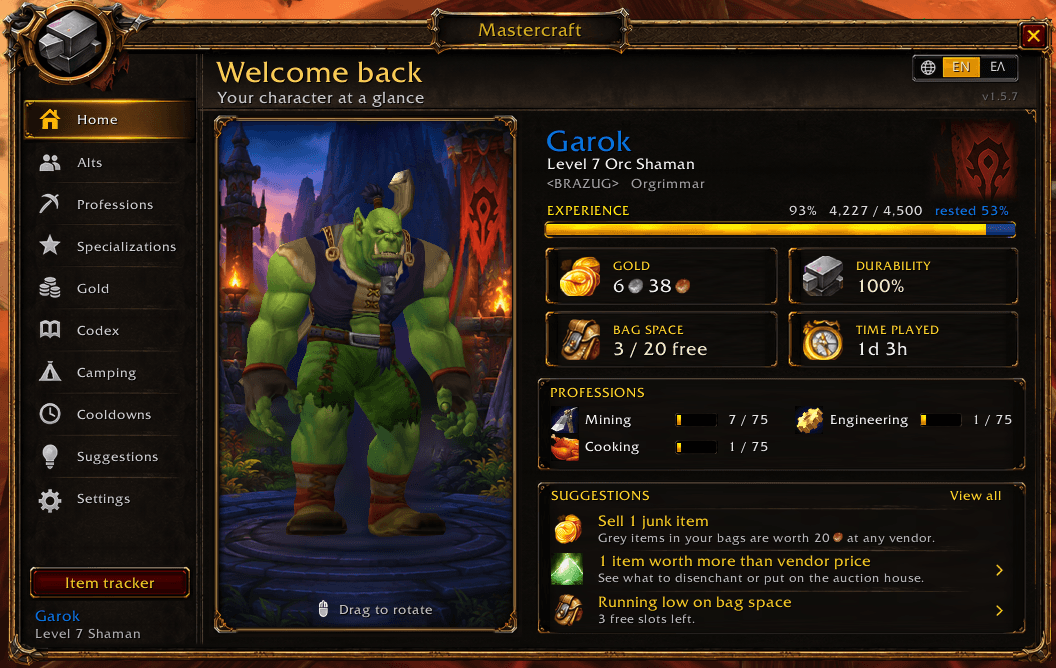
Your all-in-one profession companion for WoW: Forever - guides to 300 built for Forever, help right inside your profession window, real auction house costs, an item tracker, gathering nodes and loot advice, in one clean, modern window. In English or Greek.
Type /mc or click the anvil on your minimap.
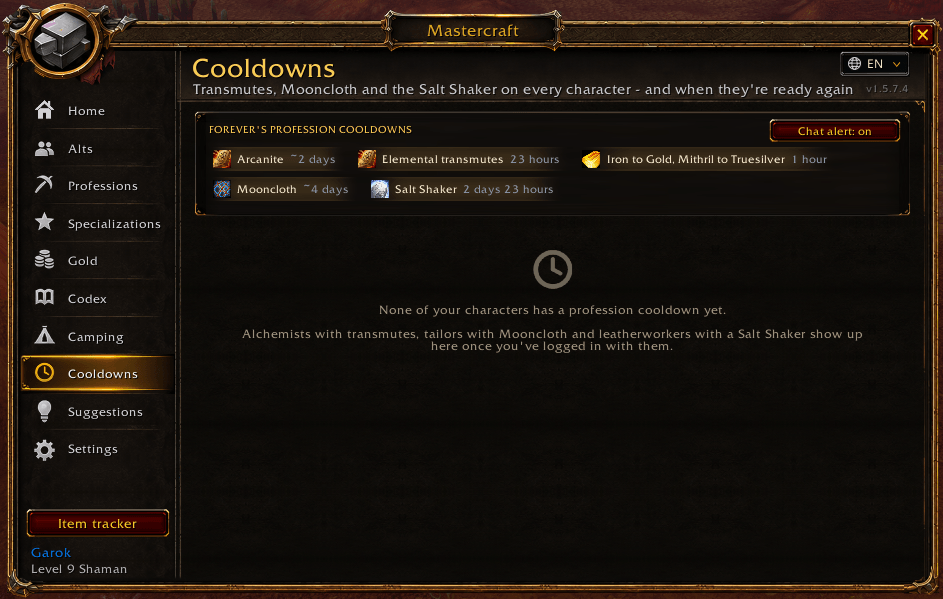
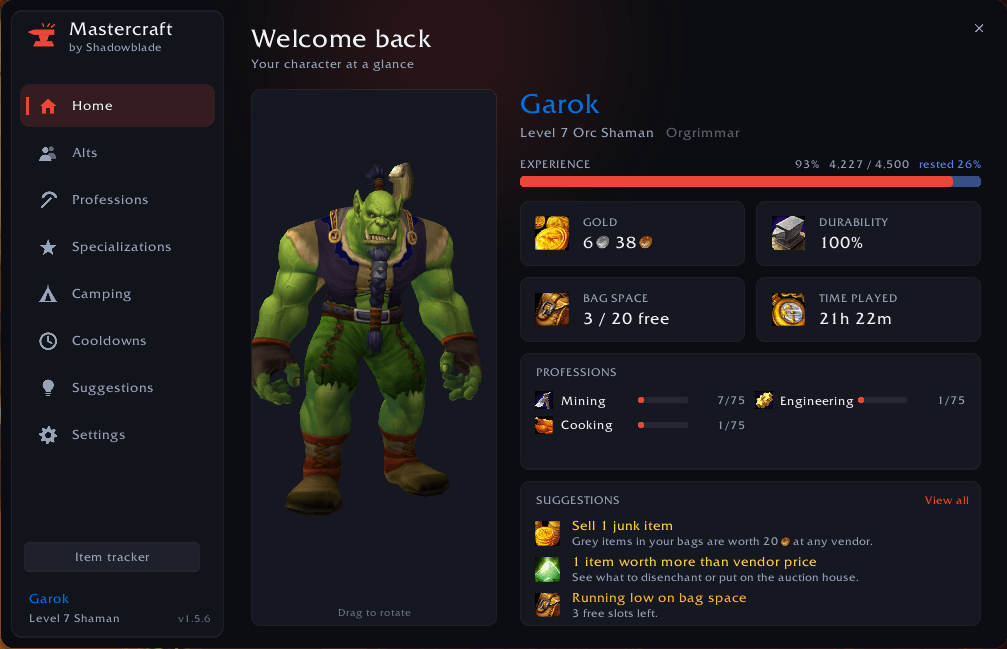
Two looks to choose from in Settings > Style: Modern (rounded, soft shadows, a glow in your faction colour) and Classic (flat and square).
Professions
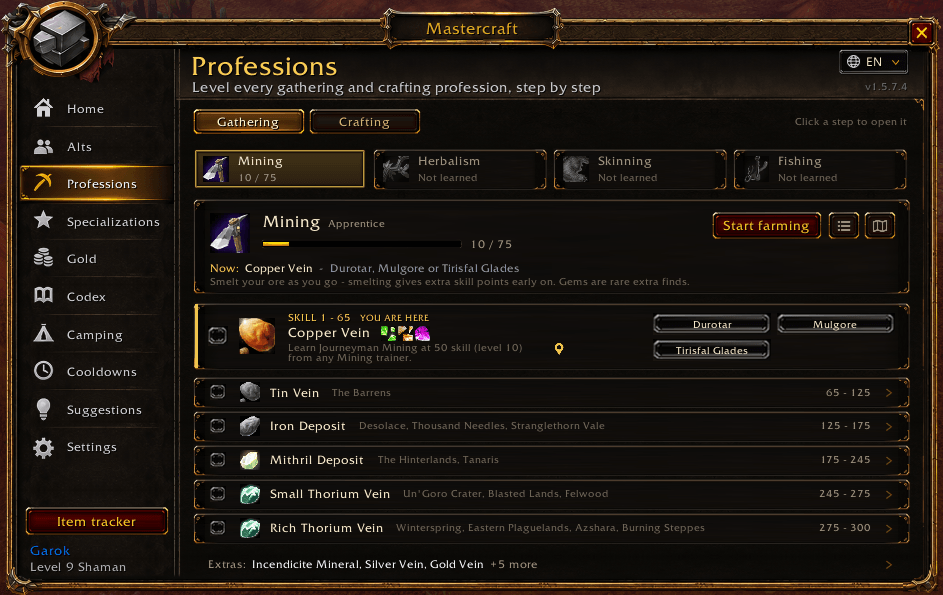
- A calm Professions page: switch between Gathering and Crafting, pick a profession from its tile, and the step you're on is open with everything about it - the other steps are one line each (hover for all of it, click to open).
- Guides for every profession, 1-300 - Mining, Herbalism, Skinning, Fishing, Alchemy, Blacksmithing, Enchanting, Engineering, Leatherworking, Tailoring, Cooking and First Aid.
- Built for Forever: Forever changed where many recipes turn grey and added new patterns. Every crafting route is built from Wowhead's Forever data - each step's recipe exists in Forever, can be learned at that skill, has the right mats, never goes grey and has no cooldown. When a step needs a pattern, the guide shows who sells it, where, and what it costs or needs (gold, Merchant's Favor, reputation).
- Where to learn every rank: the guides and pop-ups name who teaches Expert and Artisan (only a few trainers do - e.g. Artisan Blacksmithing is only Brikk Keencraft in Booty Bay), and which book or quest Cooking, First Aid and Fishing need.
- Waypoint pins: the pin next to a rank's trainer or a pattern vendor - in the guide, the mini guide and the recipe window - sets the game's own arrow to the nearest one of your faction.
- "YOU ARE HERE" and automatic checkmarks as your skill goes up - tick a step to skip it.
- Checked against your game: open a profession window once and every step is compared with your real recipe. If your game's recipe needs other mats you see the real ones (the shopping list uses them too), and recipes your game doesn't have are marked.
- Best right now - live from your game: reads your real Forever recipes and their colour, and picks the one most likely to give a skill-up (orange first, then yellow), preferring what you can already craft and what costs the least.
- Mini guide that sits next to your profession window: current step, mats, how many you can craft, and Craft 1 / Craft all buttons. It tells you when a recipe turns grey.
- Mastercraft inside the profession window: pick a recipe and a card under it shows:
- its skill-up colours - the colour it is now and until which skill it stays orange, yellow and green (from Wowhead's Forever data);
- your guide step, and how many crafts are left;
- the materials you're short on, and how many your bank and alts hold, with a Track button;
- what it costs, what it sells for and your profit;
- where to learn a recipe you don't know yet, and which of your characters already knows it.
- It shows only what fits, and you can turn it off in Settings.
- A Mastercraft button in the profession window, next to Link in chat: click it to open that profession's guide, right-click for the mini guide.
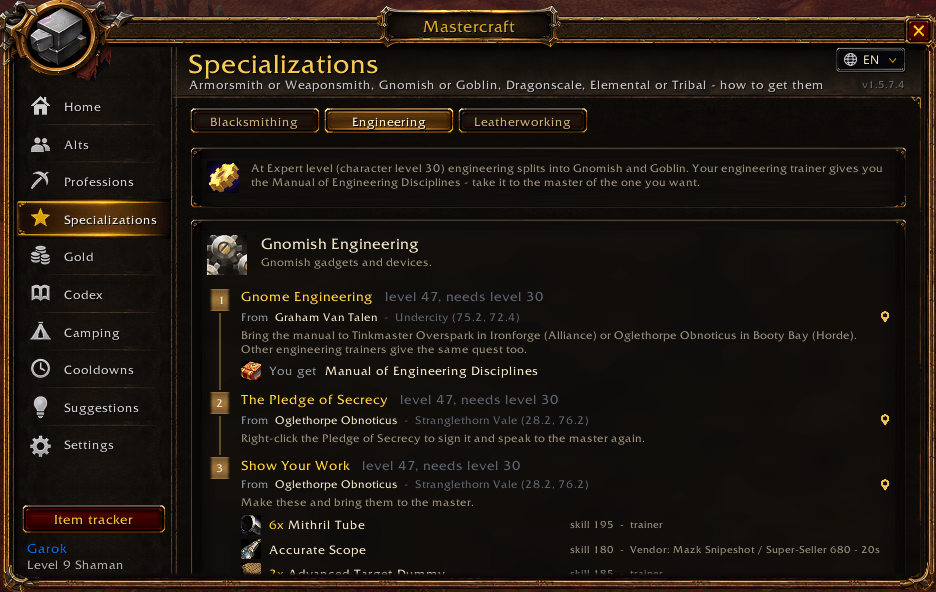
- Specializations: Armorsmith or Weaponsmith (and the master sword, axe and hammer smiths), Gnomish or Goblin engineering, Dragonscale, Elemental or Tribal leatherworking - every quest, who gives it, what to bring and what you get, on one card each.
- Every ore and gem: extra ores (Silver, Gold, Truesilver, Dark Iron, Incendicite, Lesser Bloodstone, Indurium), Elementium, and which gems each vein can drop.
- Zone buttons that open the world map on the best zones for your faction - picked from Wowhead's Forever spawn counts for every ore and herb.
- Skill-ups per hour for your current session.
Item tracker
- A small window that counts what you're collecting - "Copper Ore 12 / 20" with a progress bar, grouped per recipe.
- Search a material, drag an item onto it, or track from anywhere: Shift-click a guide step, Track list in a shopping list, Track on a recipe, or click a camping object.
- - / + buttons (Shift: by 10) and Clear. A pop-up tells you when a goal is reached.
- At the auction house, click an item in the tracker to search for it - the tracker opens by itself there when you have items in it.
- Bought something? It counts right away: what you buy at the auction house waits in your mailbox - the tracker shows it in blue and the chat says how many you bought.
- Open it from the sidebar, with Shift-click on the minimap button, or with
/mc track.
Made for WoW: Forever
- Supplies & Favor (shows up once you have any): your Merchant's Favor, your trade hub reputation (Azeroth Commerce Authority / Durotar Supply and Logistics), and every Waylaid Supplies crate in your bags - what it asks for, what you and your alts have and what the rest costs. Once you've handed in a crate, it also shows what each Favor costs you. Spend your Favor lists the patterns you can buy with it - the ones your guides use first - and who of your characters can learn them.
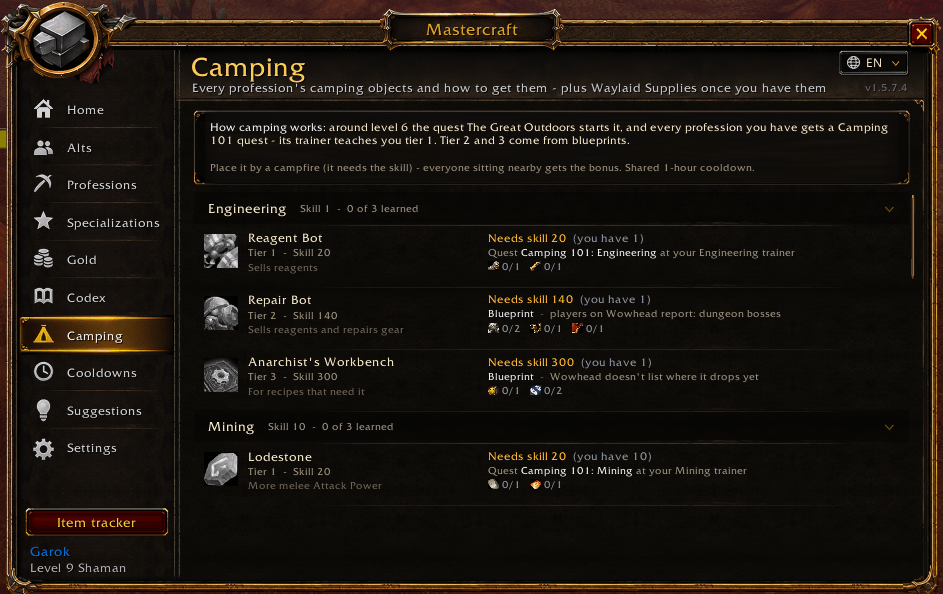
- Camping tab: every camping object of every profession - what it does, how you get it (the Camping 101 quest and your trainer for tier 1, blueprints for tier 2 and 3), the materials and how many you have, and whether you've learned it. Your professions come first; click one to track its materials.
Crafting for gold (Gold and Codex tabs)
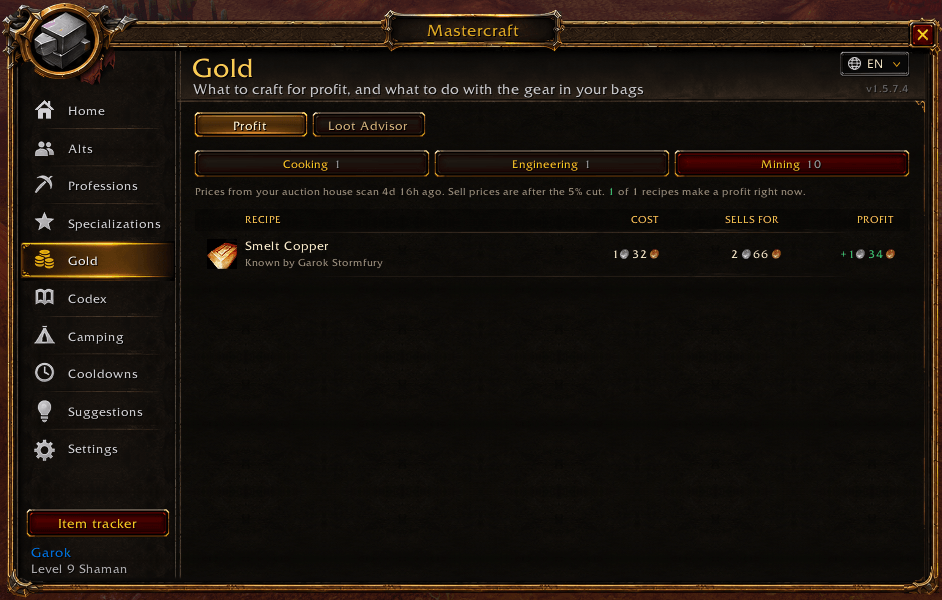
- Profit page (Gold): every recipe you know, what one craft costs (auction house or vendor prices), what it sells for after the 5% auction house cut, and your profit - best first.
- Hover a recipe for the full breakdown, click it to open it in your profession window, Shift-click to track its materials.
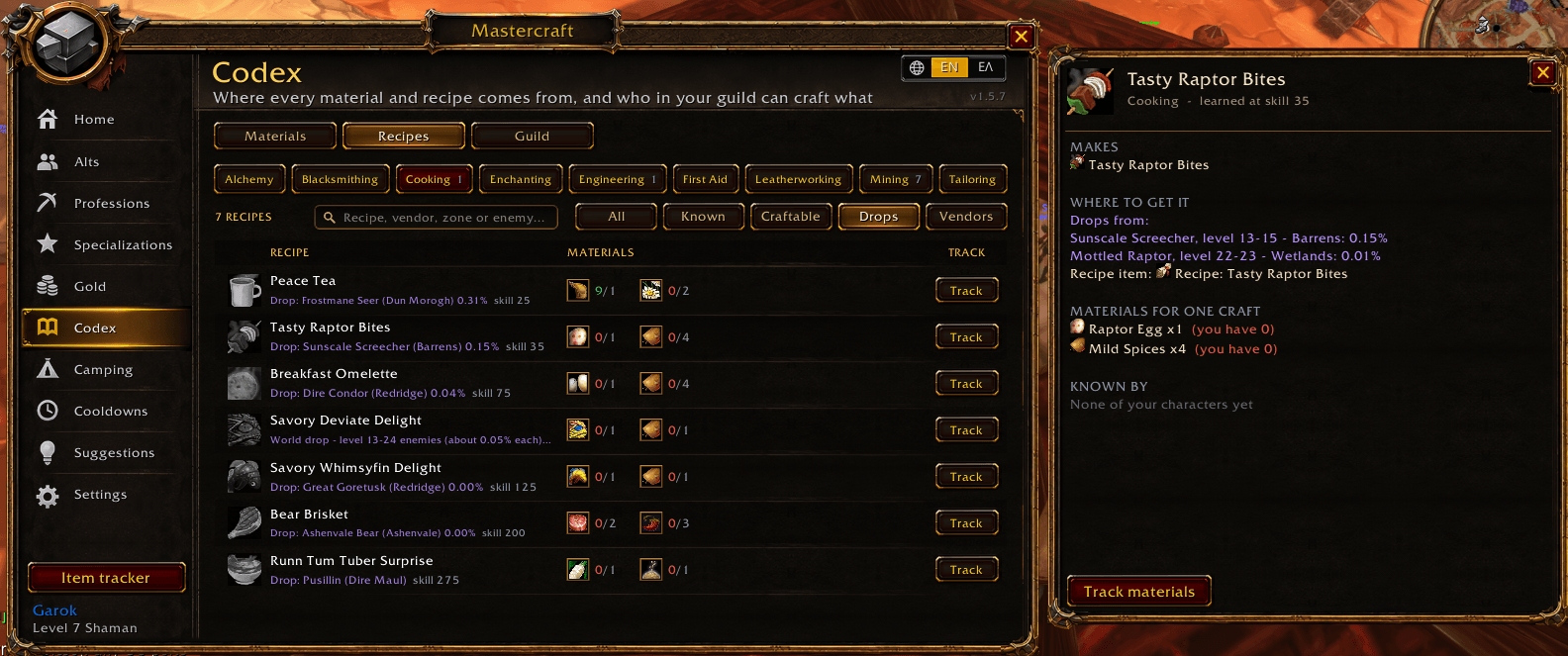
- Recipes page (Codex): every Forever recipe of all 8 crafting professions, its skill-up colours, and where to get it - trainer, vendor (who, where, cost, reputation), quest, or drop with each enemy's chance. Filter by Drops or Vendors, search by recipe, vendor, zone or enemy, and hover for the game's own tooltip. Click one for all the details in a window of its own: every vendor, every enemy that drops it, the materials and who knows it, with buttons to track it or search the auction house.
Guild crafters (Codex tab)
- Who can craft this? Search for a recipe and every guild member who uses Mastercraft answers if one of their characters knows it, with a Whisper button.
- Remembered, even offline: every answer your guild sends is kept, so crafters still show up when they're offline - with when they last answered.
- Your own characters are included too.
Customers in Trade chat
- Someone in Trade asks for something your characters can craft? A pop-up tells you - click it to whisper them. You can turn it off in Settings.
Real costs to 300
- Shopping list: everything you still need to reach 300, minus what you already own on every character (bags, bank and mailbox).
- Scan prices at the auction house - looks up only the items that matter, one by one.
- Real cost, not a guess: buying 150 Silk Cloth when only 143 are at the lowest price? Mastercraft walks the price list just like the auction house does.
- Vendor goods (vials, threads, dyes, flux, spices, Copper Rod, Mote of Magic) use the price Forever's vendors ask - no scan needed - or what a merchant really charged you once you've visited one.
- Every crafting material known by name: all Classic and Forever trade goods and every reagent of every Forever recipe are built in, so icons, prices and the item search work even before the game has loaded an item.
- Where every material comes from (Materials page, Codex): the herbs, veins and beasts that give it with the chance per gather or skin, fishing zones, the recipe that makes it, vendors, and the enemies that drop it with level, zone and chance - from Wowhead Forever data. Search by zone, enemy or vein, and All details shows everything.
Bank and mailbox
- Grab mats at the bank: one click moves what your guides need into your bags.
- Send mats to an alt: attaches the materials your alt's professions need - you just press Send.
Gathering
- Your own gathering nodes on the world map and minimap, remembered for all your characters.
- Coloured by your skill - red (can't gather yet), orange / yellow / green, grey.
- Farming tracker: what you gathered, what it's worth and your gold per hour.
- Reminders when Find Minerals / Find Herbs is off (with a one-click Turn on) or your Mining Pick / Skinning Knife is missing.
- Lure reminder when you fish without a lure on your pole - it suggests the best lure you have that your Fishing skill can use.
Loot advisor (Gold tab)
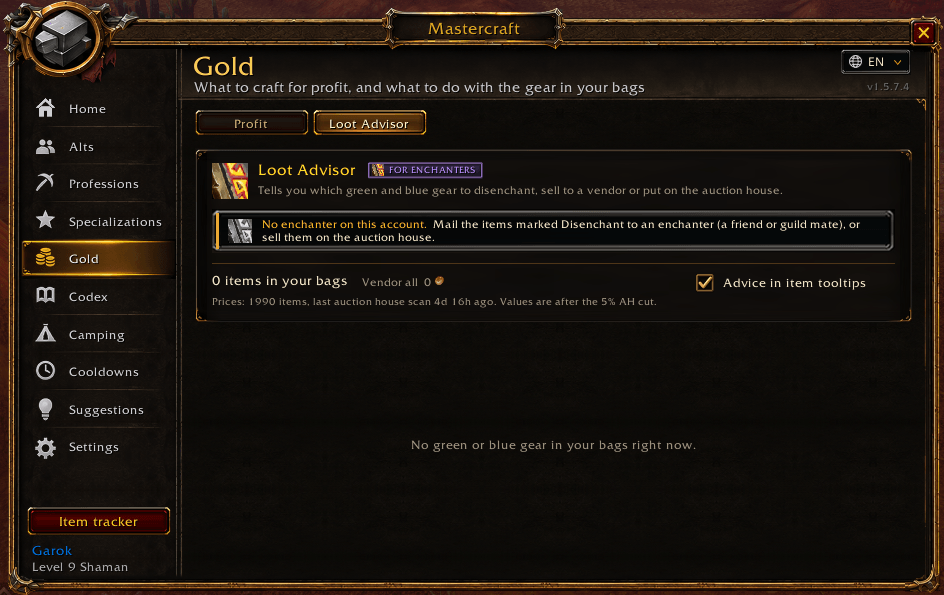
- Every green and blue weapon and armor piece tells you: VENDOR, DISENCHANT or AUCTION - and, after a price scan, how much more the best option pays.
- Disenchant predictions with quantities and chances, checked against Wowhead Forever's disenchant data.
- Item tooltips show how many you own on each character and which recipes use it.
- Pattern, plans and schematic tooltips show which recipe they teach, and for each of your characters with that profession: knows it, can learn it now, or needs more skill.
Everyday helpers
- Cooldowns tab: transmutes, Mooncloth and the Salt Shaker on every character - a card per character, a bar per cooldown, and a chat alert when one is ready.
- Pop-ups when a guide step is done or a profession is about to cap - with where to learn the next rank.
- Auto sell junk and auto repair at vendors.
- Suggestions - repair, full bags, a reminder to visit your class trainer, rested XP, full quest log and more (right-click to hide one until your next level).
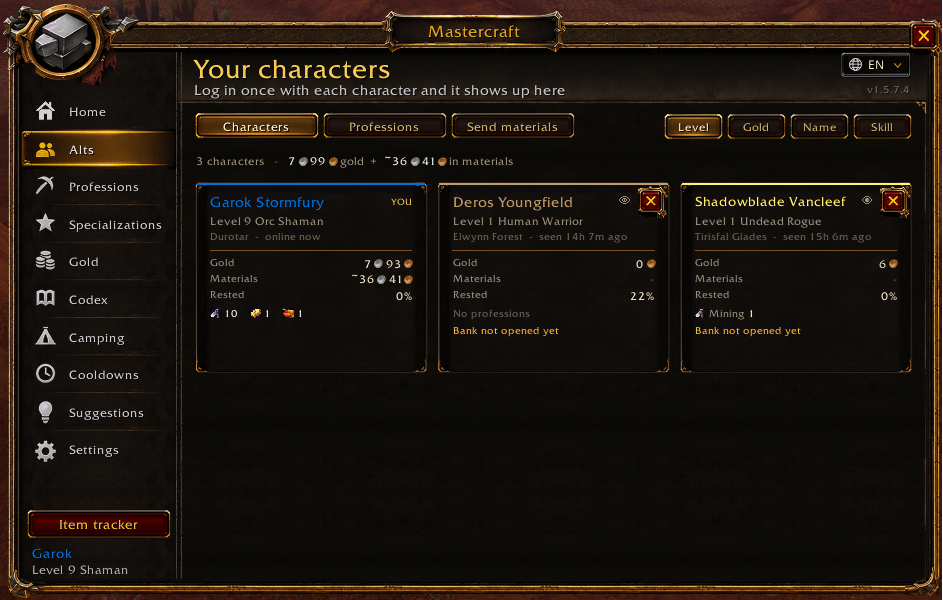
- Alts: every character as a card (sort by level, gold, name or skill; hide the ones you don't play), a table of everyone's professions, the materials one character has that another one needs (with a Mail button at the mailbox), and what your account is worth - gold plus materials at auction house prices.
- What's new after every update, and an error report you can copy and send if something goes wrong (Settings, or
/mc errors). - Tooltip settings: choose what Mastercraft adds to item tooltips (Settings > Tooltip), or keep them short and hold Shift for details.
- Link in chat posts the game's own profession link, so anyone can click it and browse your recipes.
Commands
| Command | Action |
|---|---|
/mc | Open / close Mastercraft |
/mc professions | Open the professions page |
/mc gold | Open Gold (profit and loot advisor) |
/mc codex | Open Codex (materials, recipes, guild) |
/mc farm | Start / stop the farming tracker |
/mc track | Show / hide the item tracker (/mc track 20 Copper Ore adds one) |
/mc new | What's new in this version |
/mc errors | Copy an error report to send |
/mc lang | Switch between English and Greek |
/mc donate | Support the addon |
Good to know
- Open each profession window once per character so Mastercraft can learn your recipes.
- Visit your bank once per character so bank items are counted.
- The crafting routes are built from Wowhead's Forever data and checked against your real recipes once you open the profession window. The live Best right now pick always comes straight from the game.
- Guild search asks the guild members who are online and use Mastercraft; answers they sent before are remembered, so offline crafters show up too.
- English client only. The addon itself speaks English or Greek - the button next to the close button switches. Names from the game (items, zones, NPCs) stay as the game shows them.
- Greek text uses Noto Sans (SIL Open Font License 1.1), since the game's fonts have no Greek letters.
Made by Shadowblade. Enjoying Mastercraft? Support it with a donation - thank you!
Found a bug or have an idea? Leave a comment below.
You must be logged in to leave a comment.