

Lazy Consumables
TBC raiding consumable tracker — class-specific filtering, duration tracking, inventory counts, click-to-use.
Details
Expansion
 Forever
 Categories
Developers

Having issues?
LazyConsumables
Edition-aware consumable tracker with class-specific filtering, duration tracking, and one-click use.
LazyConsumables scans your bags, shows only the consumables relevant to your class, tracks buff durations in real time, and lets you click-to-use any item securely — no searching through bags, no guessing what you need.
LazyConsumables provides a clean, organized panel that lists every consumable you've selected for tracking, grouped by category (Flasks, Elixirs, Potions, Weapon Buffs, Food, Scrolls, Misc). Each row shows the item icon, name, remaining buff duration (color-coded from green to red), and your current inventory count. Click any item to use it instantly via a secure action button.
✨ At a Glance
- Edition-specific data — separate consumable catalogs for Retail, Mists Classic, TBC Classic, Classic Era, and Titan Reforged, with runtime-validated item resolution.
- Class-specific filtering — only shows consumables relevant to your class (tanks, casters, healers, physical DPS, hunters, rogues, warlocks).
- Buff duration tracking — real-time countdown for active buffs, color-coded from green (>10 min) to yellow (>5 min) to red (<5 min).
- Inventory counts — shows how many of each item you currently have in your bags, with x0 highlighting items you're missing.
- Click-to-use — every item uses a
SecureActionButtonTemplateso it works in combat without taint. - Category organization — consumables are grouped by type (Flask, Battle Elixir, Guardian Elixir, Potion, Food, Scroll, Weapon Buff, etc.) with color-coded headers.
- Right-click menu — options panel, scale adjustment, lock/unlock, position reset, and selection management.
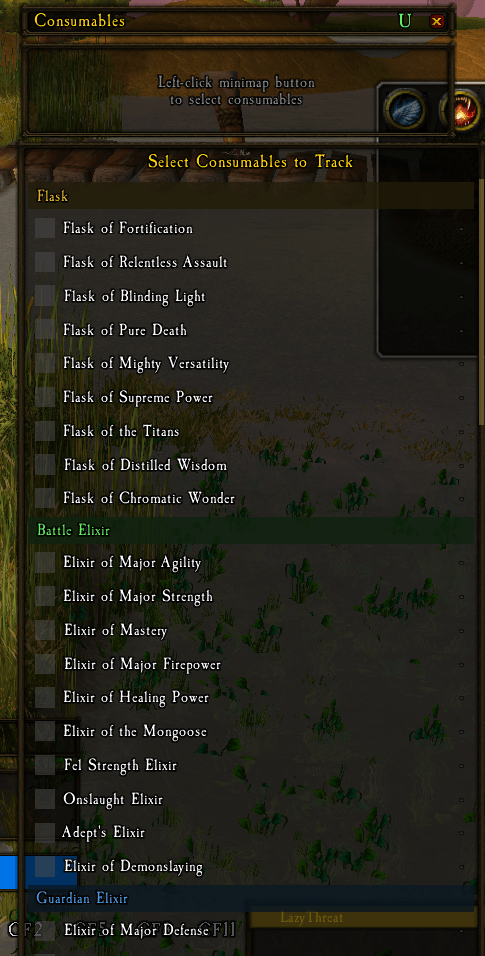
- Minimap button — left-click to open the selection menu, right-click for options.
- Manual items — add any item ID not in the catalog for custom tracking.
- Open with
/lazyconsumables,/lconsume, or/lc.
🎮 One Project, Every Supported WoW Version
LazyConsumables is a single CurseForge project with edition-specific consumable catalogs. Download the release matching your game client — do not install a Retail package in a Classic client, or vice versa.
| Game client | Download the matching release | Highlights |
|---|---|---|
| Retail | Retail | Retail consumables including Thalassian Flask variants, new potions, and augment runes |
| Mists of Pandaria Classic | MoP-Classic | MoP-era flasks, pandaren feasts, and mogu cosmetics |
| Burning Crusade Classic | TBC-Classic | Full TBC consumable database: flasks, battle/guardian elixirs, weapon oils, poisons, food, scrolls, drums |
| Classic Era / Season of Discovery / Hardcore | Classic-Era | Vanilla-era consumables including major flasks, elixirs, food, scrolls, and warlock stones |
| Titan Reforged | Titan-Reforged | Wrath-era consumable baseline with runtime validation |
Important: Consumable availability adapts to the selected game client. Older clients only show items that exist in that era.
⚔️ Core Features
Edition-Aware Consumable Database
LazyConsumables includes a comprehensive consumable database organized by edition. Each entry specifies the item ID, category, name, buff aura name, and which classes it applies to. The catalog is automatically selected based on your client version:
- Retail: Thalassian Flask variants, Draught of Rampant Abandon, Potion of Recklessness, Light's Potential, Silvermoon Health Potions, Refreshing Serum, Void-Shrouded Tincture, Farstrider's Hawkeye scope, Laced Zoomshots ammo, Amani Cornucopia feast, Void-Touched Augment Rune, and more.
- Mists Classic: Pandaren flasks, Mogu cosmetics, Crystal of Insanity, all pandaren feast variants, Heavy Windwool Bandage, Drums of Rage.
- TBC Classic: Complete database including all flasks, Battle Elixirs, Guardian Elixirs, Super Mana/Healing Potions, Ironshield/Haste/Destruction/Heroic Potions, Wizard/Mana Oils, Sharpening Stones/Weightstones, poisons, food, scrolls, bandages, sapper charges, healthstones, warlock stones, and drums.
- Classic Era: Vanilla-era flasks, elixirs, potions, food, scrolls, major healthstones, warlock stones, bandages, and utility items like Juju effects.
- Titan Reforged: Wrath-era stock consumables with runtime validation against the live client.
Class-Specific Filtering
When you open the selection menu, LazyConsumables automatically filters the catalog to show only consumables relevant to your class. Each consumable entry specifies which class(es) it applies to (tanks, physical DPS, casters, healers, hunters, rogues, warlocks). If no class restriction is set, the consumable appears for everyone.
Buff Duration Tracking
For consumables that apply a buff aura, LazyConsumables tracks the remaining duration in real time:
- Green (>10 minutes remaining)
- Yellow (>5 minutes remaining)
- Red (<5 minutes remaining)
- Gray (buff not active)
- "Active" (permanent buff with no expiration)
Weapon buffs (oils, stones, weightstones) display the remaining duration of the active weapon enchant.
Inventory Counts
Each consumable row shows how many of that item you currently have in your bags (bags 0-4). Items with zero count display x0 in red and appear desaturated, making it easy to see what you need to stock up on.
Secure Click-to-Use
Every consumable row uses SecureActionButtonTemplate with type="item" and the item link configured. This means you can click any consumable to use it instantly, even in combat, without any taint or security errors. Weapon consumables leave the cursor ready for a weapon click.
Manual Consumables
You can add any item ID not in the catalog using /lc add <itemID>. Manual items appear under a "Manual" category and are saved per-character. Use /lc remove <itemID> to remove a manual item, and /lc clear to clear all selections.
Right-Click Menu
Right-click the minimap button or any consumable row for a context menu with:
- Show/Hide Panel
- Lock/Unlock Frame
- Select Consumables (opens the dropdown menu)
- Scale Up/Down (0.5–2.0)
- Clear Selections
- Reset Position
🚀 Getting Started
- Download the release whose filename matches your WoW client.
- Extract it into your WoW
InterfaceAddOnsfolder so the final path isInterfaceAddOnsLazyConsumables. - Start or reload WoW. The addon loads automatically.
- Left-click the minimap button to open the consumable selection menu.
- Check the consumables you want to track and close the menu.
- The tracking panel appears showing your selected consumables with durations and counts.
- Click any row to use the consumable instantly.
Available Commands
/lcor/lazyconsumablesor/lconsume— Toggle panel visibility/lc menuor/lc select— Open the consumable selection menu/lc lock//lc unlock— Lock/unlock the frame/lc reset— Reset frame position to default/lc scale <0.5-2.0>— Adjust panel scale/lc minimap— Toggle the minimap button/lc list— List all tracked consumables with counts/lc add <itemID>— Add a manual consumable by item ID/lc remove <itemID>— Remove a manual consumable/lc clear— Clear all consumable selections/lc refresh— Force a display refresh
Configuration
Settings are saved per-character and persist between play sessions:
- Position — frame position and anchor points
- Scale — panel size (0.5–2.0)
- Locked — prevent frame dragging
- Shown — whether the panel is visible on login
- Minimap button — whether the minimap button is shown
- Selected consumables — which items you're tracking
- Manual consumables — any custom items added by item ID
👥 Built For Every Kind of Player
- Casual players: Open the selection menu, check a few essentials (flask, food, potion), and click to use them — no need to think about it.
- Raiders: Track the full TBC/MoP consumable rotation and never forget to refresh your flasks, elixirs, or feasts.
- Alt players: The class filter automatically adjusts — no need to reconfigure for each character.
- Theorycrafters: Add custom items by item ID and track exactly the consumables you need for your build.
- PvP players: Use the manual item feature to track flasks and elixirs specific to your PvP loadout.
📝 Notes
- Settings, positions, and selections persist between play sessions.
- The addon does not add Retail-only consumables to Classic clients or vice versa.
- All consumable data is defined in the
ConsumablesData.luacatalog file, which has no WoW API dependencies — making it easy to update and validate. - Item names and IDs are checked against Wowhead's live tooltip service.
- The addon has no external runtime dependency.
🐛 Support
Found an issue or have an idea? Please open an issue or leave a comment on CurseForge. When reporting a bug, include your game version, addon version, and the full error message if one appears. Appreciate any patreons to help as this is costing me time and money to maintain: https://www.patreon.com/c/LazyLoafs504
Made for players who would rather spend time playing WoW than searching through their bags.
You must be logged in to leave a comment.