

KinFolk: Your Guild Hub
The all-in-one guild addon for WoW Forever: a guild home page, guild chat, a roster with alts and history, a permanent guild log, events and attendance, crafting, polls, recruiting, and automatic officer sync.
Details
Expansion
 Forever
 Categories
Developers

Having issues?
KinFolk: guild management for WoW Forever
KinFolk is an all-in-one guild addon for World of Warcraft: Forever. It gives guild leaders, officers, and every member one window for the guild: a guild home page, guild and officer chat, the roster with alts and history, a permanent guild log, guild events with sign-ups and attendance, crafting, a bulletin board and polls, and recruiting, and it keeps every officer's copy in sync automatically. Everything happens in game: no website, no account, no Discord bot.
Beta notice. KinFolk is new and so is World of Warcraft: Forever, so you may run into bugs. If something breaks or looks wrong, please send me a message here on CurseForge ([your CurseForge name]). Every report is read and reviewed. See "How do I report a bug?" below for what to include.
Always use the newest version. KinFolk is updated often during the beta, and fixes land quickly. Before reporting a problem, update KinFolk in the CurseForge app (or download the newest file here), and make sure every officer in your guild uses the same version so officer sync works.
At a glance
| Game | World of Warcraft: Forever |
| Made for | Guild leaders, officers, recruiters, and every guild member |
| Doors | Guild, Chat, Members, Events, Crafting, Board, and Bank for everyone; Recruiting and Officers for officers; Settings |
| Needs | Nothing else. Works on its own |
| Works with | WIM (WoW Instant Messenger): KinFolk's whisper buttons open WIM windows |
| Status | Beta. Updated often |
Highlights
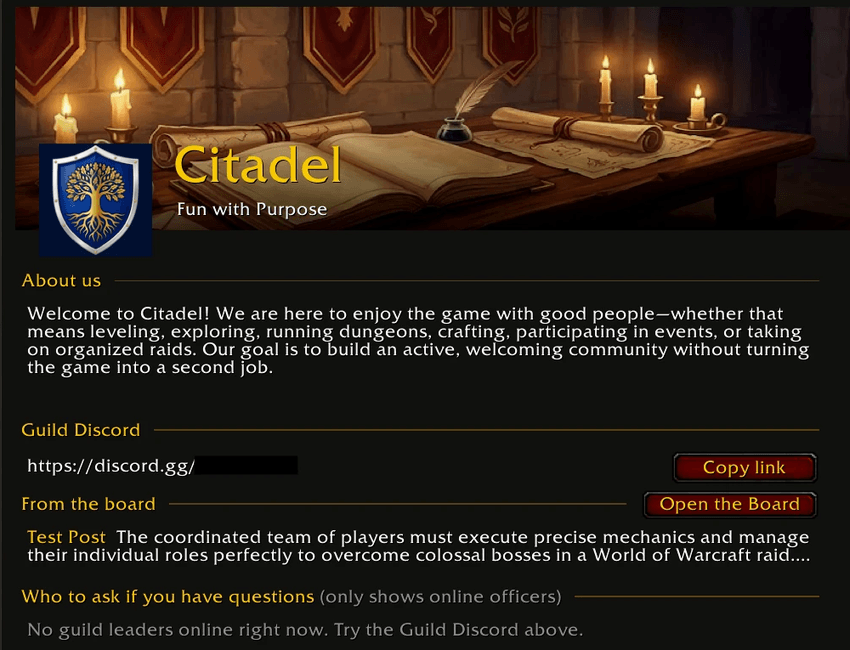
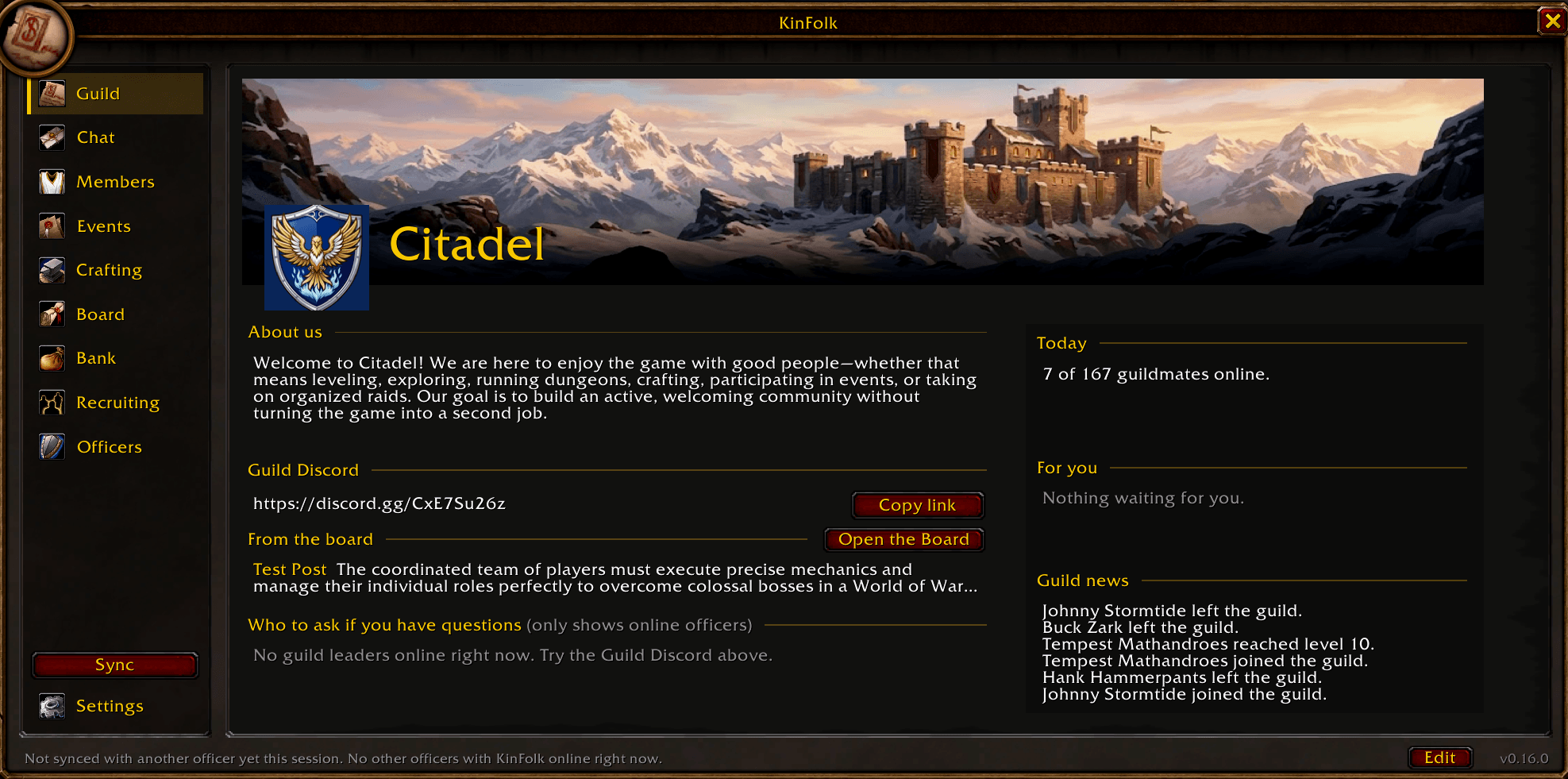
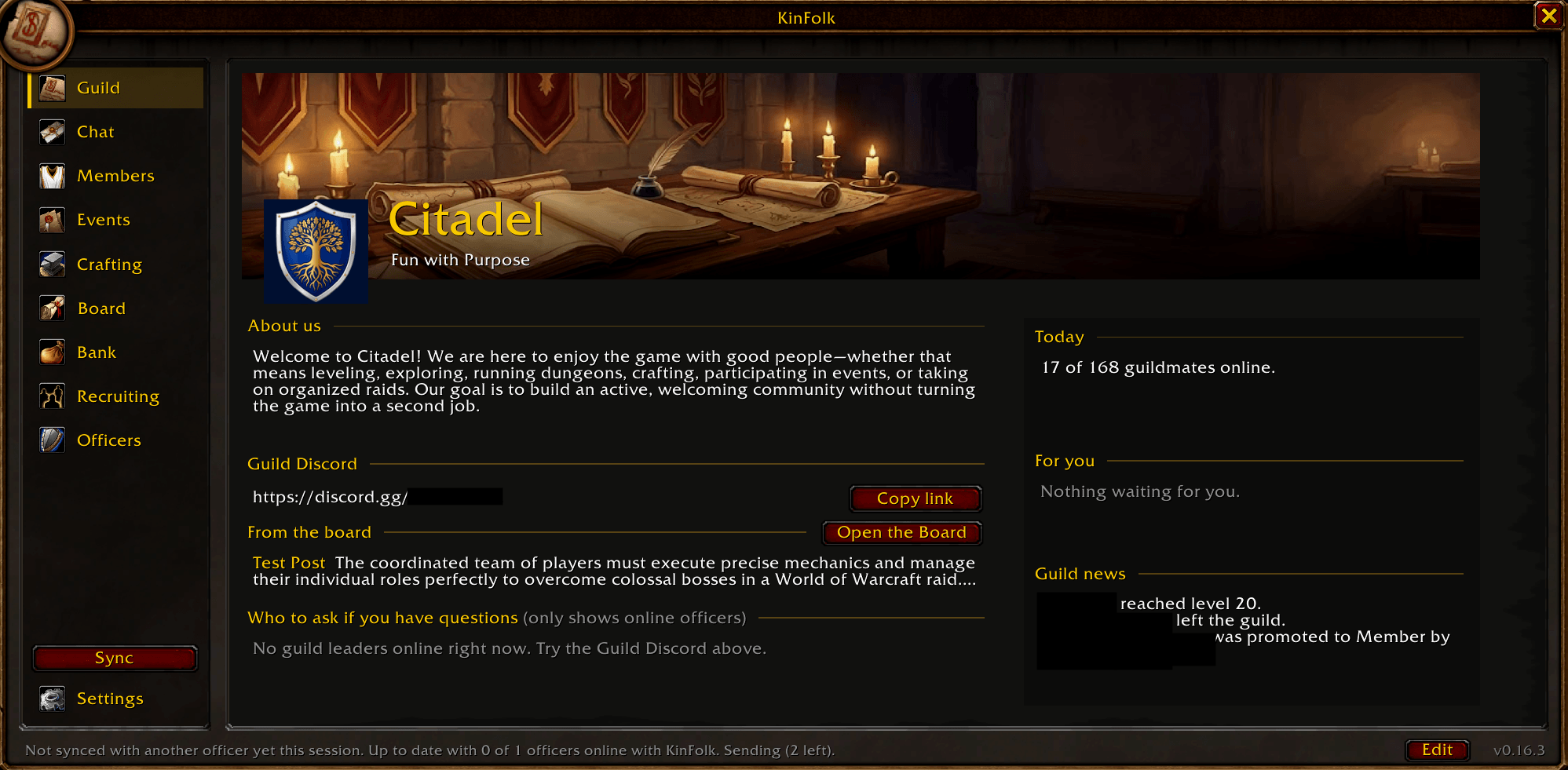
- A home for your guild. A Guild page with your banner, crest, motto, About us, Discord link, today's events, guild news, and who to ask if you have questions.
- Guild chat in one place. Read and answer guild chat, and officer chat for officers, with 14 days kept.
- Know everyone in your guild. Alts linked to mains, join dates, who invited them, rank history, time zones, and notes with no 31-character limit.
- Something for every member. Who's around, climbers this week, new guildmates to welcome, member cards, your played time, events, crafting, polls, and the bulletin board, never officer notes.
- Events people show up to. The game's own calendar, sign-ups counted by tank, healer, and damage, reminders, and attendance.
- Recruit without the chaos. Post to General and Trade, catch every reply, interview with ready questions, and follow each recruit from first whisper to full member.
- A guild log that never forgets. Joins, departures, removals, promotions, and level milestones, kept for good.
- Officers always on the same page. Records, notes, and your guild's recruiting messages sync between officers by themselves.
Why KinFolk?
Running a guild means keeping track of a lot of people: who joined when, whose alt is whose, who was asked to leave and why, who signed up for tonight, and what the other officers already know. The game's guild tools were not built to hold all of that, so officers end up juggling spreadsheets, Discord threads, and memory.
KinFolk was built around what guild leaders ask for most:
- Notes that fit. The game's public and officer notes hold 31 characters, a limit unchanged since 2004 and one of the most repeated requests on Blizzard's own forums. KinFolk notes have no length limit and show who wrote them and when.
- Alts and mains. The game cannot link a player's characters. KinFolk links alts to mains and suggests links for you.
- History that stays. The game's guild log is short, and its guild bank log keeps only the last 25 transactions per tab. KinFolk keeps its own guild log for good.
- One window for the guild. Guild news, guild chat, events, and the roster without opening the game's old guild window.
- Officers on the same page. Records are shared automatically, so nobody has to ask "did anyone talk to this person?"
- A reason to stay. Players stay in guilds where they find people to play with. Who's around, leveling buddies, the group board, crafting, polls, and celebrations make your guild the place where that happens.
Features
KinFolk's window has a sidebar of doors down the left: Guild, Chat, Members, Events, Crafting, Board, and Bank for everyone, plus Recruiting and Officers for officers, with Sync and Settings at the foot. Every page uses the same clean layout: numbers in a row of tiles you can click, gold section headings, and items on cards. A small back arrow above the page always takes you back, anything that cannot be undone asks Sure? first, and dates are picked from a small calendar instead of typed. Switch off any part your guild does not use.
Guild: your guild's home page
- Your guild at a glance under a banner: the guild's name, crest, and motto, About us, and your Guild Discord with a Copy link button.
- From the board: the newest bulletin board post, with a button to open the board.
- Who to ask if you have questions: your Guild Master and the rank below who are online now. Click a name to open a whisper.
- Today (who is online, today's events, open crafting requests and groups), For you (events to answer, polls to vote in, crafting requests for you, each one click away), and Guild news.
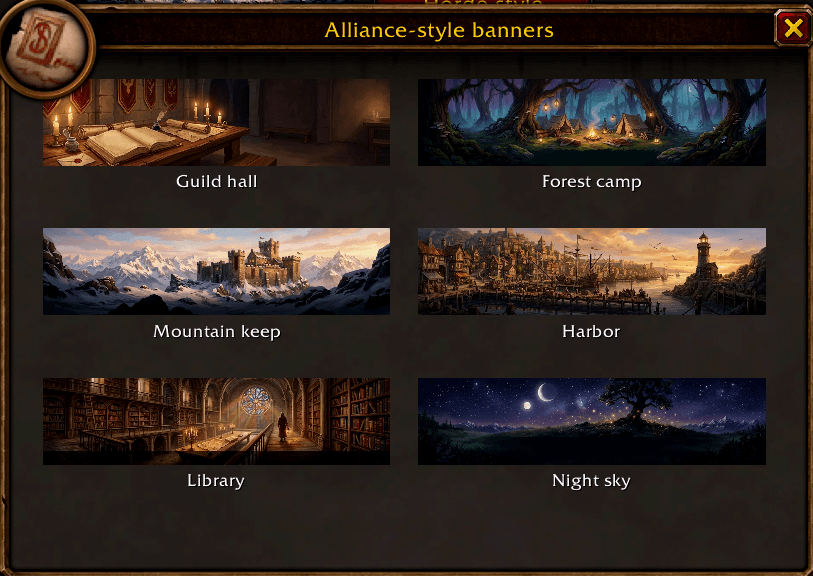
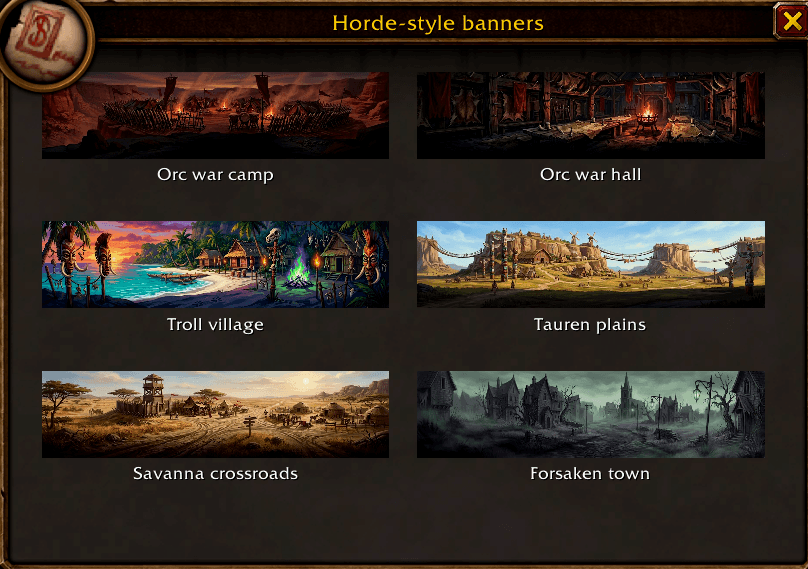
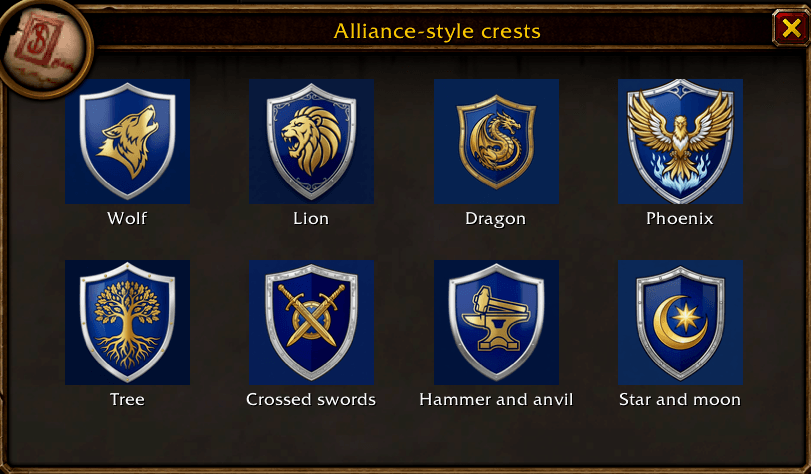
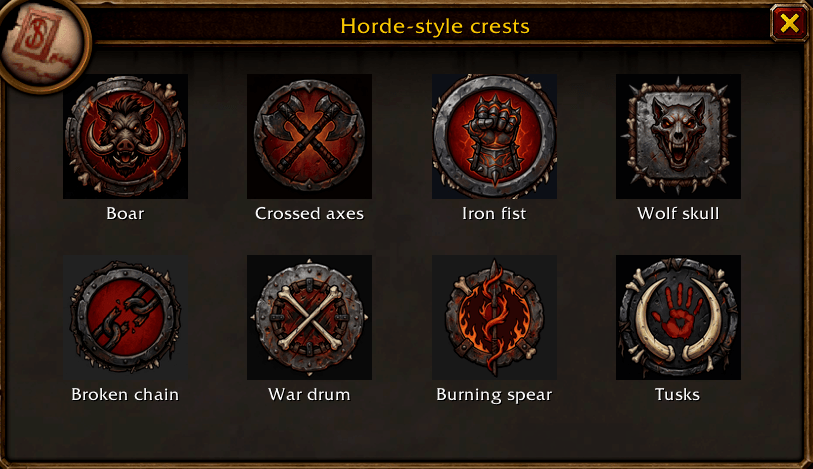
- Officers set the motto, about us, Discord link, crest (16 KinFolk crests in Alliance and Horde styles, or any of the game's icons), and banner (Alliance scenes, or Horde scenes for orc, troll, tauren, and Forsaken guilds). Every guildmate with KinFolk sees a change right away.
Chat: talk to the guild without the chat box
- Guild chat for everyone and Officer chat for officers, with names in class colors (click one to whisper) and item links you can click.
- Type and press Enter to send. Nothing is ever sent on its own.
- KinFolk keeps the last 14 days it saw, on your computer only.
Members: the roster the game should have had
For everyone
- Members overview on one screen: tiles for members, online now, new this week, and max level, and guild makeup as one bar of class colors.
- Who's around: online guildmates by zone, yours first. Click a name to whisper.
- Climbers this week: the guildmates who gained the most levels.
- New this week: click a name to say hello.
- You: your rank, how long you have been in the guild, your played time (total and this level), and how many guildmates are near your level.
- Member cards: each guildmate's level, days offline, days in the guild, nickname, role, professions, and what they craft.
- Leveling buddies: guildmates near your level, where they are, and a one-click whisper to team up.
- Guild log: the game's own guild log, grouped by day.
- Guild nicknames in chat: guildmates show as [Nickname] First Last for everyone using KinFolk.
For officers
- A searchable roster grouped by rank, with filters: online now, inactive, joined in the last 14 days, alts, former members, and watch list. Click a tile on the overview to filter.
- Member records: a row of facts (level, days offline, days in the guild, events attended and missed), then Membership (join date, who invited them, main and alts, time zone, away notice), Rank history, KinFolk notes with no length limit, Guild nickname and note, the game's own notes, and the Watch list.
- Alts and mains: link them in one step, with suggested alts from guild notes ("Bob's alt") and from your own characters.
- Guild note builder: nickname, role, spec, and professions in one tidy note, ready to paste into the game's roster. KinFolk understands the role words members write (Heals, Healer, Tank, DPS, Damage, and more).
- Inactivity report with your own number of days, ready to copy, and away notices so nobody on a break is counted as inactive.
- Watch list: officers are warned if a flagged player rejoins, whispers after a post, or is added as a recruit.
- Guild log kept for good: joins, departures, removals, promotions and demotions, level milestones, and note changes, with the last 7 days in tiles, grouped by day, searchable, and shared between officers.
Events: plan it, fill it, see who came
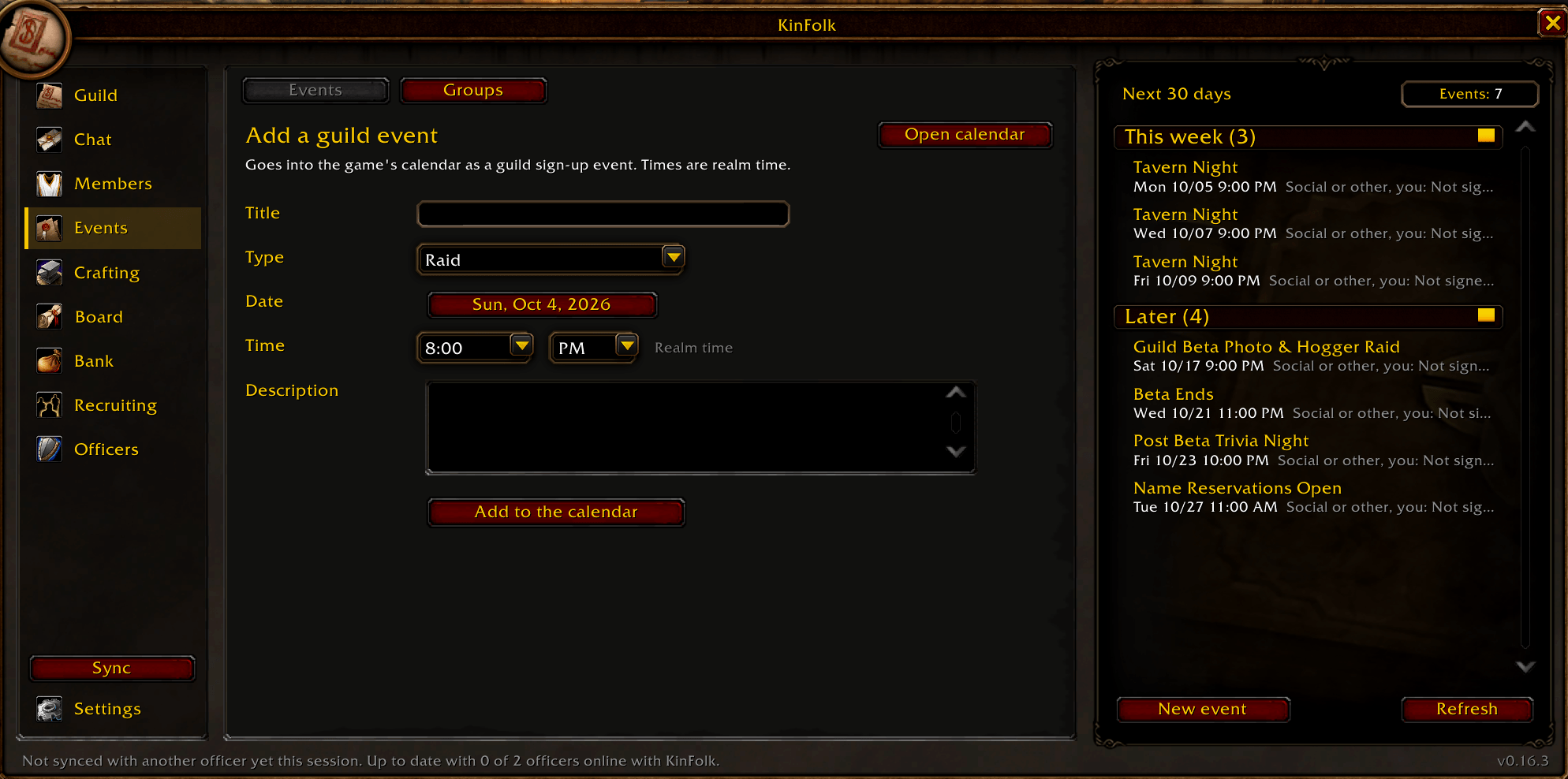
- Guild events from the game's own calendar for the next 30 days. Every member can sign up, with or without KinFolk.
- Start page: the week in tiles, the next event, and the events you are coming to.
- Who is coming, counted by tank, healer, and damage and by class, with every answer listed. Your own answer shows on the event, and its button is greyed out.
- Sign up or Tentative right from KinFolk (Tentative counts as coming), with no trip to the game's calendar. The event's organizer can Confirm tentative in one click. Normal invites also offer Decline. Officers can Announce in guild chat.
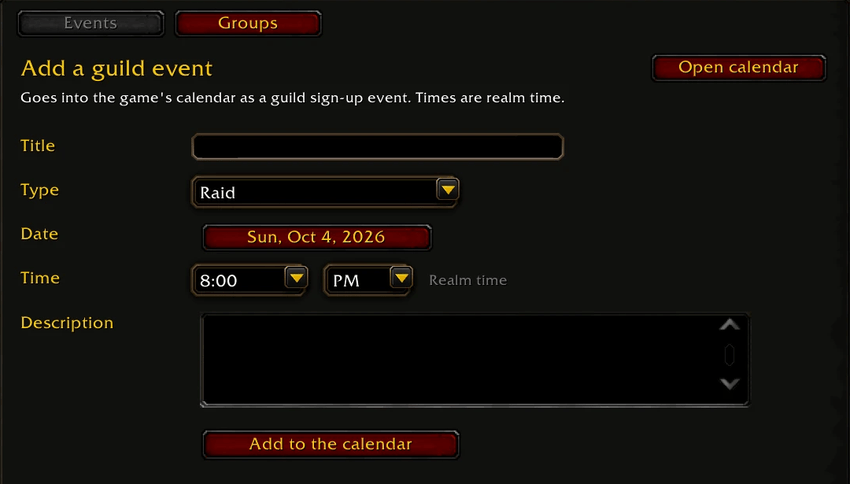
- Add an event (raid, dungeon, PvP, meeting, or social): pick the date from a small calendar and the time from two lists. Officers who can edit an event can delete it.
- Reminders at login and 15 minutes before it starts, and attendance taken from your group or raid in one click.
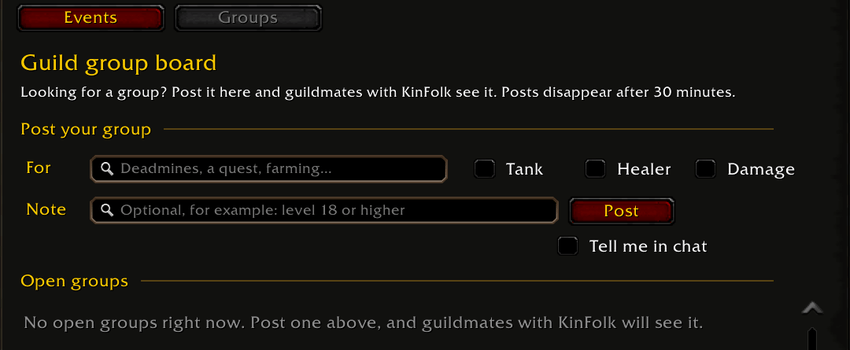
- Guild group board: post what you are looking for (a dungeon, a quest, farming) and which roles you need. Guildmates with KinFolk see it at once and can whisper to join. Posts close after 30 minutes.
Crafting: who can make it?
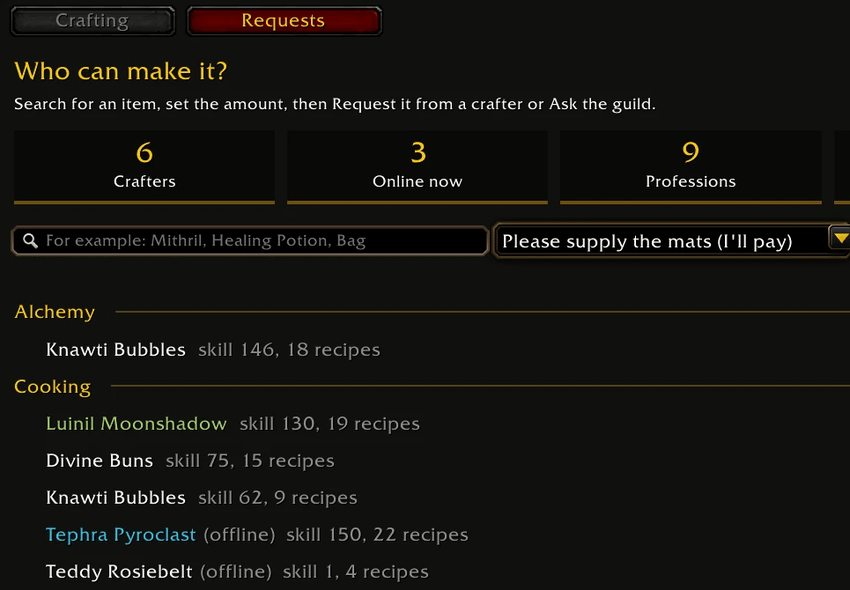
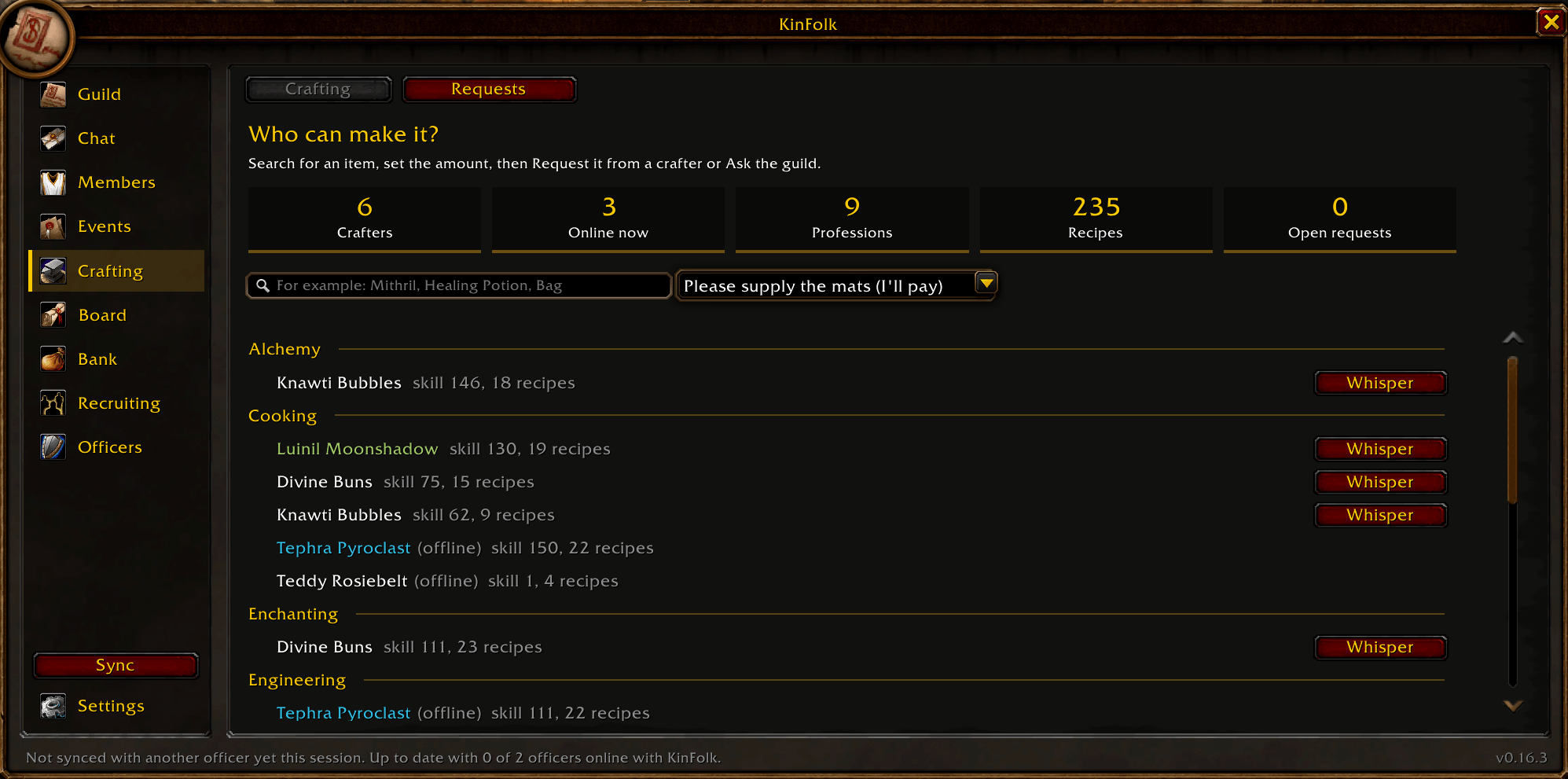
- Crafting directory: search "who can make this?" across the recipes of guildmates with KinFolk, shared automatically when they open their profession windows. Set an amount and see which mats you have or are missing. Online crafters first.
- Crafting requests: search for an item, then ask a crafter, or the whole guild, to make it, even when no crafter is listed yet. The Requests page shows only the active requests. Crafters take the job, see which mats they still need, and mark it done. Requests reopen if a crafter leaves the guild.
Board: news, votes, and milestones
- Bulletin board: officer posts for plans, rules, and decisions, each on its own card, with pins and one-click sharing to guild chat. Every member with KinFolk can read it.
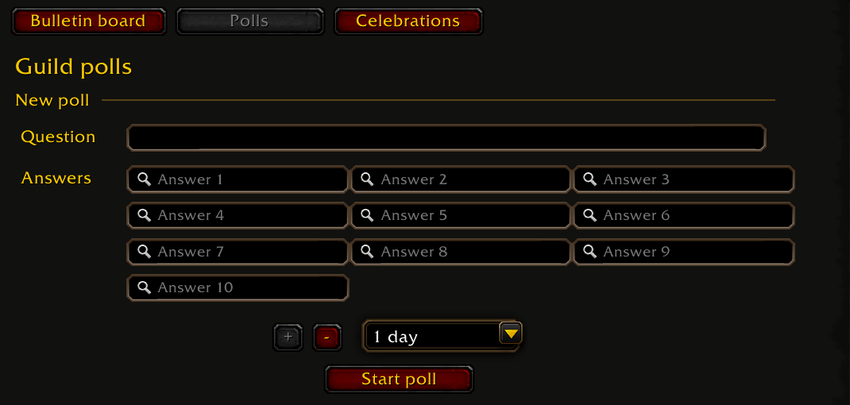
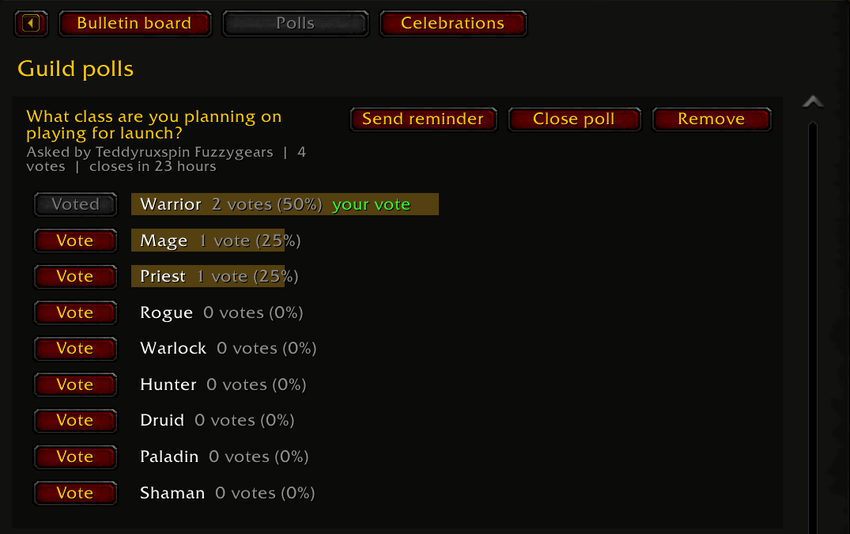
- Polls: officers ask a question with up to ten answers, announced in guild chat, with a reminder button; guildmates vote in KinFolk and see the totals (counts only, never who voted for what).
- Celebrations: guild join anniversaries and level milestones, each with a one-click congratulations in guild chat.
Bank: the guild bank, kept
- Bank ledger: every gold deposit and withdrawal, kept for good.
- Bank requests (ask the bank for an item; the guild's Banker rank or officers approve, decline with a reason, and mark it given) and Bank contents are built and marked Under construction until WoW Forever turns on guild bank item tabs.
Recruiting: find the right people, without the busywork
Posting
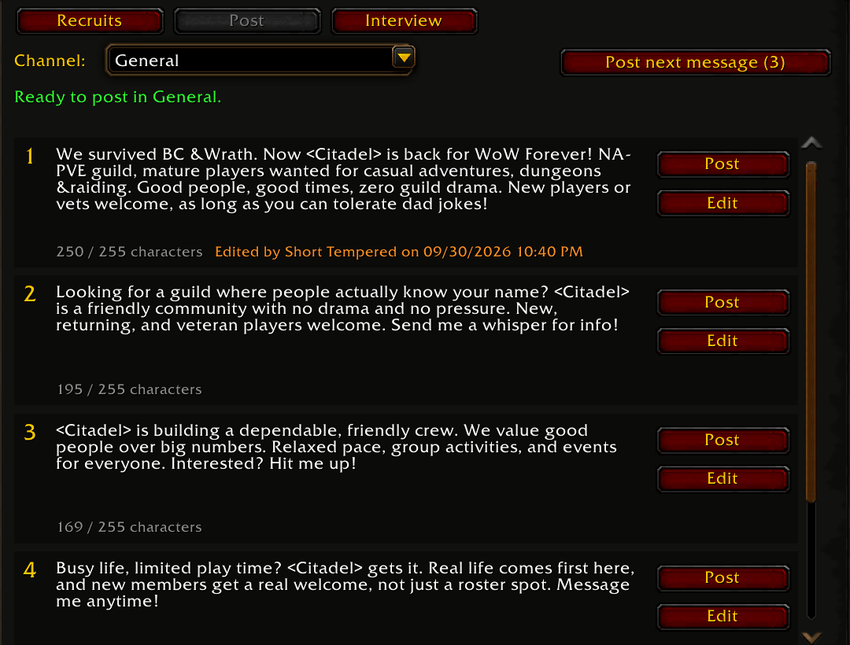
- Five ready-made recruiting messages with your guild's name filled in, all editable, with a live character counter.
- One-click posting to General or Trade, plus Post next message to rotate through them.
- A shared wait between posts for each channel, across every officer, so your guild never spams a channel.
Catching replies
- A reply pop-up for 30 minutes after you post: anyone new who whispers you becomes a recruit in one click.
- Returning recruits are flagged: if someone you turned down before comes back, you see when and why.
Recruit records
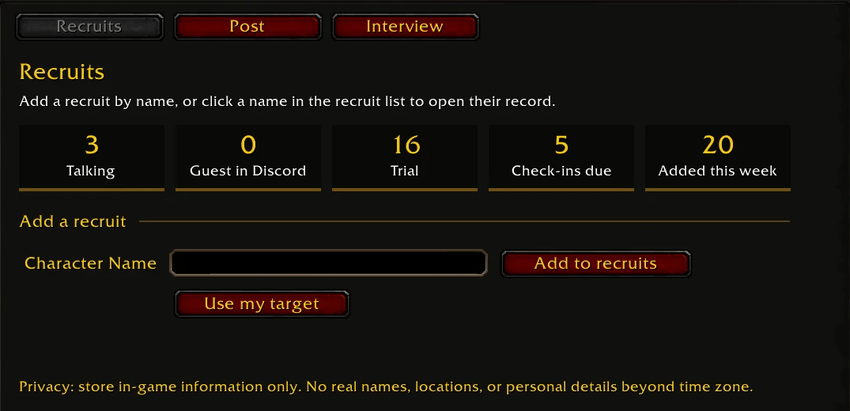
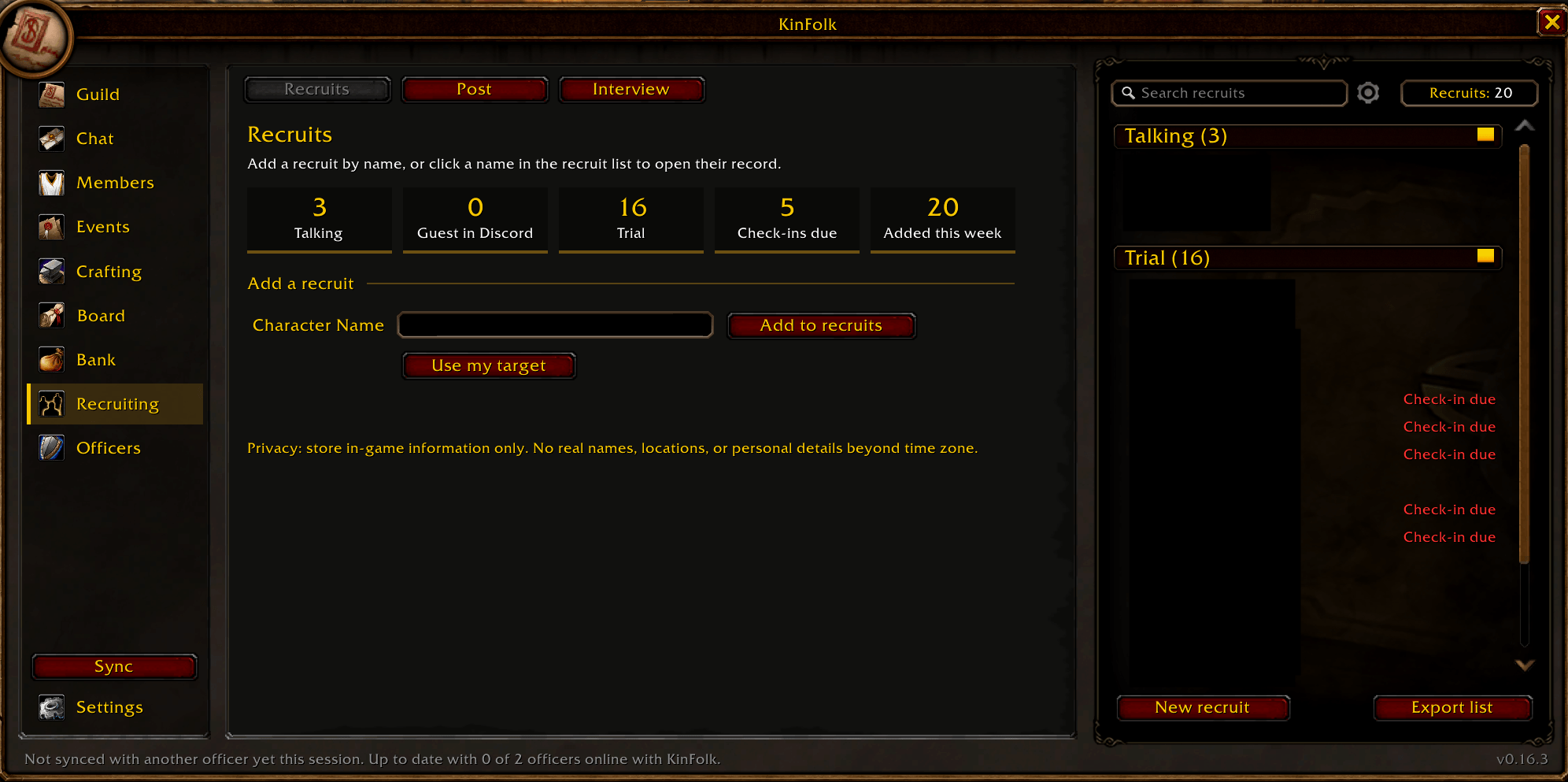
- A start page with the recruits in each status, check-ins due, and recruits added this week, and Add to recruits (it adds them to KinFolk's list; it does not invite them).
- Every recruit on one page: Contact, Recruiting, Trial, Guild note, Assessment, Officer notes, with the class icon and a colored status badge.
- Look up fills in class, level, race, guild, and zone. Use my target fills in names with special letters (like ß or Ç) exactly.
- Invite to guild from the record, and Export a record or the whole list as plain text. When a recruit joins the guild, their record moves to Trial by itself, and the trial reminders start.
Interviews and trials
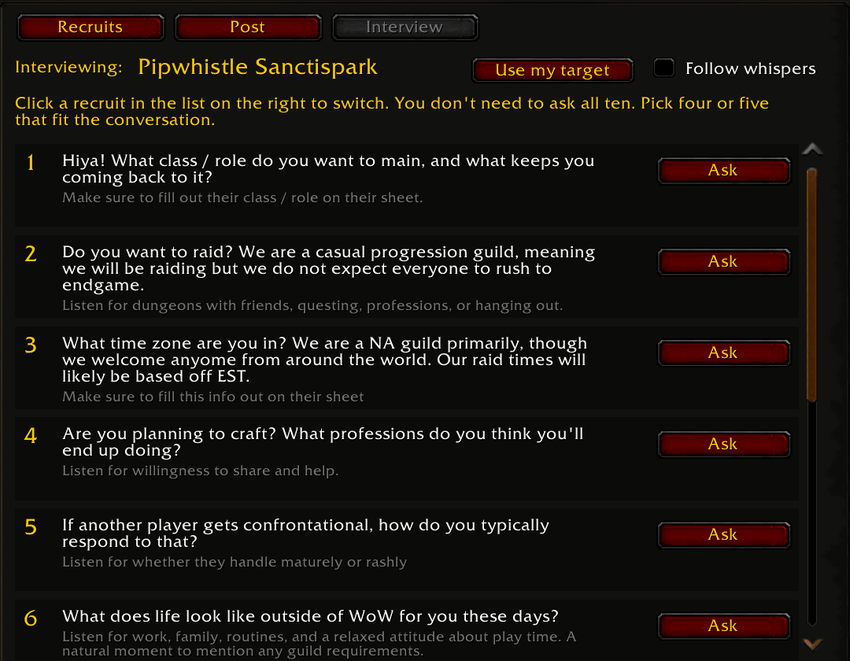
- Your guild's interview questions, each with what to listen for, and Ask puts a question in a whisper for you to review and send.
- Each recruit remembers which questions you already asked, and KinFolk can follow whoever just whispered you.
- Trial start fills in the check-in and trial end dates, with reminders. Bot check tips and red flags help with judgment calls.
- Founder mode for players starting a new guild: charter signatures, founding statuses, a checklist, and moving everything into the guild once it exists.
Officers: tools for officers
- Quick posts: the welcome for new members (a small strip offers to welcome someone who joins, never in the middle of your screen or during combat) and up to eight saved guild chat lines, each sent with one click.
- Officer sync, automatic and in the background whenever officers are online together: recruits and notes, members data, the guild log, attendance, the bulletin board, and your guild's recruiting messages, interview questions, red flags, and bot check tips. Changes are passed along between officers who are never online at the same time; the newest change wins and notes are never lost. The Sync button in the sidebar syncs right away, and share codes cover officers who rarely overlap.
Settings
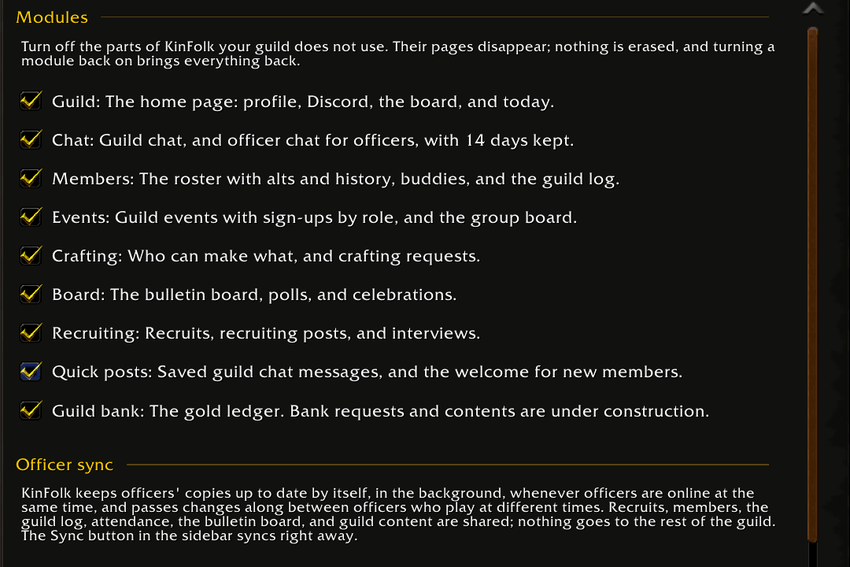
- Settings in tabs: Guild setup (your setup, guild content, guild notes, sharing with officers), Display (minimap button and nicknames), Modules (switch off any part your guild does not use, and officer sync), Permissions, and Start over.
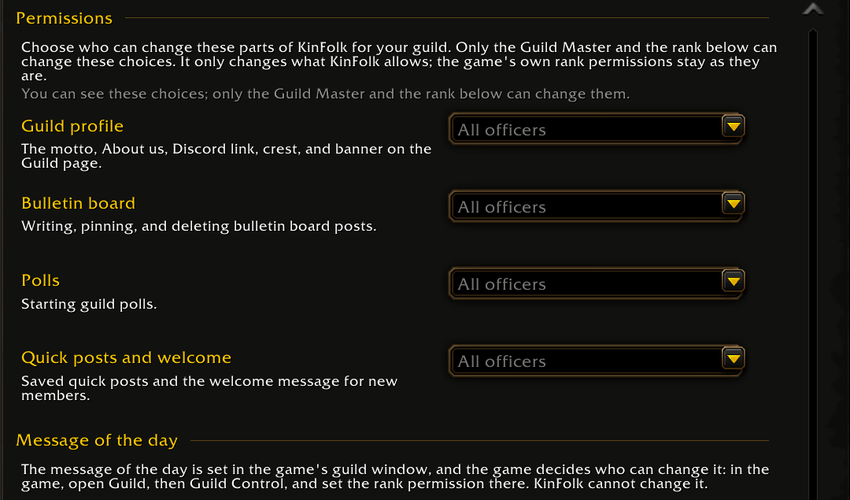
- Permissions: the Guild Master and Deputy choose whether all officers, or only the two of them, may change the guild profile, the bulletin board, polls, and quick posts. Every officer can see the current choices.
- A minimap button, helpful tooltips everywhere, and a short setup tour.
Works with other addons
- WIM (WoW Instant Messenger): works with KinFolk. When WIM is installed, every KinFolk whisper button opens WIM's window for that player with the message already typed in. Nothing is sent until you press Enter. WIM's own settings decide when its windows pop up (by default, not in combat), and KinFolk follows them.
- Prat 3.0: everything works except nicknames in chat, which do not show yet when Prat is installed. A fix is being worked on.
- BugSack and BugGrabber: recommended during the beta. They catch any error so you can copy it into a bug report.
Using another chat or guild addon with KinFolk? Message me on CurseForge and say how it goes.
How KinFolk works
- Officers and members. During setup, an officer picks which guild ranks count as officers. Those ranks get the full tools. Everyone else gets the member view: the Guild page, chat, the member pages, events, crafting, and the board, never officer notes or records.
- Your data stays in the game. KinFolk saves to your computer in the game's own saved data and shares officer data only with officer ranks, through the game's hidden addon messages.
- In-game information only. KinFolk never asks for or stores real names, locations, or anything outside the game.
- Two separate channels. Officer records travel only between officers. The group board, crafting, and polls use a separate guild-wide channel that carries only what the whole guild is meant to see.
- Nothing happens on its own. KinFolk never posts, whispers, invites, or changes anything without your click.
What the game does not let addons do, and what KinFolk does instead:
| You want to... | KinFolk... |
|---|---|
| Promote, demote, or remove a member | leaves it to the game's guild window (J), and still records the change in its log |
| Write a guild note | builds the note and opens the roster so you can paste it |
| Change the message of the day | leaves it to the game's guild window |
| Look up a player you are not targeting | runs /who when you click Look up |
What's being worked on, and what's next
Being tested now
- Bank requests and bank contents: built, and waiting for WoW Forever to turn on guild bank item tabs. They open after testing on the live game.
- Climbers this week fills in over the first few days as KinFolk sees level-ups.
- Prat 3.0: nicknames in chat with Prat installed.
Coming next
- Day-first dates for players outside the US.
- Your requests: message me on CurseForge with ideas.
Getting started
- Install with the CurseForge app (it keeps KinFolk up to date for you), or download the zip and extract it into your Forever InterfaceAddOns folder, so there is a folder named KinFolk.
- Restart the game completely. At character select, click AddOns and make sure KinFolk is ticked (tick Load out of date AddOns if needed).
- Open KinFolk with the minimap button or /kinfolk.
- Officers: a short first-time setup confirms your guild, your officer ranks, and your recruiting rules and messages. Each officer does it once.
- Members: no setup. KinFolk opens on the Guild page straight away.
- Stay up to date. Update KinFolk whenever a new version is out, and keep every officer on the same version. Your KinFolk version is shown in chat when you log in.
Slash commands
| Command | What it does |
|---|---|
/kinfolk | Open or close KinFolk |
/kinfolk help | List all commands |
/kinfolk setup | Review or change your guild's setup (officers) |
/kinfolk sync | Sync with online officers now and show what sync sees (same as the Sync button) |
/kinfolk check | Quick health check after a game patch: version match, game functions, and errors |
/kinfolk reminders | Show check-ins and trial endings that are due |
/kinfolk minimap | Hide or show the minimap button |
/kinfolk probe | Show what your game supports (helpful in bug reports) |
/kinfolk reset | Erase everything KinFolk saved on this computer |
Frequently asked questions
What is KinFolk?
KinFolk is a guild management addon for World of Warcraft: Forever. It combines a guild home page, guild and officer chat, a searchable guild roster with alts and member history, a permanent guild log, guild events with sign-ups and attendance, crafting, a bulletin board and polls, recruiting, and automatic officer sync in one in-game window.
Do all my guild members need KinFolk?
No. Officers get the most from it, and members who install it get the member view. Events use the game's calendar, so everyone can sign up either way.
What do regular members get?
The Guild page, guild chat, a members overview (who's around, climbers this week, new guildmates, and your own played time), member cards, leveling buddies, the game's guild log, events with sign-ups, crafting and crafting requests, the group board, polls, celebrations, and the bulletin board. Officer notes and records stay with officers.
How do I track alts in my guild?
Open a member in KinFolk and type their main's name, or use Suggested alts on the Members overview. The main's record then lists every linked alt.
How do officers share recruit notes in WoW Forever?
KinFolk's officer sync shares records automatically between officers who are online at the same time and passes changes along to others later. Share codes cover officers who are rarely online together.
Why don't my officers see my changes?
Make sure everyone has the same KinFolk version (shown when you log in; KinFolk warns about differences), each officer has done setup once, and each officer's rank is ticked as an officer rank. The first exchange can take a minute or two. /kinfolk sync shows what sync can see.
Why can't KinFolk promote, remove, or write guild notes for me?
World of Warcraft: Forever does not allow any addon to do those. Use the game's guild window (J) for rank changes; KinFolk gets guild notes ready to paste.
Will KinFolk spam chat?
No. It only sends what you click, and recruiting posts have a wait between posts that all your officers share.
Can I use it to start a new guild?
Yes. If you are not in a guild yet, founder mode tracks your charter signatures and founding plans, then moves your records into the guild once it exists.
How does the crafting directory find recipes?
When a guildmate with KinFolk opens one of their profession windows, KinFolk notes the recipes they know, with each recipe's ingredients, and shares them with the guild. The game only lets an addon read your own recipes and bags, so the directory grows as guildmates with KinFolk play.
What is the Bank door?
The Bank ledger keeps every gold deposit and withdrawal for good. Bank requests and bank contents are built and wait for WoW Forever to turn on guild bank item tabs; until then they are marked Under construction.
What do away notices do?
A member who is taking a break marks themselves away until a date. Officers see it on the roster, and away members are left off the inactivity report, so nobody is removed for being on vacation.
Does KinFolk work with WIM or Prat?
Yes with WIM: KinFolk's whisper buttons open WIM windows with the message ready to send. With Prat, everything works except nicknames in chat, which is being fixed. See "Works with other addons" above.
How do I report a bug?
- Update to the newest version first. The problem may already be fixed.
- Install BugSack (with BugGrabber) from CurseForge if you can. It keeps the error text so you can copy it.
- Message me here on CurseForge ([your CurseForge name]) with what you were doing, your KinFolk version (shown when you log in), the error text, and a screenshot if it helps. Include what /kinfolk check prints, and for sync problems, what /kinfolk sync prints.
Every report is reviewed. Thank you for helping make KinFolk better.
KinFolk is made for World of Warcraft: Forever. Copyright 2026 Mathew Baldwin. All rights reserved.
You must be logged in to leave a comment.