
KillETA – Forever WoW
A lightweight Time to Die countdown and per-character mob kill tracker built for WoW Forever.
Details
Expansion
 Forever
 Categories
Developers

Having issues?
Kill ETA Forever
Kill ETA Forever estimates how long your current hostile target has left to live and displays the result in a compact, movable panel designed specifically for World of Warcraft: Forever.
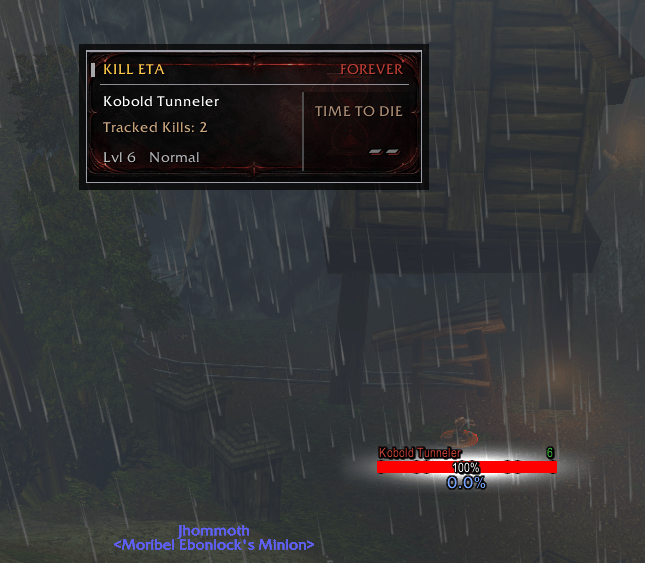
The addon now also includes a per-character kill tracker that displays how many eligible mobs of the targeted creature type you have defeated.
Features
Clear Time to Die countdown
Approximate protected-health estimates displayed with
~Automatically updates when switching hostile targets
Displays the target’s name, level, and classification
Per-character Tracked Kills
Separate kill totals for each creature type
Supports credited player and pet kills
Duplicate-count protection
Enlarged panel and text for improved readability
Custom forged-metal panel artwork
Classification-colored frame accents
Branded, draggable minimap button
Click the minimap button to show or hide the panel
Movable and lockable window
No external libraries or dependencies
Tracked Kills
Tracked Kills begin at zero when the feature is installed and are stored separately for each character.
The addon records an eligible hostile mob when it observes that mob die while it is your current target. Targeting another mob of the same creature type displays the total you have accumulated for that mob.
Credited pet kills are also supported.
WoW Forever does not expose an unrestricted combat log to addons. Because of this:
Off-target kills are not guaranteed to be counted.
Historical kills from before installing the feature cannot be recovered.
Gray or other non-XP kills may not provide a readable death signal and therefore may not be counted.
Understanding the Countdown
A normal countdown such as 12s uses directly accessible health information.
A countdown beginning with ~, such as ~12s, is an approximate estimate produced through WoW Forever’s protected-health APIs.
The panel displays -- until it has enough information to produce an estimate.
Minimap Button
The branded Kill ETA minimap button provides quick access to the panel:
Left-click to show or hide the Kill ETA window.
Drag the button to reposition it around the minimap.
The button position is retained when WoW Forever restores SavedVariables correctly.
Commands
/killeta— Show available commands/killeta lock— Lock the window/killeta unlock— Unlock the window for dragging/killeta reset— Restore the default window position/killeta show— Show the panel/killeta hide— Hide the panel/killeta toggle— Show or hide the panel/killeta status— Show countdown status/killeta kills— Show the current target’s tracked-kill total/killeta doctor— Show Forever compatibility diagnostics
Compatibility
World of Warcraft: Forever
Game version
1.60.1Interface
16001Live-tested on client build
1.60.1.70009No external dependencies
Live testing covered protected-health countdowns, target switching, separate totals across multiple creature types, player and pet kills, minimap controls, window movement, and persistence across /reload.
WoW Forever Beta Notice
WoW Forever currently has a client-side SavedVariables loading issue. Kill totals and UI placement were verified across /reload, but the game may fail to restore addon data after a complete client restart until Blizzard resolves the beta-client issue.
WoW Forever remains in beta, so addon behavior may require adjustment as Blizzard updates the client and its combat API.
You must be logged in to leave a comment.