

Inked4GamePadUI
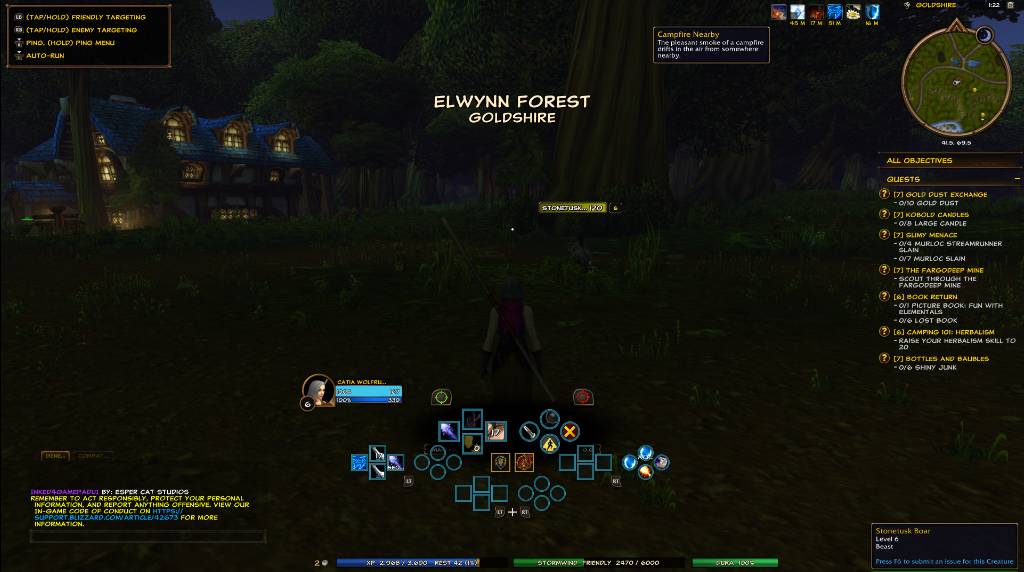
Inked4GamePadUI is a controller-friendly UI overhaul for Warcraft Forever designed specifically to work alongside Blizzard’s native Gamepad UI.
Details
Expansion
 Forever
 Categories
Developers

Having issues?
Inked4GamePadUI
Inked4GamePadUI is a specialized version of Inked by Esper Cat Studios, built specifically for players using Blizzard’s native Gamepad UI in Warcraft Forever.
Unlike the standard version of Inked, this edition does not provide its own controller navigation system. Blizzard remains in full control of Gamepad navigation, panel behavior, bindings, focus, and interface layout.
Inked4GamePadUI focuses on improving the appearance and usability of the Warcraft interface without interfering with Blizzard’s native controller system.
Important
This version is designed specifically for Blizzard’s native Gamepad UI.
If you are not using Blizzard’s built-in Gamepad interface, the standard version of Inked may be a better fit.
Inked4GamePadUI does not replace or modify Blizzard’s Gamepad navigation system.
Features
Controller-Safe Interface
Inked4GamePadUI has had Inked’s original controller systems completely removed.
Blizzard retains ownership of:
- Gamepad navigation
- D-Pad navigation
- Interact/Confirm controls
- Back/Close controls
- Panel focus
- Gamepad bindings
- Blizzard interface layout
- Gamepad action bars
This allows Inked4GamePadUI to enhance the interface while staying out of Blizzard’s controller system.
Custom UI Styling
Inked4GamePadUI keeps Inked’s visual identity, including:
- Custom interface styling
- Class-colored health bars
- Custom action bar appearance
- Custom fonts
- Theme support
- Adjustable font sizes
- Item level displays
- Loot presentation improvements
- Threat display
- Combat information
- Custom unit frame styling
The goal is to make the interface feel more expressive without replacing Blizzard’s underlying Gamepad framework.
Bottom Status Display
The Inked status display has been repositioned near the bottom of the screen for better compatibility with Blizzard’s Gamepad layout.
It includes:
- Gold
- Experience
- Reputation
- Durability
Gold and Reputation displays are intentionally read-only and do not respond to clicks.
Automatic Equipment Upgrades
Inked4GamePadUI includes an optional automatic equipment upgrade system.
When enabled:
- Inked checks newly acquired equipment
- Determines whether the item is a usable upgrade
- Automatically equips the better item
There are no controller prompts or confirmation windows.
Auto Equip is either ON or OFF.
Attack Work Bench
Create and maintain reusable attack macros directly through Inked.
The Attack Work Bench includes:
- Multiple saved macro slots
- Macro editing
- Save support
- Clear function
- Place macro directly onto the action bar
The Work Bench no longer opens or manipulates Blizzard’s Spellbook or Macro interface.
Cast Sequence Work Bench
Build and maintain cast-sequence macros without manually editing macro text every time.
Features include:
- Multiple saved sequence slots
- Custom sequence editing
- Reset timing support
- Save support
- Clear function
- Place the generated macro directly onto the action bar
Like the Attack Work Bench, it operates independently of Blizzard’s protected Spellbook interface.
Gamepad Action Bar Integration
The Attack Work Bench and Cast Sequence Work Bench launcher buttons are positioned near the center of Blizzard’s native Gamepad action bar.
They are intended to visually integrate with the Gamepad layout without changing Blizzard’s action bar positioning or navigation.
Inventory Support
Inked4GamePadUI intentionally leaves Blizzard’s native Gamepad bag navigation alone.
Supported inventory enhancements include:
- Item level display
- Junk identification
- Automatic junk selling
- Bag space display
The custom Inked inventory/controller system from the standard edition is not included.
Removed From This Edition
To maintain compatibility with Blizzard’s Gamepad UI, several systems from standard Inked are intentionally not included:
- Inked controller navigation
- Controller panel navigation
- Controller binding system
- Micro Menu controller wheel
- Custom Game Menu integration
- Custom Edit Mode layout installer
- Frame mover system
- Custom inventory navigation
- Fishing automation
- Thank You system
- Mail system
- Swing timers
- Mirror timers
- Custom Spellbook opening
- Custom Blizzard panel closing behavior
These removals are intentional.
The goal of Inked4GamePadUI is to enhance Blizzard’s Gamepad UI, not compete with it.
Options
Open Inked options with:
/inked
or:
/inked options
Options allow you to enable, disable, and configure supported Inked visual and gameplay features.
Compatibility
Designed for:
Warcraft Forever Beta
Built specifically for:
Blizzard Native Gamepad UI
Because Warcraft Forever is still under active development, Blizzard may change interface APIs or Gamepad behavior between builds.
If something stops working after a Warcraft Forever update, please report the issue along with any Lua error message.
Philosophy
Inked4GamePadUI follows a simple rule:
Blizzard controls the Gamepad. Inked controls the style.
The addon avoids replacing Blizzard’s controller system and instead focuses on visual improvements, quality-of-life features, and controller-safe enhancements.
Author
Inked4GamePadUI
Created by Esper Cat Studios
Based on the original Inked interface project.
The Esper Cat Studios UI — Controller Friendly
You must be logged in to leave a comment.