
Immersive Class UI Forever
An Immersive UI addon that is inspired by warcraft 1-3 lore, and classic lore. Designed to keep towards classic UI positioning but more heavily themed items. Contains some QoL for specific classes.
Details
Expansion
 Forever
 Categories
Developers

Having issues?
Immersive Class UI Forever
Your class deserves to look like your class.
Think about the first time you rolled your character. You picked a Rogue because you wanted to lurk in the shadows. You picked a Shaman because you wanted to call on storms and stone. Then you looked at the bottom of your screen and saw the same gray bars as everyone else.
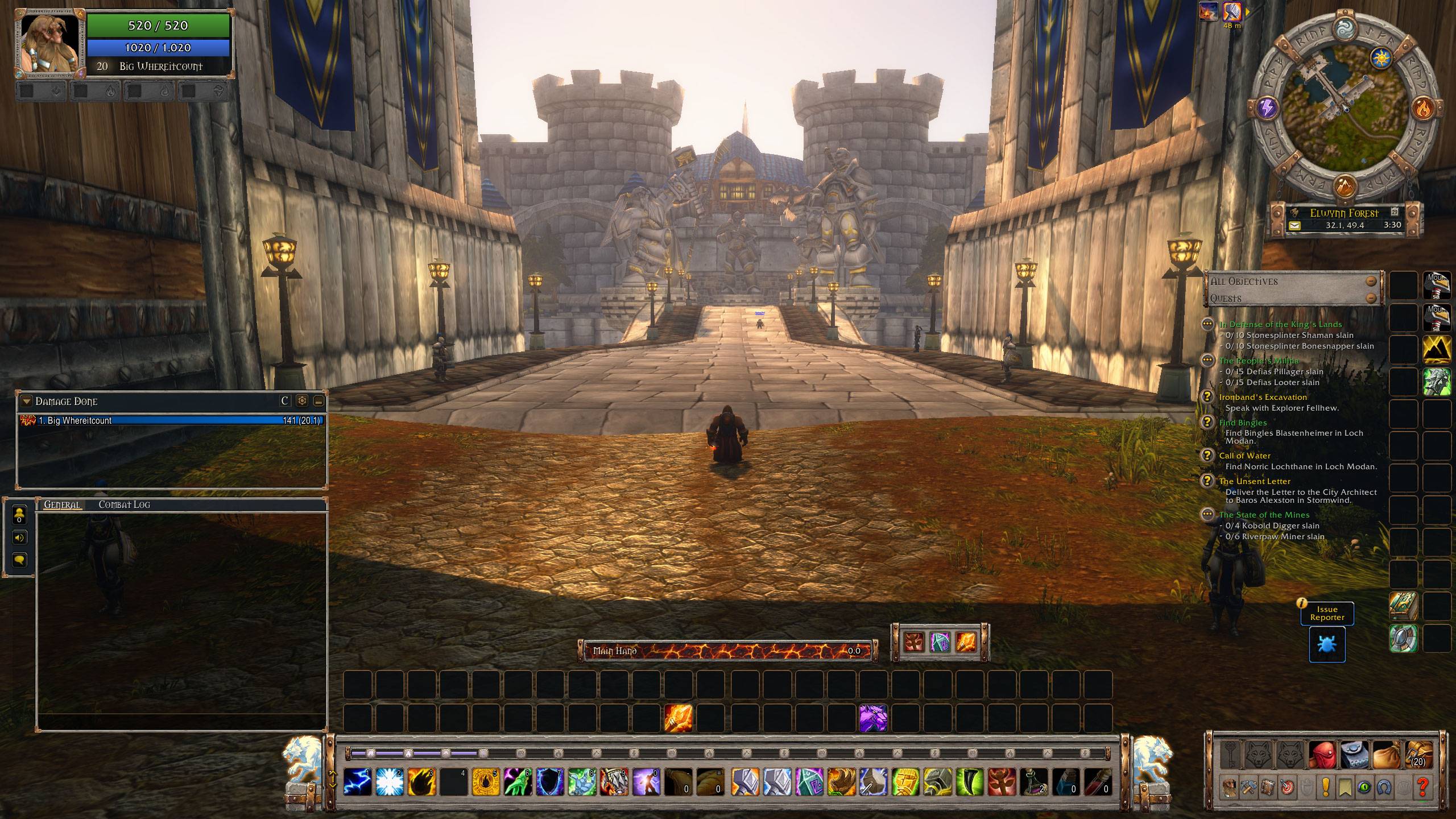
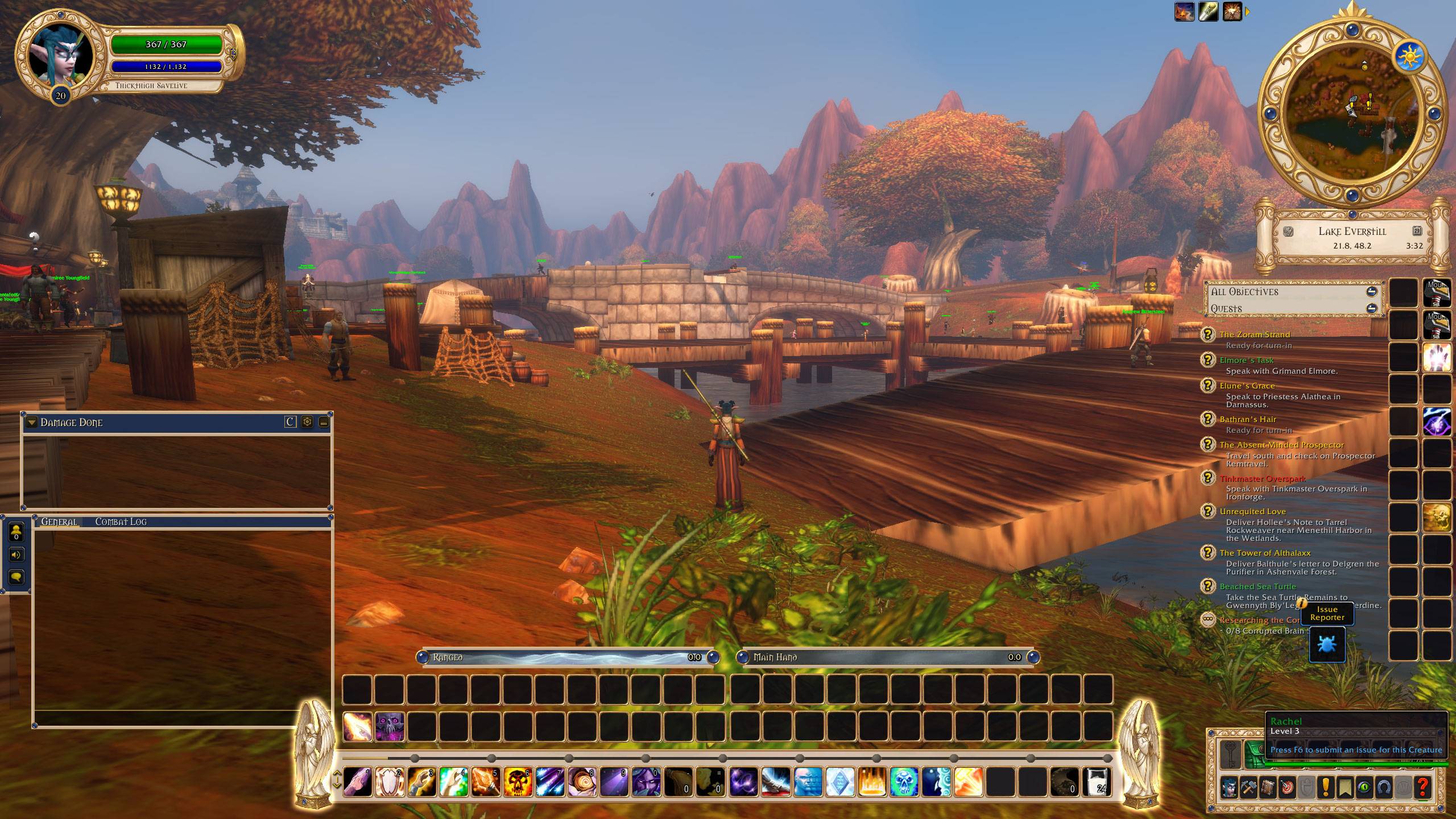
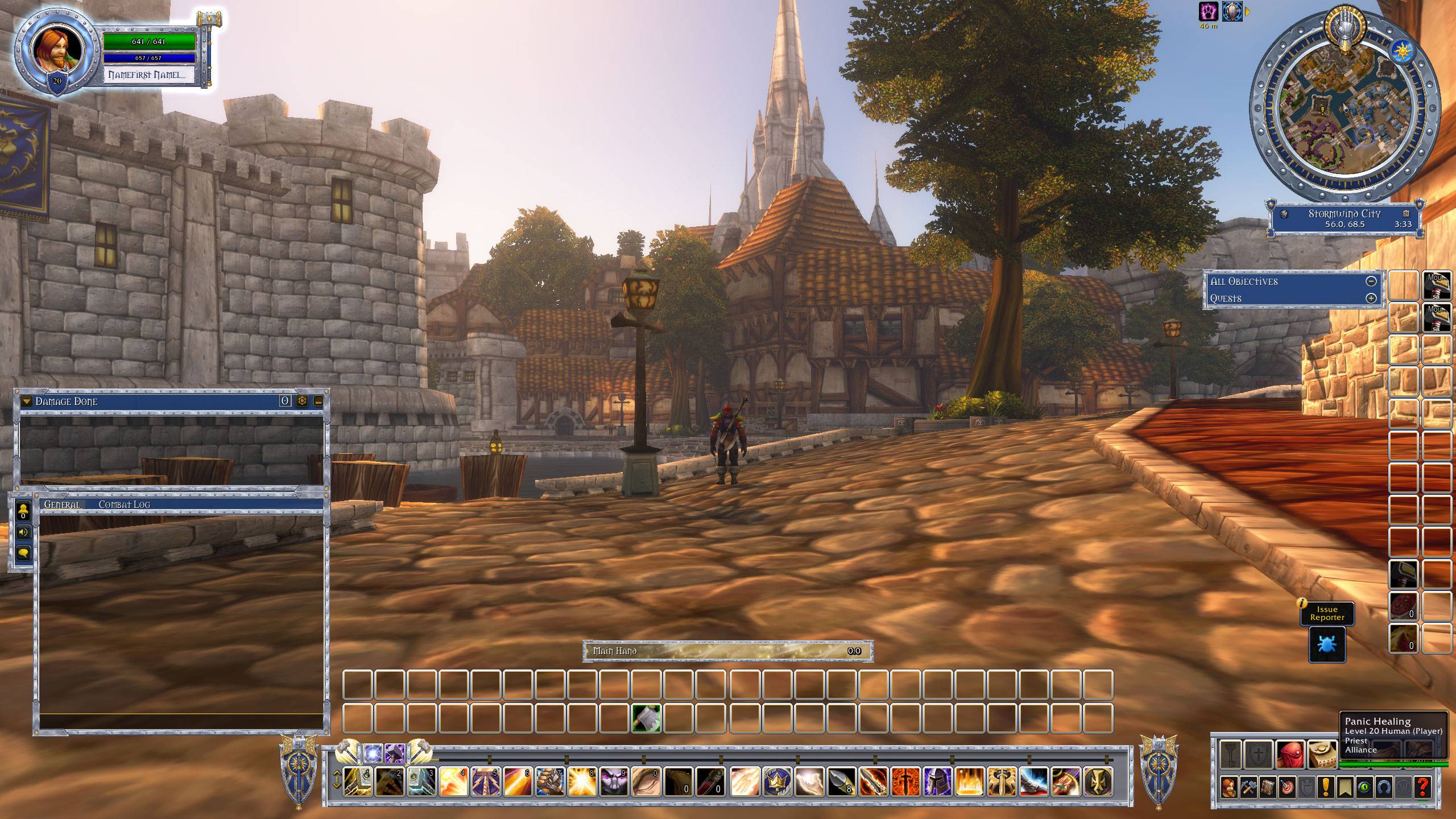
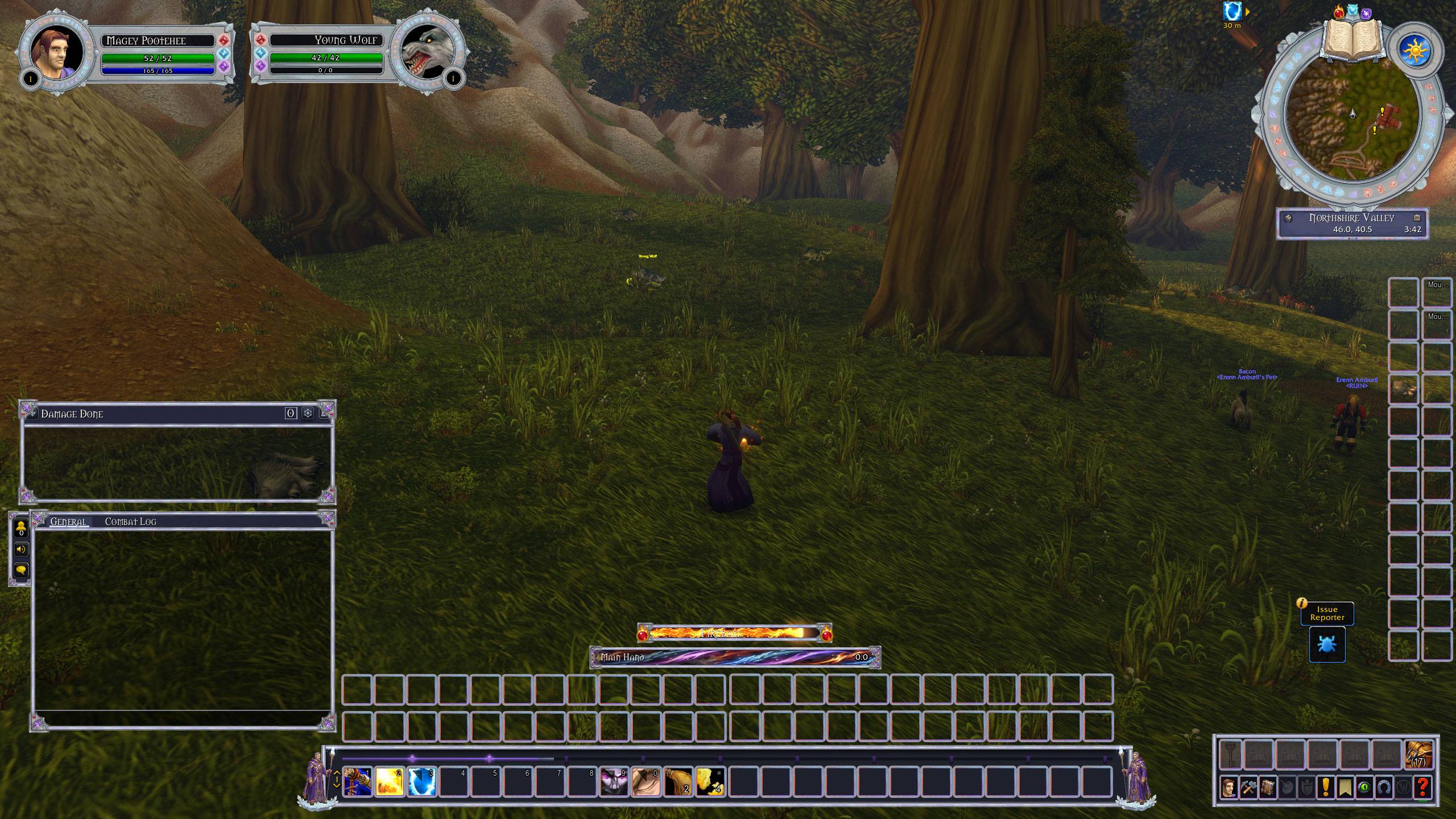
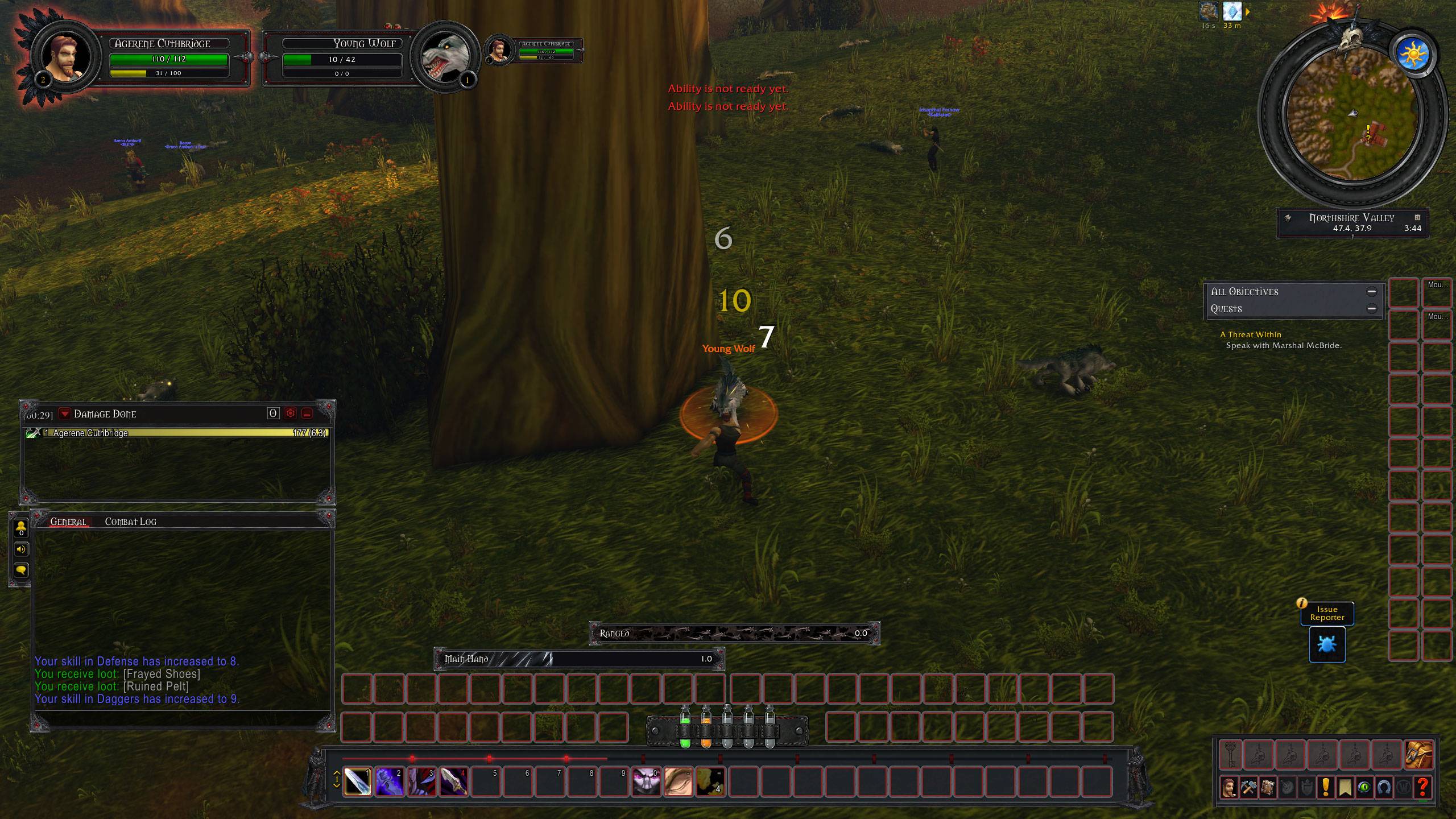
That is what this addon fixes. Immersive Class UI Forever gives every class its own hand-painted interface. A Rogue plays inside black leather and raven feathers. A Mage plays inside moonstone and glowing crystal. A Warrior plays inside dented iron that heats up as the fight gets going. Your whole screen starts to feel like it belongs to your character.
And it is not just paint. Many pieces react to what you are doing in the game. Your talents change the art. Your stance or form shows up on your bars. The spell you cast decides what your cast bar looks like. Your weapon swings fill with poison, blood, fire or frost.
A quick heads up: this is a beta. This is our first step toward a fully polished interface. Every class has a first version, and they are all in this download. Some of the art will be redone. Some pieces will move around. Lots of new features are still on the way. If you try it, we would love to hear what you think, because your feedback decides what we polish first.
Why it is easy to live with
One download covers every class. You get the main addon plus nine class themes. Only the theme for the class you are playing actually runs. The others just sit there and wait, so they never slow you down.
You choose for each character. The first time you log in, your character gets asked if it wants its class theme or the normal Blizzard look. You can change your mind any time. Just open the game's Options, go to AddOns, and find Immersive Class UI Forever.
It dresses up Blizzard's own frames instead of replacing them. Your action bars, health bars, cast bar, chat and damage meter are still the real Blizzard ones underneath. That means your keybinds, your Edit Mode setup and the way things work in combat all stay the same. They just look a whole lot better.
Every theme comes with a layout that fits its art. When you pick a theme, it offers to set up an Edit Mode layout that puts everything right where the art expects it. If we improve that layout later, you will be asked if you want the update. You can still move anything you like in Edit Mode.
It helps you get the size right. The themes are built for a screen with a certain amount of room. If your screen has less, you will get a one-time tip that tells you the exact UI Scale setting to use so everything fits.
What every theme covers
No matter which class you play, your theme dresses up:
- Your character frame. This is the big hero piece with your class's art.
- Your target, focus and party frames. These stay clean around the portrait circle on purpose. That leaves room for special elite and rare target art that is coming later.
- Your action bars. They sit on a themed panel with class art on both ends. Your experience and reputation bars are built right into that panel.
- Your minimap, framed with a themed ring and nameplate.
- Your swing timers, filled with painted art that moves as you swing.
- Your cast bar, with its own painted fills and emblems.
- Your chat windows, damage meter and quest tracker, all framed to match.
- Your bags and game menu buttons.
Meet the themes
Shaman: Elemental UI
Carved stone, glowing runes, bronze and ghost wolves. Wolves guard the ends of your bars. Your totem bar sits on stone tablets, and you can set a key for each element's totem and for Totemic Recall. Your weapon enchants make the interface glow, and there is a built-in display that shows your gear's durability.
Priest: Priest UI
Think of a holy relic made of ivory, gold trim and deep blue gems, with Spirit Healers standing at each end of your bars. The best part? When you go into Shadowform, your whole interface turns purple to match.
Paladin: Paladin UI
This is the Silver Hand: polished steel, blue enamel and sunny gold. You get a kite shield and a warhammer on your bars. Around your portrait is the Oath Ring, a ring of liquid light in the color of your aura. It pours in, blends and drains away as your auras change. Your main talent tree picks the look of your weapon swings.
Druid: Druid UI
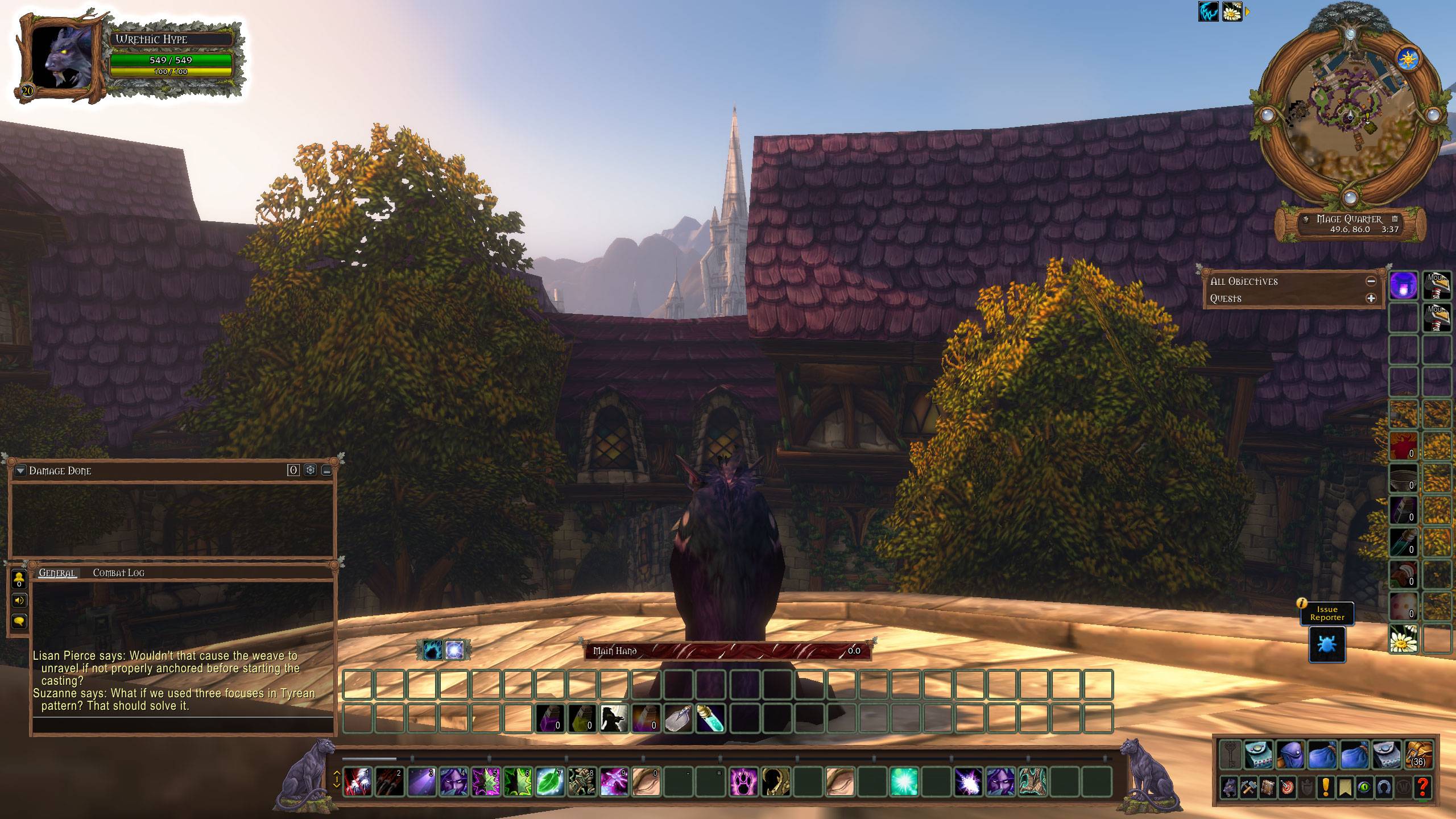
Living oak, bark, moss and moonstone. When you shift into a new form, the change shows up on your cast bar, your swing timer and the art on the ends of your bars.
Warrior: Warrior UI
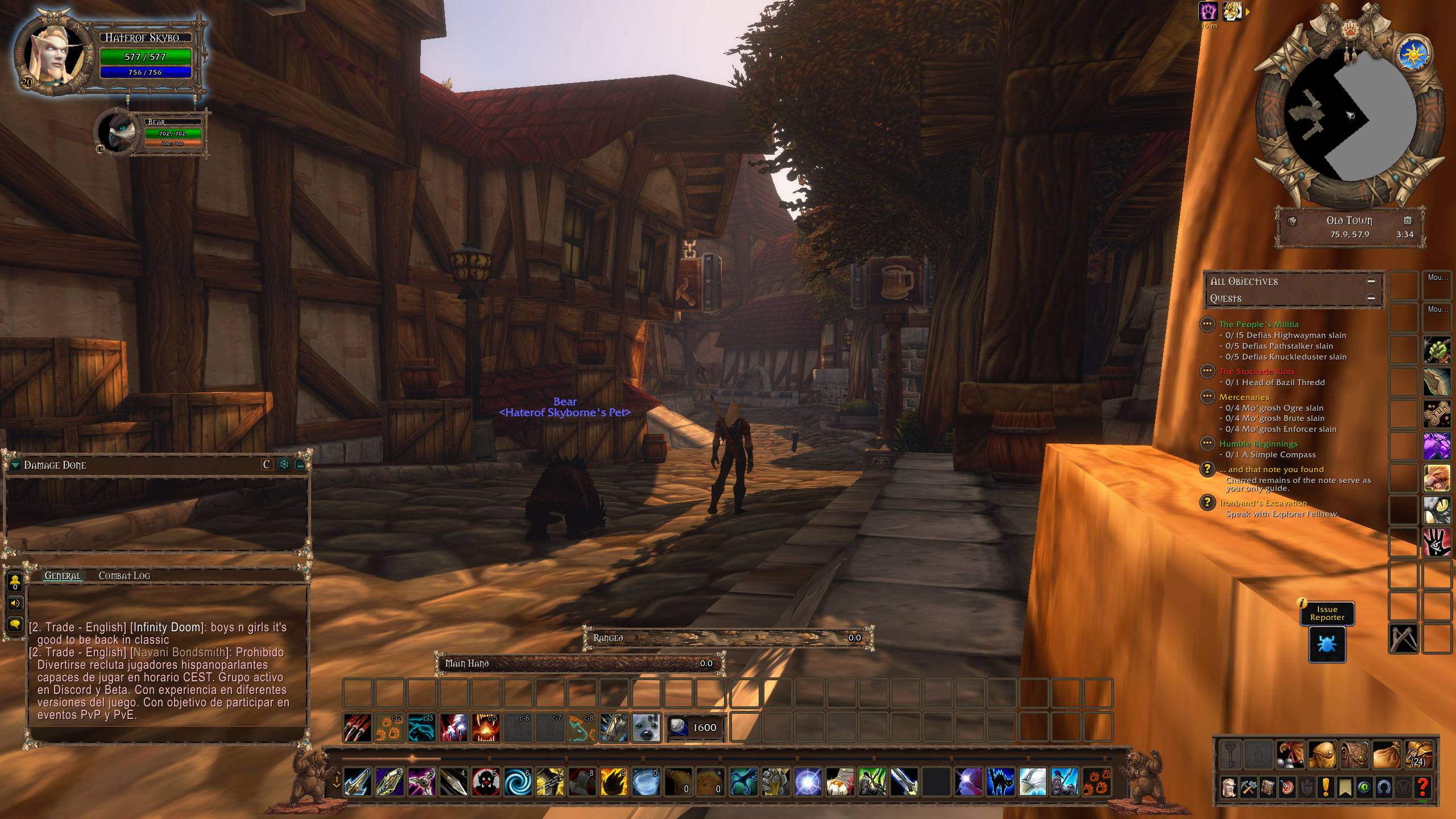
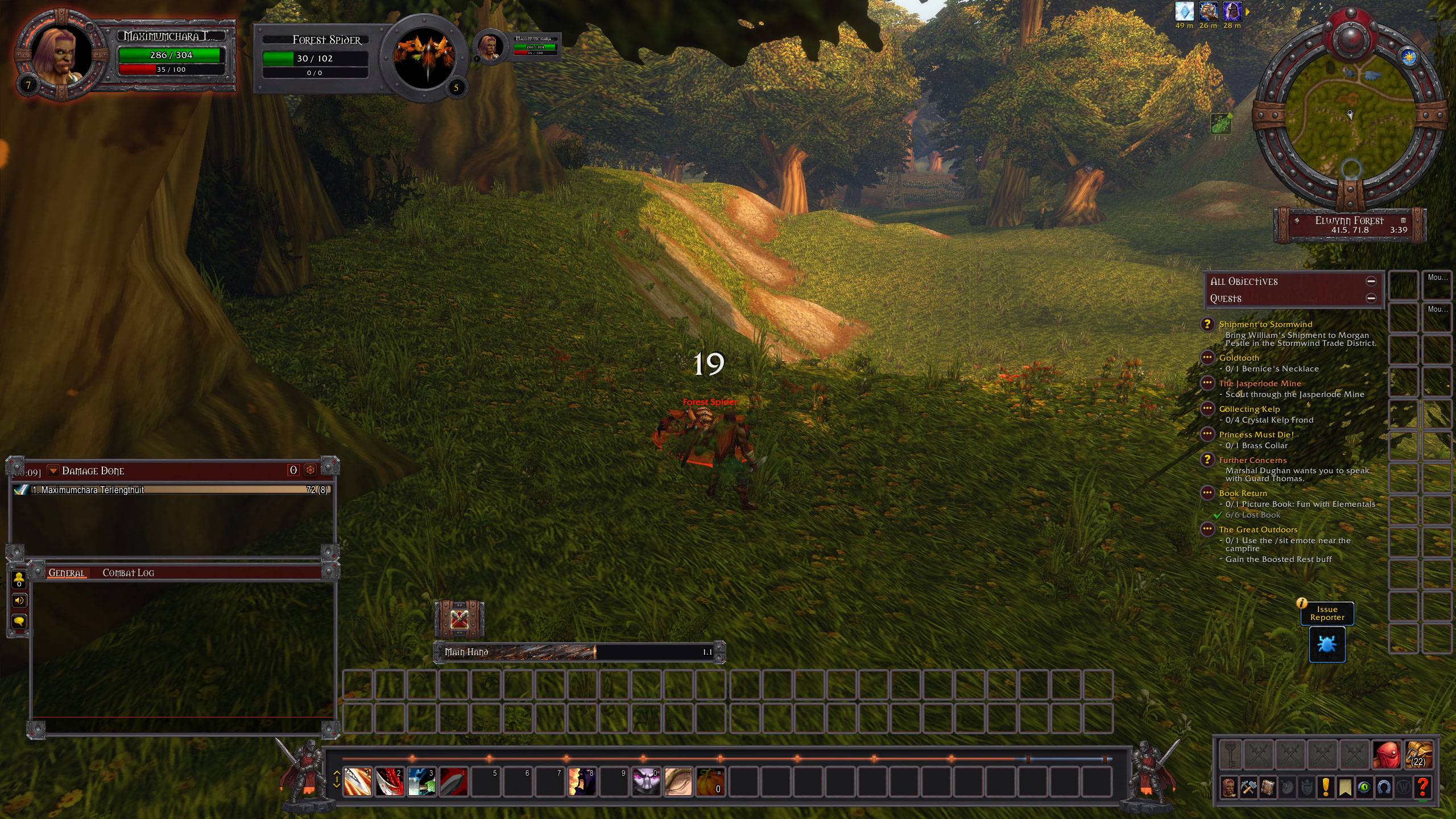
Black, battered iron with blood red enamel. Your character frame heats up with your rage, glowing from cold iron to burning red as you fill up. The art on your bars fills with red too. Each stance, Battle, Defensive and Berserker, gets its own knight on the ends of your bars.
Hunter: Hunter UI
Carved wood, tanned hide, bone and turquoise beads. Your talents pick the art on your bars: a bear, a hawk, or axes crossed over a trap. Each spec gets its own look for your main hand, off hand and ranged swings. You also get a themed pet bar, pet frame and ammo tracker.
Warlock: Warlock UI
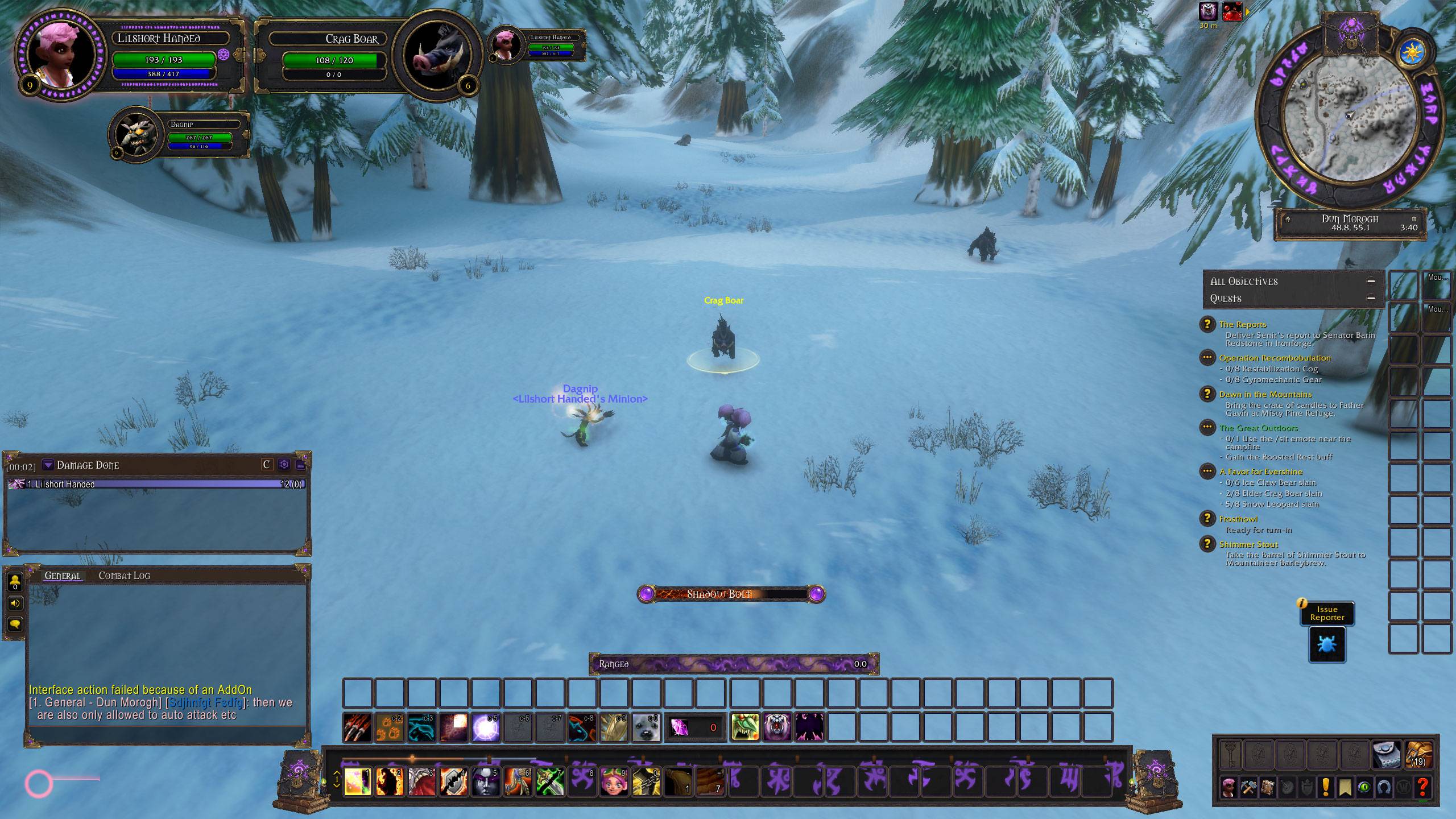
This one is called the Forbidden Grimoire. It is made of cracked black leather and old brass, with violet ink that changes with your talents. Affliction, Demonology and Destruction each get their own art. Here is a fun detail: every spell uses the look of its own school on your cast bar. You also get a soul shard counter and a pet frame that hangs from chains.
Mage: Mage UI
Moonstone, silver and crystal that carry the colors of all three schools of magic. The art on your bars shows your mage holding an open hand with an orb circling above it. It sparkles for Arcane, crackles for Fire and drops little snowflakes for Frost. Your cast bar matches the school of the spell you are casting, and Frostfire Bolt even gets its own look.
Rogue: Rogue UI
Welcome to the Black Feather Order: black leather, dark metal and raven feathers.
- A hooded assassin guards the ends of your bars, and your talents change what the assassin holds. Assassination brings daggers dripping with green poison. Combat brings an axe and a sword with a warm amber glow. Subtlety brings daggers dripping with blood and a dark purple glow. The drips actually fall.
- Both of your weapons get their own swing timer. They fill with poison, ghostly steel or blood depending on your spec. Your ranged swings fill with flying throwing stars.
- Your combo points live in a belt of poison vials on top of your action bars. Each point fills its own vial in a different color: green, orange, purple, yellow and red. Little bubbles rise through the poison. And just like in classic World of Warcraft, your points stay with the enemy you built them on. Switch targets and the vials go gray. Switch back and your points are still there.
What is coming next
This beta is the foundation. Here is what we are working toward:
- Elite and rare target art that frames the portraits of warcraft tiered enemies.
- Art updates for each theme. Some pieces will be remade and some will move as we polish each class, so your theme may look a little different from one beta to the next.
- More special features for each class, like the Rogue's poison vials and the Paladin's Oath Ring, for the classes that do not have one yet.
- Matching improvements across every theme. When we fix something in one class, we want every class to get that fix.
- Cleaner code behind the scenes, so fixes reach every theme at the same time.
- Optimizations - While many optimizations such as art compression already exist, future versions will contain optional settings to further optimize.
- Screen Resolutions - While the addon supports natively 2k+ screen resolutions and provides a calculation prompt if you are using smaller resolutions for your ui scale in game. I would like to present and provide native options for 1920x1080 monitors and wide screens. Out of the box the beta version is installed against native 2560x1440.
- General Polish - UI layout names, configuration options, and light touches. All UI components in the beta are subject to change.
You must be logged in to leave a comment.