

Hide Chinese Chat (Forever)
Hide Chinese Chat is a lightweight World of Warcraft addon that filters chat messages containing Chinese and Korean characters. Russian/Cyrillic messages can also be hidden optionally through the addon settings.
Details
Expansion
 Forever
 Categories
Developers

Having issues?
Hide Chinese Chat (Forever)
Hide Chinese Chat is a lightweight chat filtering addon for World of Warcraft: Forever (Beta) that also works with Classic Era and TBC Classic.
The addon automatically detects messages containing Chinese and Japanese characters and removes them from your chat. Korean (Hangul) and Cyrillic/Russian filtering can also be enabled optionally.
It can filter messages from Trade, General, World, Say, Yell, Emotes, Whispers, Party, Raid, Guild, Officer, and optionally System messages.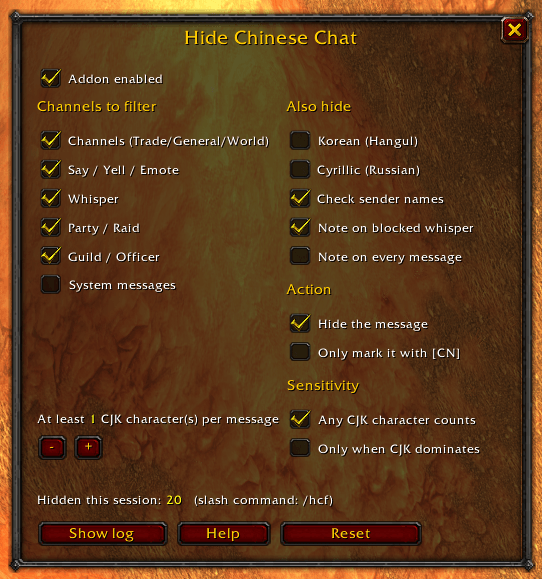
Features
- Filters Chinese and Japanese characters from chat
- Optional filtering for Korean
- Optional filtering for Cyrillic/Russian
- Choose between completely hiding messages or marking them with
[CN] - Filter messages containing any detected characters or only messages where they make up the majority
- Configure the minimum number of detected characters required before a message is filtered
- Enable or disable filtering individually for different chat categories
- Optional filtering based on the sender's character name
- Player allow list for people whose messages should never be filtered
- Keeps a log of the last 30 hidden messages
- Optional notification when a whisper has been blocked
- Item links are ignored during detection to prevent false positives
- Your own messages are never filtered
- Account-wide settings
The filter works by decoding incoming chat messages as UTF-8 and checking the Unicode ranges used by CJK characters, including Chinese ideographs, Hiragana, Katakana, Bopomofo, CJK punctuation, and fullwidth characters.
Western European characters such as German umlauts, ß, accented letters, and similar characters are not affected.
Commands
Open the options window with:
/hcf options
Use:
/hcf help
to see all available commands.
Some useful commands include:
/hcf — Show the current filter status/hcf on / /hcf off — Enable or disable filtering/hcf hide / /hcf tag — Hide messages or mark them with [CN]/hcf korean — Toggle Korean filtering/hcf cyrillic — Toggle Cyrillic/Russian filtering/hcf allow <name> — Add a player to the allow list/hcf log — Show the last 30 hidden messages/hcf test <text> — Test text against the current filter settings/hcf reset — Reset all settings
Important Notes
Blocked whispers can display a short grey notification so you know someone tried to contact you. The original message remains available through /hcf log.
Chat bubbles displayed above characters cannot be filtered because they do not pass through WoW's normal chat event system. If you want to remove those as well, disable chat bubbles under Interface → Chat.
Settings are saved account-wide in HideChineseChatDB.
You must be logged in to leave a comment.