

Hide Bag Bar Forever
Hides Blizzard's bag bar while keeping normal bag access available, with an optional draggable bag macro and minimap control.
Details
Expansion
 Forever
 Categories
Developers

Having issues?
Hide Bag Bar Forever is a lightweight quality-of-life addon for World of Warcraft: Forever that lets you hide Blizzard’s default bag bar while keeping your bags fully accessible.
It is designed for players who prefer a cleaner interface, especially when using Blizzard’s unified bag system, but still want convenient ways to open their bags without keeping the default bag bar visible at all times.
Features
- Hides Blizzard’s default bag bar
- Keeps Blizzard’s normal bag functionality intact
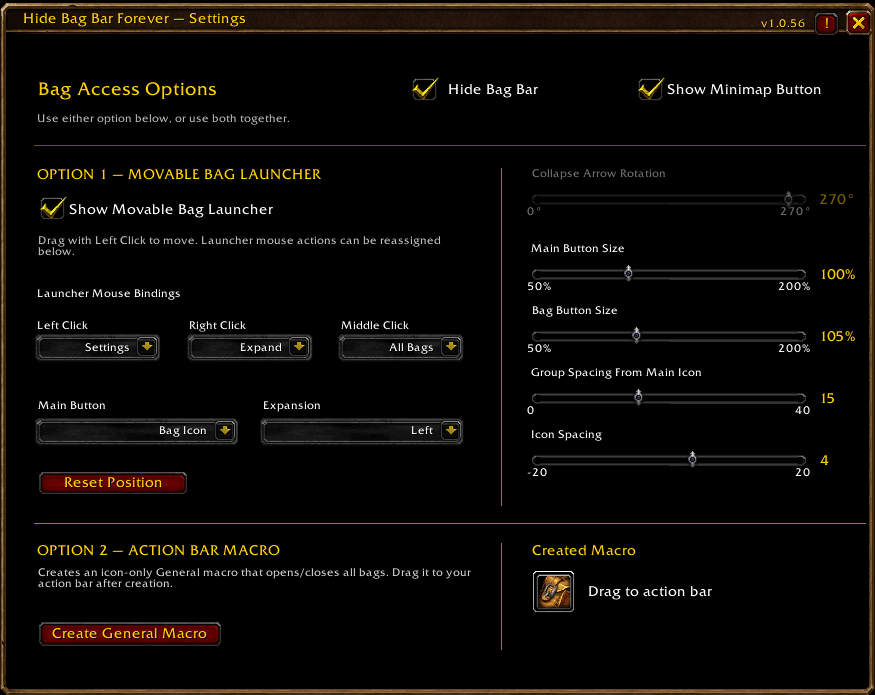
- Clean Blizzard-style configuration window
- Toggle Hide Bag Bar on or off at any time
- Optional draggable minimap button
- New fully movable Bag Launcher
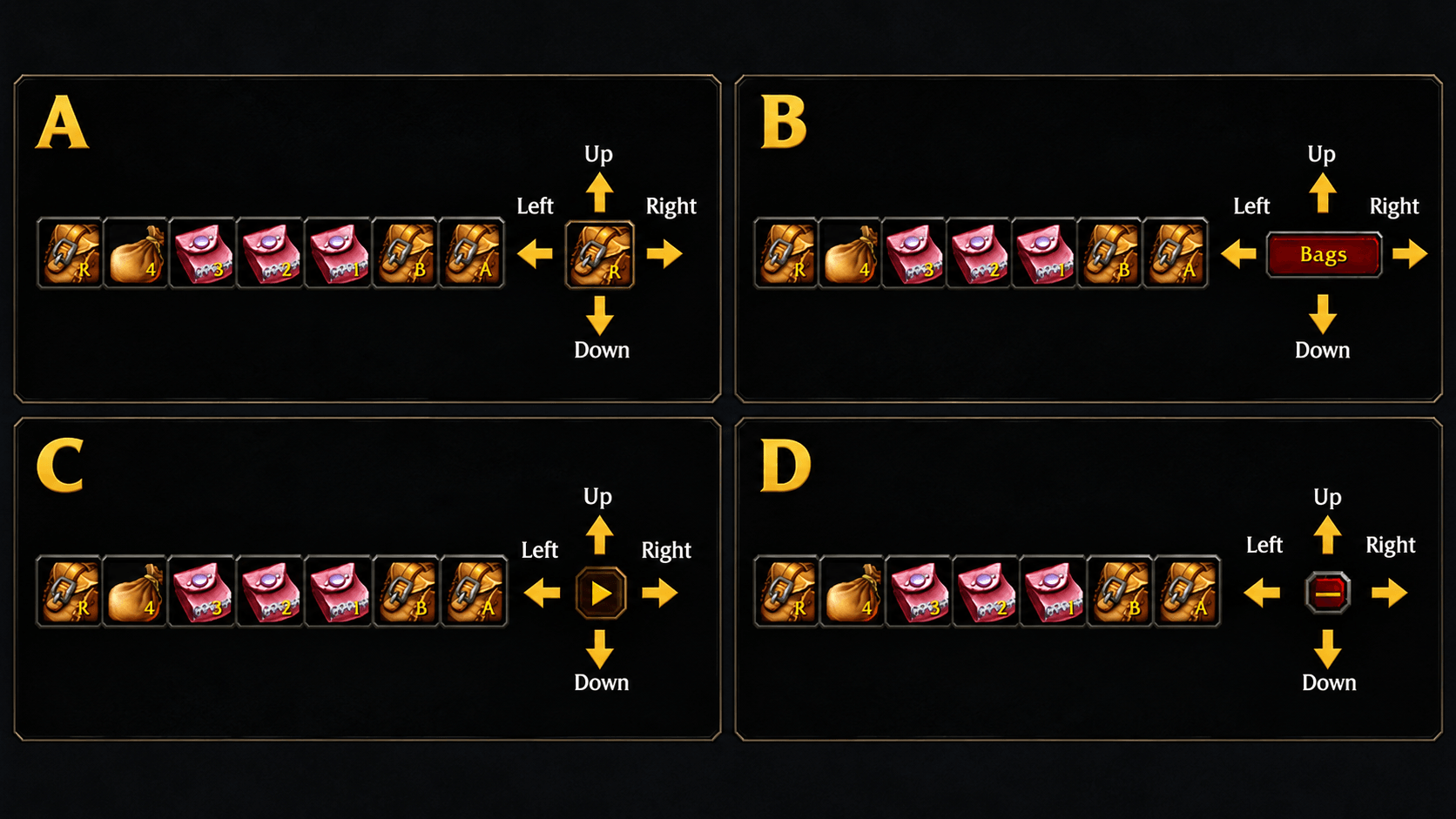
- Bag Launcher can expand in:
- Left
- Right
- Up
- Down
- Adjustable launcher and bag-button sizes
- Adjustable spacing between the launcher and bag group
- Adjustable spacing between individual bag buttons
- Multiple launcher button styles
- Customizable mouse-button actions
- Original action-bar macro option remains available
- Created bag macro can be dragged directly from the addon window to an action bar
- Lightweight and purpose-built
- No external libraries required
Movable Bag Launcher
The new Bag Launcher provides a compact alternative to Blizzard’s default bag bar.
When collapsed, it can remain as a single movable button anywhere on your screen.
When expanded, it displays your available bag buttons, including the backpack and equipped bag slots.
The launcher can expand in any of four directions:
- Left
- Right
- Up
- Down
Its position and configuration are saved between sessions.
Launcher Customization
The launcher can be customized directly from the addon settings.
Available main-button styles include:
- Bag Icon
- Panel
- Plus / Minus
- Collapse
You can also adjust:
- Main Button Size
- Bag Button Size
- Group Spacing From Main Icon
- Icon Spacing
- Collapse Arrow Rotation
Icon spacing supports both positive and negative values, allowing the expanded bag buttons to be spread apart or packed more tightly together.
The Collapse-style launcher also supports arrow rotation in 90-degree increments.
Custom Mouse Controls
Launcher mouse actions can be customized for:
- Left Click
- Right Click
- Middle Click
Each button can be assigned to:
- Expand / Collapse
- Open Settings
- Open / Close All Bags
- None
Default controls are:
- Left Click → Expand / Collapse
- Right Click → Open Settings
- Middle Click → Open / Close All Bags
The launcher can also be dragged to reposition it on screen.
Action Bar Macro
The original macro option is still available for players who prefer using a normal action-bar button.
The addon can create a General macro using:
/run ToggleAllBags()
The macro uses a bag icon with an intentionally blank name, allowing it to behave like a clean bag button on your action bar.
Once created, the macro can be dragged directly from the addon settings window onto an action bar.
You can use:
- the Movable Bag Launcher
- the Action Bar Macro
- or both together
Settings
The configuration window separates the two bag-access methods into:
Option 1 — Movable Bag Launcher
and
Option 2 — Action Bar Macro
This keeps launcher customization and macro creation clearly separated while still allowing both methods to be used together.
Slash Command
/hbbf
Opens the Hide Bag Bar Forever settings window.
Minimap Button
An optional minimap button is available for quick access to the addon settings.
It can be enabled or disabled from the configuration window.
Compatibility
Built specifically for World of Warcraft: Forever.
Hide Bag Bar Forever does not replace Blizzard’s bag system or inventory interface.
It only controls the visibility of Blizzard’s default bag bar and provides optional alternative ways to access your bags.

You must be logged in to leave a comment.