

HealingForever
HealingForever enhances Blizzard’s existing party and raid frames without forcing you into a completely different unit-frame setup. Assign your heals, click a frame, and heal.
Details
Expansion
 Forever
 Categories
Developers

Having issues?
HealingForever
A clean, modern click-casting addon built specifically for World of Warcraft: Forever.
HealingForever enhances Blizzard’s existing party and raid frames without forcing you into a completely different unit-frame setup. Assign your heals, click a frame, and heal.
Simple to configure. Fast to use. Built around the restrictions of the Forever client.
Features
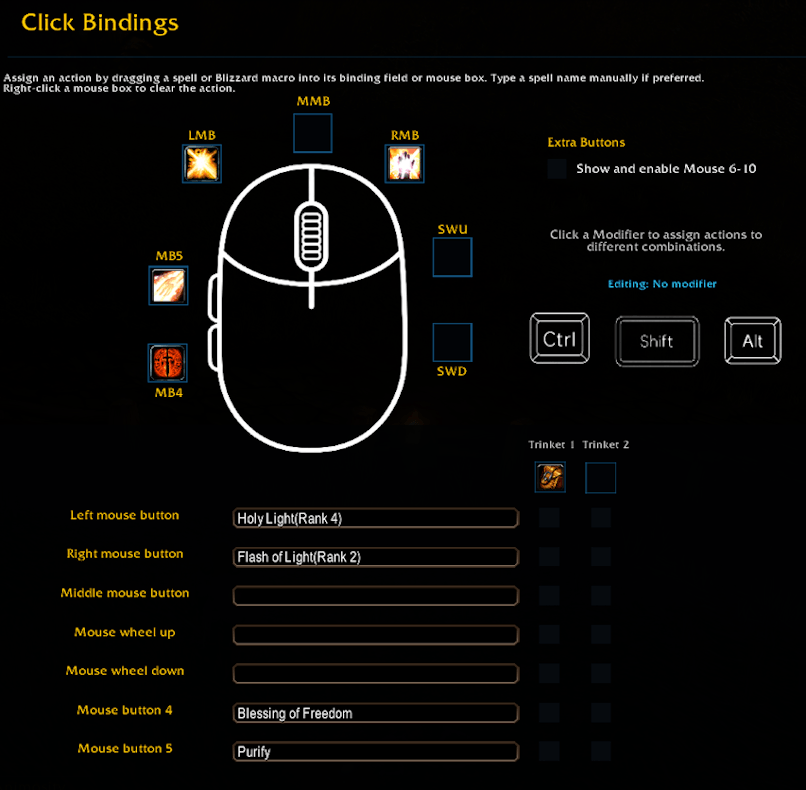
Click Casting
Assign spells to Left Click, Right Click, Middle Click, Mouse 4, Mouse 5, and additional mouse buttons.Modifier Bindings
Create separate bindings using Shift, Ctrl, and Alt for a much larger healing toolkit.Drag & Drop Setup
Drag spells directly from your spellbook into HealingForever or type the spell name manually.Smart Resurrection
When enabled, your configured resurrection spell can automatically replace your normal heal when clicking a dead player outside combat.Smart Buffs
Configure class-specific buffs and let HealingForever handle missing buffs through your normal clicks while outside combat.Trinket + Heal Bindings
Assign Trinket 1 or Trinket 2 to individual healing binds. HealingForever attempts the selected on-use trinket before casting the assigned heal.Out-of-Range Detection
Optionally dim unavailable players almost completely and display a compact OoR warning directly on their frame.Range Alerts
Add an error sound, on-screen message, or both when attempting to heal someone out of range.Built-In Sound Browser
Choose and preview compatible Blizzard sounds directly inside HealingForever, with optional support for your own custom sound files.Dispellable Debuff Outlines
Display colored outlines around healing frames when players are affected by supported dispellable debuffs.Binding Tooltips
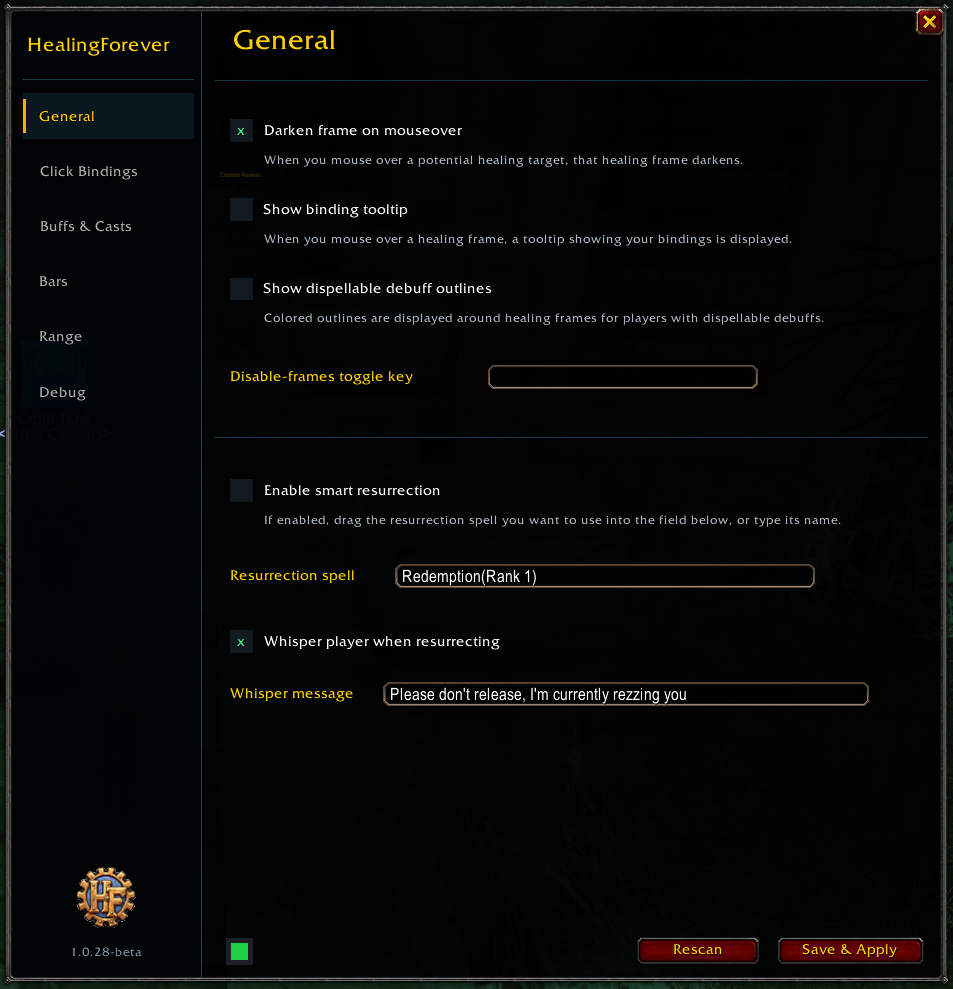
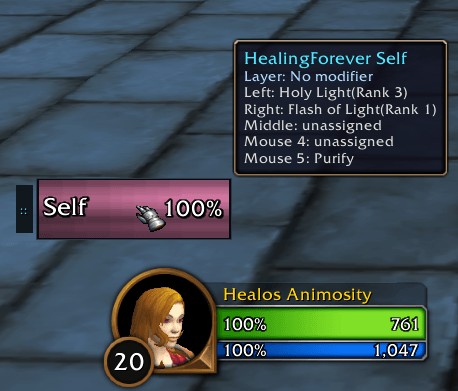
Hover over a healing frame to quickly see the abilities currently assigned to your mouse buttons.Mouseover Highlighting
Optionally darken frames as you mouse over them, making your intended healing target easier to identify.
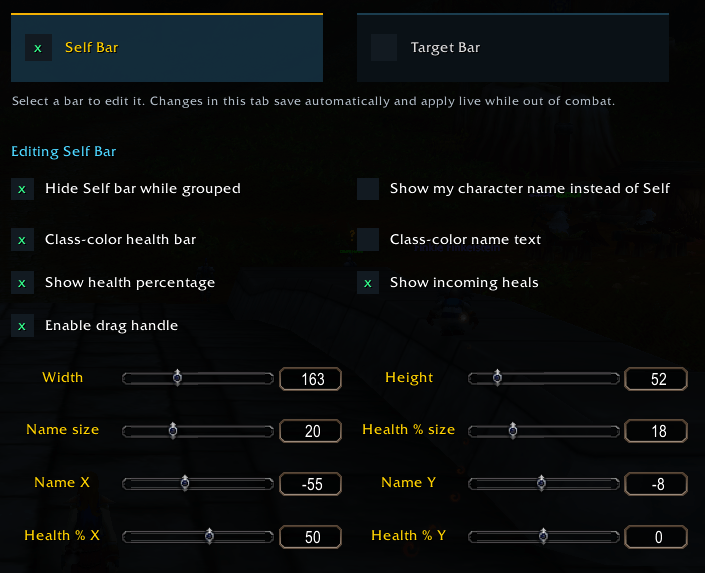
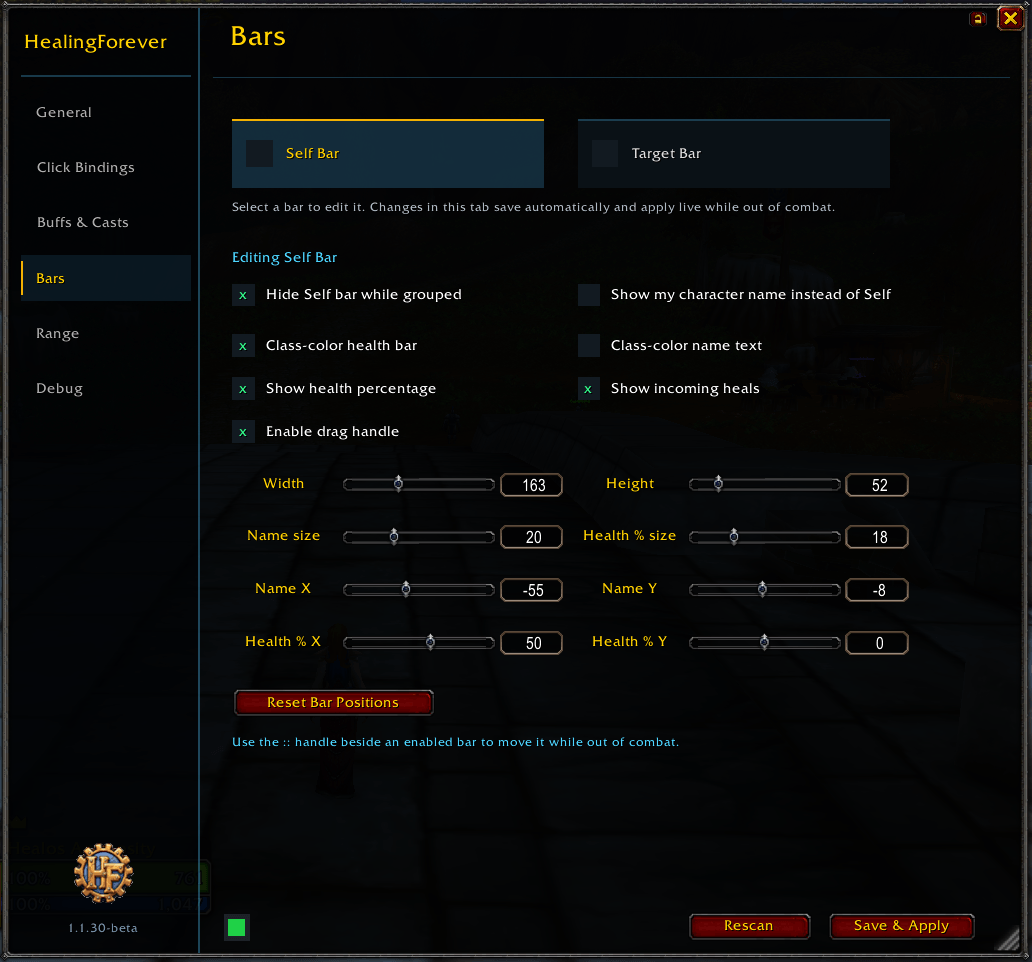
Custom Self & Target Bars
HealingForever includes optional custom bars for your character and your current target.
Self and Target are configured independently and can have their own size, text placement, font sizes, health percentages, incoming-heal displays, class coloring, and positioning.
Every adjustment updates immediately. No Apply button required.
You can also type exact numerical values for precise sizing and text placement instead of relying entirely on sliders.
Designed for Forever
HealingForever is developed specifically around the World of Warcraft: Forever addon environment.
Rather than depending on functionality that worked in older versions of WoW but is now restricted, HealingForever is designed around the secure actions and APIs available in the Forever client.
Quick Access
HealingForever includes a small movable HF icon.
Left Click: Open HealingForever
Right Click: Enable or disable healing-frame functionality
That’s it.
Configure your heals, customize the features you want, and get back to healing.
HealingForever 1.1.53-beta
Full Addon Profiles
Added a new Profiles section to HealingForever.
Save complete addon configurations as reusable profiles.
Profiles include Click Bindings, Smart Buff and casting settings, bars, range settings, general options, Healing Frames configuration, and other HealingForever settings.
Load, update, copy, and delete saved profiles.
Profiles are stored account-wide so they can be used across multiple characters.
Profile Import & Export
Added profile export codes for sharing HealingForever configurations with other players.
Import shared profiles directly into your profile library.
Imported profiles are saved first and are never automatically applied.
Profile codes contain configuration data only and do not execute Lua code.
Class Profiles
Saved profiles can now be assigned to individual classes.
Supports Warrior, Paladin, Hunter, Rogue, Priest, Shaman, Mage, Warlock, and Druid.
Optional automatic class-profile loading applies the assigned profile when that class logs in.
Class assignments are account-wide and remain separate from exported profile codes.
HealingForever UI Styling
Replaced Blizzard-style red and yellow action buttons throughout the options interface with a new HealingForever visual style.
Buttons now use a dark charcoal background, cyan-blue borders, white text, brighter hover feedback, and a darker pressed state.
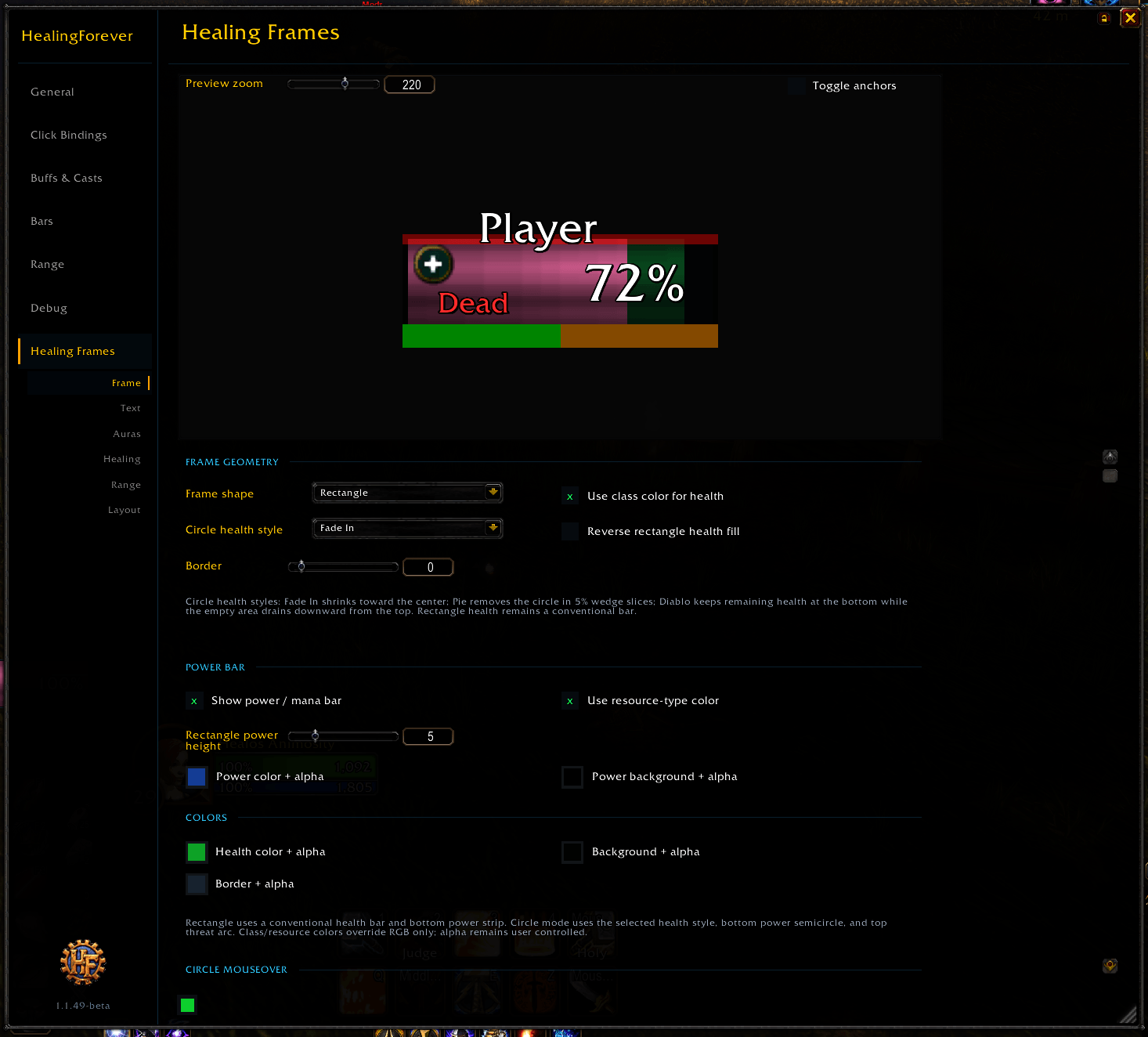
Updated styling is used consistently across the main options, Profiles, dialogs, and Healing Frames controls.
changelog: 1.1.49-beta
Redesigned Click Bindings
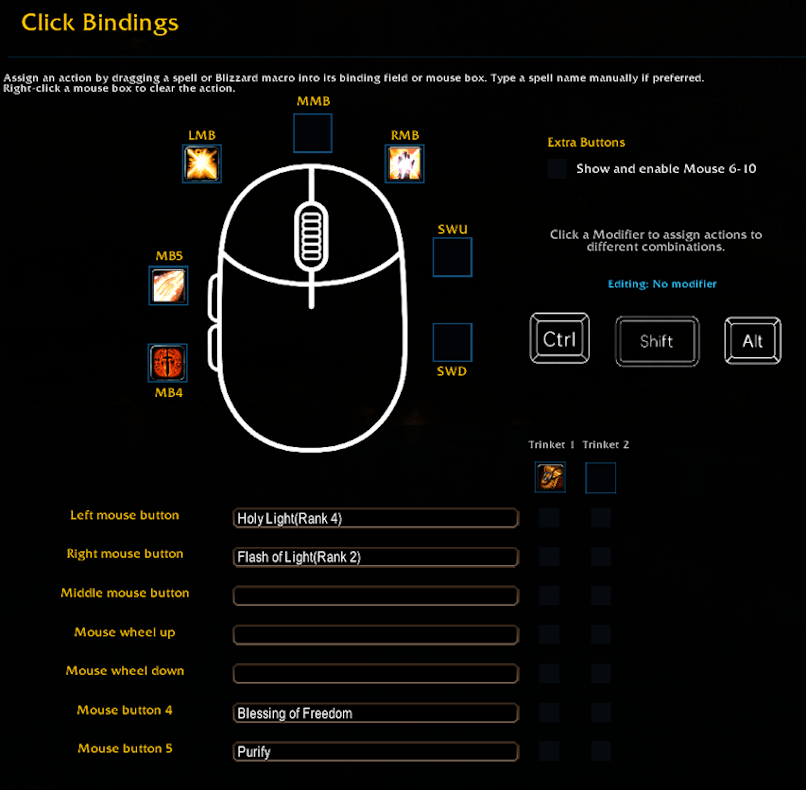
Completely redesigned the Click Bindings page with a visual mouse interface.
Drag spells directly onto the mouse diagram or into the corresponding binding field.
Added visual Ctrl, Shift, and Alt modifier controls.
Added clearer hover descriptions for mouse controls such as Left Mouse Button, Middle Mouse Button, Mouse Button 4, Mouse Scroll Wheel Up, and Mouse Scroll Wheel Down.
Updated the binding list layout while retaining optional support for Mouse Buttons 6 through 10.
Mouse Wheel Bindings
Added Mouse Scroll Wheel Up and Mouse Scroll Wheel Down as full binding options.
Wheel bindings support spells, Blizzard macros, Trinket 1, Trinket 2, and modifier combinations.
Wheel actions work while mousing over supported friendly Self, party, raid, and healing frames.
Normal camera zoom remains available when the mouse is not over a valid friendly unit.
Blizzard Macro Bindings
Blizzard macros can now be dragged directly into the same binding fields used for spells.
HealingForever uses the player's existing Blizzard macros rather than creating separate addon-managed macros.
Macro bindings display their macro name and icon in the Click Bindings interface.
Macro-driven mouse bindings are identified with a small gold M indicator.
Trinket pre-casts can be used with macro bindings.
Changes made to an existing Blizzard macro are picked up by its HealingForever binding outside combat.
Binding Interface Improvements
Binding icons are now reflected directly on the visual mouse for quicker setup and recognition.
Ctrl, Shift, and Alt click areas were refined to match their visible controls more closely.
Spell and macro assignments now share a single action field for a cleaner configuration workflow.
Existing Smart Buff threshold and exact-target behavior remains unchanged, and this release does not change the Healing Frames feature set.
-=-=-=-=-=-=-=-=-
1.1.38-beta
Smart Buff received a major reliability update.
Added a new Heal Below % priority
Added automatic buff refresh timing
Smart Buff now checks your exact class-assigned buff
Your buffs are tracked separately from other players’ copies
Improved Self Bar and party-frame behavior
Fixed out-of-range and line-of-sight buffs incorrectly casting on yourself
Smart Buff is now much more reliable about when to heal, when to buff, and who should receive the cast.
-=-=-=-=-=-=-=-=-=-=-=-
Launcher & Minimap 1.1.30
Added an option to place the HealingForever launcher on the minimap instead of beside the normal frame anchor.
The existing launcher controls are preserved:
Left Click: Open HealingForever settings.
Right Click: Toggle HealingForever frames.
Added Shift + Left Drag while using the minimap launcher, allowing the HF icon to be moved anywhere on the screen.
Minimap launcher position is saved per character and restored after logging in or using
/reload.Minimap launcher movement is disabled during combat to avoid protected-frame restrictions.
Updated the launcher tooltip to show the new Shift + Left Drag movement control.
Settings Window
Added a Lock / Unlock button beside the settings window close button.
Locking the window prevents HealingForever settings from being accidentally dragged while configuring the addon.
The lock state is saved per character.
All settings controls remain fully usable while the window is locked.
Smart Resurrection
Moved Enable Smart Resurrection from General to Buffs & Spell Casts.
Moved Whisper Player When Resurrecting and its message field to Buffs & Spell Casts.
Existing Smart Resurrection and resurrection-whisper settings are preserved when upgrading.
Smart Buff
Fixed Smart Buff incorrectly activating when clicking friendly pets.
Smart Buff now only attempts player buffs on units confirmed to be players.
Friendly pets and other non-player units now fall through to the normal assigned click action.
This fixes the issue where attempting to heal an injured pet while out of combat could instead trigger the player's Smart Buff spell and prevent the intended heal.
General
Existing character-specific settings remain preserved across the update.
Existing click bindings, modifier bindings, trinket settings, range settings, Self/Target bars, and other established HealingForever functionality remain unchanged.

You must be logged in to leave a comment.