
GroupGuard LFG (Dungeon/Raids)
Manage LFG applications and party/raid alerts with simple custom rules, highlights, and quick actions.
Details
Expansion
 Forever
 Categories
Developers

Having issues?
GroupGuard LFG – Filters, Applicant & Raid Tools
GroupGuard LFG extends the World of Warcraft Group Finder with advanced filtering, applicant information, custom rules, PUG detection, and party/raid management tools.
Supports WoW 12.x and World of Warcraft: Forever.
Features that are not supported by the current game client are automatically hidden.
🔎 LFG Search & Filters
Improve Group Finder browsing with additional filters and result information.
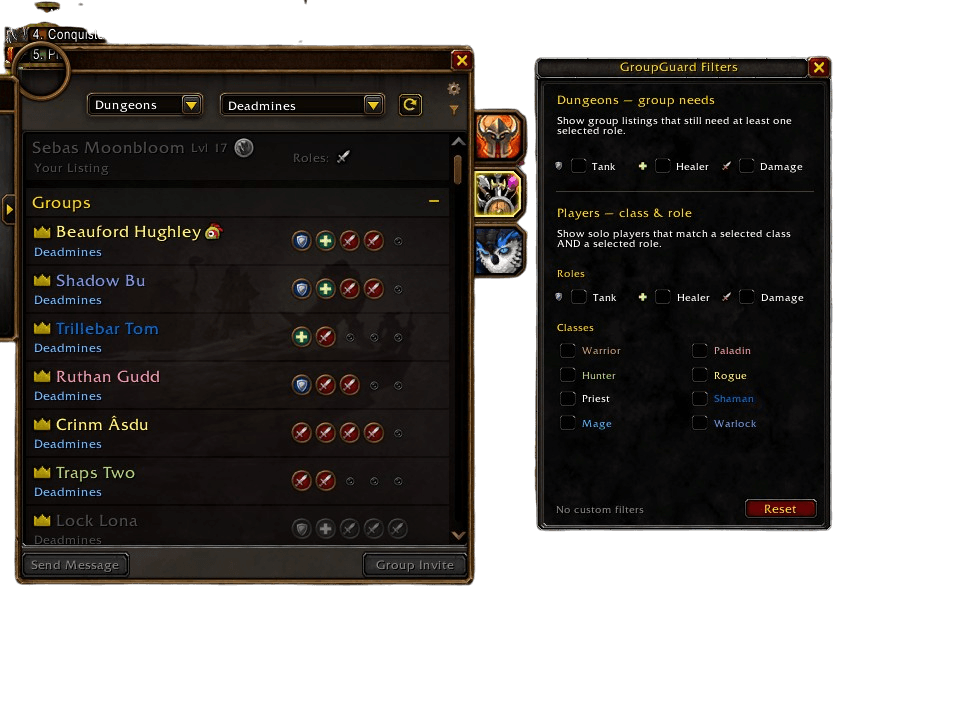
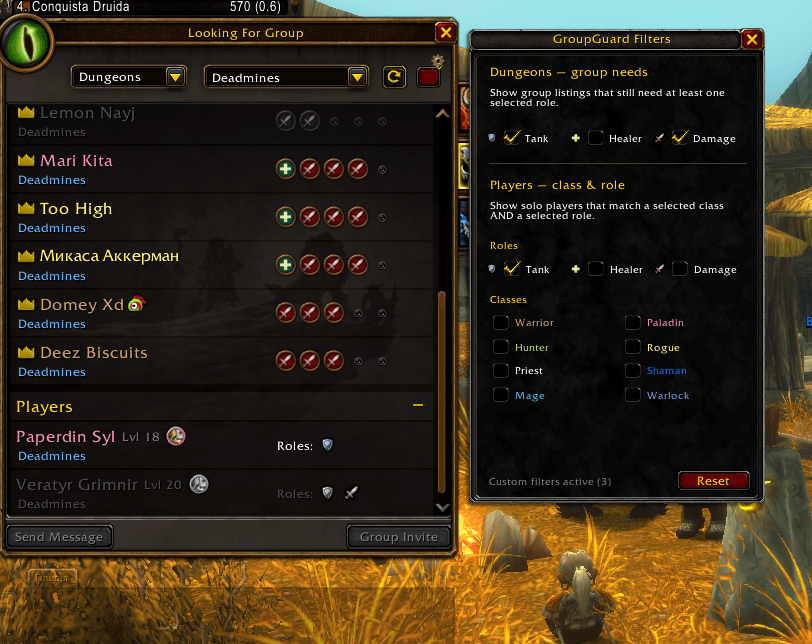
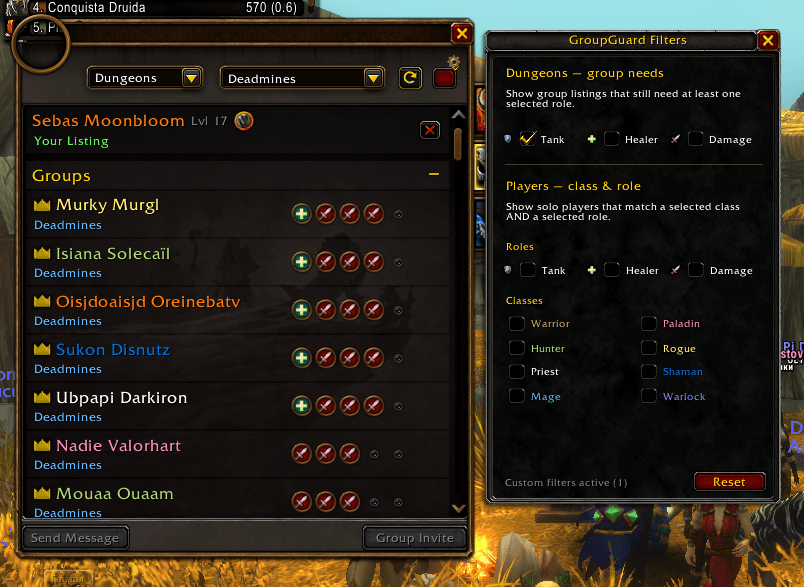
Group Filters
Filter groups by the roles they still need:
- 🛡️ Tank
- 💚 Healer
- ⚔️ Damage
Player Filters
Filter solo players by:
- Class
- Role
- Class + Role combinations
Search Result Tools
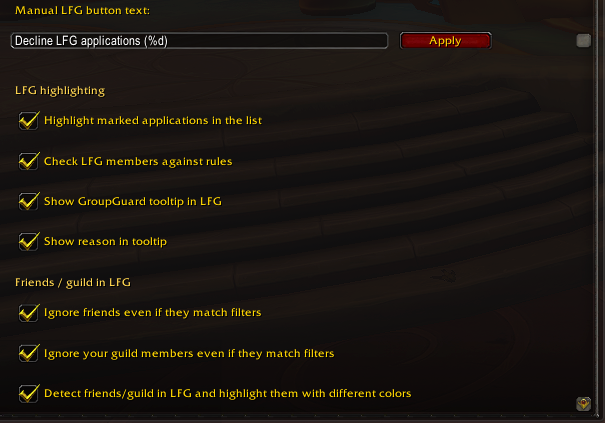
- Highlight matching LFG results
- Detect configured keywords
- Detect character names
- Detect guild names
- Detect LFG titles and comments
- Detect spam and repeated unwanted text
- Detect boost / carry / sell advertisements
- Detect GDKP advertisements
- Blizzard-style filtering interface
👥 Applicant Management
Adds more useful information and controls to the applicant list.
Applicant Information
Depending on the available game API, GroupGuard can display:
Name | Role | GG | Item Level | Rating
Additional activity-specific information can also be shown when available.
Applicant Actions
- Highlight applicants matching your rules
- Manual decline controls
- Optional automatic decline
- GroupGuard status indicators
- Configurable action protection / cooldowns
- Permission-aware actions
- Unsupported actions are automatically hidden
🎯 Activity-Aware Information
GroupGuard attempts to show information relevant to the activity you are currently recruiting for.
Mythic+
Examples:
Spec · +12 · GG Status
Raid
Examples:
Spec · 2/9 · GG Status
Available information depends on the Blizzard API provided by the current game client.
🛡️ Custom GroupGuard Rules
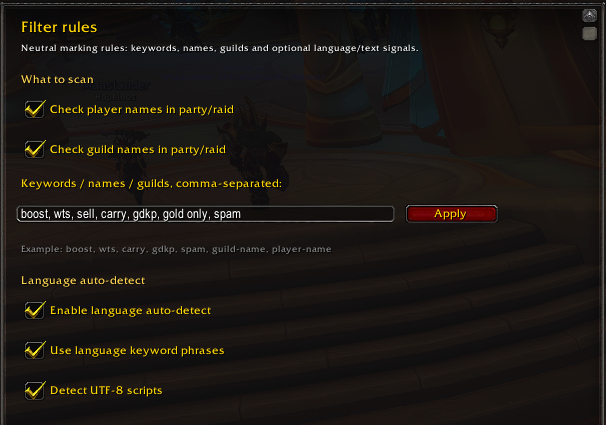
Create your own local rules for LFG applications, search results, and group members.
Rules can use:
- Character names
- Guild names
- Keywords
- LFG titles
- LFG comments
- Spam terms
- Boost / carry terms
- Sell advertisements
- GDKP advertisements
- Other visible Group Finder text
When a rule matches, GroupGuard can:
- Highlight the player or listing
- Display a warning
- Play a notification sound
- Show a GroupGuard marker
- Mark the player in party or raid
⚔️ Party & Raid Tools
GroupGuard continues working after players join your group.
Group Monitoring
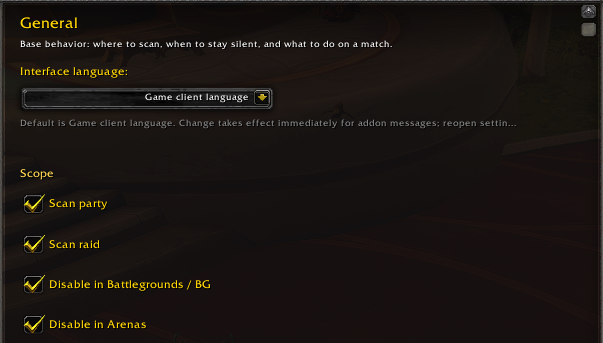
- Scan party members
- Scan raid members
- Warn when a player matches configured rules
- Display GroupGuard markers on supported group frames
Raid Management
- Quick player management controls
- Permission-aware removal actions
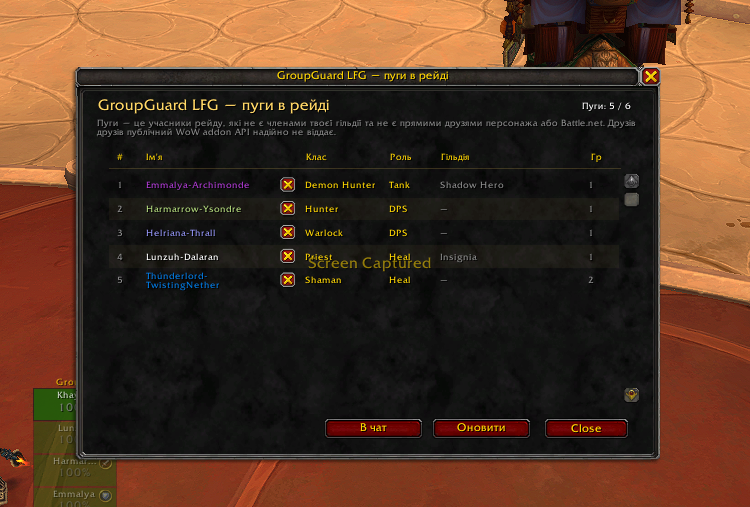
- Raid PUG detection
- GroupGuard status indicators
- Configurable action protection
🧑🤝🧑 PUG Detection
Dedicated tools help identify players outside your regular group.
Where supported, GroupGuard can distinguish between:
- Guild members
- Friends
- Known players
- External PUG players
Useful for quickly reviewing mixed guild/PUG raid groups.
⭐ Automatic Raid Assist
Automatically assign Raid Assist to configured players.
Supports:
- Selected guild ranks
- Manually configured characters
Actions are performed only when your character has the required permissions.
🌲 World of Warcraft: Forever
GroupGuard includes a dedicated compatibility layer for WoW Forever.
Supported Forever Features
- Native Forever Group Finder integration
- Group role-needs filtering
- Player class filtering
- Player role filtering
- Class + role filtering
- Solo-player information
- Activity detection
- Forever-specific LFG hooks
- Modern ScrollBox support
- Scroll position preservation
- Blizzard-style filter panel
- Client capability detection
- Automatic hiding of unsupported functionality
GroupGuard does not assume that Forever behaves exactly like Retail.
Features are enabled only when the required Forever API is available.
🎨 Blizzard-Style UI
GroupGuard is designed to visually fit into the native World of Warcraft interface.
Where possible it uses:
- Blizzard frame templates
- Blizzard buttons
- Blizzard checkboxes
- Blizzard fonts
- Native role icons
- Native textures
- Standard WoW tooltips
- Existing Group Finder layouts
Additional panels are positioned relative to Blizzard's original UI.
🔄 Modern WoW API Support
GroupGuard is maintained for modern World of Warcraft UI and API changes.
The addon includes support for:
- Modern Group Finder APIs
- LFG search result APIs
- Applicant APIs
- Activity APIs
- Group member APIs
- Role information
- Guild and friend information
- Modern ScrollBox-based interfaces
- Client-specific capability detection
When Blizzard does not expose enough information, GroupGuard uses safe fallback behavior instead of guessing data.
🤝 Compatibility
Designed to work alongside:
- Premade Groups Filter
- Blizzard's default Group Finder
- Modern WoW 12.x UI
- WoW Forever Group Finder
🌐 Languages
Available interface languages:
- 🇬🇧 English
- 🇺🇦 Українська
GroupGuard can automatically use the supported language matching your WoW client.
🔐 Privacy
GroupGuard only works with information available through the World of Warcraft UI and Blizzard APIs together with rules configured by the player.
It does not identify or determine:
- Nationality
- Ethnicity
- Religion
- Origin
- Gender
- Political views
- Other real-world personal characteristics
All filtering rules are configured locally by the player.
You must be logged in to leave a comment.