
Grouper LFG
Grouper is a looking for group tool for WoW Classic
Details
Expansion
 Forever
 Categories
Developers

Having issues?
Grouper - Server-Wide Group Finder for WoW Classic Era
Tired of spamming trade chat looking for a group? Grouper is a server-wide group finder addon for World of Warcraft Classic Era and every other Classic version, Retail and WoW Forever. Browse, create and join groups for dungeons, raids, quests, PvP and more, all from one clean window, with no chat spam required.
New in 1.0: A Brand-New Main Window
Grouper 1.0 has a completely redesigned window, in the same style as FastGuildInvite and TOG Profession Master. It has just two tabs:
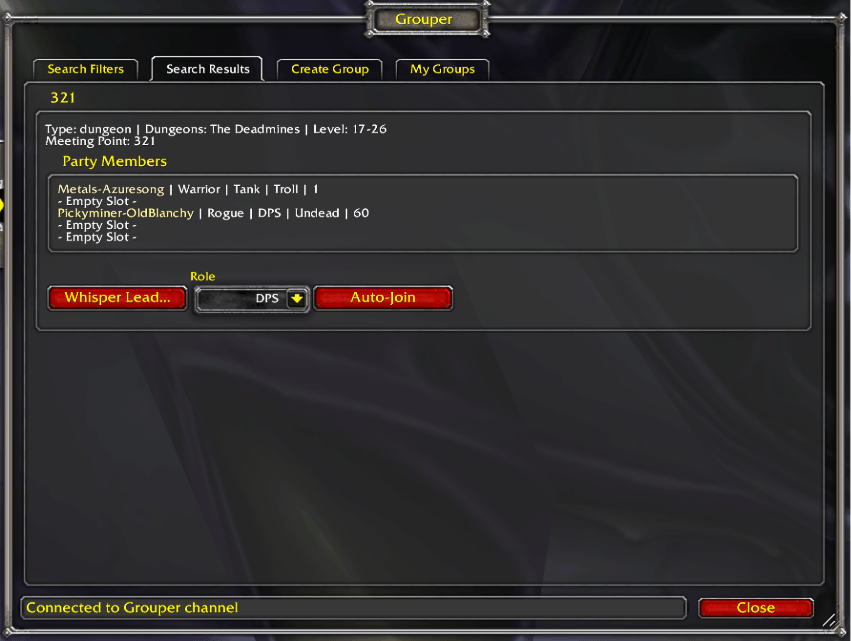
- Search Groups: your filters across the top and every matching group right below, one row per group in a striped list. Click + on a group to see its meeting point, raid recruitment, loot rules, quests and every member with their class, level and roles. Whisper the leader or Auto-Join straight from the row
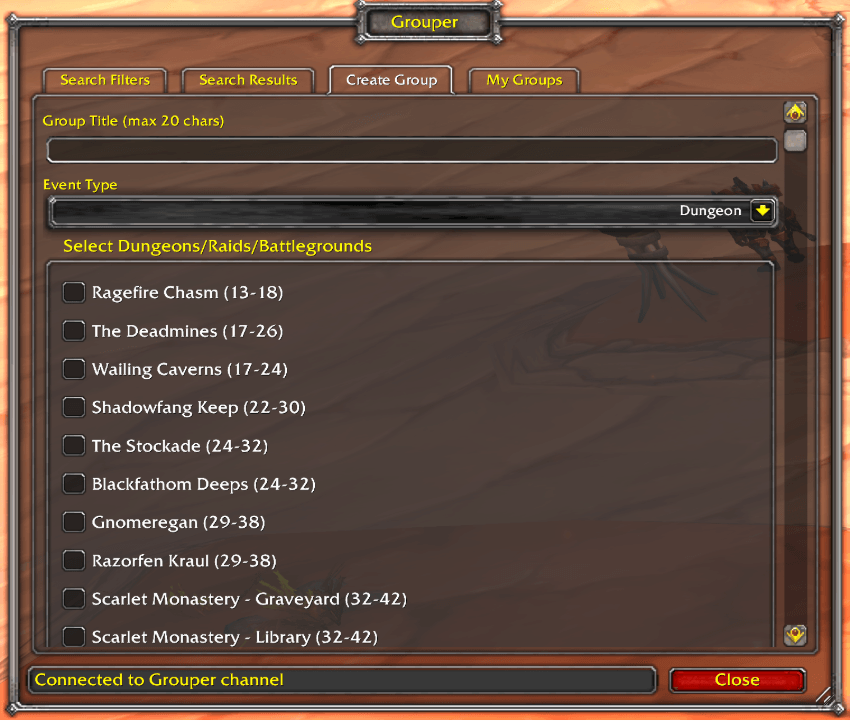
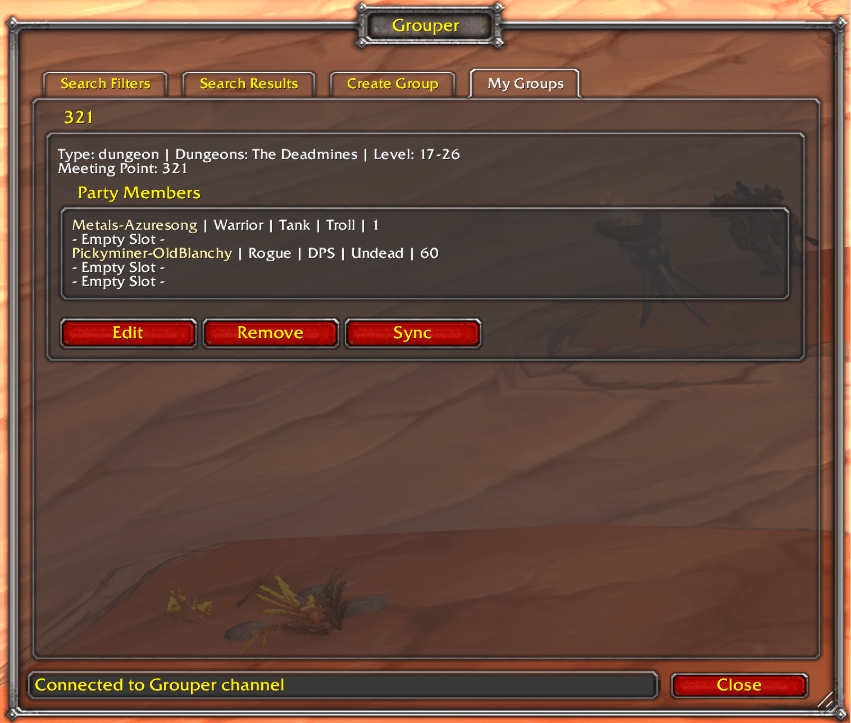
- Manage Groups: not in a group yet? It's where you create one: pick the kind of group with one click, then tick your dungeons, raids, battlegrounds or quests in a list that shows each one's levels and location. Once you're in a group, the same tab shows it, with the leader's actions in a bar across the top
Prefer the old tabbed window? Click Classic Window in the top-right corner, or type /grouper ui. The classic window has a New Window button to come back, and Grouper remembers your choice.
The Problem
WoW Classic's built-in LFG tools are limited: the LookingForGroup channel is text-only chaos, trade chat clogs quickly, and there's no structured way to advertise roles, level ranges, or specific dungeons you're running. When you finally find a group the information is already stale.
Meanwhile raid leaders have it worse: tracking 20-40 recruits across whispers, manually counting class slots, and reposting announcements every few minutes is tedious busywork that takes focus away from actually playing.
The Solution
Grouper uses a dedicated addon channel shared by every Grouper user on your realm. Group listings are shared automatically and shown in a structured list with rich filtering, so players see only the groups relevant to them, and leaders spend less time managing chat.
Core Features
Server-Wide Group Discovery
- Browse all active Grouper groups across your realm in one place, regardless of what zone you're in
- Sort the list by any column
- Stale groups expire on their own, so dead listings don't clutter the view
- When a leader presses Sync, everyone sees the updated group
Smart Filtering
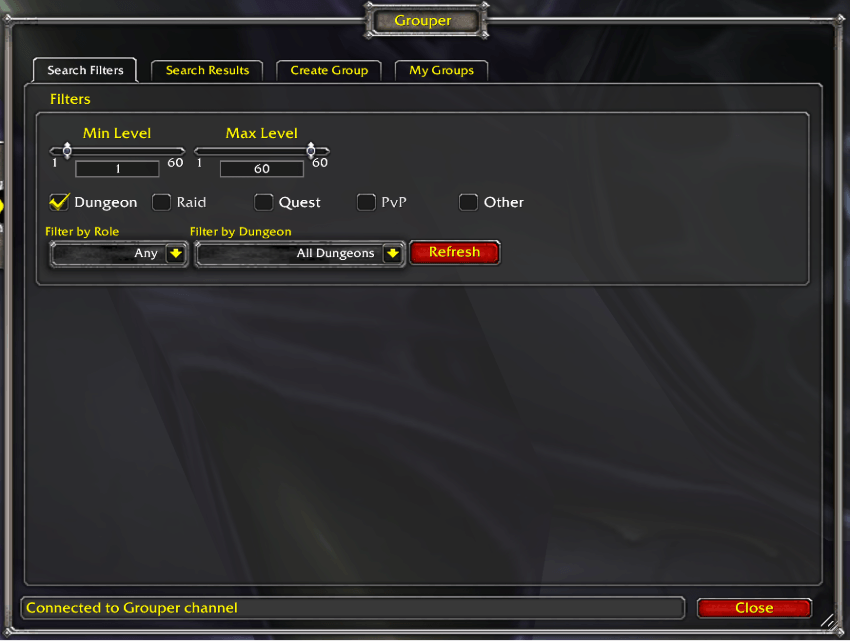
- Group types: one-click Dungeon, Raid, Quest, PvP and Other buttons; each one lit is shown
- Instance filter: pick one dungeon, raid or battleground to see only the groups heading there
- Open slot: show only groups that still need a Tank, Healer or DPS
- Level range: set a min/max level; groups outside it are hidden
- Search box: type part of a group's title, leader, instance or any member's name
- Each game version only shows the dungeons, raids and battlegrounds it actually has
Dungeon Groups
- List several dungeons in a single group posting
- Tank, Healer and DPS slots, with each member's role and 2nd role shown
- Auto-Join: pick your role and 2nd role, click Auto-Join, and the leader gets an "Invite them?" popup with Yes and No. If your first role is already taken, you fill your 2nd role instead
- A second tank or second healer can't Auto-Join into a slot that's already full; they get a whisper explaining why
- Leaders can switch Auto-Join off; players who try it are told to whisper instead
- Guild restriction: make a group guild-only, and only members of the guilds you list will see it
Raid Recruitment
- The raid size comes from the raid you pick
- Role targets: set how many Tanks, Healers and DPS you need
- Class needs: add how many of each class you want (e.g. "3 Mage")
- Loot system: /roll, DKP, EPGP, Free for All, Loot Council, Master Looter or Soft Reserve
- Clear status: Fresh, Partially Cleared, Farm Mode or Specific Bosses
- Reserved items, and a voice field for your Discord details
Quest Groups
- Pick up to five quests from a drop-down of the quests in your quest log
- If you have Questbook installed, clicking a picked quest opens it there
- Your announcement lists the quests, and players running Grouper or Questie can click them as quest links
Announcements
- The Announce button posts your group, with its level range, size and the roles or classes you still need, to the LFG channels you're in
- Choose which channels get your announcements, plus Guild chat and your GreenWall confederation
- Not in the LFG channel yet? Announce joins it for you, and your next announcement includes it
- Each group can be announced once a minute, so a stray double-click can't spam chat
Running Your Group
- Sync: share your group's current state with every Grouper user. Do this after roles change or someone joins
- Announce: post your group to chat (see above)
- Assign Roles: set each member's role and 2nd role
- Transfer Leadership: hand the listing to another member
- Edit: change your group's type, dungeons, title or meeting point
- Remove: take your listing down (it asks first)
- Right-click any group for the same actions
Window & Customization
- Minimap button: left-click opens Grouper, right-click opens its settings
- Titan Panel and other LibDataBroker displays can show Grouper too
- Background, border and font choices in the settings
- The window remembers its size and position, and Escape closes it
Group Types
- Dungeon: 5-man groups with Tank / Healer / DPS slots, several dungeons per posting, and Auto-Join
- Raid: recruitment with role targets, class needs, loot system and clear status
- Quest: questing groups built from the quests in your log
- PvP: battleground groups, with the level bracket you choose
- Other: anything else, from world events to role-play
How It Works
- When you log in, Grouper joins its addon channel and asks the other players for the groups they know about
- When a leader creates or syncs a group, it's shared with everyone on the channel
- When a group is removed, it disappears from everyone's list
- Grouper keeps checking for groups from players who log in after you
- Groups never cross factions: Horde players see Horde groups and Alliance players see Alliance groups
- Announcements and invites only happen when you click a button, which keeps Grouper inside the game's rules for addons
Slash Commands
- /grouper or /grouper show: open the main window
- /grouper ui: switch between the new window and the classic tabbed one
- /grouper config: open the settings
- /grouper join: join the Grouper channel (usually automatic)
- /grouper status: show channel and sync status
- /grouper cleanup: clear stale groups from the list
- /grouper savepos: save the window's position as your default
- /grouper autojoin status: show whether you're accepting Auto-Join requests
- /grouper autojoin toggle: start or stop accepting Auto-Join requests
- /grouper debug on|off: turn detailed logging on or off (for bug reports)
- /grouper debug tab: open the Grouper Debug chat tab
Requirements
- Ace3
- VersionCheck-1.0
- LibDBIcon-1.0 (installed automatically by the CurseForge app; WoW Forever uses the copy bundled with Grouper)
- LibAceGUIWidgets (installed automatically by the CurseForge app)
- LibGuildRoster (installed automatically by the CurseForge app)
- Optional: Questbook, to open picked quests in it
- WoW Classic Era (Interface 11509)
- TBC Classic (Interface 20506)
- WotLK Classic (Interface 30405) and Titan Reforged (Interface 38000)
- Cataclysm Classic (Interface 40402)
- Mists of Pandaria Classic (Interface 50504)
- Retail (Interface 120007)
- WoW Forever (Interface 16001)
Recent Updates
v1.0.1 (Latest Release — 2026-10-04)
Fixed
- Announce no longer causes an error the first time you use it. If you weren't in the LFG channel yet, Grouper joined it and then tried to post a moment later, which the game blocks. Announce now posts straight away to the channels you're already in, plus Guild and GreenWall, joins the LFG channel for you, and tells you your next announcement will include it. If there was nowhere to post yet, it tells you to click Announce again
- Announce now still posts where it can during combat, instead of giving up entirely
v1.0.0 (2026-10-03)
New
- A brand-new main window, in the same style as FastGuildInvite and TOG Profession Master, with two tabs: Search Groups and Manage Groups. Search Groups puts the old Search Filters and Search Results on one page: your filters across the top and the matching groups right below them. Groups are listed one per row in a striped list. Click + on a group to see its meeting point, raid recruitment, loot rules and quests, and every member with their class, level, role and 2nd role. Whisper the leader or Auto-Join straight from the row
- Manage Groups is where you create your group and then run it. Before you're in a group, it's a redesigned create page in the same style as Search Groups: pick the kind of group with one click, then tick your dungeons, raids, battlegrounds or quests in a striped list that shows each one's levels and location, with the full details on hover. Raid recruiting, loot and guild settings sit in tidy rows above the list, the title fills itself in from your picks, and what you've filled in is kept if you switch tabs
- Once you're in a group, Manage Groups shows it, with your leader actions in a bar across the top: Sync, Announce, Assign Roles, Transfer Leadership, Edit and Remove. Remove now asks before it deletes your listing. Right-click any group for the same actions
- Search Groups has a search box that finds a group by its title, leader, instance or any member's name, and every column can be sorted
- Prefer the old tabbed window? Click Classic Window in the top-right corner, or type
/grouper ui. The classic window has a New Window button to come back, and Grouper remembers your choice - Quest groups pick their quests from a drop-down of the quests in your quest log, up to five. If you have Questbook installed, clicking a picked quest opens it there
- Quests in your group's announcement show up as clickable quest links for anyone running Grouper or Questie
- Grouper now runs on WoW Forever, with the Classic dungeons, raids and battlegrounds
Changed
- Grouper now needs the LibAceGUIWidgets addon, which draws the new window, and LibGuildRoster, which Grouper uses to read your guild for guild-only groups. The CurseForge app installs both for you; if you install addons by hand, install them as well
- The minimap button library is now its own addon (LibDBIcon-1.0) instead of being bundled inside Grouper, so it stays up to date without waiting for a Grouper release. The CurseForge app installs it for you. If you install addons by hand, install LibDBIcon-1.0 as well. WoW Forever still uses the bundled copy
- Grouper's name now shows in orange in your addon list
- Removed: a chat-throttling safety check that had never actually switched on
Fixed
- Grouper can tell you're in a group again on Classic. On every Classic game version it always thought you were solo and never the leader. That meant a raid leader's group list never synced to other players. Group detection now works on every game version
- Grouper sometimes replied to the wrong player. A message on the shared channel could make Grouper users whisper someone who never asked. Replies and Auto-Join refusals now go only to the player who actually sent the request
- The Assign Roles window now remembers its size, and its member list adjusts when you resize it
- Grouper no longer depends on old chat functions that the game can switch off. Before, if they were off, Grouper could error when it loaded and fail to send any chat messages. It now uses the game's current chat functions
v0.8.1 (2026-08-05)
Fixed
- Auto-Join works again. It could never send an invite on Classic Era after Blizzard's recent client update changed how addons invite players. Grouper now checks which method your client supports instead of assuming, so it works on every game version
- The Auto-Join confirmation popup is back. When someone asks to join your group you get a "Invite them?" prompt with Yes and No, instead of the invite being sent behind your back. You stay in control of who joins, and it is also what lets WoW allow the invite at all — that popup is required, and without it the whole feature was blocked
- Auto-Join no longer floods your screen with "AddOn 'Grouper' tried to call a protected function" errors. Every successful invite was producing eight of them, and the updated group list never reached anyone
- When an invite fails, the group leader is now told and the person trying to join gets a whisper explaining it. Previously it failed in complete silence, which made Auto-Join look like it simply did nothing
- Join requests from players on another realm could be recorded under the wrong name, so the leader's group list did not match who had actually asked
- Long dungeon names are no longer cut off mid-word in other players' group lists. "Lower Blackrock Spire" was showing up as "Lower Blackrock Spir"; it now shows as "LBRS", which is what people call it anyway
- Turning Auto-Join off now actually turns it off. The setting existed but did nothing, so leaders who switched it off kept getting join requests. Players who try to Auto-Join you while it's off are told to whisper you instead
- Removed the "auto-accept invites" option. It promised to skip the confirmation popup, which WoW does not permit — that popup is what allows the invite to happen at all — and it never did anything regardless
- Auto-Join now actually works. It was turning down anyone the group had already seen — which included every player the leader had synced, and anyone who clicked the button a second time — so most requests were quietly declined instead of getting an invite
- Group leaders were being whispered "…disband your party first" out of nowhere. That message was meant for someone trying to join a second group, and it was being sent to the leader by mistake
- The "2nd Role" column was showing a dash for everyone, on both the Search Results and My Groups tabs, even after roles had been assigned. Everyone's second role now shows properly — including when it's the same as their main role, which is a perfectly normal choice
- The Assign Roles window no longer lets you leave a member's second role blank. You always pick two, and picking the same role twice is fine
- If you had the LFG channel ticked in the announcement settings but weren't actually in that channel, your announcements were skipped there without a word. Grouper now joins the channel for you, and tells you if it can't
- Shamans now show in the correct class colour on Classic Era, where Shaman and Paladin share the same pink. Other game versions are unchanged
- The version at the bottom of the window ran straight into its label, reading "Grouper Version0.8.0". It now has a space
- Players on Burning Crusade were being told they had version 0.6.1 no matter which version they actually had installed
- The Search Filters and Create Group tabs were only drawing part way down the panel — several filters and form fields further down were missing entirely. Both tabs now build completely
- Group leaders were sometimes not recognised as the leader of their own group, which could leave the wrong controls showing on the My Groups tab. Player names are now matched consistently everywhere, including for players from realms with a space in the name
- When a large group listing arrived incomplete, Grouper asked for the missing piece many times over instead of once, adding needless chatter on the shared channel. It now asks once, then once more if it still hasn't arrived
/grouper statusalways showed "Players: 0" no matter how many players Grouper had seen. It now shows the real number- Typing
/grouperon its own now opens the window, instead of just printing the command list - Closing and reopening the window repeatedly could produce an error blamed on whichever other addon happened to draw a panel next. Grouper now cleans up its panels properly
v0.8.0 (2026-06-10)
New
- Pick a primary and secondary role when joining a group — if the primary slot is already filled, you automatically fill the secondary slot instead, no extra back-and-forth with the leader needed
- Group member lists now show each player once with their secondary role displayed next to their name in a "2nd Role" column, color-coded by role — so you can see everyone's backup role at a glance
- The Assign Roles popup now has a Secondary dropdown for each member — leaders can record both roles when organizing the group
- Your last-used secondary role is remembered across sessions
- Smarter group announcements — when you Announce a dungeon group, Grouper works out exactly what you still need from everyone's primary and backup roles. If a current member can flex, it says so: e.g. "Need 1: Tank or Healer" instead of demanding both
Fixed
- Fully resolved the retail error spam — while you're in a Mythic+ key, a raid boss encounter, or a PvP match, Grouper no longer touches the protected player information the game keeps private, which also clears up the unrelated world-map and crafting-order errors some players were seeing. Outside those situations, everything works exactly as before
- Group member join/leave is still tracked correctly even during Mythic+ keys, raid encounters, and PvP matches — Grouper reads your live group roster in those situations instead of the protected system messages, so nothing is missed
v0.7.3 (2026-05-25)
Fixed
- No more Lua error spam when running dungeons on retail — Grouper now safely skips the protected system messages Blizzard's retail client marks as off-limits to addons
Older updates are in the addon's full changelog.
Bug Reports & Feature Requests
Found a bug or have a suggestion?
If you have any questions, comments, or anything else, please feel free to reach out on Discord!
Credits
Developed by:
- Pimptasty - Author
Special Thanks:
- The Old Gods guild community for real-world testing and feedback
- Ace3 library maintainers for the excellent addon framework
- WoW Classic community for bug reports, suggestions, and support
License
Grouper is open-source software. See the LICENSE file for details.
You must be logged in to leave a comment.