
Glyphic: Immersive RP Languages
Speak and understand the languages of Azeroth in chat — Old God, Demon, and more lore friendly options.
Details
Expansion
 Forever
 Categories
Developers

Having issues?
Glyphic: Immersive RP Languages
Speak the languages of Azeroth, from the whispers of the Old Gods to Orcish, Darnassian and beyond. Or drop the language entirely and talk with a Dwarven brogue, aye.
Major Update v0.5:
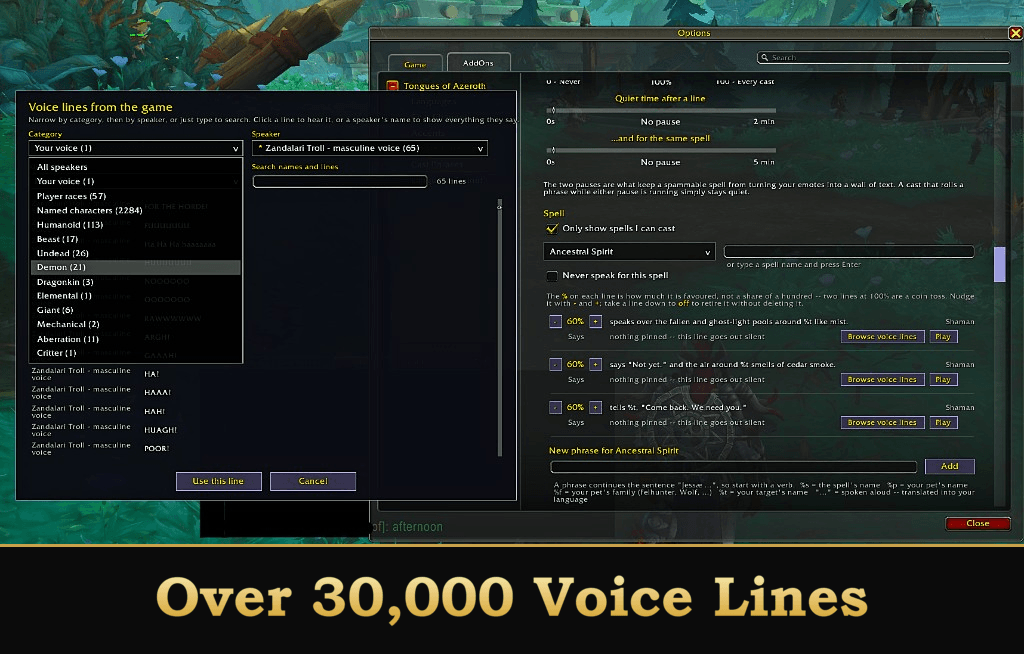
The cast phrase feature now allows you to pull directly from WoW's extremely large database of voice lines. Adding flare and substance to your character! This features over 30,000 different lines to chose from to really make your character unique to you. Other players that have this addon will also hear your cast phrases (toggleable), adding to immersion for everyone close by.
Also, an absolute boatload of bug fixes were added in this release.
Rename: Some very good suggestions from the community have prompted me to rename this addon to "Glyphic". It's far enough along it's life cycle where I believe it needs it's own identity. Please keep the feedback coming!
Glyphic translates your chat into the fictional languages of Azeroth, in the spirit of the old Tongues addon. It covers 66 tongues, a set of spoken accents for when you would rather stay understandable, lines your character speaks when you cast, and a word game for learning the languages you don't know yet.
Works on every client
One install runs on Retail (Midnight), WoW: Forever, and Classic (Vanilla, Cata, Mists, Wrath). A compatibility layer adapts the interface and chat functions to whatever client you're on, so there are no separate downloads to manage.
Features
- 66 languages and dialects. The core playable-race and Old God tongues, plus dozens of beast, faction, elemental and eldritch languages.
- A color for every tongue. Demonic reads as a warm orange, Old God as a deep purple, and every language has a default you can recolor. Language tags are colored out of the box; tinting the speech itself is a separate toggle, so you can have one without the other. WoW's own languages can be tinted too, including from players who don't run the addon. The palette is saved account-wide, so it follows you across every character.
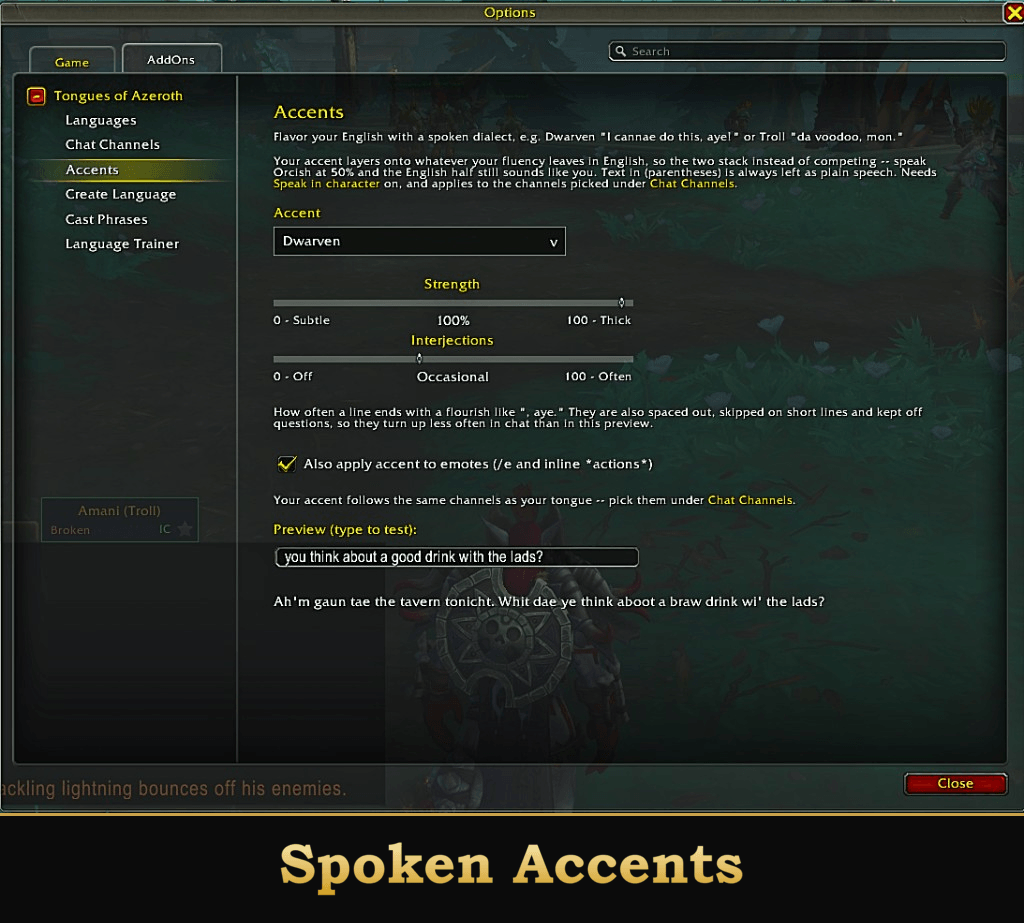
- Accents. Rather than translating, these flavor your English with a spoken dialect: Dwarven ("I cannae do this, aye!"), Troll ("da voodoo, mon.") and ten more, each with its own strength.
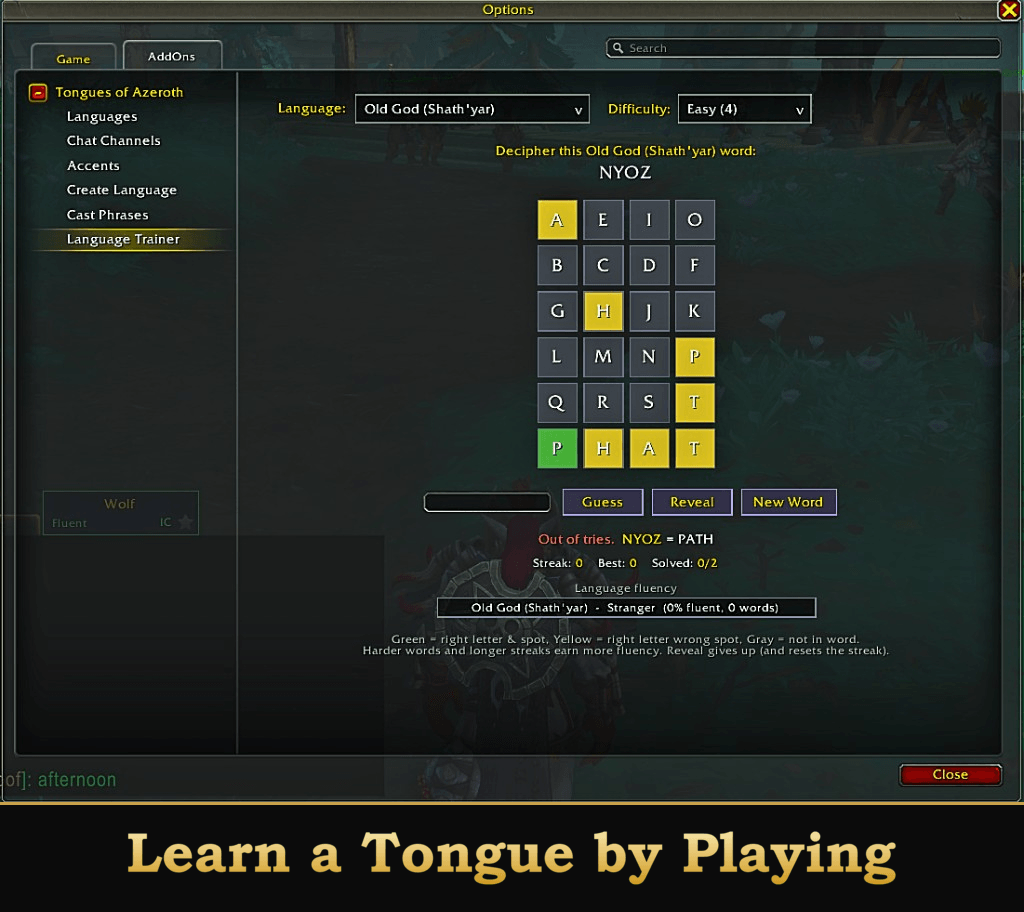
- Language Trainer. A Wordle-style word game for learning languages. Climb reputation ranks, build fluency, and unlock decoding as you go.
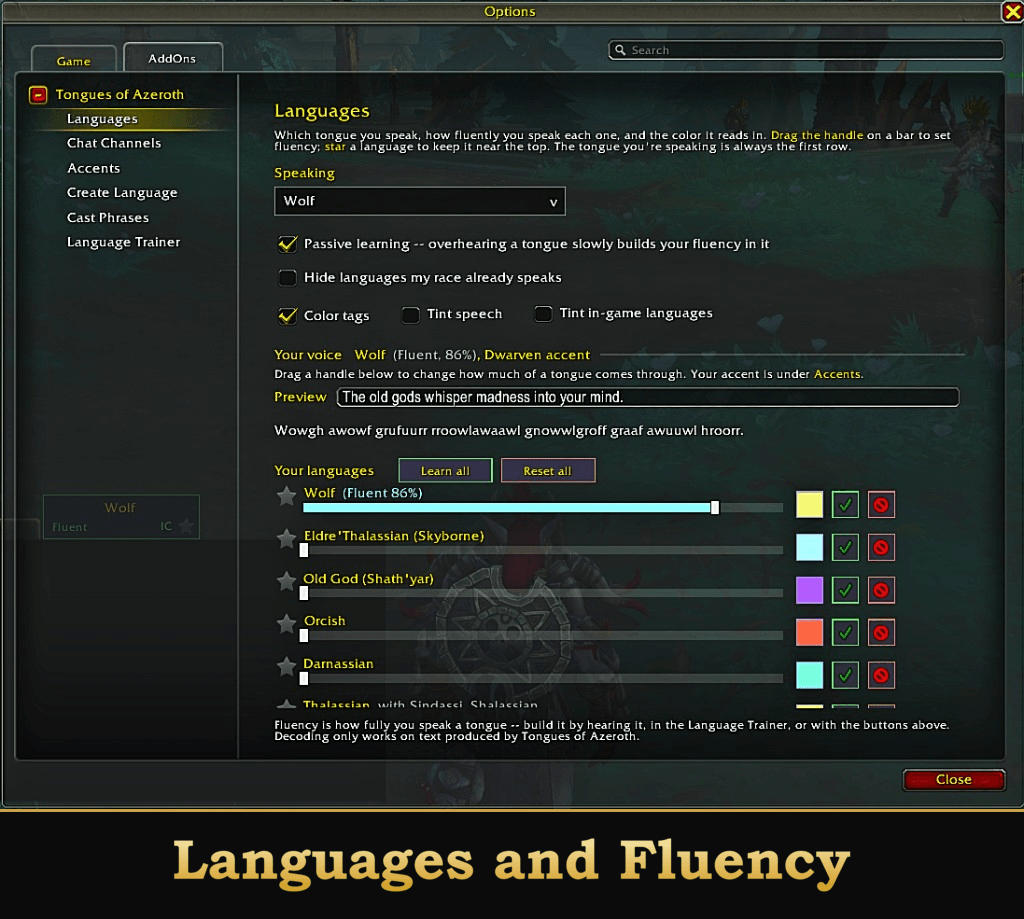
- Fluency, per language. Drag the bar on a language's row to set how much of your text comes through in it, from a few cryptic words to fully unintelligible. Every tongue remembers its own, so you can be fluent in one and stumbling in another.
- Per-channel filters. Choose which chat types are affected: Say, Yell, Party, Raid, Guild, Whisper and the rest.
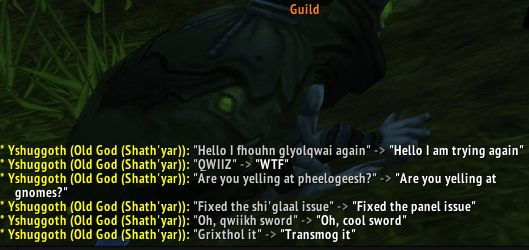
- Decoding. Mark the tongues your character understands. When another Glyphic user speaks one, you see the decoded meaning in your own chat, with your fluency in it shown on a progress bar.
- An ordered language list. The tongue you're speaking is always the first row, favorites sit under it, and the rest follow, so nothing you use is ever seventy rows down. Star a language on its row to favorite it, and the star on the floating bar decides whether scrolling cycles only those.
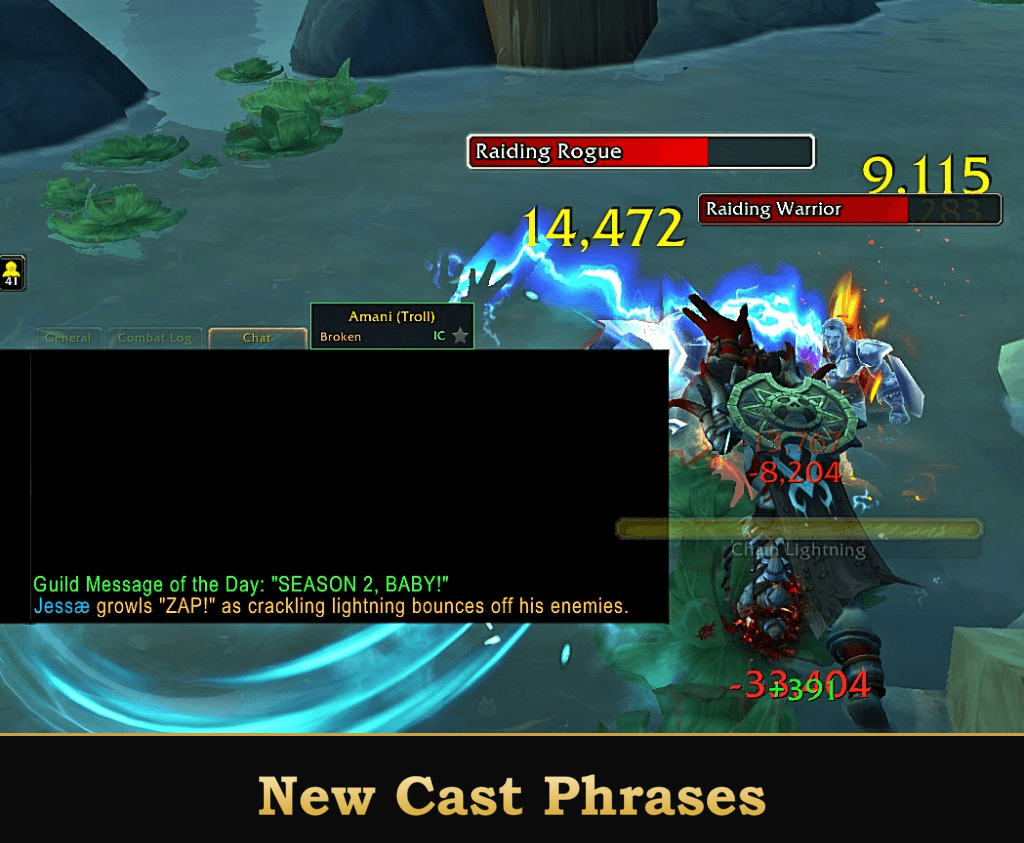
- Cast Phrases. Customize your character to speaks configured voice lines and phrases when a spell lands.
- Minimap button and a draggable window for one-click access, with Back and Close navigation on clients that have no native options tree.
- Deterministic. The same words always translate the same way, so speech stays consistent between everyone running the addon.
- Punctuation, numbers and links are preserved.
Languages
The 11 core languages use Blizzard's own in-game parser word lists:
| Language | Flavor |
|---|---|
| Old God (Shath'yar) | Eldritch, apostrophe-heavy |
| Orcish | Guttural, hard-edged |
| Darnassian | Flowing, soft |
| Thalassian | Sharp, regal |
| Dwarven | Hard, stony |
| Gnomish | Clipped, technical |
| Taur-ahe | Earthy, open vowels |
| Zandali | Rhythmic |
| Draenei | Airy, long vowels |
| Gutterspeak | Raspy, clipped |
| Demonic | Harsh, dark |
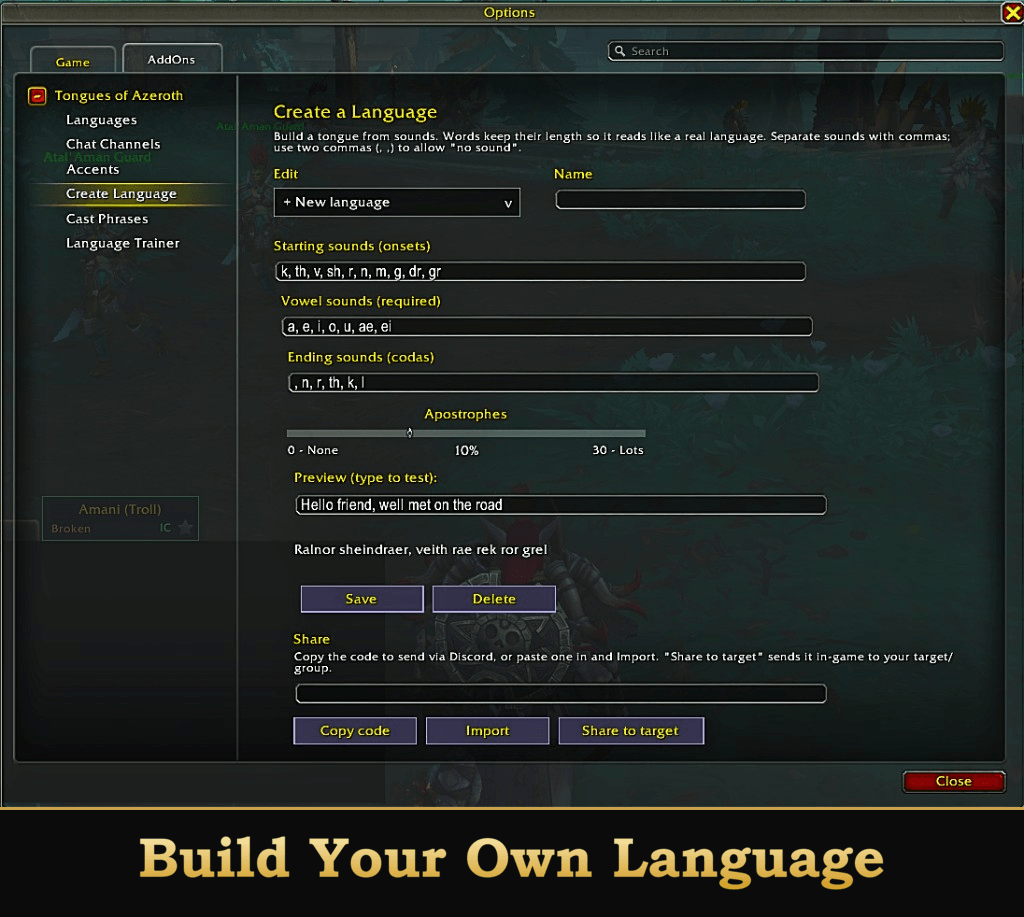
Another 60 or so generated tongues and dialects sit behind those, each with its own phonetic style:
- Beasts and creatures: Wolf, Bear, Bat, Boar, Serpent, Cat, Seal, Bird, Ravenspeech, Stag, Orca, and hunter-pet dialects (Raptor, Chimaera, Crocolisk, Core Hound, Spider, Scorpid, Wasp, Sporebat, Turtle and more)
- Peoples and factions: Eldre'Thalassian (the Skyborne tongue, new in WoW: Forever), Common, Dark Iron, Gilnean, Goblin, Ogre (Ogri'zhan), Furbolg, Tuskarr, Vrykul, Pandaren, Sprite (Faerie), Sylvan, Moonkin, Trentish
- Elemental, eldritch and ancient: Kalimag, Titan, Draconic, Nerubian (plus Qiraji and Silithid), Nerglish (Murloc), Nazja (Naga), Ethereal, Undead
- Sub-dialects that share a parent's sound: the Troll variants (Amani, Gurubashi, Drakkari), Sindassi and Shalassian under Thalassian, Eredun under Demonic, Forsaken under Gutterspeak, and others
Accents
Prefer to be understood? Accents rewrite your English into a spoken dialect rather than a foreign language. Choose one, set its strength, and speak normally. There are twelve: Dwarven, Troll, Orcish, Darnassian, Draenei, Tauren, Forsaken, Pandaren, Goblin, Gilnean, Vrykul and Pirate.
Accents and languages compose. Whatever your fluency leaves in English keeps your accent, so a Dwarf at 50% Orcish sounds like a Dwarf speaking broken Orcish. At 100% there is no English left for the accent to touch.
Cast Phrases
Your character can speak when a spell lands. Choose one of over 30,000 in-game voice lines and write out a phrase attached to any spell you can cast to customize a unique character personality and enhance your immersion of what and who your character is supposed to be.
Your own words
Write your own lines with tokens for the spell, your target and your pet. Pets speak too, on any class. Per-phrase weights decide how often each comes up, a single "how often" chance controls whether a cast speaks at all, and two pauses, one global and one per-spell, stop a spammable spell turning your emotes into a wall of text.
Getting started
Install, then type /glyphic or click the minimap button to open the options panel. Pick your tongue under Languages, an accent under Accents, choose your channels under Chat, and switch Speak in character on.
That one switch covers your whole voice, tongue and accent together. It's on the floating bar and bindable to a key, because ducking out to answer someone in plain English and ducking back is something you do all evening. The minimap button turns green in character and red out of it, so you can read the state at a glance. With it off you still read, decode and color everyone else.
Handy commands:
/glyphicopens the config panel/glyphic icswitches in and out of character/glyphic lang <id>sets your language (/glyphic listshows them all)/glyphic accent <id>picks an accent (/glyphic accent list,/glyphic accent off)/glyphic gameopens the Decipher language trainer/glyphic say <text>says one translated line/glyphic castsets up phrases spoken when you cast
Good to know
- Chat has a 255-character limit, so translated text is trimmed to fit.
- This transforms your text client-side. It does not touch WoW's real server-side language system.
- Settings are stored per character, so each of your characters keeps its own voice. The color palette is the one exception: it's shared account-wide, because a language reading as the same color everywhere is the point of coloring it.
- Cast Phrases go out as emotes.
/sayand/yellhave needed a real keypress since patch 8.2.5, so no addon can send those from a spell cast. During raid encounters, Mythic+ and rated PvP the game blocks addon chat altogether, and the line is shown to you alone instead.
How it's built, and an AI disclosure
Every release is read through before it goes out, checked against an offline test suite of eleven automated test files that run without a game client, and play-tested in game on the clients it supports. I decide what gets built, what the rules are and what ships, and nothing ships unreviewed.
All screenshots are real captures of the addon running. None of the images are AI-generated.
If something is broken. Open an issue and it'll get fixed.
Support
This addon is free and always will be. If you'd like to say thanks:
- Ko-fi: https://ko-fi.com/jessemods
- Source and issues: https://github.com/JessePretendstoCode/TonguesOfAzeroth
You must be logged in to leave a comment.