
ForeverUI
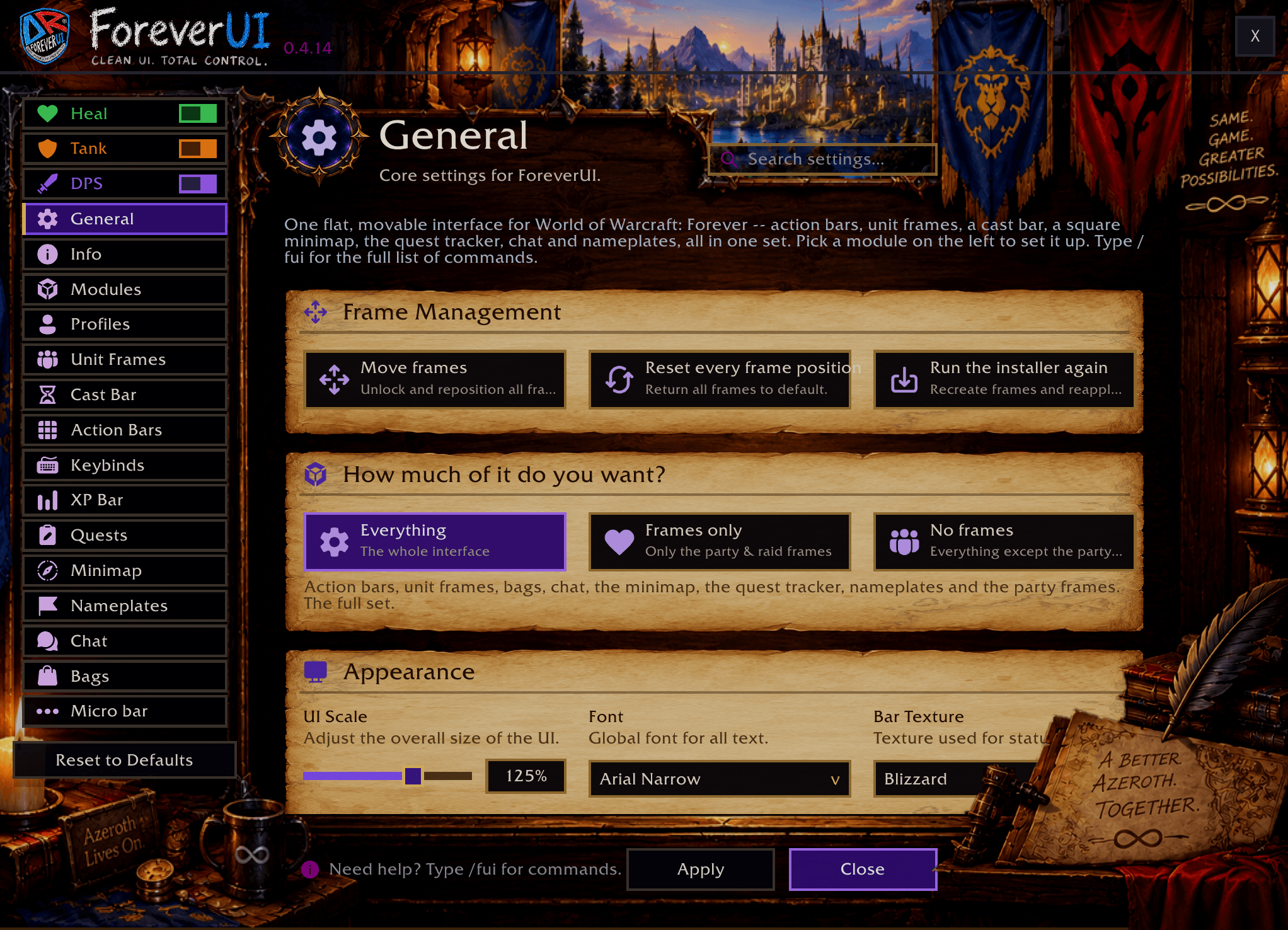
One interface for every role in WoW: Forever - healer and tank frames with click-casting, action bars, unit frames, cast bar, nameplates, bags, chat and quest tracker. Flat, dark, movable, all set up from one window. Type /fui.
Details
Expansion
 Forever
 Categories
Developers

Having issues?
ForeverUI

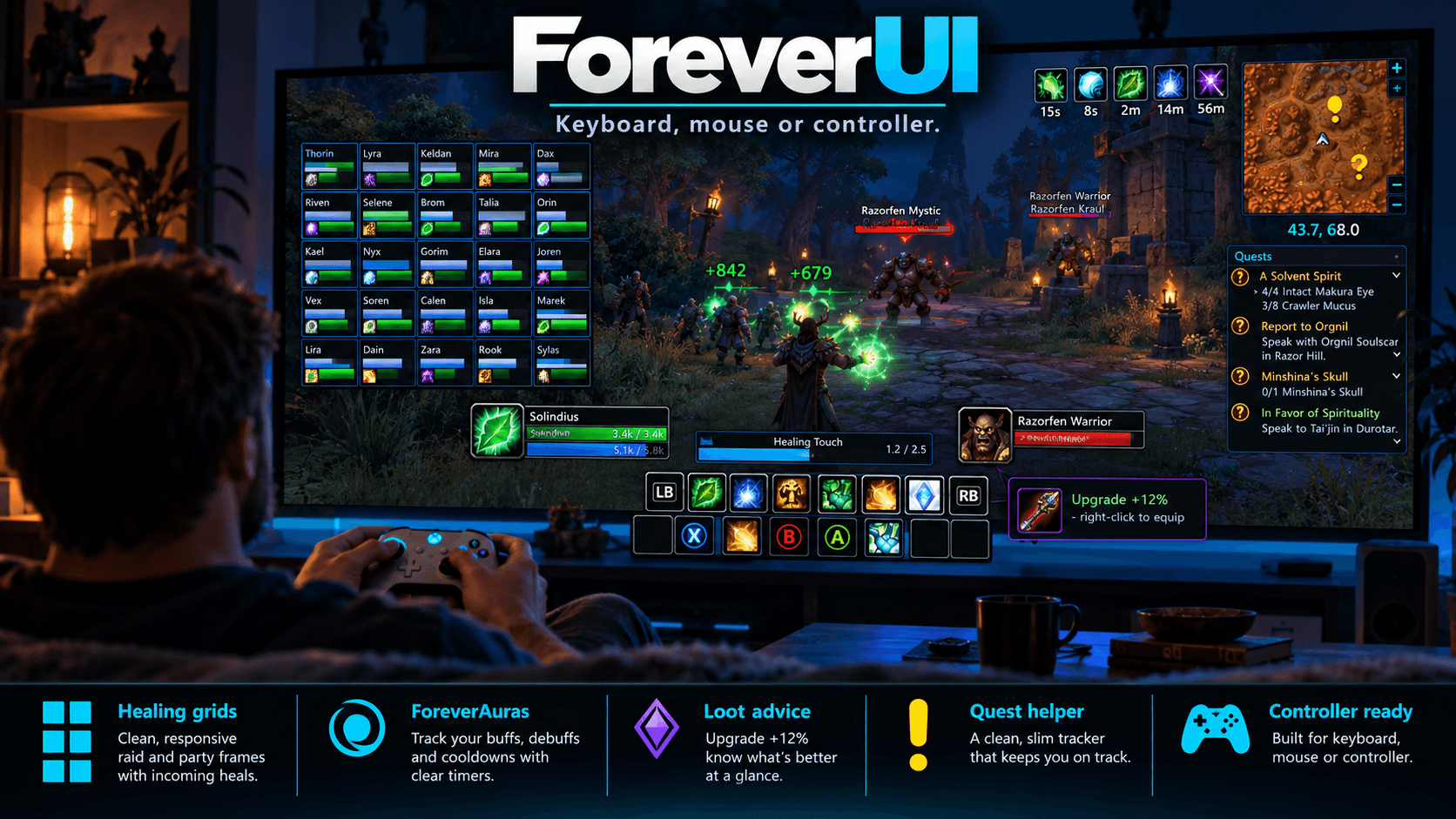
One interface for WoW: Forever. Healer, tank or DPS. Keyboard and mouse, or a controller.
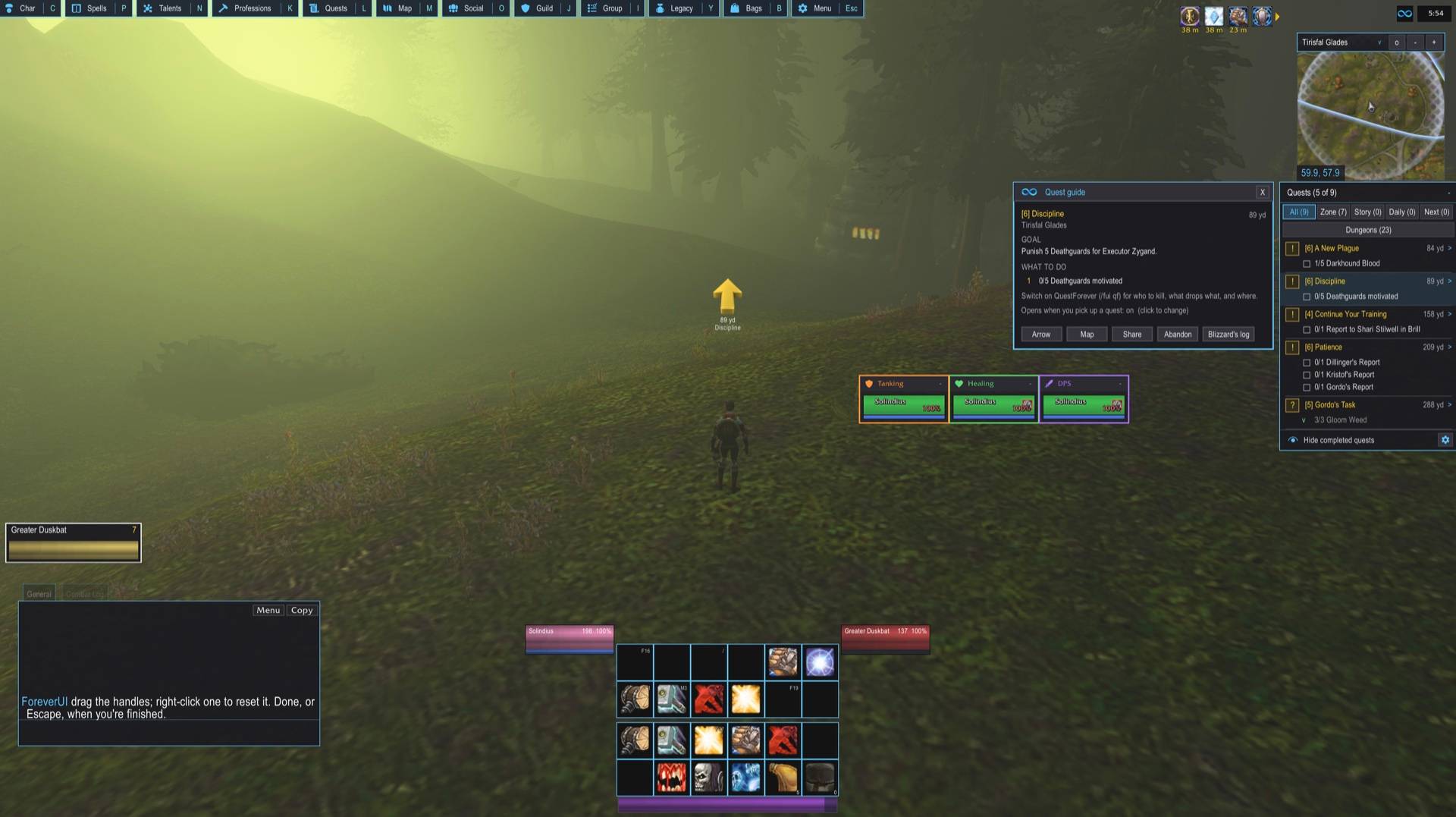
Unit frames, healing grids, action bars, your own aura icons, loot advice, a quest helper, nameplates, bags, chat, minimap and more - all flat and dark, all movable, all set up from one window. Type /fui.
Play with a controller? So does ForeverUI.
Forever ships Blizzard's full controller UI: the console-style action bars, a pointer that walks the windows, the radial menu. ForeverUI works with it. Pick up a pad (or switch the game to controller mode) and ForeverUI's own action bars, bag window and micro bar step aside so the controller's run untouched - while your unit frames, healing grids, ForeverAuras cooldowns, loot advice, quests, nameplates and the whole look stay.
- Controller buttons are labelled the way you press them: A, B, X, Y, LB, RB, LT, RT and the d-pad.
- General > Controller: Automatic (switches by itself when the game is in controller mode - nothing to set), Always controller, or Always keyboard + mouse. A switch asks for one reload.
- QuestForever keeps to the minimap while the controller is in charge, so the quest log (which is the world map on Forever) opens cleanly from L or the pad.
- Back on keyboard and mouse, everything ForeverUI does comes straight back.
Everything ForeverUI does
Party and raid frames that know your role
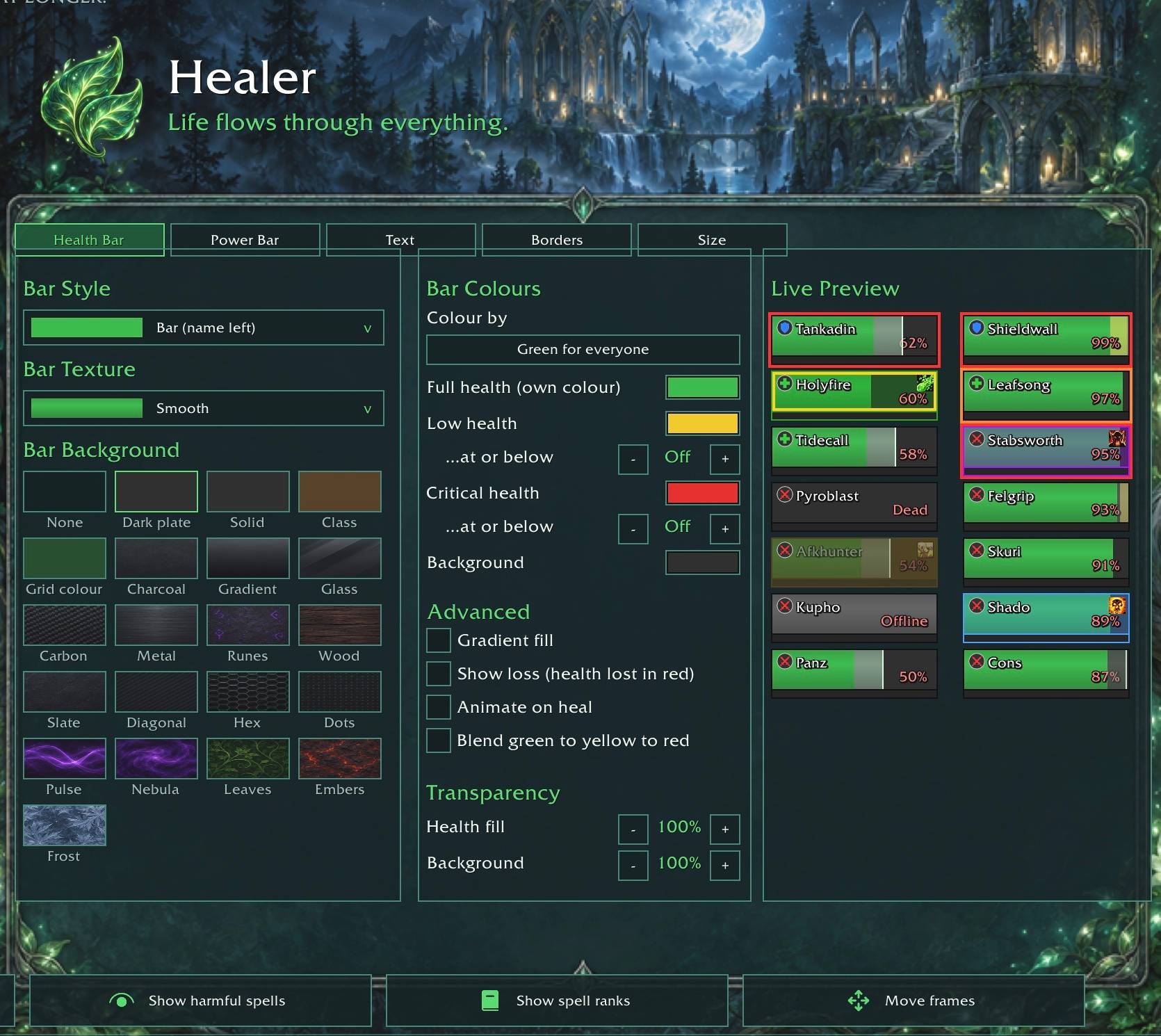
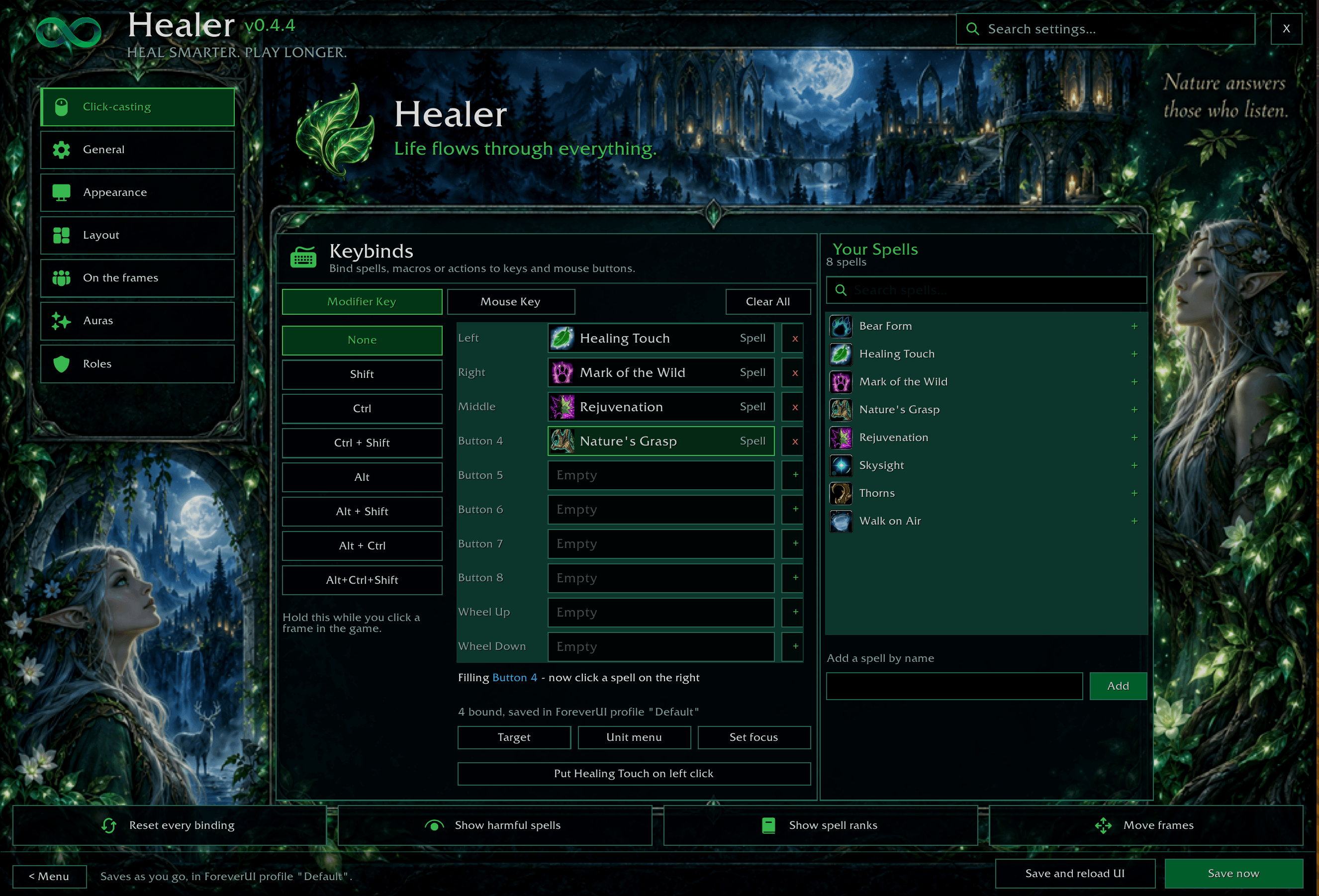
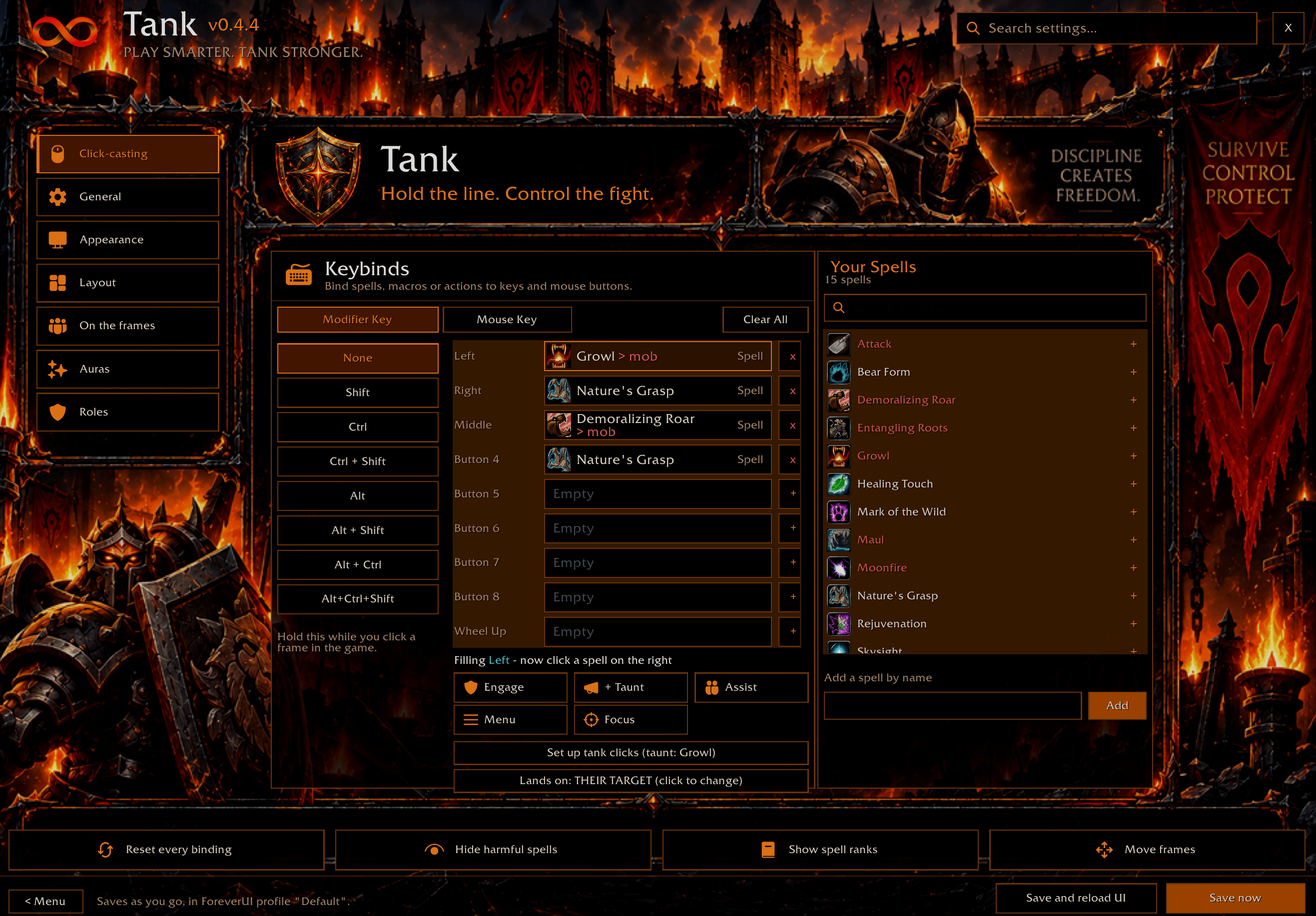
- Healer: click-casting on any mouse button and modifier, HoT timers that stay in combat, incoming heals, dispellable debuffs, who is missing your buffs (Buff Watch), click a dead player to resurrect them, and up to ten extra panels (tanks, healers, a group, a class, names you choose).
- Tank: a threat screen - a pulsing AGGRO border, a threat meter on each frame, a Loose list, an alarm in the middle of the screen. Left-click to engage, right-click to taunt. A raid marker bar and a smart mark key (skull first, then cross).
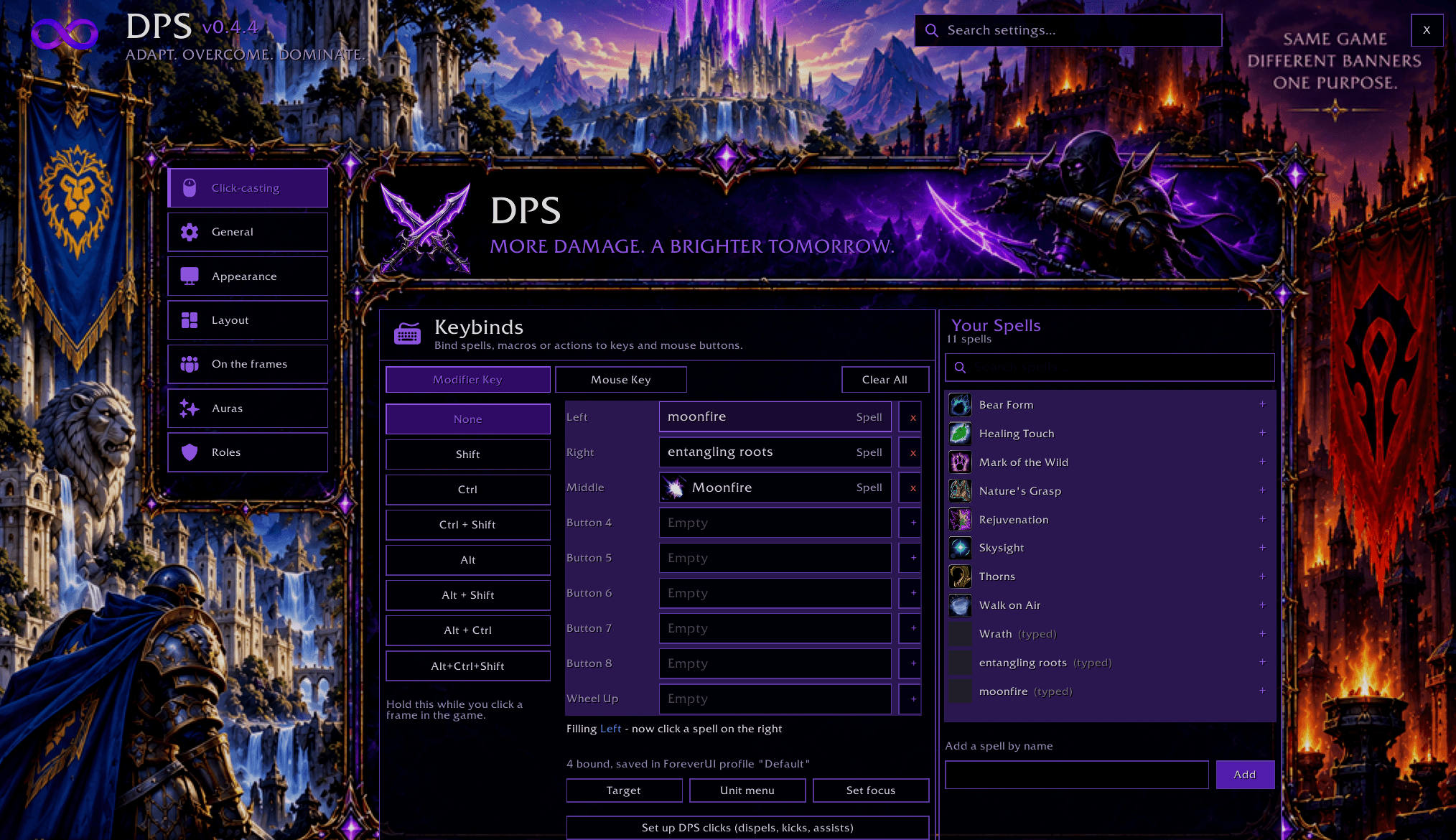
- DPS: its own grid and its own clicks, and an "IT'S ON YOU" warning when a mob turns to you.
- Each role keeps its own clicks, keybinds, indicators and layout. Change spec (or Set Role) and your frames follow.
- Each role's grid is always on, in groups only, or off - one click per role in Quick Setup. Put the tanking or DPS grid up while you level, or keep the healing grid out of sight until you join a group.
- Downranking: "Show spell ranks" in Click-casting gives every rank its own row, and a rank you bind is cast at exactly that rank.
ForeverAuras - your own aura icons, no WeakAuras needed
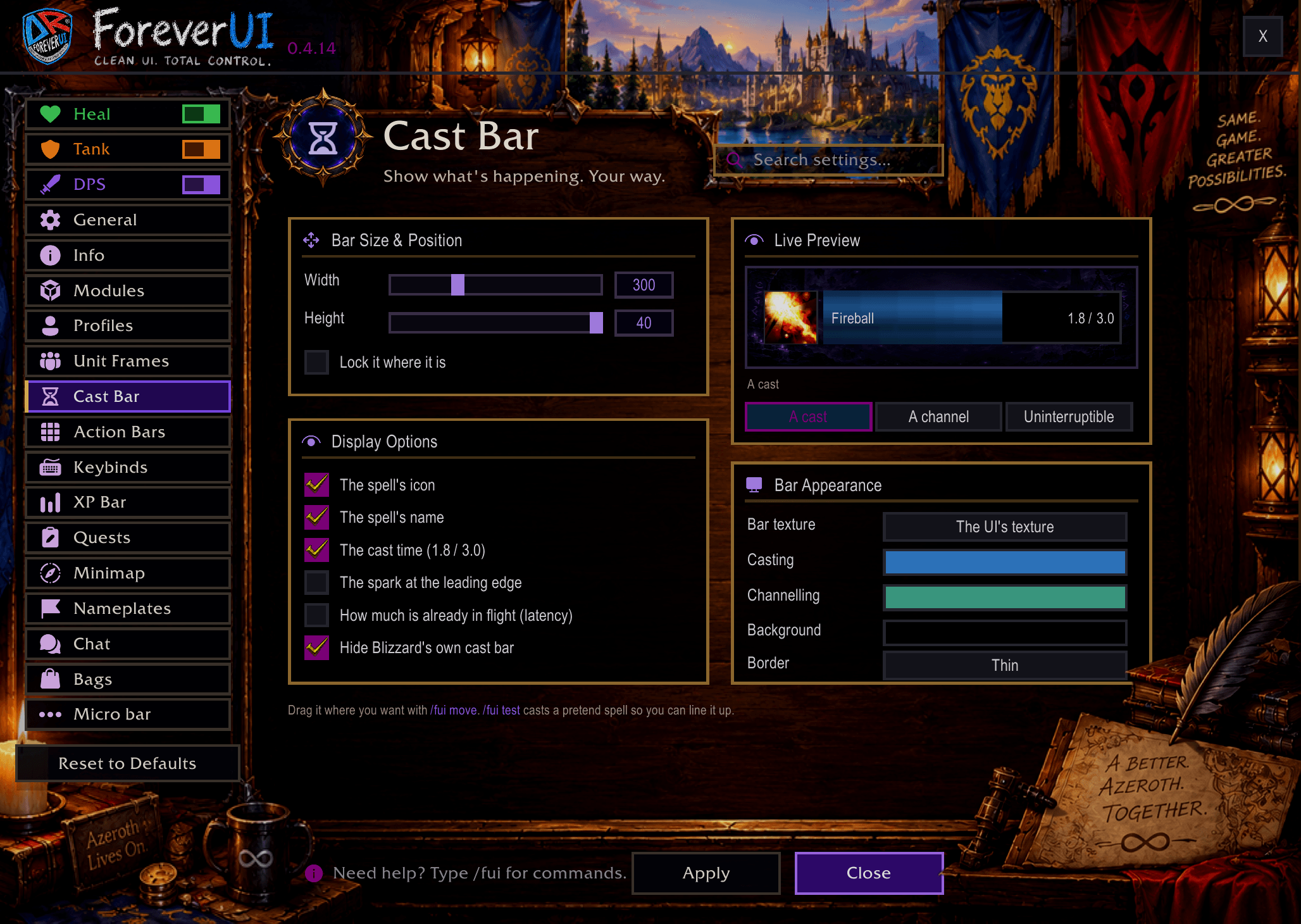
Cooldown icons with a countdown, a glow and a sound when they are ready, tinted when you can't use them or are out of range. Buff icons for you and debuff icons for your target. Place each one anywhere, share them as text. /fui auras.
Loot advice
When loot lands in your bags ForeverUI tells you what it is good for: junk to sell (and what it's worth), gear that isn't for you (wrong armour or weapon type), gear for a higher level (and whether it will be an upgrade then), and upgrades worth putting on, with how much better and "right-click to equip". Upgrades get a green + in the bags and a line on the tooltip. Weighed for your class and role - healing, tanking, strength, agility or spell damage - or pick one yourself. It never equips anything for you. /fui loot.
Action bars
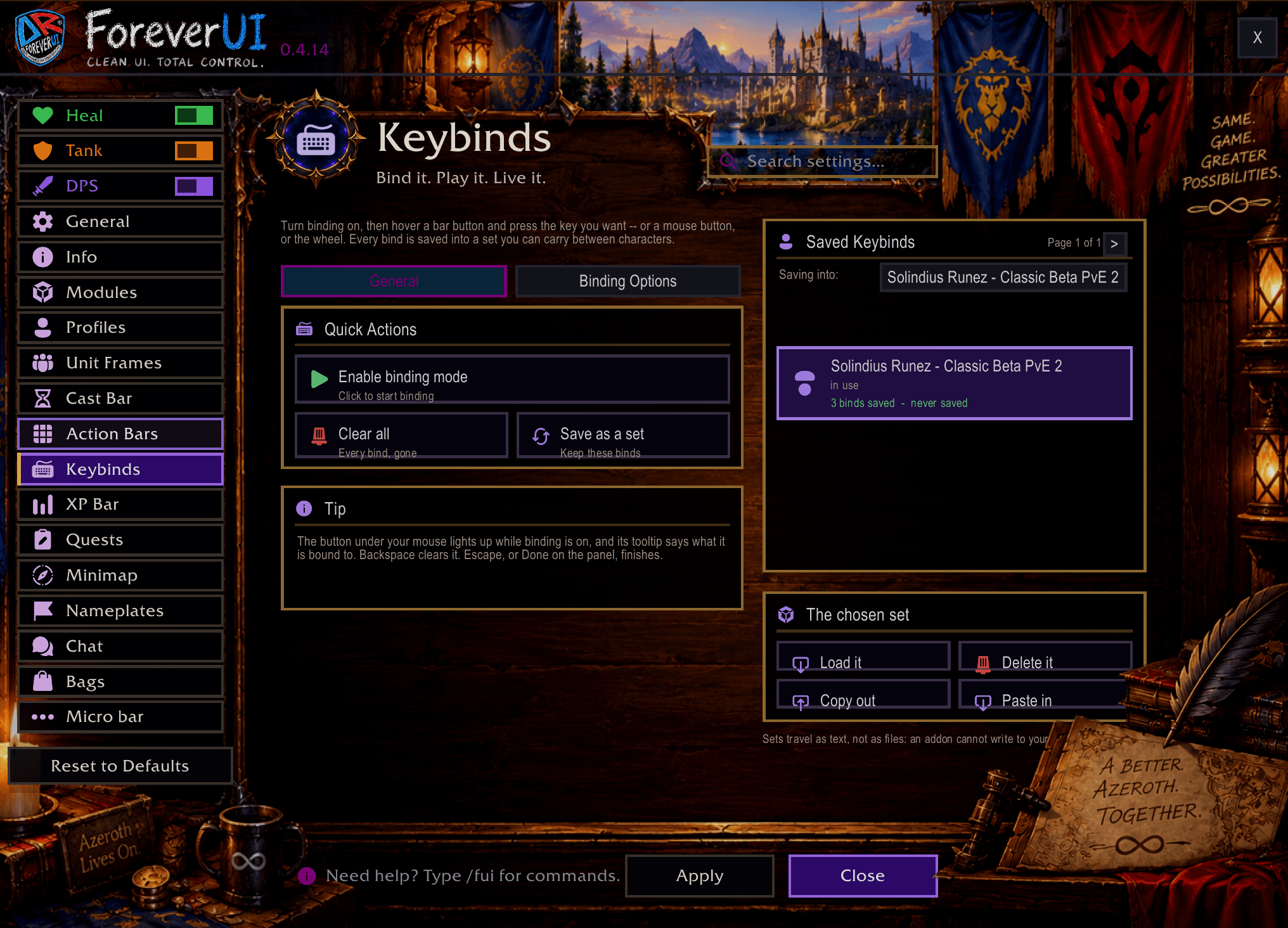
All eight bars, each with its own layout. Hover a button and press a key to bind it (/fui keys). Cooldown numbers, red when out of range, icon zoom, your own border colour, rounded buttons if you like them. Locked so nothing drags off by accident - hold Shift to move a spell.
Unit frames
Player, target, target-of-target, pet and focus. Class colours, power and cast bars, health and power text (current, percent, both, or current / max), incoming heals and shields, buffs and debuffs placed where you want them, and the pet happiness face for hunters.
QuestForever - where to go and what to do
! and ? on the world map and minimap, dots where your quest mobs and items are, tooltips that say which quest a mob is for and your progress, every quest in plain steps, an arrow to your next step, quest chains, a Dungeons tab, and holiday quests only in season. /fui qf.
Nameplates
Flat health bars with name, level, health and a cast bar that shows kick priority. NPC jobs under their names (<Innkeeper>, <Hunter Trainer>), mining veins, herbs and chests as just their name in gold, raid marks, your target a little larger.
And the rest
- Bags: one window with search, categories, item count and the currency bar, and a strip of your bag slots above it to swap a bag for a bigger one.
- Chat: your own background colour and opacity, border, text size and where the edit box sits, tabs that fade out completely - or put Blizzard's chat away with one switch.
- Micro bar that can fade away until you point at it.
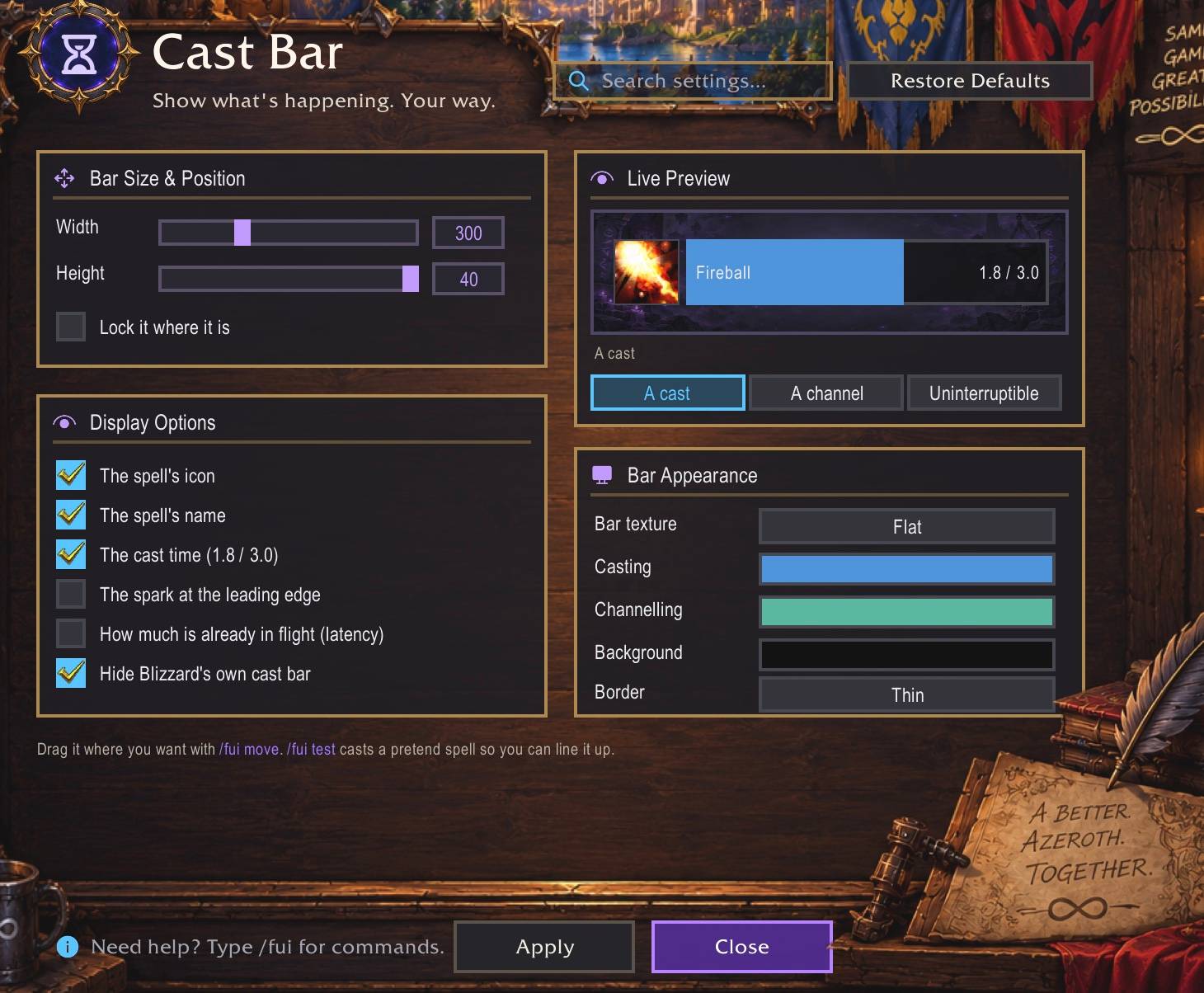
- Minimap, XP bar, cast bar and quest list, all restyled. Herb and ore tracking from the minimap.
- The map, quest log and Legacy open with one click, through Blizzard's own buttons.
- Kick alerts and Blizzard's Cooldown Manager in ForeverUI's style.
- A 3D waypoint arrow to your map pin or tracked quest.
- Rounded corners for windows, buttons and unit frames - or keep them square.
- What's new opens once after each update, so you see what changed.
/fui new. - Your whole setup as text:
/fui backupcopies it,/fui restoreputs it back. - Quick Setup, profiles, and
/fui moveto drag anything anywhere.
Note From the Developer
Hi, my name is Solindius. I love playing all three roles: tanking, healing, and DPS. I created ForeverUI because I wanted one interface that would let me spend less time managing addons and more time actually playing the game. Originally, I built separate frameworks for healing and tanking - HealForever and TankForever. They worked, but I quickly realized I was creating the same problem I wanted to solve. Every time I changed roles, I had another addon, another configuration, and more things to manage.
ForeverUI grew out of a simple idea: the interface should understand the role I am playing and adapt with me. If I am healing a dungeon and our tank leaves, I want to switch to tank and have my interface immediately become the tanking setup I already created. If I switch to DPS, the same thing should happen.
This is where everything is moving. HealForever and TankForever are now inside ForeverUI - the same healing engine, the same threat frames, the same click-casting, just in one addon with the bars, unit frames, cast bar, minimap, nameplates, chat, bags and quest tracker to go with it. The two standalone addons still work and I still build them for every release, so nobody gets stranded. But new work happens here.
I know a lot of you are still downloading HealForever, and honestly, I get it - I am mainly a healer. I have always been a healer. But most of us are also altaholics, and that is really the point of this addon: one setup that follows you between characters and roles instead of three setups you maintain by hand.
Just want the healing frames?
Type /fui only heal (or /fui > General > Healing only). Every other part of ForeverUI switches off and the game's own bars, map, bags and chat come back - only the healing frames stay. Prefer a separate addon? HealForever on CurseForge is the same healing frames on their own.
Levelling? QuestForever shows you where to go and what to do
ForeverUI comes with QuestForever, a quest helper. Turn it on in the first-time setup ("Levelling?"), from its page near the top of /fui, or with /fui qf:
- A yellow ! where you can pick a quest up (one per quest giver, the tooltip lists them all), a ? where you hand one in, and dots where the mobs, items and objects for your quests are - on the world map and the minimap.
- Hover a mob, an NPC or an object in the world and its tooltip says which of your quests it is for and your progress ("Kobold Vermin slain: 3/10"). Hover a quest giver and it lists what they have for you.
- Every quest in plain steps - "Kill …", "Loot … from …", "Use …", "Go to: …" - with the finished ones ticked.
- Click a quest in the quest list and the arrow points to your next step, or the hand-in once it is done.
- It learns the new Forever quests nobody has mapped yet as you play;
/fui qf exportgives you text to post here so the next update has them for everyone.
Off by default, so it costs nothing if you do not level. Also on CurseForge as its own addon: QuestForever.
Where to get it
- Here on CurseForge (this page), or on Wago, or
- ispress.de/foreverui - a page with screenshots and a direct download.
Fair warning about that link: it is piggybacked onto a website I built for music and publishing. It is not a dedicated addon site, and I don't know whether it will ever become one. It is just somewhere I can put the files and explain things properly without a CurseForge account.
I need your help testing
Here is my honest problem. Forever's beta did not give us max-level characters, and I wish it had. Right now I have a level 11 druid and a level 8 priest. During this beta I get to do one of two things: build addons that will be good to have when everything goes live, or spend all my time leveling characters to test them on. I chose building.
So I am relying on you. If you play a class or a spec I cannot get to yet, tell me what you need - in the comments here, and I will implement it for your class. I will eventually have every class and every spec covered myself; I just do not have the hours right now.
My own plan is to get the druid to 60 so I can tank, heal and boomkin in five-mans and hopefully some raids, and test all three roles properly the way they are actually played.
Help me turn ForeverUI into something we actually want to play with.
Thanks,
Solindius
Raid frames that know your role
Most of us have a stack of alts, and some of us have one character that does it all. ForeverUI's party and raid frames change with the role you're playing.
- Healer. HoTs, incoming heals, dispellable debuffs and buffs someone is missing, watched in the corners of every frame. Click a player to heal them.
- Tank. The same frames become a threat screen: who has a mob and shouldn't (a thick pulsing AGGRO border, a threat meter on each frame, a Loose list, an alarm in the middle of the screen). Left-click to engage, right-click to engage and taunt. Aim any click at the player or at what the player is fighting.
- DPS. Its own window, its own grid and its own click-casts - interrupts, off-heals, whatever you actually press.
Each role keeps its own click-casting, its own keybinds, its own indicators, its own bar colours and its own layout - you never set it up twice. Change the tank's bars and the healer's stay exactly as they were. Change spec and ForeverUI asks "Your role changed to Tank. Switch your frames?"; one click brings up the setup you already built, and respeccing back restores the other. Don't want the frames at all? Turn them off and keep the rest - every piece is a switch, so you can run just the raid frames on top of your own UI.
What it replaces
Action bars
Eight bars, twelve buttons each, sized and spaced how you like. The button is the spell: Blizzard's slot artwork is stripped and the icon fills the whole block, with its own baked-in border cropped off.
- The main bar follows stances and stealth on its own, handled inside the game's secure environment so it keeps working mid-fight.
- Keybinding without a menu.
/fui keys, then hover a button and press the key you want - or a right, middle or side mouse button, or the wheel. It binds and saves on the spot, the button under your cursor lights up and its tooltip shows what it is bound to now, and Backspace clears it. Typing in chat still types. Binds are kept per character or shared across all of them, and put back every login. - Locked in normal play so a spell can't be dragged off by accident - but the moment your cursor is carrying a spell, every slot accepts it. No mode to remember.
Unit frames
Player, target, target-of-target, pet and focus. Class colours, power bars, cast bars, and health and power text you can set to whatever you actually read. Hunters get their pet's happiness beside the pet frame.
XP bar
A thin purple line instead of a framed strip across the screen. Rested experience shows as a lighter band ahead of the fill; the numbers appear on hover, always, or never.
Quest list
ForeverUI's own quest list: tabs, level badges and distances, the nearest few quests first, and a click on any quest for its steps and the waypoint arrow. Its text size follows Quests > Text size. Prefer Blizzard's tracker? One switch puts it back, in a tidy panel with a header that rolls it up and the gold artwork stripped off.
Nameplates
Flat health bars over enemies with the name, level, health percent and a cast bar. Reaction colours, players by class, and your current target's plate a little larger so it stands out. Your own debuffs on the mob stay visible above the plate.
Chat
Tidied into one square box with emoji and clickable links, tabs that can fade out completely - or one switch to put Blizzard's chat away, and it comes straight back when you untick it, with the conversation intact.
Moving things
/fui move puts a handle on every frame. Drag it where you want, /fui move again to finish. Frames snap to the centre when they're close, nothing moves in combat, and /fui reset puts everything back.
Profiles
Settings live in named profiles and each character remembers the one it used. Copy a profile, reset it, or export it as text to paste to someone else.
About saving on the beta (please report this one)
The Forever client currently writes every addon's settings to disk and never reads them back after a reload or a restart. That is a bug in the game, not in any addon, and it affects all of them. Only Blizzard can fix it.
ForeverUI works around it by keeping your essentials - your setup answers, which modules run, your role grids and their click-casts, where you moved things, and a growing list of looks (chat, micro bar fade, power text and more) - in character macros named FUI Save 1, FUI Save 2 and so on, which the game does keep. They come back automatically at login, so please don't delete them and keep a few character macro slots free. For everything else, /fui backup gives you your whole setup as text to keep. To make a change stick: make it, wait a few seconds, then reload.
/fui saving explains this in game and hands you a ready-made bug report to paste to Blizzard. Please send it - the more reports they get, the sooner it is fixed.
Built for Forever's restrictions
Forever can hand an addon a health, threat or name value it is allowed to show but not do arithmetic with - and the API calls that tell you which values those are are not always right. Every calculation in ForeverUI runs inside a guarded call. A frame that can't be measured shows the bar and stays quiet, rather than throwing an error every time the number changes.
Commands
| Command | What it does |
|---|---|
/fui | the options window |
/fui frames | the party & raid frame settings (click-casting) |
/fui role tank / healer / dps | switch which role the frames are set up for |
/fui move | drag frames where you want them |
/fui keys | hover a button, press a key to bind it |
/fui auras | ForeverAuras: your own cooldown and aura icons |
/fui loot | loot advice settings |
/fui qf | QuestForever, the quest helper |
/fui new | what changed in the latest versions |
/fui backup / restore | copy your whole setup as text, or paste it back |
/fui unlock | drop new spells onto the bars |
/fui quests | show or hide the quest tracker |
/fui profile | switch, copy, export, import |
/fui saving | about the beta's saving bug, with a report to send |
/fui errors | collect anything that went wrong, ready to paste |
/fui reset | reset every frame position |
/fui version | what's running, and on which client |
Installing
Unzip into World of Warcraft/_classic_era_/Interface/AddOns (or _classic_beta_ for the Forever beta) so the folder sits as Interface/AddOns/ForeverUI. First login walks you through a few questions, including which role your frames should start in.
Not affiliated
ForeverUI is an independent addon.
You must be logged in to leave a comment.