

ForeverTotems
**ForeverTotems** is a clean, lightweight, all-in-one totem tracking and quick-cast launcher designed specifically for Shamans in World of Warcraft Forever.
Details
Expansion
 Forever
 Categories
Developers

Having issues?
# ForeverTotems
**ForeverTotems** is a clean, lightweight, all-in-one totem tracking and quick-cast launcher designed specifically for Shamans in World of Warcraft Forever. It replaces clunky action bar setups with a dedicated 4-element frame (Fire, Earth, Water, Air) featuring live duration counters, flyout spell selectors, and customizable audio warnings.
---
### Features
* **Click-to-Cast Action Buttons:** Drop your totems directly from the frame using standard secure action buttons.
* **Hover Flyout Menus:** Hover over any elemental slot to reveal a pop-out tray of every available totem for that element. Click any spell to cast it and set it as that slot's primary action.
* **Smart Visual Feedback:**
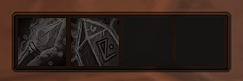
* **Inactive / Dormant:** Slots are desaturated (grayscale) and dimmed when no totem is out.
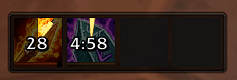
* **Active:** Icons light up with full color, show Blizzard's animated proc glow, run a clockwise cooldown spiral, and track duration with a bottom progress bar.
* **High-Visibility Timers:** Digital countdown text overlaid on the button face changes color dynamically (White > Yellow at 10s > Red at 5s) with decimal precision in the final seconds.
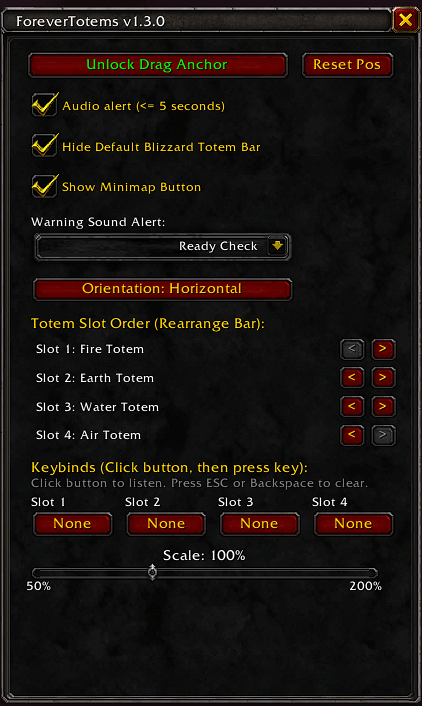
* **Audio Alerts:** Configurable sound warning when any active totem has 5 seconds or less remaining. Includes a sound switcher with 6 classic sound cues (Raid Warning, Alarm Clock, Ready Check, Gong, PVP Flag, Low Thud).
* **Hover Keybinding (Quick Bind):** Assign custom hotkeys directly from the settings window by hovering over a button and pressing your desired key—no default binds forced on install. Press ESC or Backspace to unbind.
* **Flexible Layout & Positioning:**
* Toggle between **Horizontal** and **Vertical** display modes on the fly.
* Free-drag placement anywhere on screen with lock/unlock toggles.
* Built-in sliders for frame scale (50%–200%) and fine X/Y nudging.
---
### Commands
* `/ft` or `/forevertotems` — Open the graphical configuration and keybinding window.
---
### Installation
1. Download the archive and extract the `ForeverTotems` folder.
2. Place the folder into your World of Warcraft directory:
`World of Warcraft_classic_beta_InterfaceAddOnsForeverTotems`
3. Launch the game and type `/ft` to configure your layout, sounds, and hotkeys.
You must be logged in to leave a comment.