

ForeverNet
Professions, cooperative crafting, and item requests for World of Warcraft: Forever.
Details
Addon ID:
26867
Addon Version:
1.0.0
Expansion:
1.60
Upload date:
Oct 06, 2026
Last Updated:
Oct 06, 2026
Downloads:
Less than 100
Website:
Source Link
Expansion
 Forever
 Developers

TheWoolfi
Creator
Having issues?
# ForeverNet
**Plan crafts, find crafters, and request help in World of Warcraft: Forever.**
ForeverNet brings your learned recipes and your guild or group's crafting capabilities into one catalog. Choose an item and quantity to see the materials you need, what you already own, and which players can help with the crafting steps.
**Author: Andrew Woolfi** · **License: MIT**
## Find recipes and crafters
- Scan your open profession to save learned item recipes in your profile.
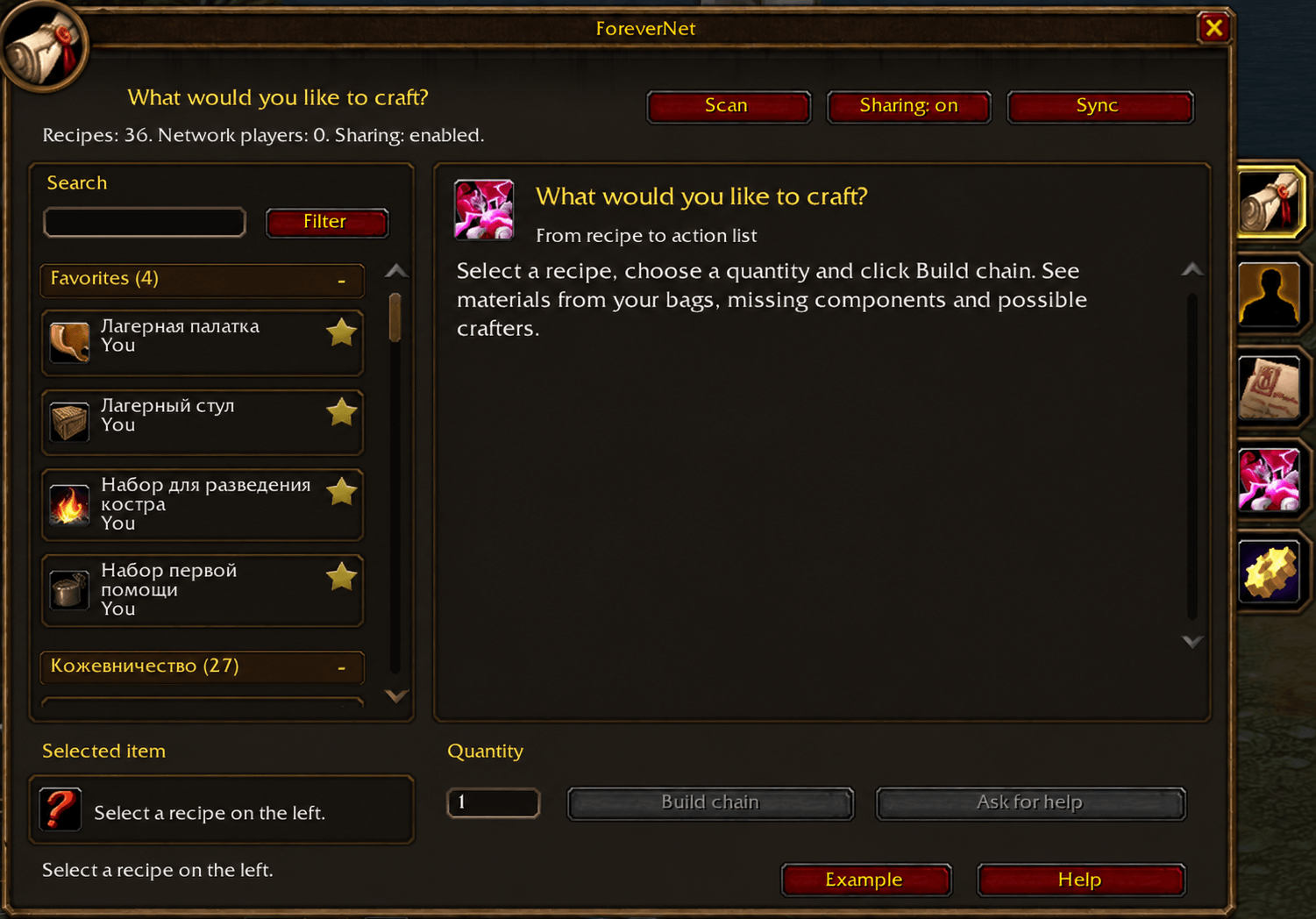
- Browse recipes in collapsible profession sections and search by item, player, or profession.
- Use **Filter** to choose a profession, regular recipes or Blueprints, and your own recipes or those available from other network members. Filters work together and can be reset.
- Each item appears once, even when several players know how to make it. View available crafters and switch the recipe or crafter used for your plan.
- Use the star buttons to favorite up to **5 player profiles and 5 recipe items**. Favorite profiles stay at the top of the Network list; recipe favorites have their own section above profession groups. Selections persist across sessions.
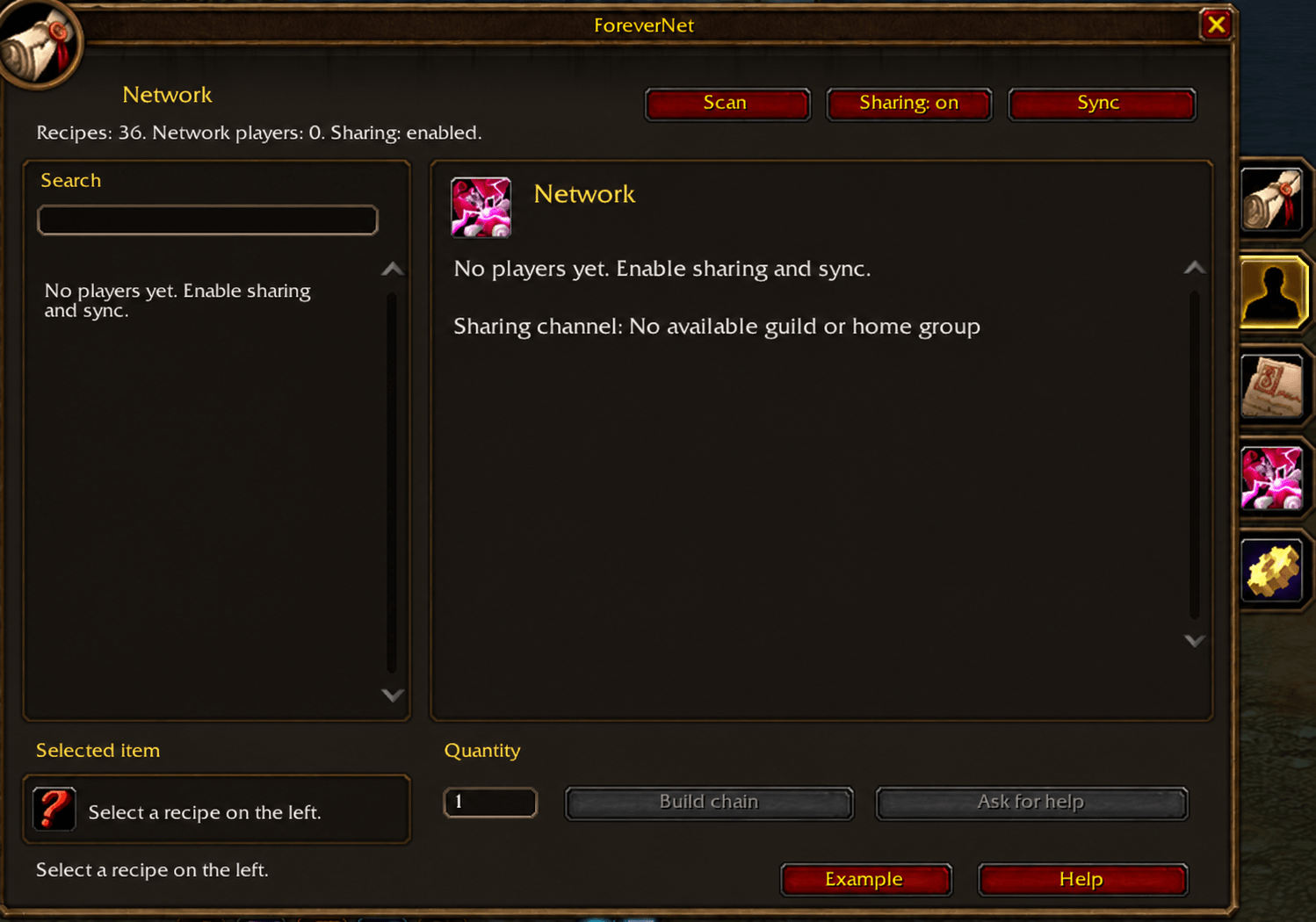
- The **Network** tab shows other players, with profession skill ranks, recipe counts, item cards, and Blueprint highlights. Click a card to open that player's recipe. Your own profile remains available for planning without appearing as another network member.
## Build a production chain
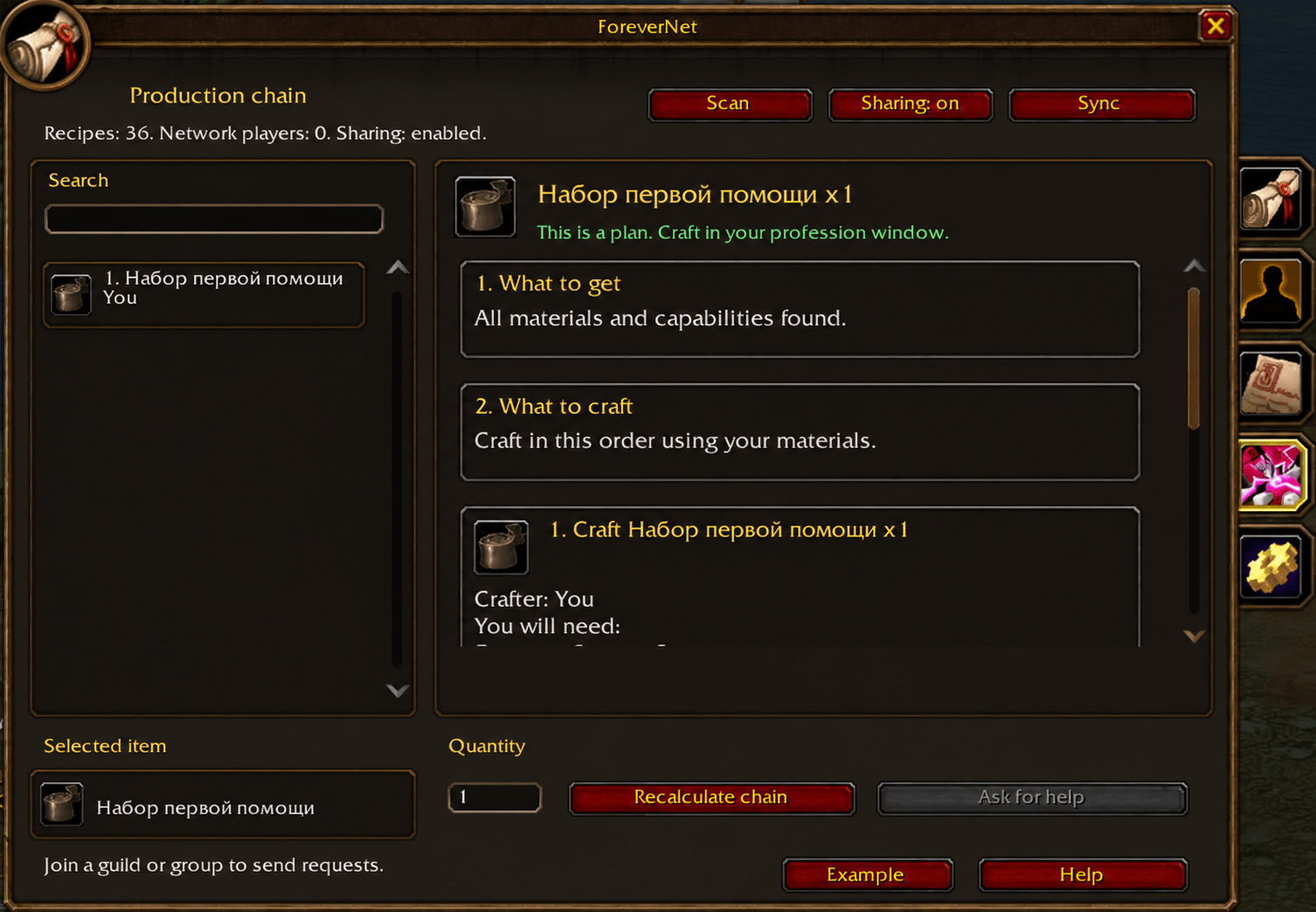
- Calculate reagent quantities and crafting batches for the amount you want to make.
- See intermediate components, the crafting order, potential crafters, and missing materials or capabilities.
- Follow two lists: **What to get** and **What to craft**. Each crafting step shows its crafter and total ingredients. Use **Get N ready-made** to get a reagent instead of crafting it, or **Craft N** to make a missing material. **Other recipes** unfolds known alternatives with total ingredient quantities in the same list. Used stock is folded away until needed. A choice rebuilds the original chain; ready-made materials remain missing until acquired. Choices apply to this plan only; default selection does not compare prices or gathering routes.
- Account for items in your bags and your last saved personal bank snapshot. Material cards distinguish available stock from shortages.
- Choose a missing component and use **Ask for help** to create an item request.
- Try the **Example** button for an isolated demonstration that is never sent to other players.
Blueprint flags, camp facilities, and recipe facility requirements can be recorded manually through slash commands. These capabilities can be shared for planning; automatic discovery of all Blueprint and Camping mechanics is not yet implemented.
## Cooperate with your guild or group
ForeverNet exchanges profession profiles, recipe capabilities, camp availability, and requests through in-game addon messages. Participants must have ForeverNet installed, share a supported guild, party, or raid channel, and enable **Sharing**.
- Automatic participant discovery when sharing is enabled or your group/guild changes.
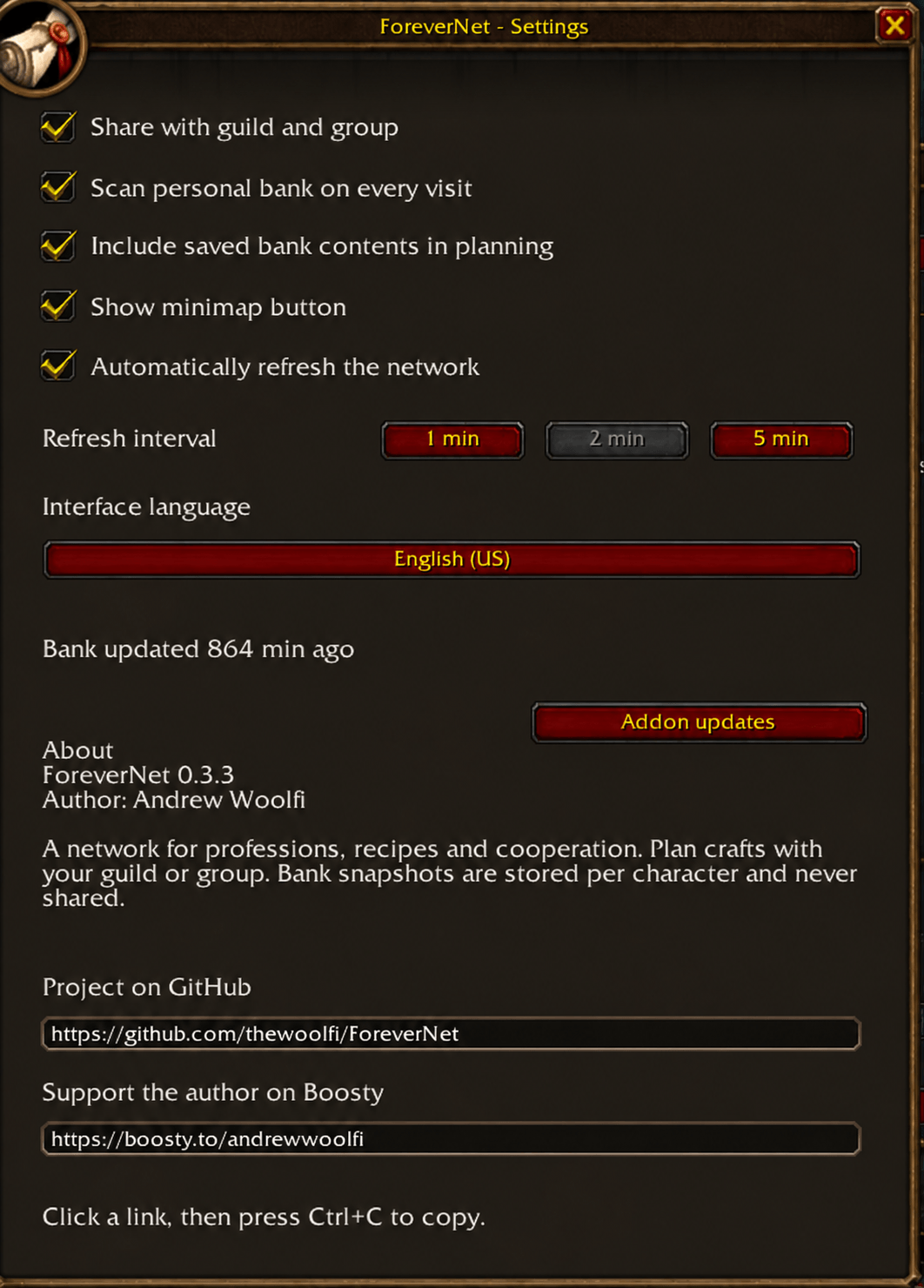
- Optional automatic network refresh, with **1-, 2-, or 5-minute intervals**. The default is 2 minutes.
- A **Sync** button for manual refresh, including when automatic refresh is disabled.
- Profile changes are shared after scans or manual edits while automatic refresh and sharing are enabled.
- New participants can receive existing unexpired requests in their shared channel.
- Requests move through open, accepted, completed, or cancelled states. The request owner's addon accepts the first offer of help.
Sharing starts disabled on a new installation. Bag and bank inventories are never sent to other players, and no external server is required. Ordinary peer profiles expire after 30 minutes without an update; favorite profiles are retained and labeled as saved data when stale. Item requests expire 30 minutes after creation. Your own learned recipes and bank snapshots persist across normal logouts and reloads. Recipe favorites bookmark items; favorite the crafter's profile as well to retain a recipe known only by that player.
## Personal bank and settings
Your personal bank is scanned automatically on visits and when its contents change during a visit. Snapshots are stored separately for each character; their age is shown when you plan outside the bank. You can disable automatic bank scanning or exclude saved bank stock from calculations.
The interface uses dark brown panels, light text, gold headings, game item icons, native side tabs, and thin scrollbars. Settings include sharing, automatic refresh and its interval, bank options, minimap button visibility, and interface language. The About section includes the author, version, GitHub link, and Boosty support link.
The movable minimap button opens the addon with a left-click and help with a right-click. Drag it to reposition it; its position is saved.
## Languages and addon updates
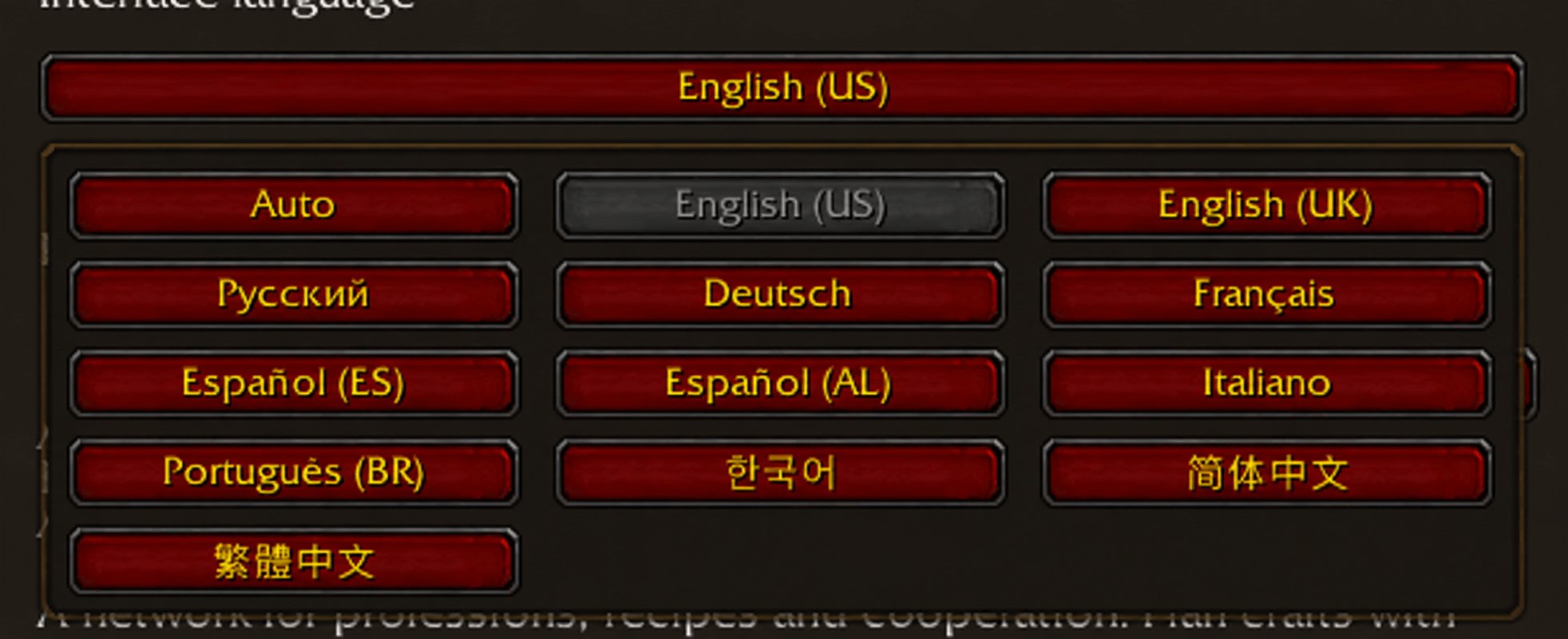
Interface support covers all 12 WoW locale codes: **English (US/UK), Russian, German, French, Spanish (Spain/Latin America), Italian, Brazilian Portuguese, Korean, Simplified Chinese, and Traditional Chinese**. Language is detected automatically or selected in settings. Additional translations are machine-assisted and still need native-speaker review; recipe names received from another player may retain that player's language.
Korean and Chinese fonts are bundled for addon text, buttons, window titles, input fields and tooltips, including when these languages are selected on a Russian or English client. The font folder and its SIL Open Font License are included in the addon package.
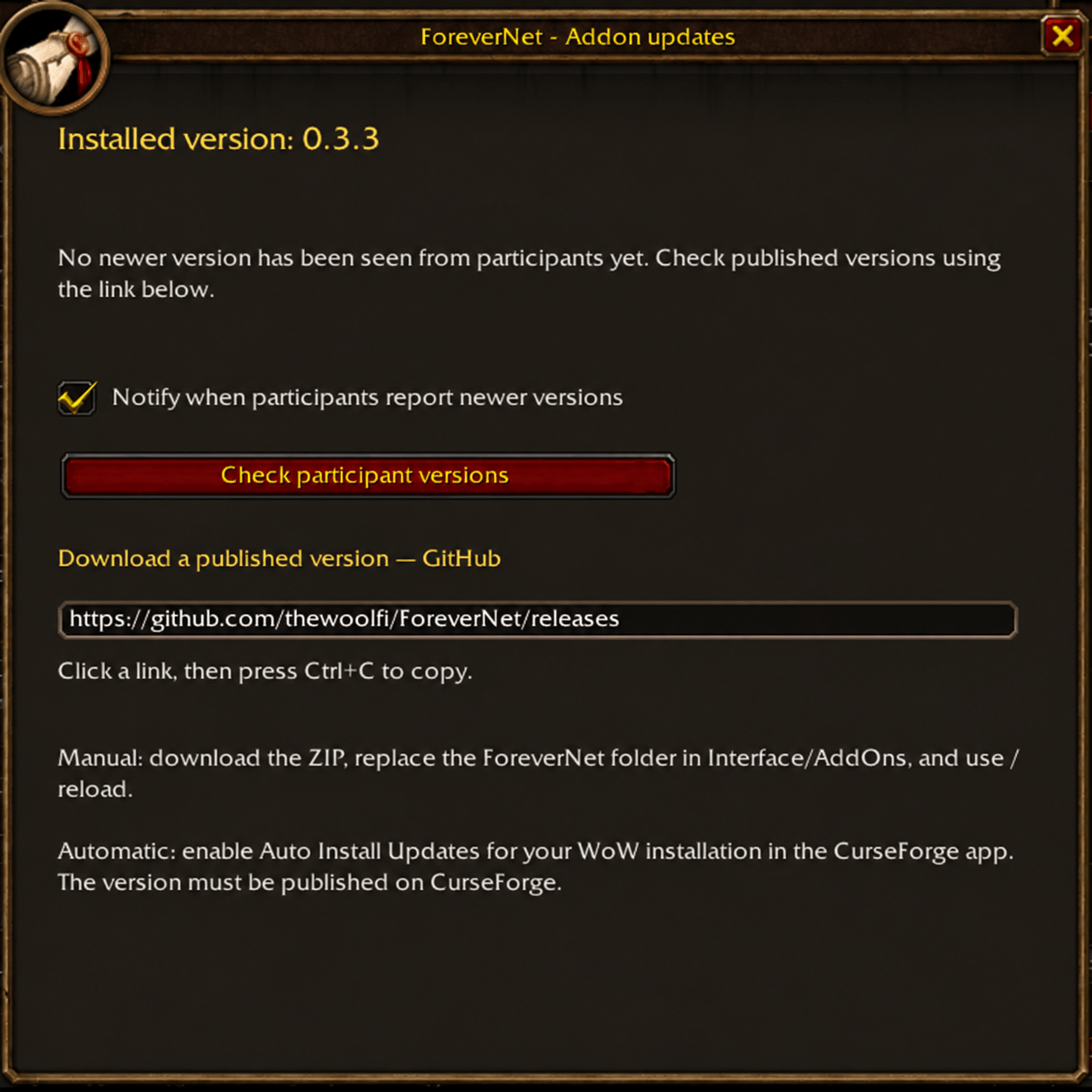
The update window shows your installed version and compares versions reported by participants. Notifications can be turned off, and the window provides a GitHub download link and update instructions. It does not check published releases over the internet or install files in game. Updating the addon itself is done manually or through an external addon manager; this is separate from refreshing the network.
## Getting started
1. Extract the installation ZIP into your client's `Interface/AddOns` directory so the file is at `Interface/AddOns/ForeverNet/ForeverNet.toc`. Enable the addon and restart the client after the first installation.
2. Open ForeverNet with the minimap button or `/fn`.
3. Open your own profession, clear its search/filters if needed, and click **Scan**. Repeat for the professions you want to share.
4. Visit your personal bank to save its contents.
5. Choose a recipe and quantity, then click **Build chain**. Withdraw bank materials before crafting and rebuild the plan after stock changes.
6. For cooperation, enable **Sharing** for all participants in the same guild or group. Use **Sync**, or leave automatic refresh enabled.
7. Select a missing component and click **Ask for help**.
**Commands:** `/fn` opens the addon, `/fn settings` opens settings, `/fn updates` opens version information, `/fn help` shows commands, and `/fn demo` opens the example.
## Current limitations
ForeverNet is a Beta for Forever; compatibility with other WoW clients is not confirmed. Plans suggest a sequence but do not guarantee an optimal route or a crafter's availability. Players craft, travel, and trade manually; building a chain does not automatically assign orders for every step.
Personal bank snapshots do not cover account or guild banks. Some recipes with alternative reagents, variable or currency costs, or ambiguous item outputs are skipped by the scanner. Old saved recipes can be removed with `/fn forget RECIPE_ID`. The capability graph is available through the addon API for developers; there is no dedicated graphical Skill Graph screen yet.
## Links and support
- [GitHub — source code, releases, and issue reports](https://github.com/thewoolfi/ForeverNet)
- [Support Andrew Woolfi on Boosty](https://boosty.to/andrewwoolfi)
Please include your client build, ForeverNet version, error text, and steps to reproduce when reporting an issue.
You must be logged in to leave a comment.