

ForeverDungeonLoot
Browse dungeon loot and recipe sources, prepare quest chains, and track quest progress in WoW Forever. Supports English and Korean.
Details
Expansion
 Forever
 Categories
Developers

Having issues?
Forever Dungeon Loot
Find your loot. Plan your quests. Follow your progress.
A dungeon companion for WoW Forever that brings loot browsing, recipe sources and dungeon quest preparation into one window.
Check the gear you want, find the quests to pick up before entering, and see where you are in each quest chain.
Loot & recipes · Quest preparation · Live quest progress · English / 한국어
English first · 한국어 소개는 아래에 있습니다.
Find the gear — and how to get it
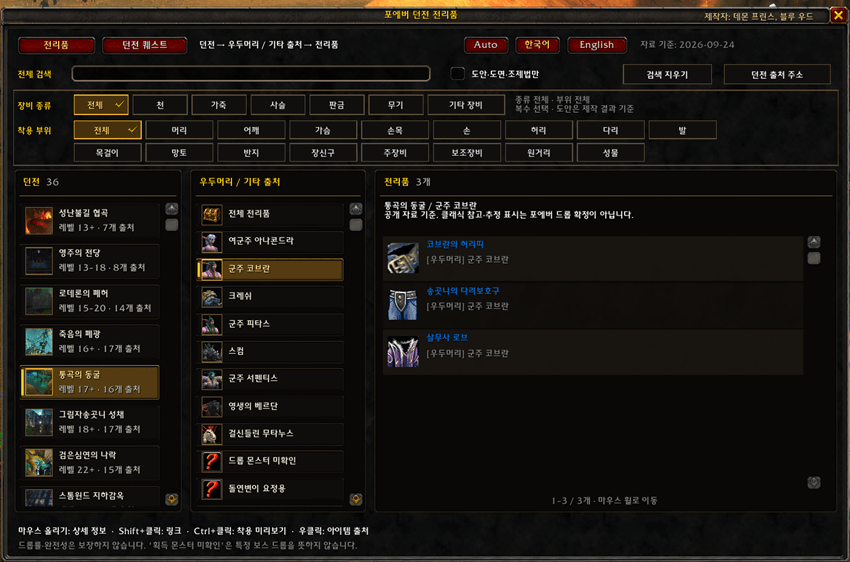
- Browse by dungeon and source. Explore recorded boss loot, other drops, quest rewards and vendor sources.
- Search across the catalog. Find items by Korean or English name, item ID, or a linked crafted item's name.
- Show the equipment you need. Combine cloth, leather, mail, plate, weapon and other-equipment filters.
- Follow the recipe. Filter for recipes and, where a crafted item is linked, check its recipe's recorded drop or vendor source.
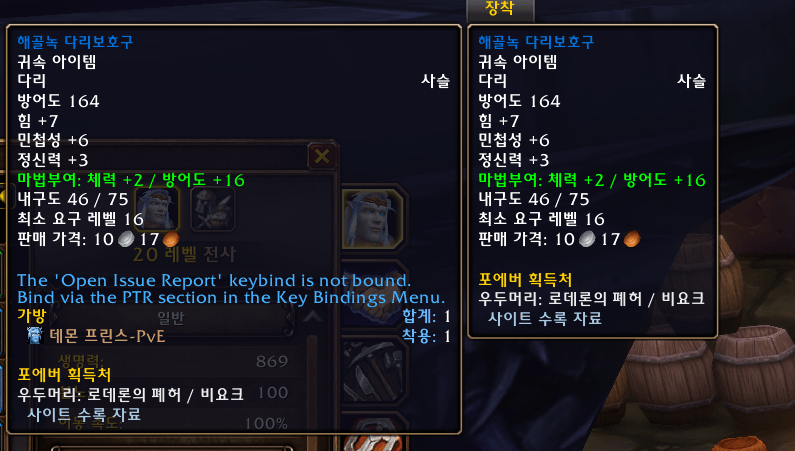
- See sources in item tooltips. Items in the catalog show source notes, with direct drops and recipe sources kept distinct.
Arrive with your quests prepared
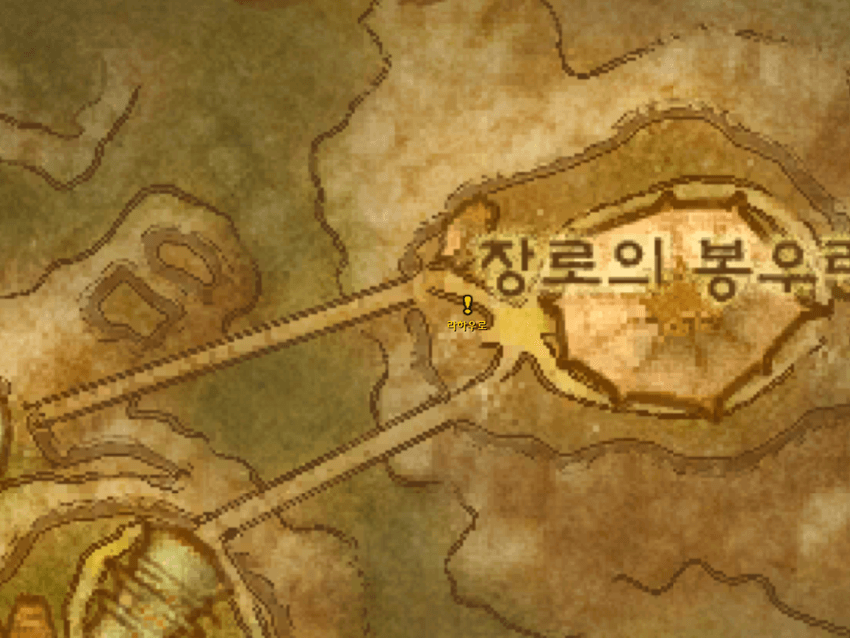
- Know where to start. Check the quest giver, location, recorded coordinates, dungeon objectives and turn-in location.
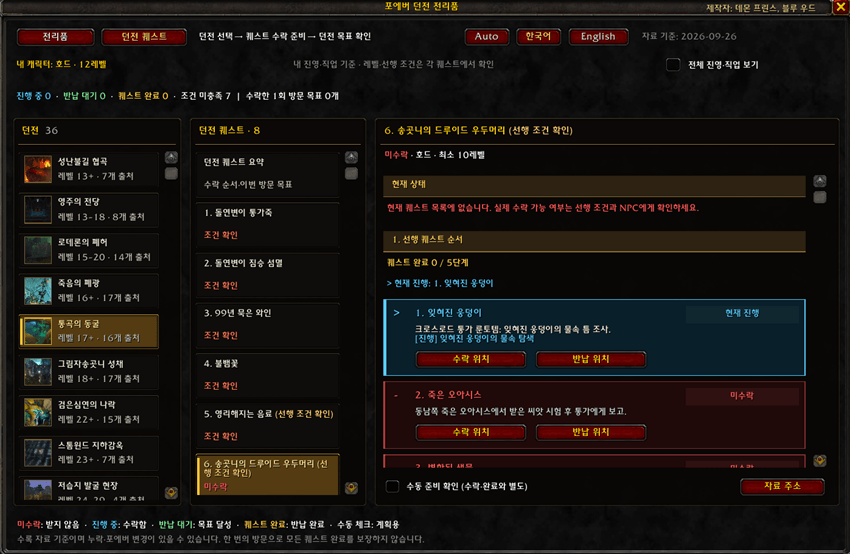
- Follow the chain. View prerequisites and follow-ups as numbered cards, with each step's progress shown separately.
- Spot special starting conditions. Recorded labels identify quests accepted inside the dungeon, started by drops or found on objects.
- Keep related steps together. Integrated preparation and follow-up quests appear under their main quest, with their individual details and progress retained.
- Plan for your character. View faction/class-appropriate quests, check level and prerequisite notes, and save a personal preparation checklist.
See what is finished — and what is next
Quest progress updates from the game's quest records. When available, live kill and collection objectives appear alongside the guide.
| Status | In the addon | Meaning |
|---|---|---|
| Not accepted | Red | Not currently accepted, according to the available game record |
| In progress | Light blue | Accepted and underway |
| Ready to turn in | Light green | Objectives complete; turn-in still needed |
| Quest completed | Bright gold | Turn-in completion recorded by the game |
Finishing an objective and turning in a quest are shown separately. Unknown or failed quest states remain clearly labelled. Preparation checkmarks are personal reminders and do not change actual quest progress.
Choose Korean or English
Use Auto / 한국어 / English at the top of the window.
- Auto: Korean for a Korean client; English for other client languages.
- Manual selection: Choose your preferred addon language. Changing it reloads the UI while preserving saved settings and preparation marks.
- The addon's interface and bundled guides are translated. Native item tooltips, item links and live objective text follow the game client's language.
Get started
Install the ForeverDungeonLoot folder in your game's InterfaceAddOns folder, enable the addon, then click its minimap button or type /fdl. No additional addon is required.
- Hover: Item details and recorded sources.
- Shift + click: Insert an item link when a chat edit box is active.
- Ctrl + click: Preview supported equipment.
- Right-click an item: Open its source URL for copying.
/fdl scale 0.8: Adjust the window scale./fdl reset: Reset the window position and scale.
Coverage & feedback
Version 1.4.0 includes quest preparation guides for 10 dungeons. Loot coverage varies by dungeon; beta observations, Classic references and unverified information are labelled. The catalog is bundled with the addon and does not fetch live website updates. An empty result is not proof that an item cannot drop.
Found a missing source or an incorrect quest step? Include the dungeon, item or quest name/ID, addon version and a screenshot or source when reporting it.
Created by Demon Prince & Blue Wood — 데몬 프린스, 블루 우드
Source and third-party notices are included in SOURCES.txt, QUEST_SOURCES.txt and THIRD_PARTY.txt.
한국어 소개
원하는 전리품을 찾고, 퀘스트를 준비하고, 다음 단계를 확인하세요.
포에버 던전 전리품(Forever Dungeon Loot)은 전리품 검색부터 도안 획득처, 던전 퀘스트 준비와 진행 확인까지 한 창에 모은 WoW Forever용 애드온입니다.
어떤 장비를 노릴지, 입장 전에 무슨 퀘스트를 받아야 할지, 선행 퀘스트는 어디까지 했는지 확인하세요.
전리품·도안 검색 · 던전 퀘스트 준비 · 선행 순서·진행 추적 · 한국어·영어 지원
원하는 장비와 획득처를 한눈에
- 던전·출처별 전리품 탐색 — 등록된 우두머리 전리품, 기타 드롭, 퀘스트 보상과 상인 판매 정보를 확인합니다.
- 전체 자료 검색 — 한글·영문 이름, 아이템 ID, 연결된 제작 완성품 이름으로 검색합니다.
- 장비 종류 복수 선택 — 천·가죽·사슬·판금·무기·기타 장비를 조합해 필요한 장비를 골라 봅니다.
- 도안과 완성품 연결 — 도안만 모아 보고, 연결 정보가 있는 완성품은 제작에 필요한 도안의 드롭·판매처까지 확인합니다.
- 아이템 툴팁에 획득처 표시 — 등록된 아이템의 출처를 표시하며, 완성품 직접 드롭과 제작 도안 획득처를 구분합니다.
입장 전에 퀘스트부터 준비하세요
- 수락부터 반납까지 안내 — 수락 NPC와 장소, 기록된 좌표, 던전 안 목표와 반납처를 확인합니다.
- 선행·후속 퀘스트를 순서대로 — 번호가 붙은 단계별 카드로 연결 관계와 각 단계의 진행 상태를 확인합니다.
- 특별한 시작 방식도 표시 — 자료에 기록된 던전 안 수락, 아이템 드롭 시작, 물건 발견 등의 조건을 제목에서 구분합니다.
- 연결된 퀘스트는 한곳에 — 통합한 준비·후속 단계는 대표 퀘스트 안에 모으고, 각 단계의 설명과 진행 상태는 유지합니다.
- 내 캐릭터에 맞게 준비 — 진영·직업에 맞는 목록, 레벨·선행 조건 안내와 캐릭터별 준비 체크를 활용합니다.
완료한 단계와 지금 할 일을 구분하세요
게임의 퀘스트 기록을 읽어 진행 상태를 갱신하고, 게임이 제공하는 경우 처치·수집 목표도 함께 표시합니다.
| 상태 | 표시 색상 | 의미 |
|---|---|---|
| 미수락 | 빨간색 | 확인 가능한 게임 기록상 현재 수락되어 있지 않은 상태 |
| 진행 중 | 하늘색 | 퀘스트를 수락하여 진행하는 상태 |
| 반납 대기 | 연초록색 | 목표를 달성했으며 반납이 필요한 상태 |
| 퀘스트 완료 | 밝은 황금색 | 게임에 반납 완료가 기록된 상태 |
목표 달성과 퀘스트 반납 완료를 따로 표시합니다. 상태를 확인할 수 없거나 실패한 경우도 별도로 안내합니다. 준비 체크는 개인 메모이며 실제 퀘스트 진행 상태를 바꾸지 않습니다.
한국어·영어를 원하는 대로
창 상단의 자동(Auto) / 한국어 / 영어(English) 버튼으로 선택합니다.
- 자동 선택: 한국어 게임에서는 한국어, 그 외 언어에서는 영어로 표시합니다.
- 수동 선택: 원하는 애드온 언어를 고를 수 있습니다. 변경하면 UI를 다시 불러오며 저장된 설정과 준비 체크를 유지합니다.
- 애드온 화면과 동봉 안내문을 번역합니다. 게임 기본 툴팁·아이템 링크·실제 진행 목표 문장은 게임 언어를 따릅니다.
바로 시작하기
게임의 InterfaceAddOns 폴더에 ForeverDungeonLoot 폴더를 넣고 애드온을 켜세요. 미니맵 버튼이나 /fdl 명령어로 열 수 있으며, 별도 필수 애드온은 없습니다.
- 마우스 올리기: 아이템 상세 정보와 등록된 획득처 확인
- Shift + 클릭: 채팅 입력창이 열려 있을 때 아이템 링크 입력
- Ctrl + 클릭: 지원 장비 착용 미리보기
- 아이템 우클릭: 복사할 수 있는 자료 주소 표시
/fdl scale 0.8: 창 크기 조절/fdl reset: 창 위치·크기 초기화
수록 범위와 제보
1.4.0 기준 10개 던전의 퀘스트 준비 가이드를 제공합니다. 전리품 자료의 범위는 던전마다 다르며 베타 관측, 클래식 참고, 미확인 정보를 구분합니다. 자료는 애드온에 동봉되며 게임 중 웹에서 자동 갱신되지 않습니다. 검색 결과가 없다는 이유만으로 드롭되지 않는다고 판단하지 마세요.
누락된 획득처나 잘못된 퀘스트 단계를 발견하셨다면 던전명, 아이템·퀘스트 이름 또는 ID, 애드온 버전, 스크린샷이나 확인 자료를 함께 알려주세요.
제작자: 데몬 프린스, 블루 우드
자료 출처와 외부 자료 관련 고지는 동봉된 SOURCES.txt, QUEST_SOURCES.txt, THIRD_PARTY.txt에서 확인할 수 있습니다.
You must be logged in to leave a comment.