
Forever Progress Bars
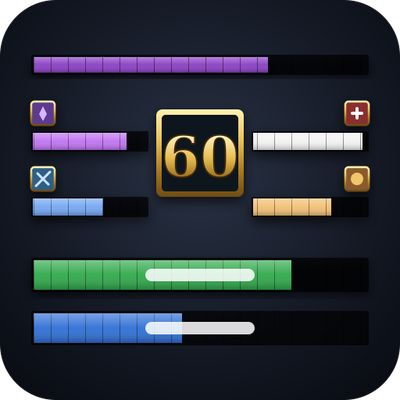
Your professions, secondary skills and reputations as clean bars, with your level on a gold crest in the middle, on a gold-framed background. Drag it anywhere, click a bar to open the profession.
Details
Addon ID:
27023
Addon Version:
1.5.0
Expansion:
1.60
Upload date:
Oct 06, 2026
Last Updated:
Oct 06, 2026
Downloads:
Less than 100
Website:
Source Link
Expansion
 Forever
 Categories
Developers

StephanTxC
Creator
Having issues?
Summary
Your professions, secondary skills, reputations and experience as clean bars, with your level on a gold crest. In a row or in columns, scaled as you like, shareable as a string. Click a bar to open the profession.
Forever Progress Bars
Everything you level, in one strip: two primary professions, two secondary skills, four reputations of your choice, an optional experience bar and a large level number, for WoW: Forever. English, Deutsch, Español, Français.
Professions and skills
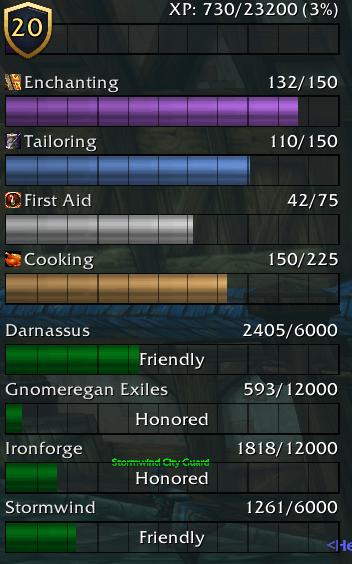
- Two primary professions on the left, two secondary skills on the right (First Aid and Cooking by default), each with its icon, name and rank.
- Your rank in the middle of each profession bar: Apprentice, Journeyman, Expert, Artisan, Master (can be switched off).
- Fishing and Riding are hidden by default; every skill can be shown or hidden in the options.
- Coloured per profession: flask green for Alchemy, arcane purple for Enchanting, bolt-of-cloth blue for Tailoring, and so on.
- Click a bar to open the profession, the same way Blizzard's own profession tabs do. Click again to close it. Gathering skills without a window stay unclickable.
- The tooltip shows rank, points to the next cap and any bonus.
- Works in every client language: professions are recognised by their spells, not by English names. Profession names, ranks and standings also follow the language you pick in the options.
Reputation
- A second row with up to four factions, lined up under the profession bars.
- Colours from the game's own reputation colours, and the standing ("Friendly", "Honored", …) in the middle of the bar.
- Left-click a reputation bar to pick another faction right there; right-click opens the reputation tab.
Experience bar (optional)
- An experience bar in the same style as the reputation bars, as wide as the whole strip (or a width of your own): above the professions, between professions and reputation, at the bottom, or anywhere on the screen.
- A title line like the reputation bars: "Level 20" on the left, "730 / 23200 (3%)" on the right (or in or below the bar, left, middle or right), with its own fonts and sizes (a big level, small numbers). Or the level as a badge of its own on the bar, placed at any of its points or riding on the end of the fill, with its own style and size.
- Rested experience shows ahead of the fill; the tooltip gives experience, progress, what is left to the next level and rested experience.
- Hidden at the maximum level. While it is on, Blizzard's experience bar is hidden.
Level
- Your level in a box between the bars, above, in the middle of or below the columns, or anywhere on the screen (X from the screen's middle, Y from its top edge). It can also be switched off.
- Box styles: Classic, Gold (shaded like a bevel), Class colour or the number alone, plus hand-drawn gold badges (crest, laurel wreath, wings), a rank medal whose ornaments grow every ten levels (a plain medal at first, ribbons and stars later, wings from 50, a ruby crown at 60) and two gold rings from Blizzard's own art. Every badge grows with the number, and a number starting or ending with 1 is nudged so it looks centred. The number in gold, white or your class colour; font, size and outline adjustable.
Background
- An optional background behind everything, sized to cover exactly what is shown (the reputation row only while it has bars, the level box where it reaches out).
- Any colour and opacity, padding, and a flat or gold border from 1 to 8 pixels.
Layout
- In a row (professions side by side, reputation below), in two columns (professions left, reputation right) or in one column (professions, then reputation), with a bar width of your choice for the columns.
- Switch professions, reputation, level and XP bar on or off; the rest closes up.
- Hide in combat or in a group, the bars and the XP bar each on their own (safe in combat: the game hides them itself).
- Scale everything together from 50 to 200 %.
- Position from the screen's centre or left edge, and from its top edge or centre, so it lands in the same place on other resolutions.
- The strip starts at the top of the screen, 60 % of the screen wide (at most 1180), so it fits small screens and large UI scales too, and locked (click-through). Right-click the minimap button or type
/fpb unlockto drag it somewhere else, or set position and width exactly in the options. - Bar height, text height, the space between text and bar, spacing, segment width, label font size and icon size are all adjustable, as are the colour and opacity of the bars' empty part.
Options
- Its own options window in the style of Forever Unit Frames, opened from the minimap button or with
/fpb: General, Bars, Professions, Reputation, Level, XP bar, Background and Profiles. - Also listed in Blizzard's addon compartment next to the minimap: left-click opens the options, right-click locks or unlocks the strip.
- Profiles: save your layout under a name and share it between characters.
- Presets in the profile list: "Classic" (one row, level in the middle) and "Column with XP bar". They are read-only (changes last until the next reload); "Save as…" turns one into a profile of your own. Your reputations, hidden skills, lock and minimap button come along.
- Export and import: your whole profile as a text string to pass on; paste one to take it over. Imports are only read as settings, never run as code.
- Language: follows the game; a dropdown in the options window picks another one, and the change applies at once.
Commands
/fpb (options), /fpb lock, /fpb unlock, /fpb status
Notes
- Made for WoW: Forever.
- Fonts: the game's own, plus every font another addon registers with LibSharedMedia.
- The translations were not written by native speakers: corrections are very welcome on the issue tracker.
- Bug reports and ideas are welcome on the project's issue tracker.
/fpb statusprints what helps with a report.


You must be logged in to leave a comment.