
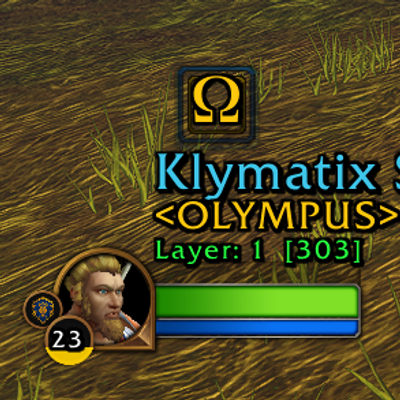
Forever Player Frames w/ Guild Information
Enhanced player and target frames for WoW Forever with class-colored names, guild information, layer detection, XP display, and a cleaner expanded unit-frame layout.
Details
Expansion
 Forever
 Categories
Developers

Having issues?
Forever Player Frames is an enhanced unit-frame addon designed specifically for WoW Forever.
The addon builds on the familiar Blizzard player and target frames instead of replacing your entire UI. It adds useful player information, improved visual organization, layer information, guild identification, and other enhancements while keeping the frames recognizable and easy to read.
FEATURES
Enhanced Player Frame
• Improved information around the standard player frame
• Class-colored player name
• Guild information displayed directly with the player frame
• Current layer information
• Level and XP information
• Cleaner organization of important character information
• Designed to remain compact and readable during normal gameplay
Enhanced Player Target Frame
When targeting another actual player, Forever Player Frames adds an expanded information display to the standard target frame.
• Target player's name displayed prominently
• Player name uses the appropriate class color
• Guild status displayed directly with the target information
• Special identification for guild members
• Clear identification of players belonging to other guilds
• Clear identification of players who currently have no guild
• Information positioned around the normal target frame without covering the portrait, health bar, or resource bar
NPCs and Creatures
The enhanced target-player display is only intended for actual player characters. Normal NPC, creature, mob, and other non-player targets continue to use the standard game presentation.
Layer Information
Forever Player Frames can display the player's detected WoW Forever layer information directly with the player frame, making it easier to know which layer your character is currently playing on.
DESIGNED FOR WOW FOREVER
This addon was created specifically around the WoW Forever experience. Because WoW Forever may use systems or APIs differently from standard retail World of Warcraft, features are developed and tested specifically with Forever in mind.
INSTALLATION
- Install through CurseForge or extract the addon manually.
- Make sure the
WOWForeverPlayerFramefolder is located inside your World of Warcraft AddOns directory. - Start or restart the game.
- Enable Forever Player Frames from the AddOns menu.
You must be logged in to leave a comment.