

Forever Layer Hop
Discover active WoW: Forever layers and hop between them through a cooperative FLH player network.
Details
Expansion
 Forever
 Categories
Developers

Having issues?
Forever Layer Hop
Forever Layer Hop (FLH) is a cooperative layer-discovery and layer-hopping addon built specifically for World of Warcraft: Forever.
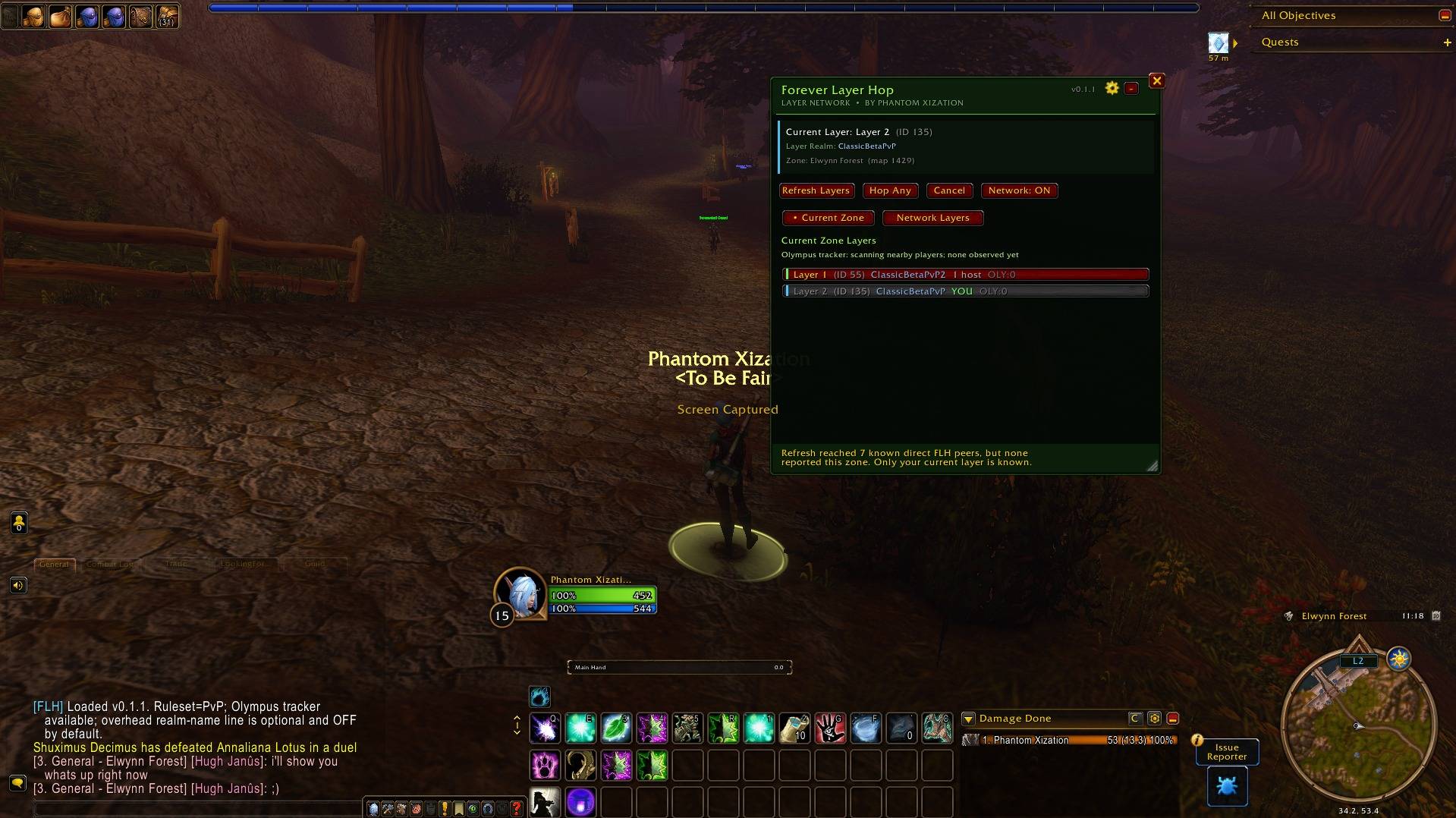
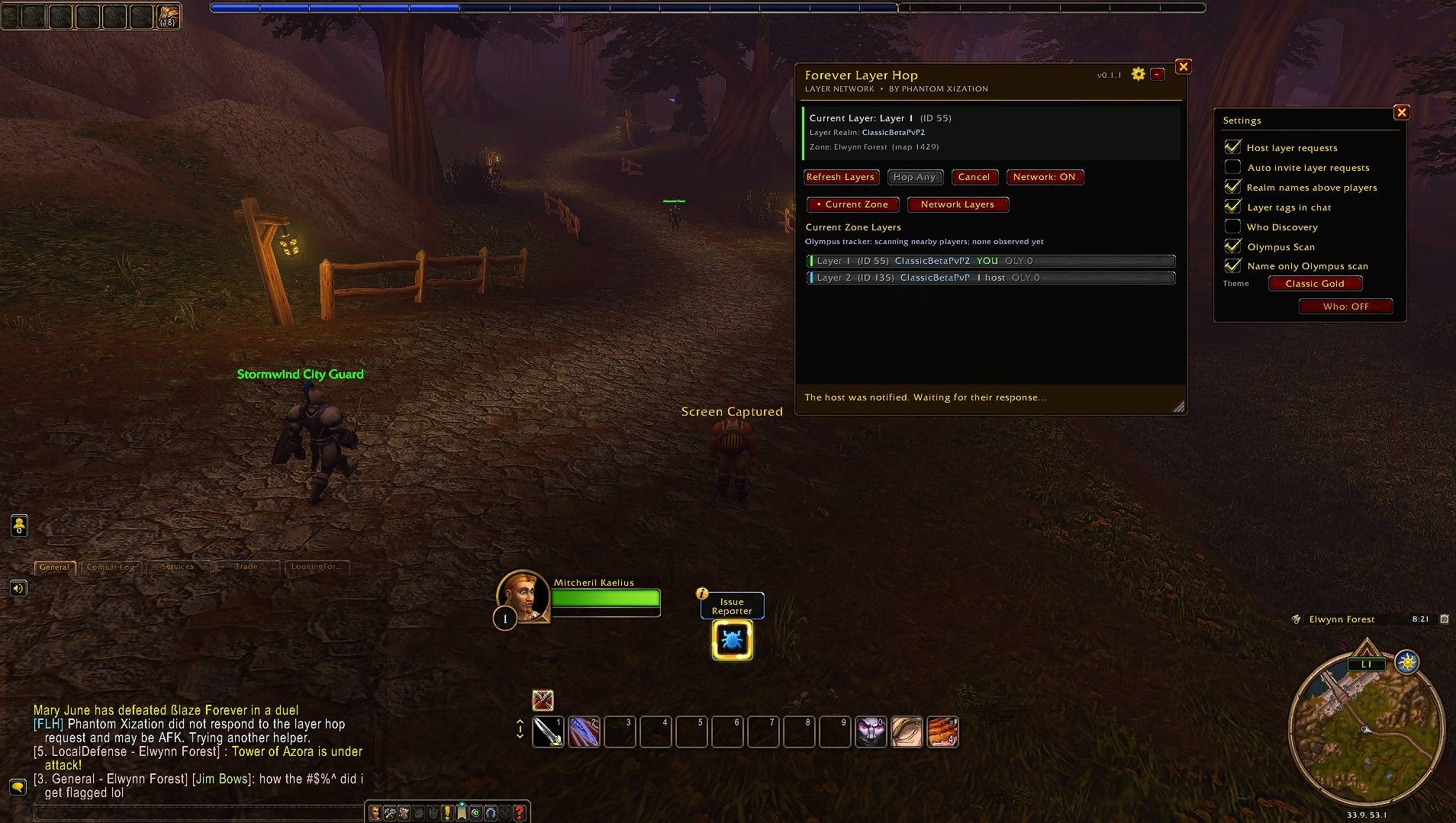
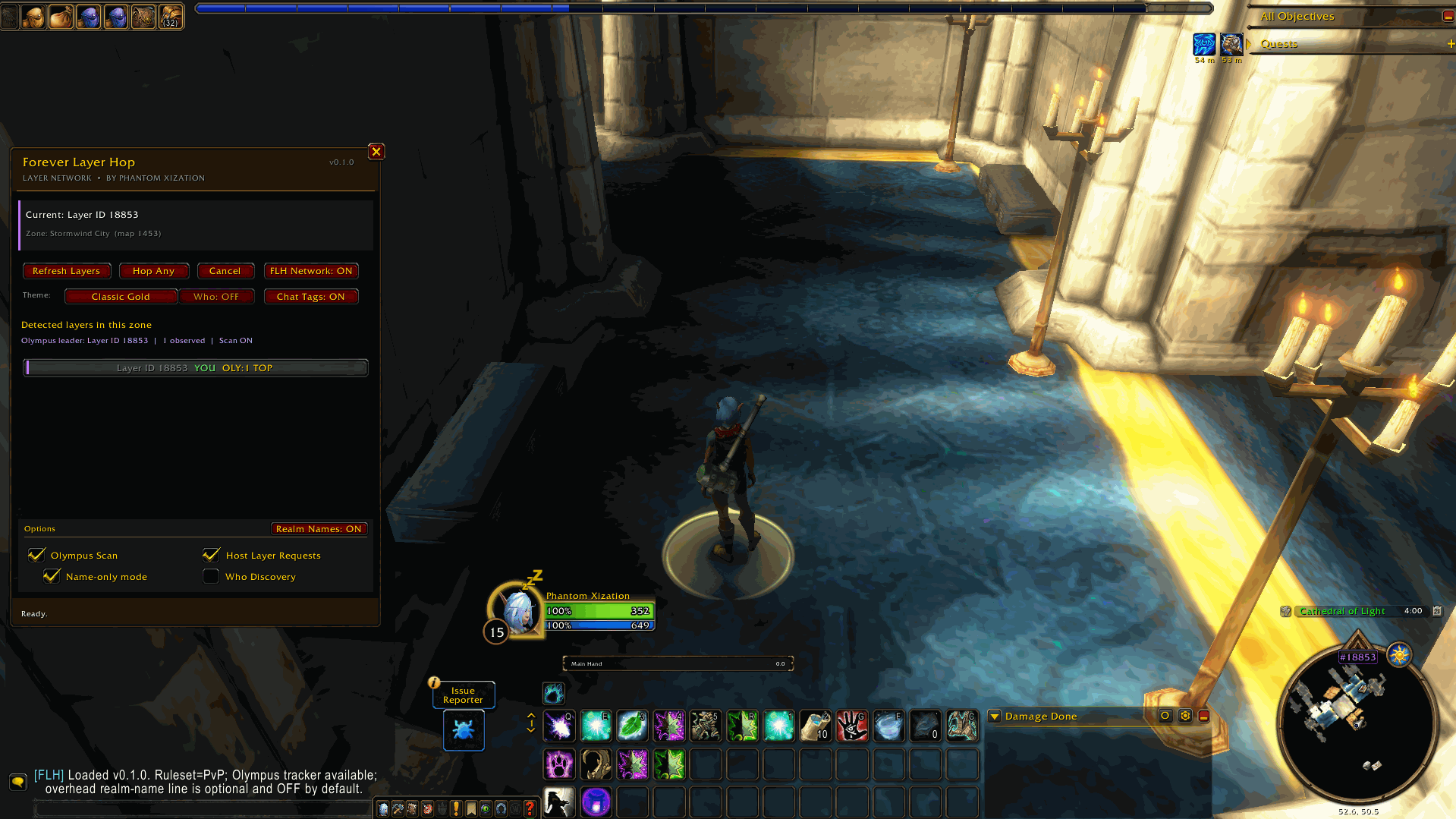
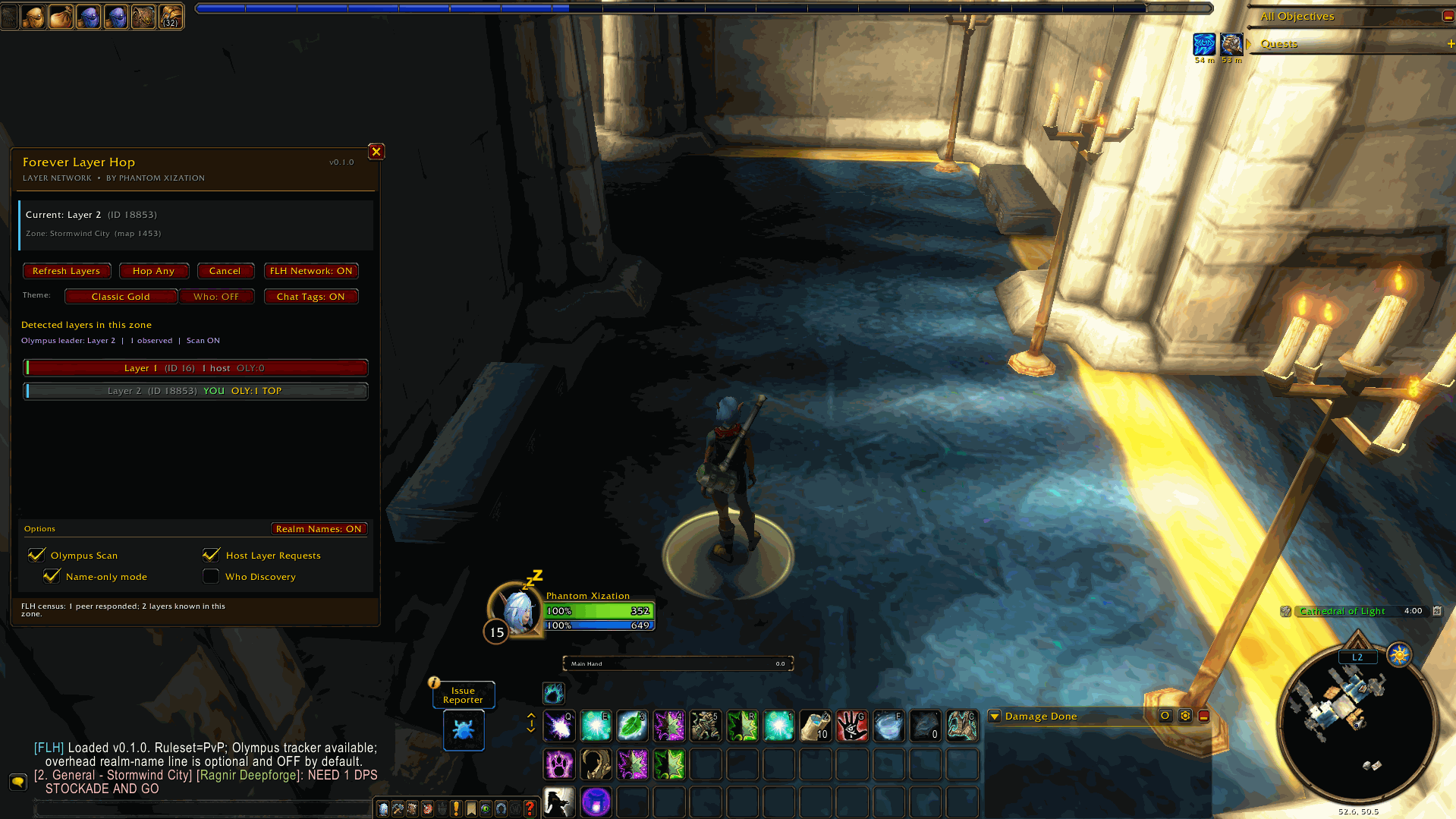
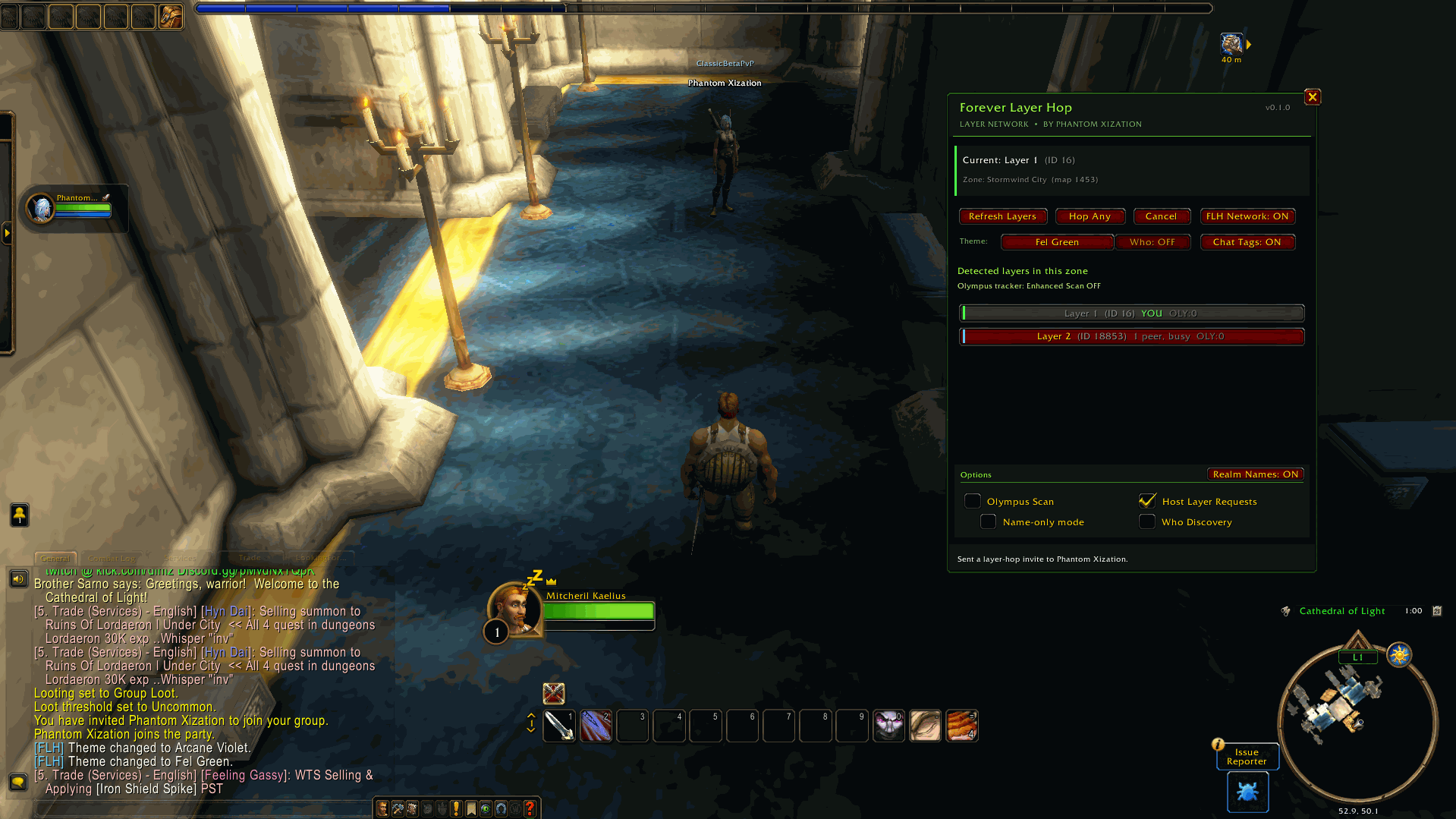
FLH detects the layer your character is currently on, discovers other participating FLH users across the Forever ruleset ecosystem, builds a live list of known layers, and lets you request a hop to another layer through the normal Blizzard party system.
WoW does not provide addons with a direct SwitchToLayer() API. Forever Layer Hop does not create, force, or control layers. Instead, it works with Blizzard's existing grouping and addon-message systems to make the layer structure that already exists more visible and usable.
Features
Layer Detection
FLH detects your current raw layer by observing nearby NPC and vehicle GUID data exposed by the WoW client.
The addon keeps track of:
- your current map;
- your current raw layer ID;
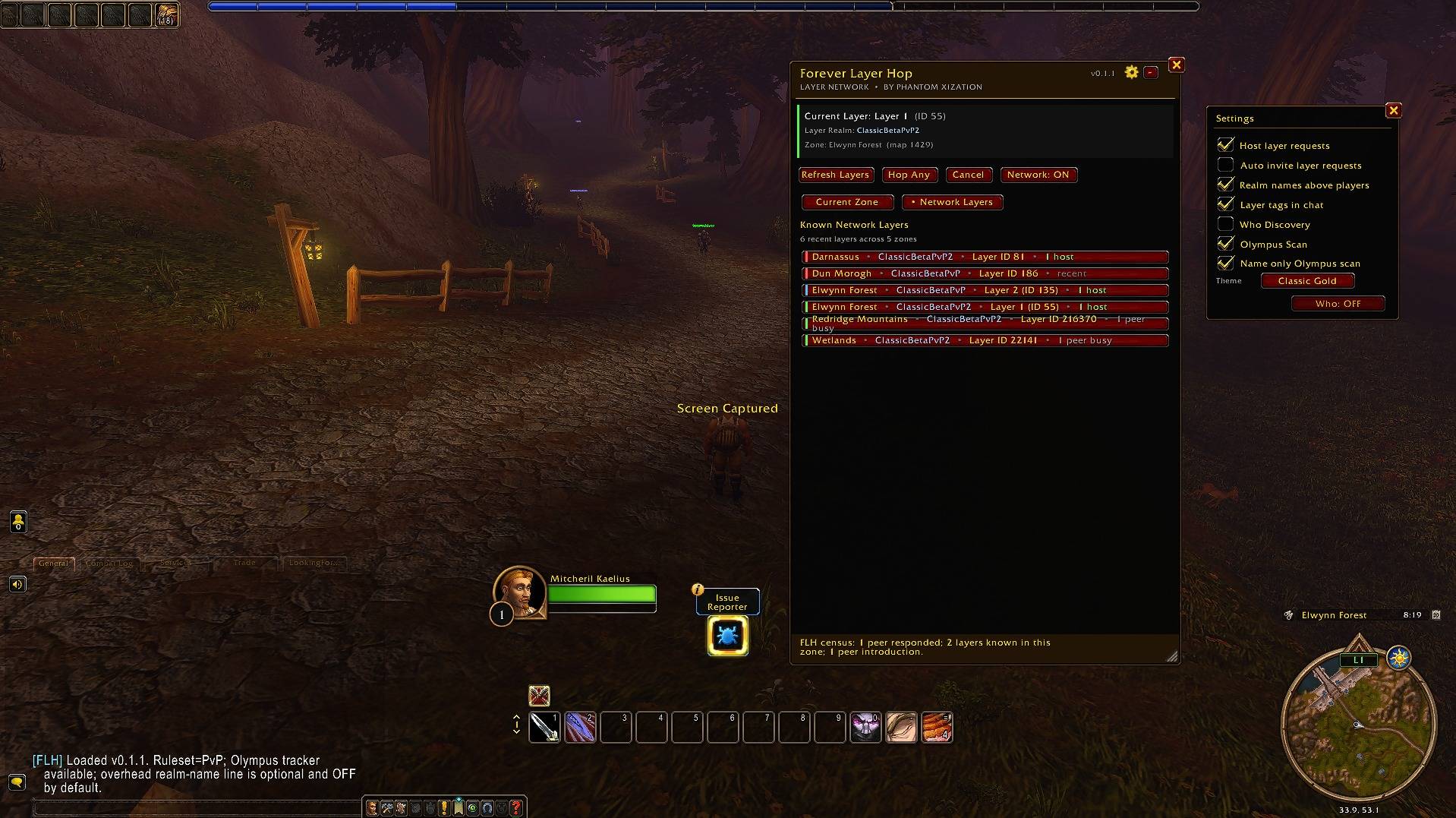
- other layers reported by confirmed FLH users;
- how many FLH peers have recently reported each layer;
- whether an available host is known on that layer.
The raw Blizzard layer IDs are presented as simpler friendly labels such as:
Layer 1
Layer 2
Layer 3
while the raw ID remains visible for diagnostics.
Refresh Layers
The Refresh Layers button asks the FLH network for current layer information.
FLH can discover participating users through several Blizzard-supported addon communication paths:
- realm-local FLH custom addon channel;
- guild addon messages;
- party addon messages;
- raid addon messages;
- instance-group addon messages;
- direct addon whispers to confirmed FLH peers;
- introductions from other confirmed FLH peers;
- optional Who Discovery.
The returned information is merged into the layer list.
For example:
Layer 1  (ID 16)       3 hosts
Layer 2  (ID 18853)    YOU
Layer 3  (ID 24117)    1 host
A layer with no currently known available host may still be visible, but FLH distinguishes it from a layer where a usable host is available.
One-Click Layer Hopping
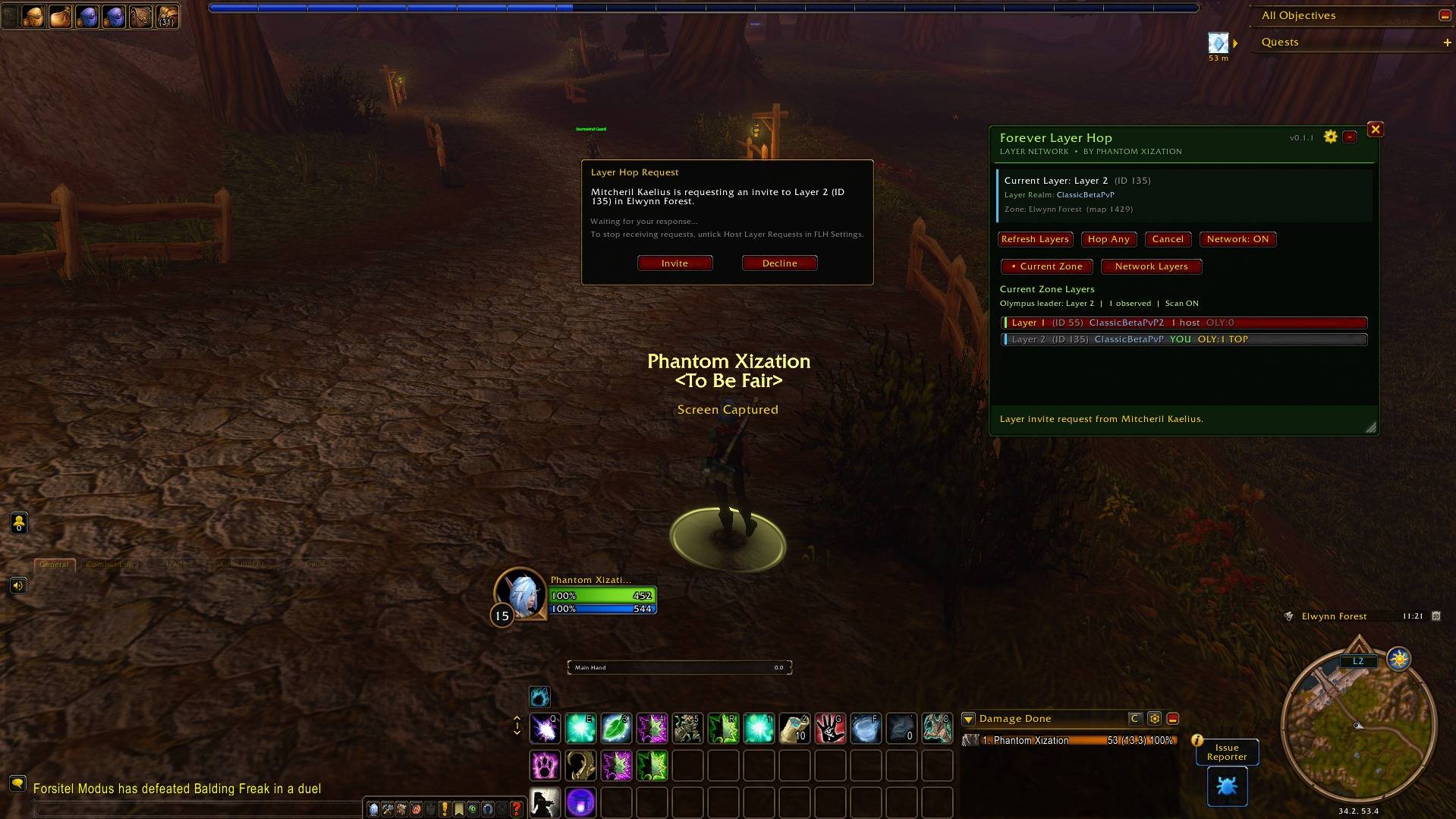
Click a detected layer to request a hop.
FLH will:
- identify FLH users currently reporting the requested layer;
- request a helper;
- select one available helper;
- have that helper send a normal Blizzard party invitation;
- join the helper;
- verify that your raw layer changed to the requested destination;
- keep the helper group active so the destination remains anchored.
The addon does not need to use the Premade Group Finder to perform the hop.
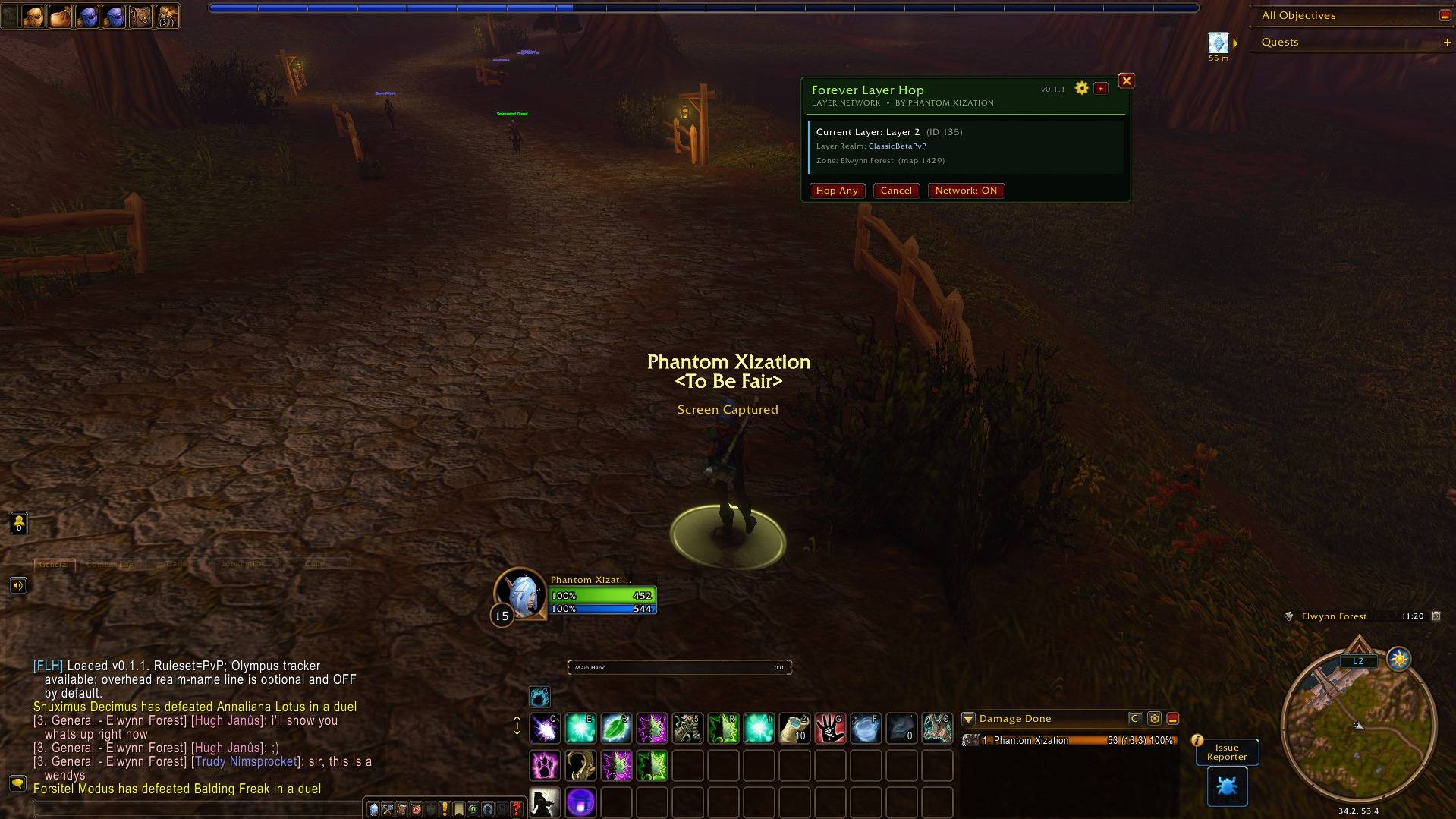
Hop Any
Hop Any looks for another known layer and prefers destinations with an available host.
This is useful when you simply want to move off your current layer without targeting a specific one.
Important: FLH Stays Grouped After a Successful Hop
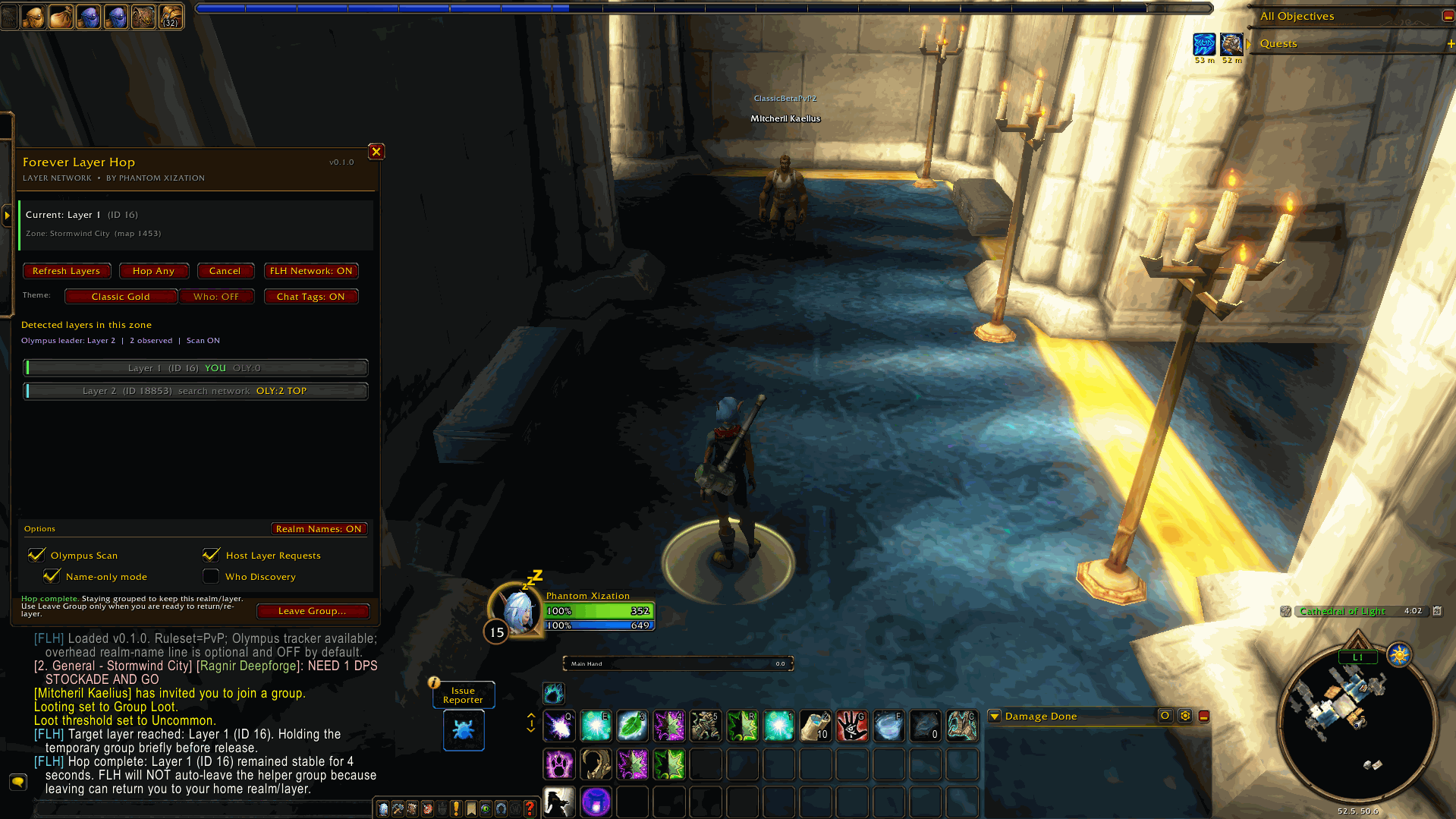
During Forever testing, we discovered that leaving the helper party can immediately move the guest character back toward their home realm/layer assignment.
Because of this, Forever Layer Hop intentionally does not automatically leave the party after a successful hop.
After a successful hop, FLH keeps the temporary helper group active.
The addon provides a manual Leave Group… button when you are ready to leave.
Leaving the group may cause WoW to return you to your original realm/layer environment.
How WoW: Forever's Realm and Layer System Appears to Work
One of the reasons Forever Layer Hop exists is that WoW: Forever's rulesets do not appear to function as one single physical mega-server.
From the player's point of view, Blizzard has removed the traditional realm-selection experience. Instead of selecting a traditional realm such as Whitemane or Faerlina, players choose a ruleset such as:
- PvP;
- Normal / PvE;
- RP;
- Hardcore.
The ruleset acts as the large shared gameplay ecosystem.
However, testing during the WoW: Forever beta shows that there are still multiple backend realm identities operating underneath those rulesets.
For example, the PvP ruleset has exposed backend realm names such as:
ClassicBetaPvP
ClassicBetaPvP2
Similar backend realm naming has also been observed on other Forever rulesets.
Players assigned to different backend realms can still:
- appear in the same world;
- see each other;
- whisper each other;
- invite each other;
- form parties;
- play together;
- send direct addon whispers.
In normal gameplay, the player generally does not need to know which backend realm they were assigned to.
Layers Exist on Top of Those Backend Realms
Instead of thinking of the Forever PvP ruleset as:
PvP Ruleset
│
├── Layer 1
├── Layer 2
└── Layer 3
our testing indicates that the behavior is closer to:
PvP Ruleset
│
├── ClassicBetaPvP
│   ├── Layer A
│   ├── Layer B
│   └── Layer C
│
└── ClassicBetaPvP2
    ├── Layer A
    ├── Layer B
    └── Layer C
The exact server architecture is Blizzard's internal implementation, but this model matches the behavior that Forever Layer Hop can directly observe through the game client.
What We Have Directly Verified During FLH Testing
During development, two characters were able to stand beside each other in Stormwind and interact normally while the client reported that they belonged to different backend realms.
For example:
Player A
Realm: ClassicBetaPvP
Raw Layer: 18853
and:
Player B
Realm: ClassicBetaPvP2
Raw Layer: 16
The characters could still see one another and group normally.
When Player A joined Player B's party, Player A was moved onto the same environment as Player B and began reporting:
Raw Layer: 16That behavior is the foundation of Forever Layer Hop's hopping system.
Another player already anchored to the destination realm/layer acts as the temporary host.
Why Leaving the Group Matters
During testing, after a character successfully moved from:
ClassicBetaPvP
Layer 18853
to the environment of a helper on:
ClassicBetaPvP2
Layer 16
leaving the helper group caused the guest to move back toward their original home realm/layer assignment.
This strongly suggests that the party connection temporarily anchors the guest to the helper's environment rather than permanently changing the guest's home assignment.
That is why FLH keeps successful hop groups together.
Why Custom Addon Channels Can Behave Differently
Another important discovery during testing was that two characters from different backend realms could:
- stand beside each other;
- whisper each other;
- group together;
- send direct addon whispers;
while the same custom addon chat channel did not necessarily communicate between the two backend realms.
For example:
ClassicBetaPvP
ForeverLayerHopNet
and:
ClassicBetaPvP2
ForeverLayerHopNet
could behave like separate channel scopes even though the players themselves could interact normally.
This means being part of the same visible Forever ruleset does not necessarily mean every Blizzard communication system has identical backend scope.
Forever Layer Hop handles this by using multiple addon communication routes rather than relying on one custom channel alone.
How the FLH Network Works
FLH uses a cooperative peer network made entirely from Blizzard's in-game addon-message APIs.
There is no external FLH server.
A simplified network can look like:
                 Forever Ruleset
                       │
        ┌──────────────┼──────────────┐
        │                             │
 ClassicBetaPvP                ClassicBetaPvP2
        │                             │
   Layer 18853                     Layer 16
        │                             │
   FLH Player A  ◄──── addon ────► FLH Player B
        │            whisper          │
        └──────────────┬──────────────┘
                       │
                 FLH peer network
Within the network, clients can exchange:
- current map;
- current raw layer;
- host availability;
- addon version;
- confirmed peer introductions.
Only clients actually responding to FLH addon traffic are treated as confirmed FLH users.
FLH Does Not Scan Every Player You See
Forever Layer Hop does not store every character you walk past and does not silently ping every visible player.
With Who Discovery turned OFF, FLH primarily communicates with:
- clients on the realm-local FLH network;
- guild members through addon broadcasts;
- party or raid members through addon broadcasts;
- already confirmed FLH peers;
- peers introduced by other confirmed FLH users.
A normal player without FLH installed simply ignores the addon messages.
Only a player that actually responds as an FLH client becomes part of the peer network.
Guild Discovery
When Refresh Layers runs, FLH can send a lightweight addon broadcast through the player's guild.
The addon does not individually whisper every guild member.
Instead:
FLH guild broadcast
        │
        ├── player without FLH → ignores it
        │
        └── player with FLH → responds
A responding FLH guild member can then become a confirmed peer.
This can be particularly useful when guild membership spans connected Forever backend realms.
Party and Raid Discovery
FLH can also discover other FLH clients through:
- PARTY;
- RAID;
- INSTANCE_CHAT.
When the group roster changes, FLH can announce itself through the Blizzard addon-message system.
If another member of the group also has FLH installed, their client responds.
The group member can then become part of the known FLH peer network.
This allows FLH's network to grow organically through normal gameplay.
Direct Cross-Realm Peer Bridging
During testing, direct addon whispers successfully worked between characters on:
ClassicBetaPvPand:
ClassicBetaPvP2even when the shared custom addon channel did not cross that same boundary.
Forever Layer Hop uses this capability to maintain known cross-realm peer connections.
Once FLH learns a confirmed player such as:
Mitcheril Kaelius
Realm: ClassicBetaPvP2
Layer: 16
another FLH client can contact that peer directly without requiring the realm-local custom channel.
Peer Introductions
Known FLH peers can also introduce other confirmed FLH users they already know.
For example:
Phantom knows Mitcheril
        │
        ▼
Mitcheril knows Sarah and Bob
        │
        ▼
Refresh Layers
        │
        ▼
Mitcheril introduces Sarah and Bob
        │
        ▼
Phantom can contact them directly
This allows the network to gradually expand without repeatedly probing random players.
Peer data is bounded and expires over time so the local database does not grow forever.
Optional Who Discovery
Who Discovery is OFF by default.
If enabled, Who Discovery can use player-triggered /who results as a bootstrap method for locating otherwise unknown FLH installations.
The process is roughly:
/who results
      │
      ├── player without FLH → no response
      │
      └── player with FLH → replies
Only characters that actually respond as FLH clients become confirmed peers.
Who Discovery is optional because normal FLH networking can operate through guild, group, local-network, and known direct-peer discovery.
Realm Names Above Players
FLH can optionally display the player's actual backend realm above their normal overhead player name.
For example:
ClassicBetaPvP2
Mitcheril Kaelius
<MOB>
The feature is optional and can be toggled from the main FLH window.
It can also be controlled using:
/flh realmnames on
/flh realmnames off
FLH obtains the backend realm separately from Forever's first-name/surname character system.
The player's surname is not treated as the realm.
Forever Character Names and Realms
WoW: Forever uses a character naming system where the visible character can contain a first name and surname.
For example:
Mitcheril KaeliusTesting indicates that the first name is the character's unique portion while multiple characters may share a surname.
For normal player actions such as whispers and party invitations, Forever uses:
FirstName Surnamewhile the actual backend realm is separate.
FLH therefore tracks these separately:
First name: Mitcheril
Surname: Kaelius
Realm: ClassicBetaPvP2
Player target: Mitcheril Kaelius
Client identity: GUID / FLH client ID
This prevents FLH from confusing a Forever surname with a realm name.
PvP and Hardcore Olympus Tracker
Forever Layer Hop includes an optional observed Olympus activity tracker.
This functionality is only available on:
- PvP rulesets;
- Hardcore rulesets.
FLH checks the current ruleset through Blizzard's game-rule API.
Conceptually:
C_GameRules.IsGameRuleActive(Enum.GameRule.HardcoreRuleset)
C_GameRules.IsGameRuleActive(Enum.GameRule.PvPRuleset)
If the client is running:
- PvP → Olympus tracker available;
- Hardcore → Olympus tracker available;
- Normal/PvE → hidden;
- RP → hidden;
- unknown/unsupported ruleset → hidden.
The Olympus tracker is an observational estimate, not a complete server-wide census.
It uses visible player observations and FLH layer reports to estimate Olympus activity on known layers.
Its purpose in Forever Layer Hop is to help users identify layers that may experience increased lag due to large gatherings of Olympus members, allowing players to be aware of potentially high-population or high-latency layers before choosing to join them.
Forever Layer Hop is not affiliated with or endorsed by the Olympus guild/community.
Chat Layer Tags
FLH can optionally append layer information to supported player chat displays.
This can help identify when another player is currently reporting a different layer.
Chat layer tags can be toggled with:
/flh chatlayers on
/flh chatlayers off
Hosting Layer Requests
Users can decide whether their character should help other FLH users hop to their layer.
The option is available directly in the main window:
Host Layer Requests
It can also be controlled with:
/flh host on
/flh host off
When hosting is enabled and the character is available, FLH can volunteer that client as a potential helper.
Anti-Dogpile Helper Selection
If many FLH users are on the same destination layer, FLH does not need every one of them to send the requester a party invite.
FLH collects helper responses and selects one helper.
This reduces unnecessary invites and network traffic.
Network and Privacy
Forever Layer Hop uses only Blizzard's in-game addon communication APIs.
FLH has:
- no external web service;
- no external FLH account system;
- no telemetry server;
- no remote player database;
- no external tracking system.
Network information is exchanged inside WoW.
Confirmed peer information may be stored locally inside:
ForeverLayerHopDBso previously discovered FLH clients can be contacted again after /reload.
FLH does not upload this database anywhere.
What "Realmless" Means in Forever
Based on behavior observable during the Forever beta, the most useful way to understand Blizzard's "realmless" design is:
Realmless from the player's perspective does not necessarily mean realm boundaries no longer exist anywhere in Blizzard's backend.
The traditional realm-selection experience is hidden from the player while Blizzard manages the underlying population structure.
A simplified model is:
Ruleset
  ↓
Backend Realm
  ↓
Layer
Or:
Ruleset
The shared gameplay ecosystem and game rules.
Backend Realm
An infrastructure/population partition operating inside that ruleset.
Layer
A temporary copy of an area/world used to distribute players and manage population.
This allows Forever to feel like one enormous PvP, PvE, RP, or Hardcore population without requiring every player to exist on one literal server instance at the same time.
Why This Matters to Forever Layer Hop
WoW does not expose addon functions such as:
GetAllLayers()or:
SwitchToLayer()Forever Layer Hop therefore cannot simply ask Blizzard:
Give me every active layer.Instead, participating FLH clients act as distributed observers.
Each client can report:
I am currently on:
Map 1453
Layer 18853
Another client might report:
I am currently on:
Map 1453
Layer 16
FLH merges those reports into the visible layer list.
When you select another layer, the addon asks one of the clients already anchored there to provide the normal Blizzard party connection needed to move you.
FLH does not create Blizzard layers.
FLH makes existing layers discoverable and usable.
Commands
Main Commands
/flhOpen or close the Forever Layer Hop window.
/flh scanRefresh known layers.
/flh hopHop Any.
/flh statusDisplay current layer, map, and status information.
/flh host on
/flh host off
Enable or disable hosting layer requests.
/flh realmnames on
/flh realmnames off
Toggle backend realm names above players.
/flh chatlayers on
/flh chatlayers off
Toggle chat layer tags.
/flh rulesetDisplay the detected Forever ruleset.
Advanced / Troubleshooting Commands
/flh peersShow known FLH peers.
/flh netdebugDisplay network state and message diagnostics.
/flh nettestTest FLH communication.
/flh ping FirstName SurnameTest direct addon-whisper communication with a specific FLH player.
/flh identityDisplay the character's Forever name, surname, backend realm, and FLH client identity information.
/flh channelsDisplay available FLH communication routes.
/flh resetClear layer/network peer caches for troubleshooting.
Compatibility
World of Warcraft: Forever
Interface:
16001Current public target:
Forever 1.60.1
Beta / Backend Changes
World of Warcraft: Forever is still evolving.
Blizzard may change:
- realm architecture;
- layer behavior;
- party anchoring;
- game-rule APIs;
- addon communication behavior;
- GUID formats;
- nameplate behavior;
- connected-realm behavior.
If a Forever update breaks FLH, please report:
- what you were doing;
- the layer IDs involved if visible;
- your ruleset;
- any Lua error;
- screenshots if possible.
This will make it much easier to update the addon as Blizzard changes Forever.
Summary
The simplest way to think about Forever Layer Hop is:
WoW Forever
      │
      ▼
Ruleset
      │
      ▼
Multiple backend realms
      │
      ▼
Multiple layers
      │
      ▼
FLH clients report where they are
      │
      ▼
Refresh Layers builds the layer list
      │
      ▼
You select another layer
      │
      ▼
An FLH host invites you
      │
      ▼
WoW moves you to that environment
Forever Layer Hop does not bypass Blizzard's systems.
It uses the systems already provided by WoW to make Forever's hidden realm/layer structure easier for players to understand and navigate.
License
Forever Layer Hop is released under the MIT License.
You must be logged in to leave a comment.