

FallenQuestTracker
Never lose track of what a mob wants from you.
Details
Expansion
 Forever
 Categories
Developers

Having issues?
# FallenQuestTracker
See your quest progress right above the mobs you need, without opening the quest log.
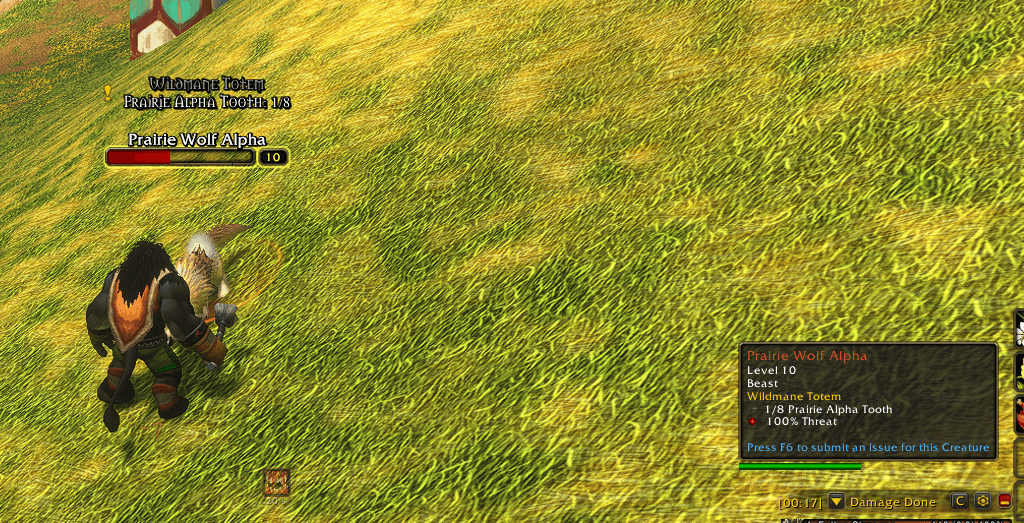
FallenQuestTracker adds a small line of text over enemy nameplates showing the quest objectives that mob counts toward:
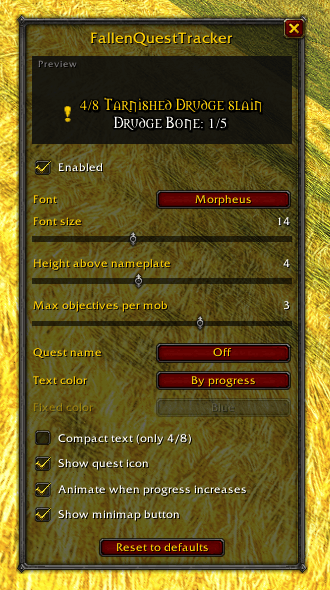
- **Kill objectives:** `4/8 Tarnished Drudge slain`
- **Collection objectives:** `Prairie Alpha Tooth: 1/8`, even when the item name differs from the mob's name
## How it works
The text comes straight from the game's own tooltip data, so there is no name guessing. If the game counts that mob for your quest, the addon shows it.
## Features
- Progress text above enemy nameplates
- Multiple objectives per mob, each on its own line
- Quest name above the objectives (on target/mouseover, always, or off)
- Color by progress: white → yellow at half → green when 1 left (or a fixed color)
- Pulse animation when progress increases
- Quest icon and compact mode (only `4/8`)
- Settings window with live preview (`/fqt`)
- Minimap button
- Completed objectives are hidden automatically
- Lightweight: updates on quest events instead of constant scanning
## Commands
- `/fqt`: open settings
- `/fqt toggle`: enable / disable
- `/fqt minimap`: show / hide minimap button
- `/fqt reset`: reset settings
- `/fqt debug`: troubleshooting info for the targeted or hovered mob
## Troubleshooting
Text not showing on a mob? Target it (or hover over it), type `/fqt debug` and post the output in the comments.
*Made by FallenSkullCorp*
You must be logged in to leave a comment.