
Extended Objective Tracker Settings
Extended settings for in-game objective tracker
Details
Expansion
 Forever
 Categories
Developers

Having issues?
Forever Objective Tracker
Forever Objective Tracker is a lightweight addon for World of Warcraft: Forever that adds the Objective Tracker controls Blizzard’s standard Edit Mode is currently missing.
Instead of replacing the Blizzard Objective Tracker, the addon extends the existing one and gives you additional control over its size, visibility and appearance.
Features
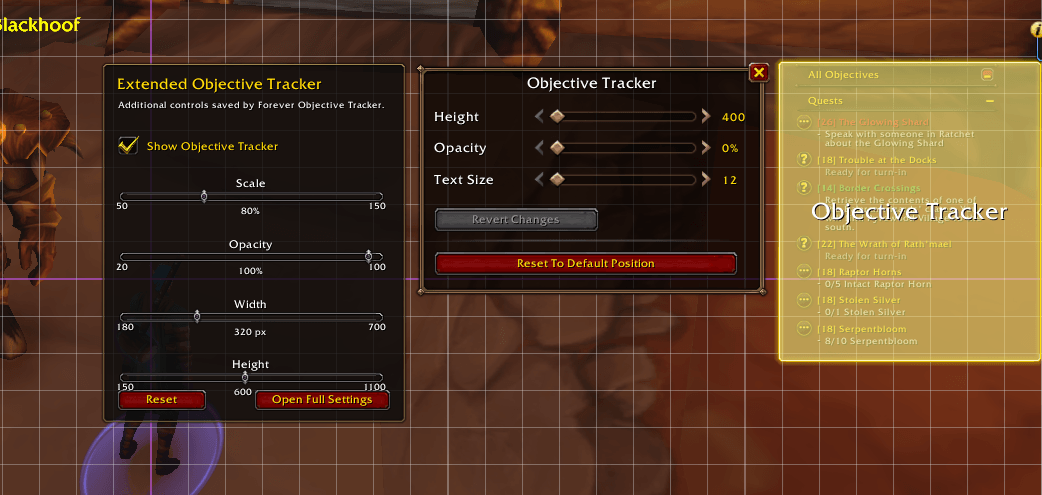
Forever Objective Tracker adds extra controls for the Blizzard Objective Tracker, including:
• Scale control from 50% to 150%
• Adjustable tracker width
• Adjustable tracker height
• Opacity control
• Completely hide or show the Objective Tracker
• Saved settings between sessions
• Integration with Blizzard Edit Mode
• Standalone backup settings window
• No external libraries or dependencies
Edit Mode Integration
The addon is designed to work alongside Blizzard’s existing Edit Mode.
Enter Edit Mode and select the Objective Tracker.
An additional Extended Objective Tracker panel will appear beside Blizzard’s normal Objective Tracker settings.
From there you can adjust:
• Scale
• Width
• Height
• Opacity
• Visibility
Blizzard Edit Mode continues to control the Objective Tracker’s position.
Why use it?
The standard World of Warcraft: Forever UI currently allows the Objective Tracker to be repositioned in Edit Mode, but does not provide full control over its overall size or visibility.
Forever Objective Tracker adds those missing controls without replacing Blizzard’s normal quest and objective system.
Your quests, achievements, objectives and other tracked content continue to use the standard Blizzard Objective Tracker.
Slash Commands
The addon also includes slash commands as a backup.
/fot
Opens the standalone settings window.
/fot show
Shows the Objective Tracker.
/fot hide
Completely hides the Objective Tracker.
/fot scale 50-150
Changes the scale of the tracker.
Example:
/fot scale 75
/fot opacity 20-100
Changes the tracker opacity.
Example:
/fot opacity 80
/fot width 180-700
Changes the tracker width.
/fot height 150-1100
Changes the tracker height.
/fot status
Displays your current settings.
/fot reset
Restores the default addon settings.
Installation
Install Forever Objective Tracker through the CurseForge app, or install it manually.
For the current World of Warcraft: Forever beta, place the addon folder inside:
World of Warcraft/_classic_beta_/Interface/AddOns/
The final folder structure should look like:
Interface/AddOns/ForeverObjectiveTracker/ForeverObjectiveTracker.toc
Restart World of Warcraft or use:
/reload
Compatibility
Designed for:
World of Warcraft: Forever
Forever 1.60.1
Interface 16001
Notes
Forever Objective Tracker modifies the appearance and visibility of Blizzard’s existing Objective Tracker.
It does not replace Blizzard’s quest tracking system or modify quest data.
All settings are stored locally and persist between sessions.
You must be logged in to leave a comment.